Developer technologies | Windows Presentation Foundation
A part of the .NET Framework that provides a unified programming model for building line-of-business desktop applications on Windows.
This browser is no longer supported.
Upgrade to Microsoft Edge to take advantage of the latest features, security updates, and technical support.
' cx='32' cy='32' r='32' /%3E%3Ctext x='50%25' y='55%25' dominant-baseline='middle' text-anchor='middle' fill='%23FFF' %3EAM%3C/text%3E%3C/svg%3E)
In WPF xaml, I would like to make a custom data grid with button in cell. I want to create button(Say "Add" button) in the last cell of each row as shown in below pic.
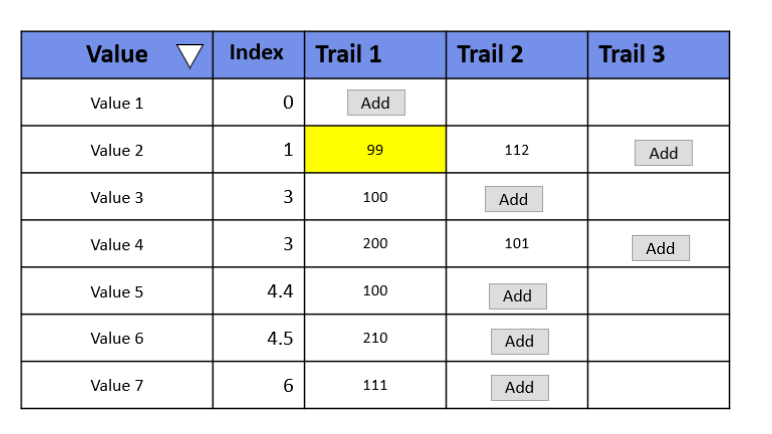
While pressing "add" button some operation will happen and data will be added to that cell and button should be shown in next column ( So button will be different random cells in data grid.) Basically I need to add and remove button from cell dynamically.
I could add column with button using below code. But I don't know how add this button in the last cell of of each row.
              <DataGridTemplateColumn >
                <DataGridTemplateColumn.CellTemplate>
                    <DataTemplate>
                    <Button Height="30" Width="30"/>
                    </DataTemplate>
                </DataGridTemplateColumn.CellTemplate>
            </DataGridTemplateColumn>
A part of the .NET Framework that provides a unified programming model for building line-of-business desktop applications on Windows.

Hi, the easiest way is to use data object for each cell. Each data object includes property for value and state. Depending on the state trigger select the displayed Celltemplate. Which language you use?

Create different templates for your requirement and use DataTemplateSelector to choose which DataTemplate to use.
Answer accepted by question author
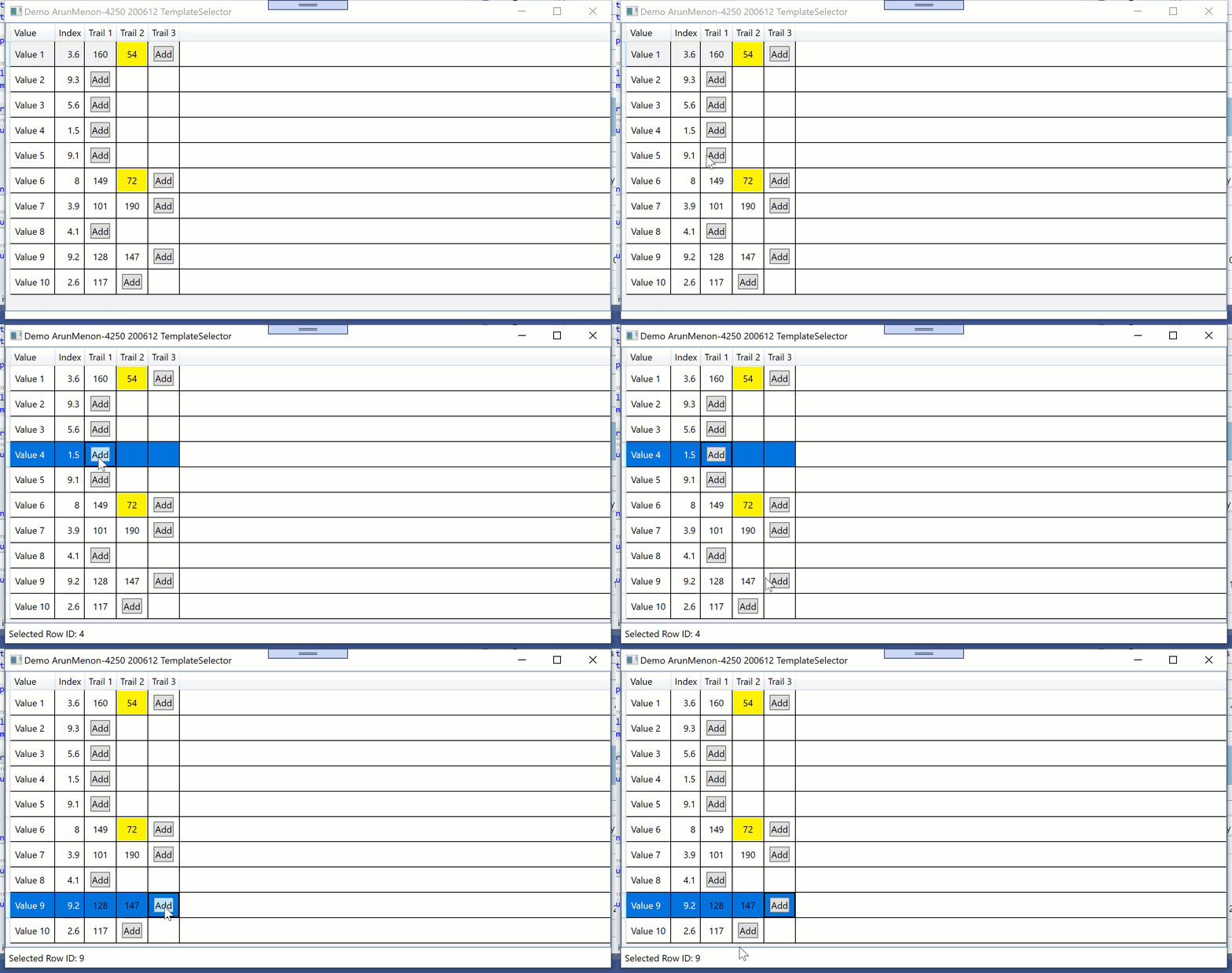
Hi, the following demo shows another solution with TemplateSelector .
XAML:
<Window x:Class="Window027"
        xmlns="http://schemas.microsoft.com/winfx/2006/xaml/presentation"
        xmlns:x="http://schemas.microsoft.com/winfx/2006/xaml"
        xmlns:d="http://schemas.microsoft.com/expression/blend/2008"
        xmlns:mc="http://schemas.openxmlformats.org/markup-compatibility/2006"
        xmlns:local="clr-namespace:WpfApp1.WpfApp027"
        mc:Ignorable="d"
        Title="Demo ArunMenon-4250 200612 TemplateSelector" Height="450" Width="800">
  <Window.Resources>
    <local:ViewModel x:Key="vm"/>
    <local:VisibilityConverter x:Key="conv"/>
    <Style TargetType="{x:Type TextBlock}">
      <Setter Property="Background" Value="Red"/>
    </Style>
    <DataTemplate x:Key="dtTextBox">
      <Grid Background="{Binding ColumnValue, Converter={StaticResource conv}}">
        <TextBlock Text="{Binding ColumnValue}" Foreground="Black"
                   Margin="5" VerticalAlignment="Center" HorizontalAlignment="Center"/>
      </Grid>
    </DataTemplate>
    <DataTemplate x:Key="dtButton">
      <Button Content="Add"
              Margin="5" VerticalAlignment="Center" HorizontalAlignment="Center"
              Command="{Binding Cmd, Source={StaticResource vm}}"
              CommandParameter="{Binding}"/>
    </DataTemplate>
    <DataTemplate x:Key="dtEmpty">
      <TextBlock/>
    </DataTemplate>
    <local:DTSelector x:Key="myTemplateSelector"
                      TemplateTextBox="{StaticResource dtTextBox}"
                      TemplateButton="{StaticResource dtButton}"
                      TemplateEmpty="{StaticResource dtEmpty}"/>
    <DataTemplate x:Key="CustomTemplate">
      <ContentPresenter Content="{Binding}"
                        ContentTemplateSelector="{StaticResource myTemplateSelector}">
      </ContentPresenter>
    </DataTemplate>
  </Window.Resources>
  <Grid DataContext="{StaticResource vm}">
    <Grid.RowDefinitions>
      <RowDefinition/>
      <RowDefinition Height="Auto"/>
    </Grid.RowDefinitions>
    <DataGrid ItemsSource="{Binding View}"
              AutoGenerateColumns="False"
              IsReadOnly="True">
      <DataGrid.Columns>
        <DataGridTextColumn Header="Value" Binding="{Binding Value}">
          <DataGridTextColumn.ElementStyle>
            <Style TargetType="{x:Type TextBlock}">
              <Setter Property="VerticalAlignment" Value="Center"/>
              <Setter Property="Margin" Value="5"/>
            </Style>
          </DataGridTextColumn.ElementStyle>
        </DataGridTextColumn>
        <DataGridTextColumn Header="Index" Binding="{Binding Index}">
          <DataGridTextColumn.ElementStyle>
            <Style TargetType="{x:Type TextBlock}">
              <Setter Property="VerticalAlignment" Value="Center"/>
              <Setter Property="HorizontalAlignment" Value="Right"/>
              <Setter Property="Margin" Value="5"/>
            </Style>
          </DataGridTextColumn.ElementStyle>
        </DataGridTextColumn>
        <DataGridTemplateColumn Header="Trail 1">
          <DataGridTemplateColumn.CellTemplate>
            <DataTemplate>
              <ContentPresenter Content="{Binding Trail1}" ContentTemplateSelector="{StaticResource myTemplateSelector}">
              </ContentPresenter>
            </DataTemplate>
          </DataGridTemplateColumn.CellTemplate>
        </DataGridTemplateColumn>
        <DataGridTemplateColumn Header="Trail 2">
          <DataGridTemplateColumn.CellTemplate>
            <DataTemplate>
              <ContentPresenter Content="{Binding Trail2}" ContentTemplateSelector="{StaticResource myTemplateSelector}">
              </ContentPresenter>
            </DataTemplate>
          </DataGridTemplateColumn.CellTemplate>
        </DataGridTemplateColumn>
        <DataGridTemplateColumn Header="Trail 3">
          <DataGridTemplateColumn.CellTemplate>
            <DataTemplate>
              <ContentPresenter Content="{Binding Trail3}" ContentTemplateSelector="{StaticResource myTemplateSelector}">
              </ContentPresenter>
            </DataTemplate>
          </DataGridTemplateColumn.CellTemplate>
        </DataGridTemplateColumn>
      </DataGrid.Columns>
    </DataGrid>
    <Label Grid.Row="1" Content="{Binding Info}"/>
  </Grid>
</Window>
------------------------------------------
Imports System.Collections.ObjectModel
Imports System.ComponentModel
Imports System.Globalization
Imports System.Runtime.CompilerServices

Namespace WpfApp027

  Public Class ViewModel
    Implements INotifyPropertyChanged

    Private cvs As New CollectionViewSource
    Public ReadOnly Property View As ICollectionView
      Get
        If cvs.Source Is Nothing Then GetData()
        Return cvs.View
      End Get
    End Property

    Public Property Info As String

    Public ReadOnly Property Cmd As ICommand
      Get
        Return New RelayCommand(AddressOf CmdExec)
      End Get
    End Property

    Private Sub CmdExec(obj As Object)
      Dim d = TryCast(obj, ColumnData)
      If d Is Nothing Then Exit Sub
      Info = $"Selected Row ID: {d.ID}"
      OnPropertyChanged(NameOf(Info))
    End Sub

    Private Sub GetData()
      Dim rnd As New Random
      Dim col As New ObservableCollection(Of Data)
      For i = 1 To 10
        Dim d = New Data With {.ID = i, .Value = $"Value {i}", .Index = CDec(0.1 * rnd.Next(1, 100))}
        d.Trail1.ID = i
        d.Trail2.ID = i
        d.Trail3.ID = i
        If rnd.NextDouble < 0.5 Then
          d.Trail1.State = ColumnState.Button
        Else
          d.Trail1.ColumnValue = rnd.Next(50, 200)
          d.Trail1.State = ColumnState.Value
          If rnd.NextDouble < 0.5 Then
            d.Trail2.State = ColumnState.Button
          Else
            d.Trail2.ColumnValue = rnd.Next(50, 200)
            d.Trail2.State = ColumnState.Value
            d.Trail3.State = ColumnState.Button
          End If
        End If
        col.Add(d)
      Next
      cvs.Source = col
    End Sub

    Public Event PropertyChanged As PropertyChangedEventHandler Implements INotifyPropertyChanged.PropertyChanged
    Friend Sub OnPropertyChanged(<CallerMemberName> Optional propName As String = "")
      RaiseEvent PropertyChanged(Me, New PropertyChangedEventArgs(propName))
    End Sub

  End Class

  Public Class DTSelector
    Inherits DataTemplateSelector

    Public Property TemplateTextBox As DataTemplate
    Public Property TemplateButton As DataTemplate
    Public Property TemplateEmpty As DataTemplate

    Public Overrides Function SelectTemplate(item As Object, container As DependencyObject) As DataTemplate
      Dim d = TryCast(item, ColumnData)
      If d Is Nothing Then Return MyBase.SelectTemplate(item, container)
      Select Case d.State
        Case ColumnState.Value
          Return TemplateTextBox
        Case ColumnState.Button
          Return TemplateButton
      End Select
      Return TemplateEmpty
    End Function
  End Class

  Public Class VisibilityConverter
    Implements IValueConverter

    Public Function Convert(value As Object, targetType As Type, parameter As Object, culture As CultureInfo) As Object Implements IValueConverter.Convert
      If targetType Is GetType(Brush) Then
        Return If(CType(value, Integer) < 100, Brushes.Yellow, Brushes.Transparent)
      End If
      Return Nothing
    End Function

    Public Function ConvertBack(value As Object, targetType As Type, parameter As Object, culture As CultureInfo) As Object Implements IValueConverter.ConvertBack
      Throw New NotImplementedException()
    End Function
  End Class

  Public Class Data
    Public Property ID As Integer
    Public Property Value As String
    Public Property Index As Decimal
    Public Property Trail1 As New ColumnData
    Public Property Trail2 As New ColumnData
    Public Property Trail3 As New ColumnData
  End Class

  Public Class ColumnData
    Public Property ID As Integer
    Public Property ColumnValue As Integer = 0
    Public Property State As ColumnState = ColumnState.Empty
  End Class

  Public Enum ColumnState
    Value = 1
    Empty = 0
    Button = 2
  End Enum

End Namespace
Hello Peter,
Many Thanks for your answer. I am super excited to try this. BTW, Trail 1, Trail 2, Trail 3 columns are not fixed. Pressing add button will add more columns. Initially only Value, Index and Trail 1. When user press "Add" on Trail 1, Trail 2 column will be added.
Anyway, Using your suggestion, I think I can do that. Thank you!
Regards,
Arun
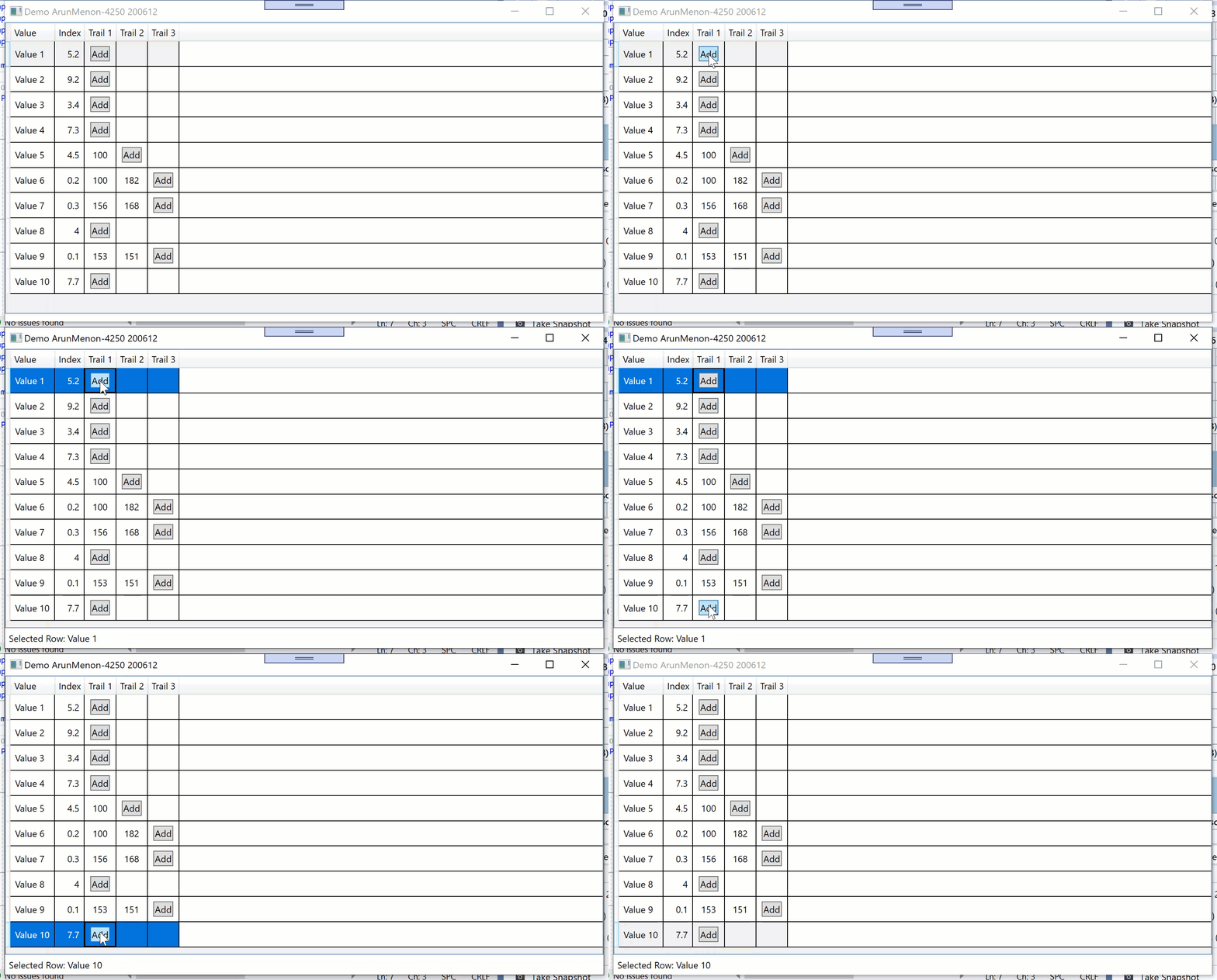
Hi, possible solution is the visibility of different controls like in following demo:
XAML:
<Window x:Class="Window026"
        xmlns="http://schemas.microsoft.com/winfx/2006/xaml/presentation"
        xmlns:x="http://schemas.microsoft.com/winfx/2006/xaml"
        xmlns:d="http://schemas.microsoft.com/expression/blend/2008"
        xmlns:mc="http://schemas.openxmlformats.org/markup-compatibility/2006"
        xmlns:local="clr-namespace:WpfApp1.WpfApp026"
        mc:Ignorable="d"
        Title="Demo ArunMenon-4250 200612" Height="450" Width="800">
  <Window.Resources>
    <local:ViewModel x:Key="vm"/>
    <local:VisibilityConverter x:Key="conv"/>
    <Style TargetType="{x:Type TextBlock}">
      <Setter Property="Background" Value="Red"/>
    </Style>
  </Window.Resources>
  <Grid DataContext="{StaticResource vm}">
    <Grid.RowDefinitions>
      <RowDefinition/>
      <RowDefinition Height="Auto"/>
    </Grid.RowDefinitions>
    <DataGrid ItemsSource="{Binding View}"
              AutoGenerateColumns="False"
              IsReadOnly="True">
      <DataGrid.Columns>
        <DataGridTextColumn Header="Value" Binding="{Binding Value}">
          <DataGridTextColumn.ElementStyle>
            <Style TargetType="{x:Type TextBlock}">
              <Setter Property="VerticalAlignment" Value="Center"/>
              <Setter Property="Margin" Value="5"/>
            </Style>
          </DataGridTextColumn.ElementStyle>
        </DataGridTextColumn>
        <DataGridTextColumn Header="Index" Binding="{Binding Index}">
          <DataGridTextColumn.ElementStyle>
            <Style TargetType="{x:Type TextBlock}">
              <Setter Property="VerticalAlignment" Value="Center"/>
              <Setter Property="HorizontalAlignment" Value="Right"/>
              <Setter Property="Margin" Value="5"/>
            </Style>
          </DataGridTextColumn.ElementStyle>
        </DataGridTextColumn>
        <DataGridTemplateColumn Header="Trail 1">
          <DataGridTemplateColumn.CellTemplate>
            <DataTemplate>
              <Grid>
                <Grid Background="{Binding Trail1.ColumnValue, Converter={StaticResource conv}}"
                      Visibility="{Binding Trail1.State, Converter={StaticResource conv}, ConverterParameter=1}">
                  <TextBlock Text="{Binding Trail1.ColumnValue}"
                             Margin="5" VerticalAlignment="Center" HorizontalAlignment="Center"/>
                </Grid>
                <Button Content="Add"
                        Margin="5" VerticalAlignment="Center" HorizontalAlignment="Center"
                        Command="{Binding Cmd, Source={StaticResource vm}}"
                        CommandParameter="{Binding}"
                        Visibility="{Binding Trail1.State, Converter={StaticResource conv}, ConverterParameter=2}"/>
              </Grid>
            </DataTemplate>
          </DataGridTemplateColumn.CellTemplate>
        </DataGridTemplateColumn>
        <DataGridTemplateColumn Header="Trail 2">
          <DataGridTemplateColumn.CellTemplate>
            <DataTemplate>
              <Grid>
                <Grid Background="{Binding Trail2.ColumnValue, Converter={StaticResource conv}}"
                      Visibility="{Binding Trail2.State, Converter={StaticResource conv}, ConverterParameter=1}">
                  <TextBlock Text="{Binding Trail2.ColumnValue}"
                             Margin="5" VerticalAlignment="Center" HorizontalAlignment="Center"/>
                  </Grid>
                <Button Content="Add"
                        Margin="5" VerticalAlignment="Center" HorizontalAlignment="Center"
                        Command="{Binding Cmd, Source={StaticResource vm}}"
                        CommandParameter="{Binding}"
                        Visibility="{Binding Trail2.State, Converter={StaticResource conv}, ConverterParameter=2}"/>
              </Grid>
            </DataTemplate>
          </DataGridTemplateColumn.CellTemplate>
        </DataGridTemplateColumn>
        <DataGridTemplateColumn Header="Trail 3">
          <DataGridTemplateColumn.CellTemplate>
            <DataTemplate>
              <Grid>
                <Grid Background="{Binding Trail3.ColumnValue, Converter={StaticResource conv}}"
                      Visibility="{Binding Trail3.State, Converter={StaticResource conv}, ConverterParameter=1}">
                  <TextBlock Text="{Binding Trail3.ColumnValue}"
                             Margin="5" VerticalAlignment="Center" HorizontalAlignment="Center"/>
                  </Grid>
                <Button Content="Add"
                        Margin="5" VerticalAlignment="Center" HorizontalAlignment="Center"
                        Command="{Binding Cmd, Source={StaticResource vm}}"
                        CommandParameter="{Binding}"
                        Visibility="{Binding Trail3.State, Converter={StaticResource conv}, ConverterParameter=2}"/>
              </Grid>
            </DataTemplate>
          </DataGridTemplateColumn.CellTemplate>
        </DataGridTemplateColumn>
      </DataGrid.Columns>
    </DataGrid>
    <Label Grid.Row="1" Content="{Binding Info}"/>
  </Grid>
</Window>
-----------------------------------------
Imports System.Collections.ObjectModel
Imports System.ComponentModel
Imports System.Globalization
Imports System.Runtime.CompilerServices

Namespace WpfApp026

  Public Class ViewModel
    Implements INotifyPropertyChanged

    Private cvs As New CollectionViewSource
    Public ReadOnly Property View As ICollectionView
      Get
        If cvs.Source Is Nothing Then GetData()
        Return cvs.View
      End Get
    End Property

    Public Property Info As String

    Public ReadOnly Property Cmd As ICommand
      Get
        Return New RelayCommand(AddressOf CmdExec)
      End Get
    End Property

    Private Sub CmdExec(obj As Object)
      Dim d = TryCast(obj, Data)
      If d Is Nothing Then Exit Sub
      Info = $"Selected Row: {d.Value}"
      OnPropertyChanged(NameOf(Info))
    End Sub

    Private Sub GetData()
      Dim rnd As New Random
      Dim col As New ObservableCollection(Of Data)
      For i = 1 To 10
        Dim d = New Data With {.Value = $"Value {i}", .Index = CDec(0.1 * rnd.Next(1, 100))}
        If rnd.NextDouble < 0.5 Then
          d.Trail1.State = ColumnState.Button
        Else
          d.Trail1.ColumnValue = rnd.Next(50, 200)
          d.Trail1.State = ColumnState.Value
          If rnd.NextDouble < 0.5 Then
            d.Trail2.State = ColumnState.Button
          Else
            d.Trail2.ColumnValue = rnd.Next(50, 200)
            d.Trail2.State = ColumnState.Value
            d.Trail3.State = ColumnState.Button
          End If
        End If
        col.Add(d)
      Next
      cvs.Source = col
    End Sub

    Public Event PropertyChanged As PropertyChangedEventHandler Implements INotifyPropertyChanged.PropertyChanged
    Friend Sub OnPropertyChanged(<CallerMemberName> Optional propName As String = "")
      RaiseEvent PropertyChanged(Me, New PropertyChangedEventArgs(propName))
    End Sub

  End Class

  Public Class VisibilityConverter
    Implements IValueConverter

    Public Function Convert(value As Object, targetType As Type, parameter As Object, culture As CultureInfo) As Object Implements IValueConverter.Convert
      If targetType Is GetType(Visibility) Then
        Return If(CType(value, Integer).ToString = parameter.ToString, Visibility.Visible, Visibility.Collapsed)
      End If
      If targetType Is GetType(Brush) Then
        Return If(CType(value, Integer) < 100, Brushes.Yellow, Brushes.Transparent)
      End If
      Return Nothing
    End Function

    Public Function ConvertBack(value As Object, targetType As Type, parameter As Object, culture As CultureInfo) As Object Implements IValueConverter.ConvertBack
      Throw New NotImplementedException()
    End Function
  End Class

  Public Class Data
    Public Property Value As String
    Public Property Index As Decimal
    Public Property Trail1 As New CulumnData
    Public Property Trail2 As New CulumnData
    Public Property Trail3 As New CulumnData
  End Class

  Public Class CulumnData
    Public Property ColumnValue As Integer = 0
    Public Property State As ColumnState = ColumnState.Empty
  End Class

  Public Enum ColumnState
    Value = 1
    Empty = 0
    Button = 2
  End Enum

End Namespace