
Thanks for this. I removed office updates (saw this suggestion on another article) and it started syncing. I will change this setting and try to add those back and see if it works.
Thanks
John
This browser is no longer supported.
Upgrade to Microsoft Edge to take advantage of the latest features, security updates, and technical support.
' cx='32' cy='32' r='32' /%3E%3Ctext x='50%25' y='55%25' dominant-baseline='middle' text-anchor='middle' fill='%23FFF' %3EJD%3C/text%3E%3C/svg%3E)
Downstream server is failing sync. All ports are open - It starts and gets to 11% and then fails.
Getting this error - any thoughts?
2021-04-20 12:32:41.429 UTC Error WsusService.37 SoapUtilities.LogException USS ThrowException: Actor = http://#server#:8530/ServerSyncWebService/ServerSyncWebService.asmx, Method = "http://www.microsoft.com/SoftwareDistribution/GetUpdateData", ID=69df2c1b-be71-4da9-bd07-22d96e4d342a, ErrorCode=InternalServerError, Message=
at Microsoft.UpdateServices.Internal.SoapUtilities.LogException(SoapException e)
at Microsoft.UpdateServices.Internal.WebServiceCommunicationHelper.ProcessWebServiceProxyException(SoapHttpClientProtocol& webServiceObject, Exception exceptionInfo)
at Microsoft.UpdateServices.ServerSync.CatalogSyncAgentCore.WebserviceGetUpdateData(UpdateIdentity[] updateIds, List1 allMetadata, List1 allFileUrls, List1& updatesWithSecureFileData, Boolean isForConfig) at Microsoft.UpdateServices.ServerSync.CatalogSyncAgentCore.GetUpdateDataInChunksAndImport(List1 neededUpdates, List1 allMetadata, List1 allFileUrls, Boolean isConfigData)
at Microsoft.UpdateServices.ServerSync.CatalogSyncAgentCore.GetAndSaveUpdateMetadata(List`1 updates)
at Microsoft.UpdateServices.ServerSync.CatalogSyncAgentCore.ExecuteSyncProtocol(Boolean allowRedirect)
at Microsoft.UpdateServices.ServerSync.CatalogSyncAgentCore.CatalogSyncThreadProcess()
at System.Threading.ExecutionContext.RunInternal(ExecutionContext executionContext, ContextCallback callback, Object state, Boolean preserveSyncCtx)
at System.Threading.ExecutionContext.Run(ExecutionContext executionContext, ContextCallback callback, Object state, Boolean preserveSyncCtx)
at System.Threading.ExecutionContext.Run(ExecutionContext executionContext, ContextCallback callback, Object state)
at System.Threading.ThreadHelper.ThreadStart()
Thanks in advance!
John
Thanks for this. I removed office updates (saw this suggestion on another article) and it started syncing. I will change this setting and try to add those back and see if it works.
Thanks
John

Hi,
Thank you very much for the update and we're looking forward to solving the problem. If you have any questions, we warmly welcome you to post in this forum again.
Have a nice day!
Regards,
Amanda
Hi @John D ,
The amount of data from the upstream server to the downstream server is too large, which may be the cause of the error. So it is recommended that we could increase the default Queue Length to 2000 in IIS, up from default of 1000 and resync to check if the problem is solved.
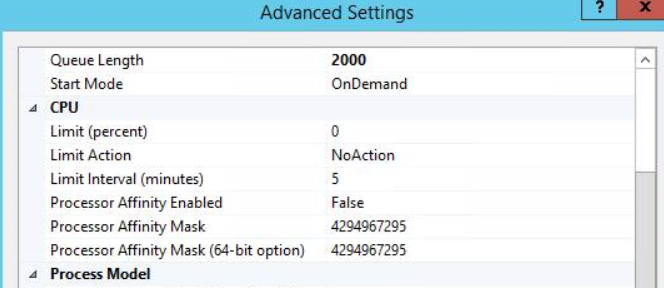
Here is the article we could refer to:
https://learn.microsoft.com/en-US/troubleshoot/mem/configmgr/windows-server-update-services-best-practices#disable-recycling-and-configure-memory-limits
If the response is helpful, please click "Accept Answer" and upvote it.
Note: Please follow the steps in our documentation to enable e-mail notifications if you want to receive the related email notification for this thread.