Developer technologies | Universal Windows Platform (UWP)
A Microsoft platform for building and publishing apps for Windows devices.
This browser is no longer supported.
Upgrade to Microsoft Edge to take advantage of the latest features, security updates, and technical support.
' cx='32' cy='32' r='32' /%3E%3Ctext x='50%25' y='55%25' dominant-baseline='middle' text-anchor='middle' fill='%23FFF' %3EIG%3C/text%3E%3C/svg%3E)
UWP Simple Animation using MVVM..
Just need the below code to animate using MVVM...*Not code behind
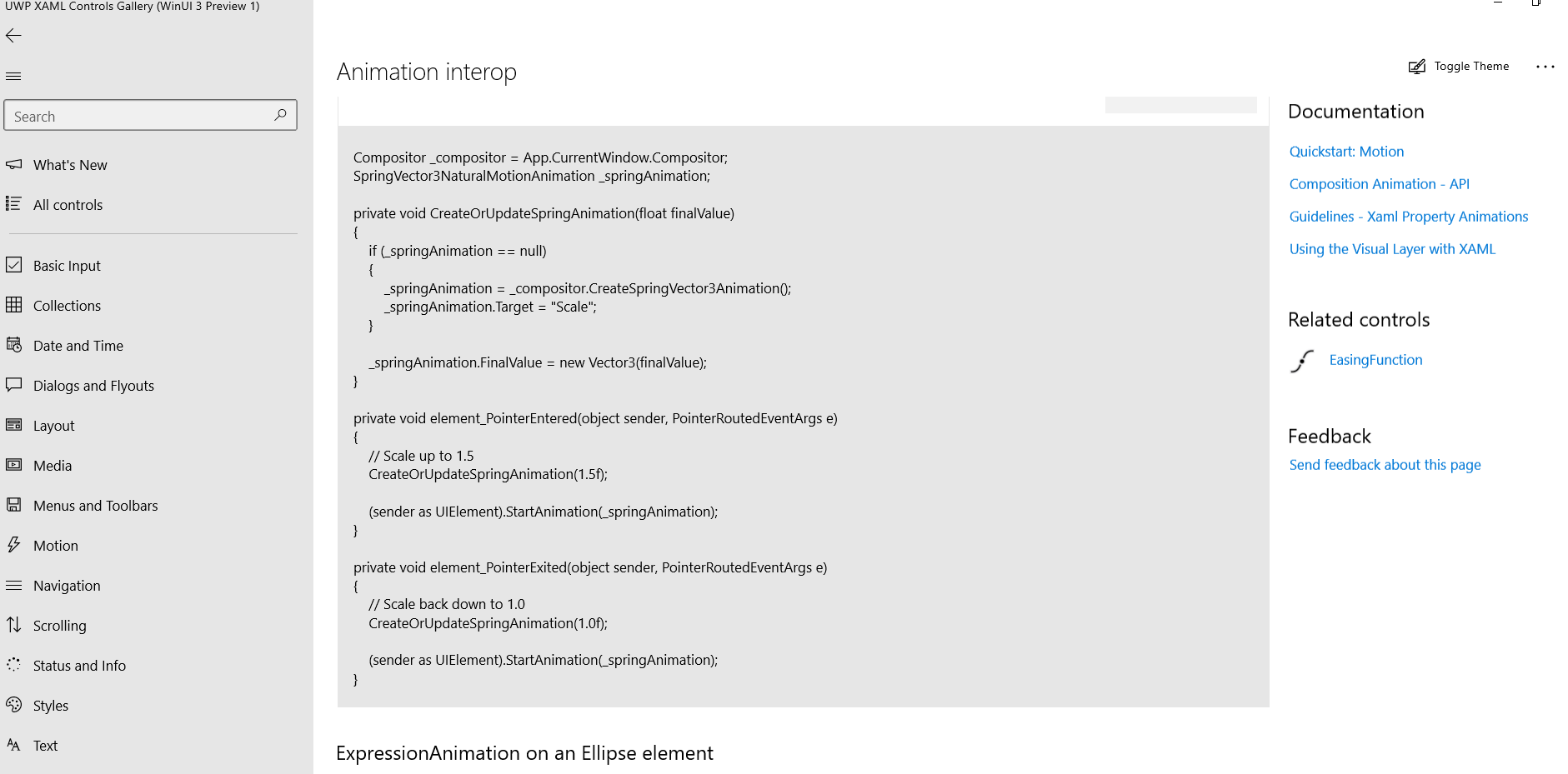
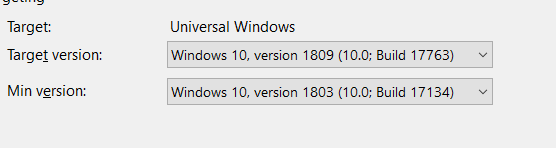
Important ...It should work in below Target Version.
A Microsoft platform for building and publishing apps for Windows devices.

You can use code behind and still have a correct MVVM pattern. Where would you like to have this code?
I want the code in ViewModel....I dont want anything in code behind...+ its not working on target Version
Answer accepted by question author
The problem is that UIElement.StartAnimation is available from 10.0.17763.0 and your min version is 10.0.17134.0. You can use animation through visual layer anyway.
As I do not like to have such kind of code in view model, I propose to you a different solution using Microsoft.Xaml.Interactivity.
Solution with behaviors
Extend Microsoft.Xaml.Interactivity.Behavior
public class ScaleBehavior : Behavior
{
    private readonly Compositor _compositor = Window.Current.Compositor;
    private SpringVector3NaturalMotionAnimation _springAnimation;
    private Visual _elementVisual;

    protected override void OnAttached()
    {
        if (!(AssociatedObject is UIElement uiElement)) return;

        uiElement.PointerEntered += Element_PointerEntered;
        uiElement.PointerExited += Element_PointerExited;
        _elementVisual = ElementCompositionPreview.GetElementVisual(uiElement);
    }

    protected override void OnDetaching()
    {
        if (!(AssociatedObject is UIElement uiElement)) return;

        uiElement.PointerEntered -= Element_PointerEntered;
        uiElement.PointerExited -= Element_PointerExited;
        _elementVisual = null;
    }

    private void Element_PointerEntered(object sender, PointerRoutedEventArgs e)
    {
        CreateOrUpdateSpringAnimation(1.5f);
        Vector2 size = _elementVisual.Size;
        _elementVisual.CenterPoint = new Vector3(size.X / 2, size.Y / 2, 0);
        _elementVisual.StartAnimation("Scale", _springAnimation);
    }

    private void Element_PointerExited(object sender, PointerRoutedEventArgs e)
    {
        CreateOrUpdateSpringAnimation(1.0f);
        Vector2 size = _elementVisual.Size;
        _elementVisual.CenterPoint = new Vector3(size.X / 2, size.Y / 2, 0);
        _elementVisual.StartAnimation("Scale", _springAnimation);
    }

    private void CreateOrUpdateSpringAnimation(float finalValue)
    {
        if (_springAnimation == null) _springAnimation = _compositor.CreateSpringVector3Animation();
        _springAnimation.FinalValue = new Vector3(finalValue);
    }
}
and add to your XAML
<Border BorderBrush="Red" BorderThickness="2" HorizontalAlignment="Center" VerticalAlignment="Center">
    <interactivity:Interaction.Behaviors>
        <appShell:ScaleBehavior/>
    </interactivity:Interaction.Behaviors>
    <TextBox Text="HELP"/>
</Border>
Solution with code in view model
<Page x:Class="UwpApp.AppShell.MainPage"
      xmlns="http://schemas.microsoft.com/winfx/2006/xaml/presentation"
      xmlns:d="http://schemas.microsoft.com/expression/blend/2008"
      xmlns:x="http://schemas.microsoft.com/winfx/2006/xaml"
      xmlns:mc="http://schemas.openxmlformats.org/markup-compatibility/2006"
      xmlns:local="using:UwpApp.AppShell"
      mc:Ignorable="d"
      Background="{ThemeResource ApplicationPageBackgroundThemeBrush}">
    <Page.DataContext>
        <local:ViewModel x:Name="ViewModel"/>
    </Page.DataContext>
    <Grid>
        <Border BorderBrush="Red" BorderThickness="2" HorizontalAlignment="Center" VerticalAlignment="Center"
                PointerEntered="{x:Bind ViewModel.PointerEntered}" PointerExited="{x:Bind ViewModel.PointerExited}">
            <TextBox Text="HELP"/>
        </Border>
    </Grid>
</Page>


public class ViewModel
{
    private readonly Compositor _compositor = Window.Current.Compositor;
    private SpringVector3NaturalMotionAnimation _springAnimation;

    public void PointerEntered(object sender, PointerRoutedEventArgs e)
    {
        CreateOrUpdateSpringAnimation(1.5f);
        Visual elementVisual = ElementCompositionPreview.GetElementVisual((UIElement) sender);
        Vector2 size = elementVisual.Size;
        elementVisual.CenterPoint = new Vector3(size.X / 2, size.Y / 2, 0);
        elementVisual.StartAnimation("Scale", _springAnimation);
    }

    public void PointerExited(object sender, PointerRoutedEventArgs e)
    {
        CreateOrUpdateSpringAnimation(1.0f);
        Visual elementVisual = ElementCompositionPreview.GetElementVisual((UIElement)sender);
        Vector2 size = elementVisual.Size;
        elementVisual.CenterPoint = new Vector3(size.X / 2, size.Y / 2, 0);
        elementVisual.StartAnimation("Scale", _springAnimation);
    }

    private void CreateOrUpdateSpringAnimation(float finalValue)
    {
        if (_springAnimation == null) _springAnimation = _compositor.CreateSpringVector3Animation();
        _springAnimation.FinalValue = new Vector3(finalValue);
    }
}
@danielescipioni Thanks for the attached Property.... But can achieve the same in MVVM without this behaviours.
Can we animate Control in ViewModel using MVVM
Yes you can if you want, I updated my answer.
' cx='32' cy='32' r='32' /%3E%3Ctext x='50%25' y='55%25' dominant-baseline='middle' text-anchor='middle' fill='%23FFF' %3EI%3C/text%3E%3C/svg%3E)
Solution with Behavior would be more appropriate because animations belong to View layer, View Models are more about the logic that can change UI state. If you are going to make everything in orthodox MVVM way, you really need to consider Daniel's first answer.
Thanks @danielescipioni , This will do....