@Anonymous ,
Do you use Google Chrome to log in Microsoft Teams client?
If so, this issue occurs because the third-party cookies is blocked in Google Chrome Cookies Setting.
To quickly fix this issue, you just need to Allow third-party cookies in the Incognito session by doing the following:
- When you open Google Chrome in an incognito session, you will get an option to enable or disable third-party cookies that blocked by default as below:
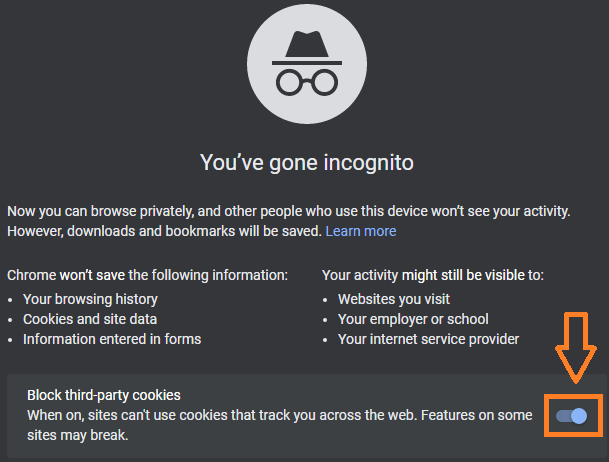
- Just tick on this button to disable Block third-party cookies and allow Microsoft Teams to use cookies.
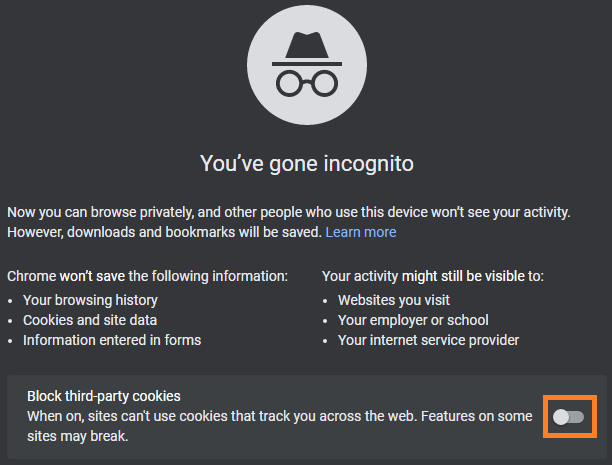
After that, to avoid changing your current cookies settings on your Google Chrome and getting Microsoft Teams working as expected, you have to block third-party cookies for all sites except Microsoft Teams URL https://teams.microsoft.com by doing the following:
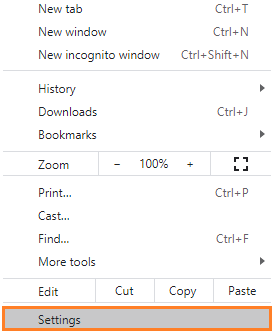
- Open Google Chrome Settings.
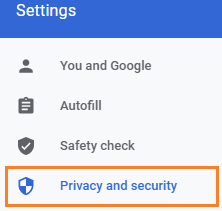
- On the left side, click on Privacy and Security.
- Click on Cookies and other site data.
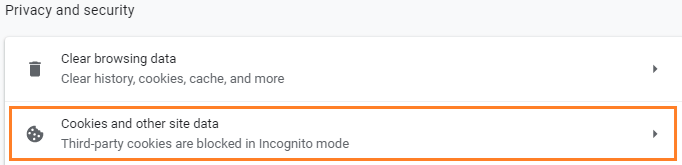
- Scroll down to Block third-party cookies in Incognito, then click the Add button.

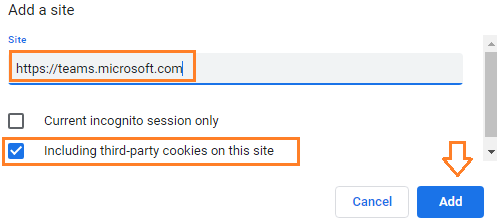
- Just provide the Microsoft Teams URL (https://teams.microsoft.com), and check Including Third-Party cookies on this site > then Click on Add. Note: if you would like to allow all subdomains under the main Microsoft domain, just add this entry *[.]microsoft.com**
- Go back to your incognito session and refresh your tab! Now, the Microsoft Teams should be working as expected now.
If the response is helpful, please click "Accept Answer" and upvote it.
Note: Please follow the steps in our documentation to enable e-mail notifications if you want to receive the related email notification for this thread.
' cx='32' cy='32' r='32' /%3E%3Ctext x='50%25' y='55%25' dominant-baseline='middle' text-anchor='middle' fill='%23FFF' %3EA%3C/text%3E%3C/svg%3E)