Microsoft Security | Microsoft Graph
An API that connects multiple Microsoft services, enabling data access and automation across platforms

This browser is no longer supported.
Upgrade to Microsoft Edge to take advantage of the latest features, security updates, and technical support.
' cx='32' cy='32' r='32' /%3E%3Ctext x='50%25' y='55%25' dominant-baseline='middle' text-anchor='middle' fill='%23FFF' %3EDK%3C/text%3E%3C/svg%3E)
Good afternoon,
tl;dr: we're trying to initiate a call using the graph api which results in
'{"error":{"code":"9999","message":"Unknown internal server error.","innerError":{"date":"2021-09-02T10:05:38","request-id":"[id],"client-request-id":"[id]"}}}
Steps taken:
The request itself is being POSTed to https://graph.microsoft.com/v1.0/communications/calls, using
{
"@odata.type": "#microsoft.graph.call",
"callbackUri": "[our callback url]",
"targets": [{
"@odata.type": "#microsoft.graph.invitationParticipantInfo",
"countryCode": "91",
"identity": {
"@odata.type": "#microsoft.graph.identitySet",
"user": {
"@odata.type": "#microsoft.graph.identity",
"displayName": "Daniel",
"tenantId": "[our tenant id]",
"id": "[my own id]"
}
}
}],
"requestedModalities": ["audio"],
"mediaConfig": {
"@odata.type": "#microsoft.graph.serviceHostedMediaConfig"
}
}
as the payload.
Previous errors have been:
7503: Application is not registered in our store
InvalidAuthenticationToken: Access token validation failure. Invalid audience
All these error messages could be fixed, but now we are stuck with this squishy "internal server error" message and don't know what to do. Does anyone here have an idea about what could be wrong with the request or any configuration problems on our side?
Thanks a lot for any hints/ideas/pointers!
Kind regards,
Daniel
An API that connects multiple Microsoft services, enabling data access and automation across platforms

Use https://jwt.ms/ to parse your access token and provide screenshots.
Good morning,
here's the requested data:
{
  "aud": "https://graph.microsoft.com",
  "iss": "https://sts.windows.net/d6d49420-f39b-4df7-a1dc-d59a935871db/",
  "iat": 1630902939,
  "nbf": 1630902939,
  "exp": 1630989639,
  "aio": "E2ZgYMjYWCnPUHqMR6rPaoKQk4gzAA==",
  "app_displayname": "Lucy",
  "appid": "c3f24762-e431-4241-826d-1d27d4919822",
  "appidacr": "1",
  "idp": "https://sts.windows.net/d6d49420-f39b-4df7-a1dc-d59a935871db/",
  "idtyp": "app",
  "rh": "0.AW4AIJTU1pvz902h3NWak1hx22JH8sMx5EFCgm0dJ9SRmCJuAAA.",
  "tenant_region_scope": "NA",
  "tid": "d6d49420-f39b-4df7-a1dc-d59a935871db",
  "uti": "CM6ht92XOECBiwDwXxPrAA",
  "ver": "1.0",
  "wids": [
    "0997a1d0-0d1d-4acb-b408-d5ca73121e90"
  ],
  "xms_tcdt": 1469581968
}
Good morning,
first of all, thanks for your help, but it didn't solve the problem (atleast not completely). In the token URL i still had "botframework.com" instead of the tenant id, replacing that one gives me a jwt with the expected roles in it:
{
  "aud": "https://graph.microsoft.com",
  "iss": "https://sts.windows.net/451c55f4-bf9f-419c-99fa-3cfcb92dab15/",
  "iat": 1630985685,
  "nbf": 1630985685,
  "exp": 1630989585,
  "aio": "E2ZgYIiy/Jkp1ikxQfhhs47V0U9cAA==",
  "app_displayname": "Lucy",
  "appid": "c3f24762-e431-4241-826d-1d27d4919822",
  "appidacr": "1",
  "idp": "https://sts.windows.net/451c55f4-bf9f-419c-99fa-3cfcb92dab15/",
  "idtyp": "app",
  "oid": "bb998e4d-f727-4125-9ffb-da92a56895eb",
  "rh": "0.ATAA9FUcRZ-_nEGZ-jz8uS2rFWJH8sMx5EFCgm0dJ9SRmCIwAAA.",
  "roles": [
    "Calls.InitiateGroupCall.All",
    "Calls.AccessMedia.All",
    "Calls.Initiate.All"
  ],
  "sub": "bb998e4d-f727-4125-9ffb-da92a56895eb",
  "tenant_region_scope": "EU",
  "tid": "451......",
  "uti": "vE1eGtAbF0m7dHpKfqRvAA",
  "ver": "1.0",
  "wids": [
    "0997a1d0-0d1d-4acb-b408-d5ca73121e90"
  ],
  "xms_tcdt": 1531399136
}
But i'm still getting the internal error even when using this jwt:
  'headers' => bless( {
                        'client-request-id' => '887a7b72-a630-4621-aea4-6c645a79b893',
                        'x-ms-ags-diagnostic' => '{"ServerInfo":{"DataCenter":"North Europe","Slice":"E","Ring":"4","ScaleUnit":"002","RoleInstance":"DU2PEPF000070C5"}}',
                        'client-response-num' => 1,
                        'date' => 'Tue, 07 Sep 2021 03:39:45 GMT',
                        'client-ssl-cert-issuer' => '/C=US/O=Microsoft Corporation/CN=Microsoft Azure TLS Issuing CA 01',
                        'client-ssl-cipher' => 'ECDHE-RSA-AES128-GCM-SHA256',
                        'client-peer' => '40.126.31.163:443',
                        'strict-transport-security' => 'max-age=31536000',
                        '::std_case' => {
                                          'client-request-id' => 'Client-Request-Id',
                                          'x-ms-ags-diagnostic' => 'X-Ms-Ags-Diagnostic',
                                          'client-response-num' => 'Client-Response-Num',
                                          'client-ssl-cert-issuer' => 'Client-SSL-Cert-Issuer',
                                          'client-ssl-cipher' => 'Client-SSL-Cipher',
                                          'client-peer' => 'Client-Peer',
                                          'strict-transport-security' => 'Strict-Transport-Security',
                                          'client-date' => 'Client-Date',
                                          'client-ssl-cert-subject' => 'Client-SSL-Cert-Subject',
                                          'client-transfer-encoding' => 'Client-Transfer-Encoding',
                                          'request-id' => 'Request-Id',
                                          'client-ssl-socket-class' => 'Client-SSL-Socket-Class'
                                        },
                        'client-date' => 'Tue, 07 Sep 2021 03:39:46 GMT',
                        'content-type' => 'application/json',
                        'client-ssl-cert-subject' => '/C=US/ST=WA/L=Redmond/O=Microsoft Corporation/CN=graph.microsoft.com',
                        'client-transfer-encoding' => [
                                                        'chunked'
                                                      ],
                        'request-id' => '887a7b72-a630-4621-aea4-6c645a79b893',
                        'client-ssl-socket-class' => 'IO::Socket::SSL'
                      }, 'HTTP::Headers' ),
  'data' => '500 Internal Server Error'
Can you use this token to call the api( /communications/calls ) in postman?
Same result, also when using Insomnia. Output has been attached.130089-insomnia.txt
' cx='32' cy='32' r='32' /%3E%3Ctext x='50%25' y='55%25' dominant-baseline='middle' text-anchor='middle' fill='%23FFF' %3EAL%3C/text%3E%3C/svg%3E)
@Daniel Kübler did you find a solution?
Your token does not contain any permissions, I think this is the cause of the error.
You can get the token according to my test process:
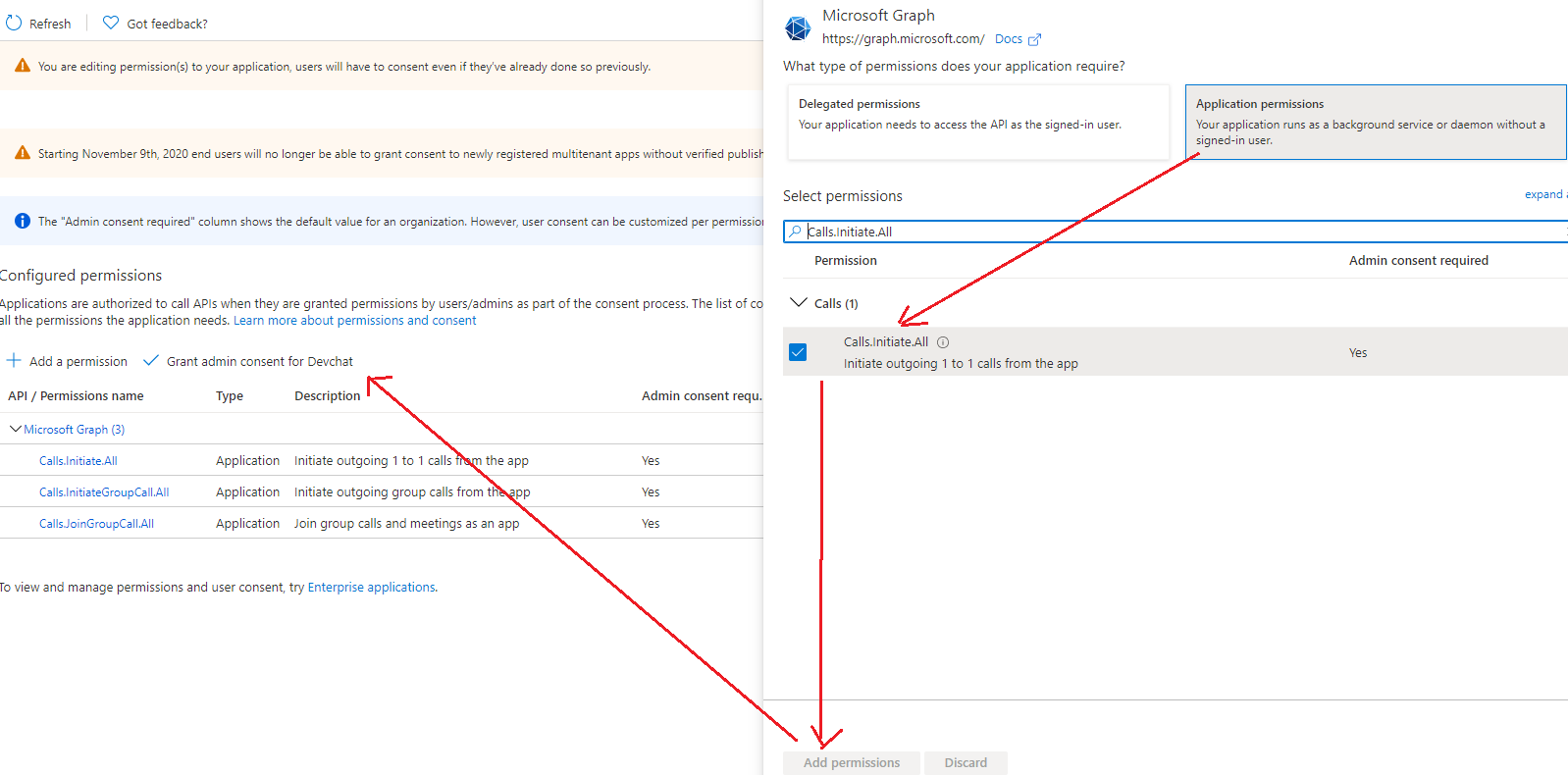
First, you can grant the Calls.Initiate.All, Calls.InitiateGroupCall.All and Calls.JoinGroupCall.All application permission to the application and grant the administrator consent.
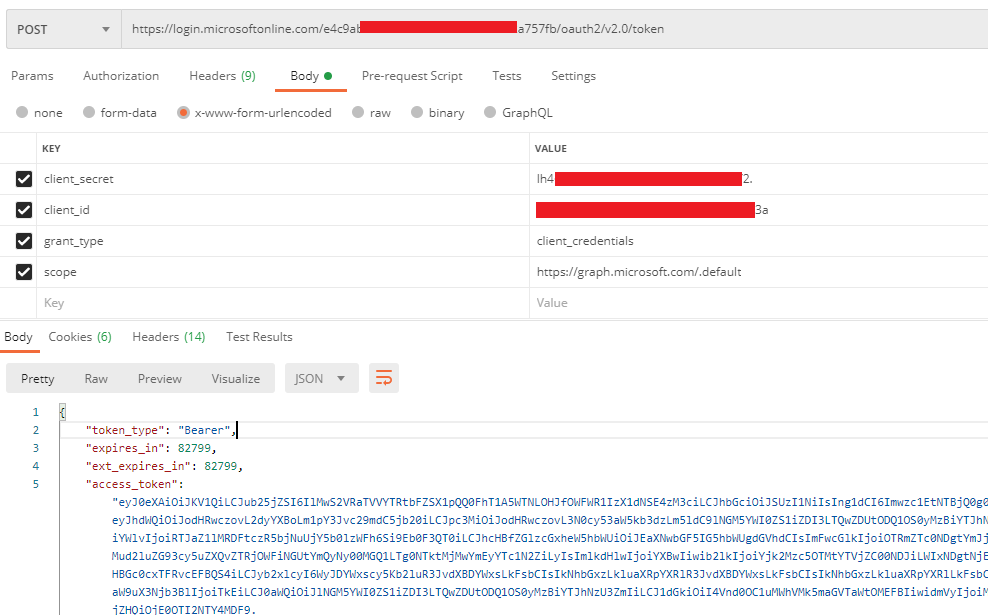
Then you need to use the daemon-based client credential flow to obtain the token.
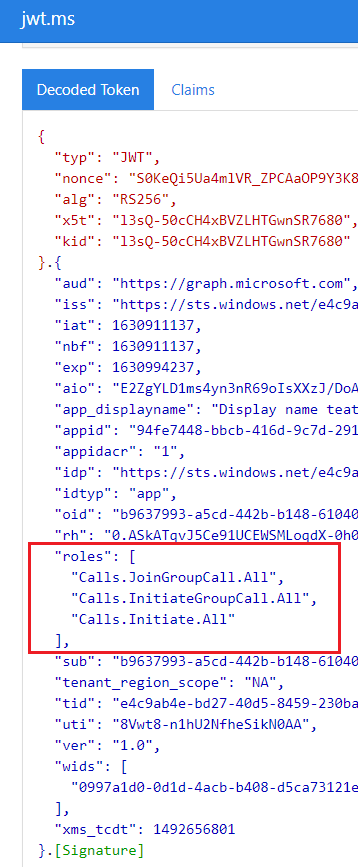
Parse the token.
If an Answer is helpful, please click "Accept Answer" and upvote it.