Community Center | Not monitored
Tag not monitored by Microsoft.

This browser is no longer supported.
Upgrade to Microsoft Edge to take advantage of the latest features, security updates, and technical support.
' cx='32' cy='32' r='32' /%3E%3Ctext x='50%25' y='55%25' dominant-baseline='middle' text-anchor='middle' fill='%23FFF' %3EJS%3C/text%3E%3C/svg%3E)
Basically the number of columns in my data source for which my query works off increases by 1 column every day.
e.g today there are 2259 columns and tomorrow there will be 2260 columns (in my data source)
When I update my data source and refresh the query it creates an error where the last column cannot be found (see below) so I have to manually tell the query that there are 2260 columns in my data source when I'm sure there is a way this can be done automatically.
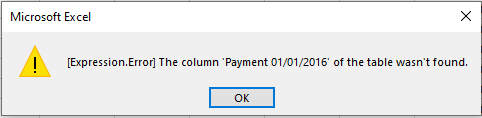
Also, there are some sheets where I only need the first 100 columns for example. Does anyone know a way where I can make the query display only the first 100 columns and ignore the remaining columns, even if the number of columns increases by 1 each subsequent day?
Any help would be greatly appreciated :)
Tag not monitored by Microsoft.
' cx='32' cy='32' r='32' /%3E%3Ctext x='50%25' y='55%25' dominant-baseline='middle' text-anchor='middle' fill='%23FFF' %3EEM%3C/text%3E%3C/svg%3E)
Power Query is no longer supported here on Q&A. Please post your question over on https://aka.ms/PQCommunity instead.