Developer technologies | Windows Presentation Foundation
A part of the .NET Framework that provides a unified programming model for building line-of-business desktop applications on Windows.
This browser is no longer supported.
Upgrade to Microsoft Edge to take advantage of the latest features, security updates, and technical support.
' cx='32' cy='32' r='32' /%3E%3Ctext x='50%25' y='55%25' dominant-baseline='middle' text-anchor='middle' fill='%23FFF' %3EB%3C/text%3E%3C/svg%3E)
WPF C# how do you create a MouseRightButtonDown Event for a Rectangle in code behind as well as following MVVM principles.
Code behind I thought would be something like this
rect.MouseRightButtonDown += rectangle_MouseRightButtonDown;
And implemented as follow:
private void rectangle_MouseRightButtonDown(object sender, MouseButtonEventArgs e)
{

}
but it’s not working. I'm sure i must be missing something very obvious but would appreciate any assistance.
A part of the .NET Framework that provides a unified programming model for building line-of-business desktop applications on Windows.

HI Big,
you can use Interactivity.dll or own attached property to catch UI-object and attach handler for every event.
Answer accepted by question author
' cx='32' cy='32' r='32' /%3E%3Ctext x='50%25' y='55%25' dominant-baseline='middle' text-anchor='middle' fill='%23FFF' %3EHL%3C/text%3E%3C/svg%3E)
Here is an example of using RightMouseClickEvent in MVVM. You could add system.windows.interactivity.dll to the project.
MainWindow.xaml:
<Window x:Class="RightMouseClickEventOfRectangleMVVM.MainWindow"
        xmlns="http://schemas.microsoft.com/winfx/2006/xaml/presentation"
        xmlns:x="http://schemas.microsoft.com/winfx/2006/xaml"
        xmlns:d="http://schemas.microsoft.com/expression/blend/2008"
        xmlns:mc="http://schemas.openxmlformats.org/markup-compatibility/2006"
        xmlns:local="clr-namespace:RightMouseClickEventOfRectangleMVVM"
        mc:Ignorable="d"
        xmlns:i="clr-namespace:System.Windows.Interactivity;assembly=System.Windows.Interactivity"
        Title="MainWindow" Height="450" Width="800">
    <Window.DataContext>
        <local:ViewModel/>
    </Window.DataContext>
    <StackPanel>
        <Rectangle x:Name="rect" Fill="{Binding MyColor}" HorizontalAlignment="Left"
                   Height="100" Margin="10,29,0,0" Stroke="Black" VerticalAlignment="Top"
                   Width="100" MouseRightButtonDown="rect_MouseRightButtonDown">
            <i:Interaction.Triggers>
                <i:EventTrigger EventName="MouseRightButtonDown">
                    <i:InvokeCommandAction Command="{Binding MyCommand}"/>
                </i:EventTrigger>
            </i:Interaction.Triggers>
        </Rectangle>
        <Button x:Name="btn" Command="{Binding Button1Command}" Content="GO"/>
    </StackPanel>
</Window>
MainWindow.xaml.cs:
using System;
using System.ComponentModel;
using System.Windows;
using System.Windows.Input;
using System.Windows.Media;

namespace RightMouseClickEventOfRectangleMVVM
{
  public partial class MainWindow : Window
  {
    public MainWindow()
    {
      InitializeComponent();
    }
    private void rect_MouseRightButtonDown(object sender, MouseButtonEventArgs e)
    {
      MessageBox.Show("clicked");
    }
  }
  public class ViewModel : INotifyPropertyChanged
  {
    private Brush myColor = Brushes.Red;
    public Brush MyColor
    {
      get
      {
        return myColor;
      }
      set
      {
        myColor = value;
        NotifyPropertyChanged("MyColor");
      }
    }
    public DelegateCommand MyCommand { get; set; }
    public DelegateCommand Button1Command { get; set; }
    public ViewModel()
    {
      Button1Command = new DelegateCommand(onButton1Command);
      MyCommand = new DelegateCommand(OnRectangleClicked);
    }

    private void OnRectangleClicked(object obj)
    {
      MyColor = Brushes.Pink;
    }

    private void onButton1Command(object obj)
    {
      MessageBox.Show("hello");
    }
    public event PropertyChangedEventHandler PropertyChanged;
    protected void NotifyPropertyChanged(string propertyName)
    {
      if (PropertyChanged != null)
      {
        PropertyChangedEventArgs args = new PropertyChangedEventArgs(propertyName);
        this.PropertyChanged(this, args);
      }
    }
  }
  public class DelegateCommand : ICommand
  {
    private readonly Predicate<object> _canExecute;
    private readonly Action<object> _execute;

    public event EventHandler CanExecuteChanged;

    public DelegateCommand(Action<object> execute)
        : this(execute, null)
    {
    }
    public DelegateCommand(Action<object> execute, Predicate<object> canExecute)
    {
      _execute = execute;
      _canExecute = canExecute;
    }

    public bool CanExecute(object parameter)
    {
      if (_canExecute == null)
      {
        return true;
      }

      return _canExecute(parameter);
    }

    public void Execute(object parameter)
    {
      _execute(parameter);
    }

    public void RaiseCanExecuteChanged()
    {
      if (CanExecuteChanged != null)
      {
        CanExecuteChanged(this, EventArgs.Empty);
      }
    }
  }
}
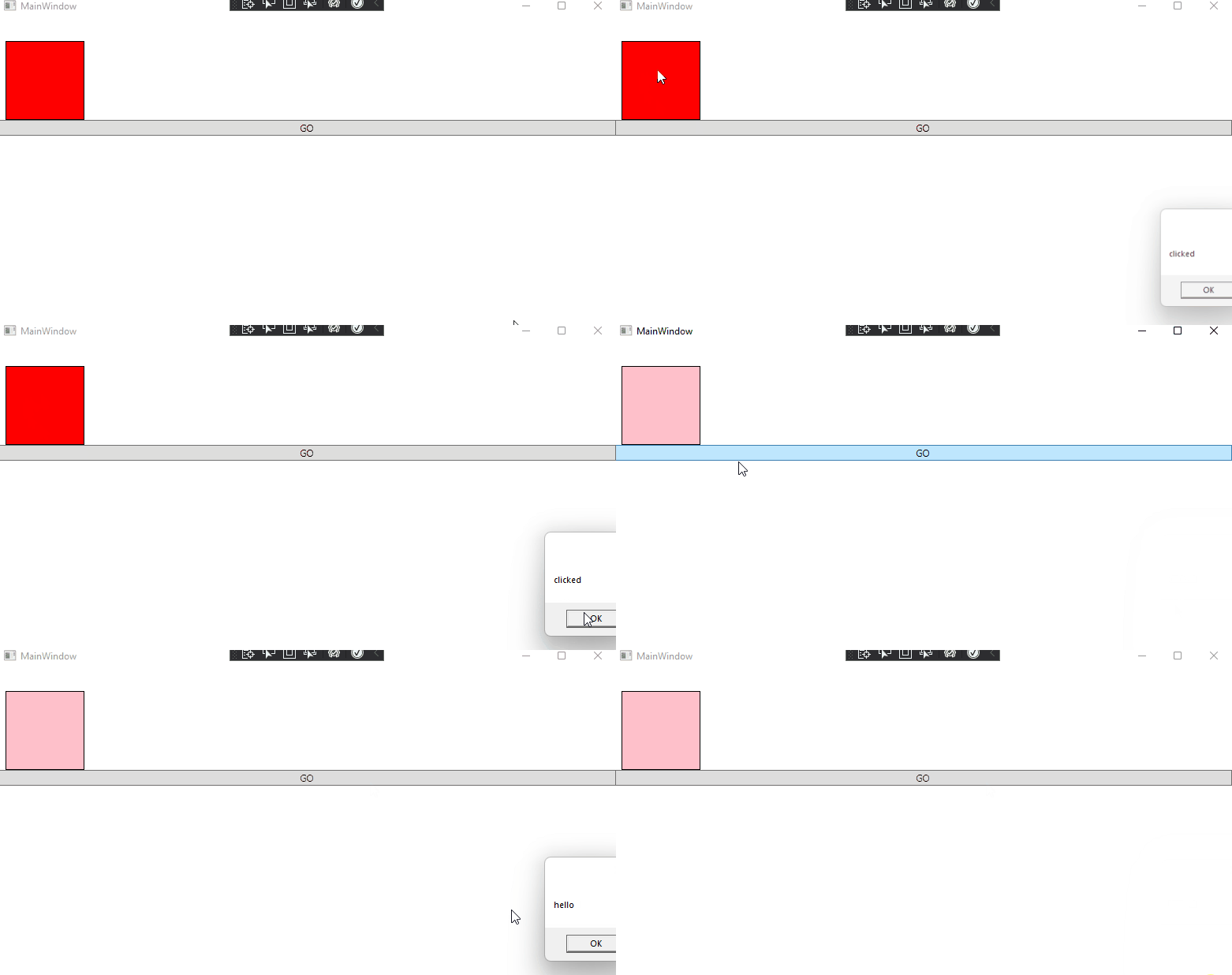
The result:
If the response is helpful, please click "Accept Answer" and upvote it.
Note: Please follow the steps in our [documentation][5] to enable e-mail notifications if you want to receive the related email notification for this thread.
[5]: https://learn.microsoft.com/en-us/answers/articles/67444/email-notifications.html
Thank you for your extensive response, it is very helpful.
Excuse the WinForms terms but how would this work if I was creating the Rectangle dynamically in code behind?
Thankyou again for your response. This works great. The problem I found was I needed to provide a background Fill to the rectangle in my case Transparent