Exchange | Exchange Server | Management
The administration and maintenance of Microsoft Exchange Server to ensure secure, reliable, and efficient email and collaboration services across an organization.
This browser is no longer supported.
Upgrade to Microsoft Edge to take advantage of the latest features, security updates, and technical support.
' cx='32' cy='32' r='32' /%3E%3Ctext x='50%25' y='55%25' dominant-baseline='middle' text-anchor='middle' fill='%23FFF' %3EAO%3C/text%3E%3C/svg%3E)
The laptop version of outlook has not updated my incoming mails since February, but my app/phone version is working ok, can you advise how I can fix this
The administration and maintenance of Microsoft Exchange Server to ensure secure, reliable, and efficient email and collaboration services across an organization.
' cx='32' cy='32' r='32' /%3E%3Ctext x='50%25' y='55%25' dominant-baseline='middle' text-anchor='middle' fill='%23FFF' %3EJS%3C/text%3E%3C/svg%3E)
Is there any progress about your issue so far? Have you checked the suggestions provided below?
If an Answer is helpful, please click "Accept Answer" and upvote it.
Note: Please follow the steps in our documentation to enable e-mail notifications if you want to receive the related email notification for this thread.
What's your Exchange server and CU version, or are you using Exchange online?
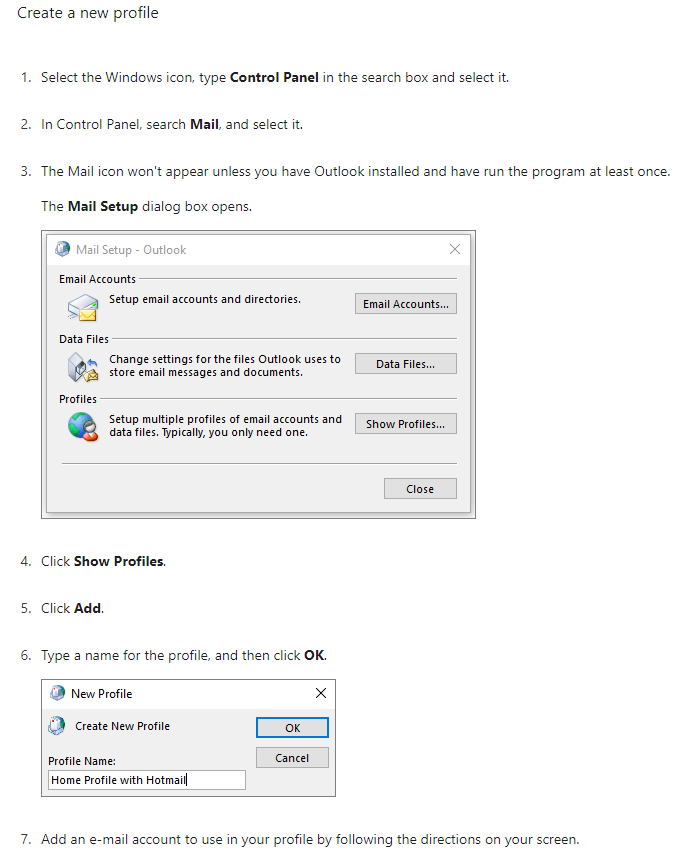
Yes, like the suggestion provided above, you could firstly re-configure your outlook profile, you could perform the operation in Control Panel as well
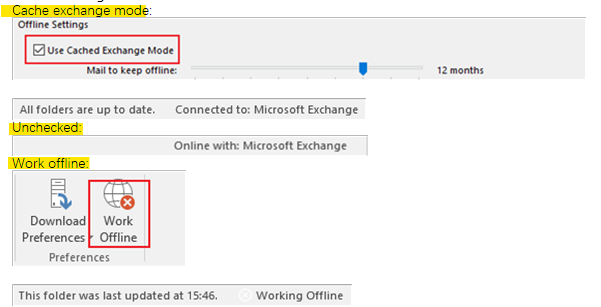
Verify the result again after finshing the operation, you could also check which mode are you using now, cached or online or offline?
If the issue still exist, you could consider using the SARA tool to help fix the issue:
Download here: Microsoft Support and Recovery Assistant
Introduction: About the Microsoft Support and Recovery Assistant
If an Answer is helpful, please click "Accept Answer" and upvote it.
Note: Please follow the steps in our documentation to enable e-mail notifications if you want to receive the related email notification for this thread.
I am writing to see how everything is going on with this thread. If you still have further concern on this, please feel free to let us know.
If an Answer is helpful, please click "Accept Answer" and upvote it.
Note: Please follow the steps in our documentation to enable e-mail notifications if you want to receive the related email notification for this thread.

I would recreate the Outlook profile on the laptop: