Microsoft Teams | Microsoft Teams for business | Other
Additional features, settings, or issues not covered by specific Microsoft Teams categories

This browser is no longer supported.
Upgrade to Microsoft Edge to take advantage of the latest features, security updates, and technical support.
' cx='32' cy='32' r='32' /%3E%3Ctext x='50%25' y='55%25' dominant-baseline='middle' text-anchor='middle' fill='%23FFF' %3EI%3C/text%3E%3C/svg%3E)
Hello
One of our users are having issues inside a team in Teams, when trying to use the functionality 'Make this a tab'.
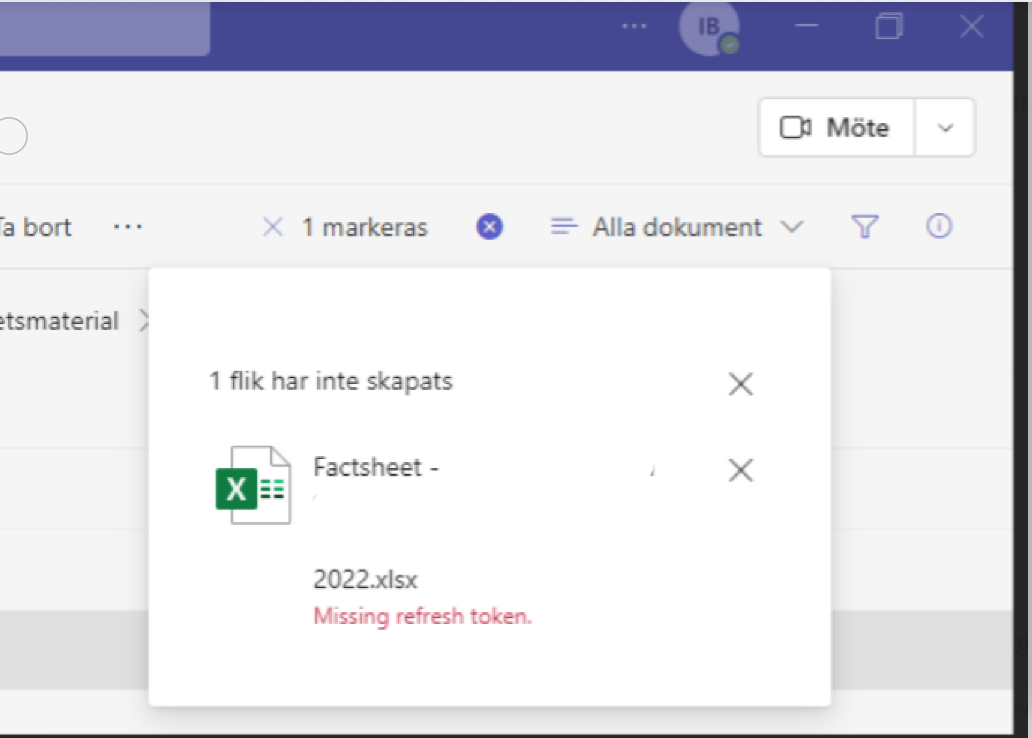
When he tries to add a new document as a tab, he gets the message 'Missing refresh token.'. He gets the error in several teams, that he is a member of.
He gets the error both in the desktop app as and the web app. The process to get the error.
Does any have idea why he is getting this error.
Additional features, settings, or issues not covered by specific Microsoft Teams categories
' cx='32' cy='32' r='32' /%3E%3Ctext x='50%25' y='55%25' dominant-baseline='middle' text-anchor='middle' fill='%23FFF' %3ERF%3C/text%3E%3C/svg%3E)
I am experiencing the very same problem.
' cx='32' cy='32' r='32' /%3E%3Ctext x='50%25' y='55%25' dominant-baseline='middle' text-anchor='middle' fill='%23FFF' %3EKY%3C/text%3E%3C/svg%3E)
Hi @IBN
Have you tried cleaning Teams cache and browser cache for this user?
Would this issue persist if you login this account on another device?
Here is also a thread for your reference: Teams - problem creating lists from excel file
I suppose this may be caused by credentials.
If the answer is helpful, please click "Accept Answer" and kindly upvote it. If you have extra questions about this answer, please click "Comment".
Note: Please follow the steps in our documentation to enable e-mail notifications if you want to receive the related email notification for this thread.
Please see my feedback below:
When did the user start experiencing the issue?
The user started experiencing the issue at 2022-06-29.
What version of Teams is the affected user using?
The user are using version 1.5.00.21463 (64-bit).
Has the User cleared cache?
The user has tried to clear the cache, this didn’t change anything.
In the teams where he wants to 'add tab' he is the owner of teams?
He is not the owner of the teams, where he as the issue.
Is this happening on both private and non-private channels?
Yes, it happens on both private and non-private channels.
Have you tried with another device to login his account?
Would the issue persist?
Hi,
If he download and re-upload this file, would the issue persist?
Also, would others be able to add it as a tab?
' cx='32' cy='32' r='32' /%3E%3Ctext x='50%25' y='55%25' dominant-baseline='middle' text-anchor='middle' fill='%23FFF' %3EM%3C/text%3E%3C/svg%3E)
I have the same problem: I have upload a PDF file and tried to create a tab out of this file. An error message "Missing refresh token" occurs.
I have tried to delete and upload it again: same error.
' cx='32' cy='32' r='32' /%3E%3Ctext x='50%25' y='55%25' dominant-baseline='middle' text-anchor='middle' fill='%23FFF' %3EP%3C/text%3E%3C/svg%3E)
We also have a user with this issue. Have gone through the suggestion above and still no happiness.