Developer technologies | Transact-SQL
A Microsoft extension to the ANSI SQL language that includes procedural programming, local variables, and various support functions.
This browser is no longer supported.
Upgrade to Microsoft Edge to take advantage of the latest features, security updates, and technical support.
' cx='32' cy='32' r='32' /%3E%3Ctext x='50%25' y='55%25' dominant-baseline='middle' text-anchor='middle' fill='%23FFF' %3EG%3C/text%3E%3C/svg%3E)
Good day!
Need help with my sql query code;
Thank you in advance!
here's my sql query code;
;WITH Barcodes AS
(
SELECT
 [BBI$Barcodes].[Item No_]
 ,[BBI$Barcodes].[Description]
 ,[BBI$Barcodes].[Variant Code]
FROM [BBI$Barcodes]
),
ILEtransfer AS
(
SELECT
 [BBI$Item Ledger Entry].[Entry Type]
 ,[BBI$Item Ledger Entry].[Location Code] AS [Location]
 ,[BBI$Item Ledger Entry].[Item No_]
 ,MAX([BBI$Item Ledger Entry].[Description]) AS [Description]
 ,[BBI$Item Ledger Entry].[Variant Code]
 ,SUM([BBI$Item Ledger Entry].[Quantity]) AS [Delivery]

FROM [BBI$Item Ledger Entry]
WHERE
 [BBI$Item Ledger Entry].[Location Code]='HPGW'
 AND [BBI$Item Ledger Entry].[Entry Type] = '4'
GROUP BY
 [BBI$Item Ledger Entry].[Location Code]
 ,[BBI$Item Ledger Entry].[Entry Type]
 ,[BBI$Item Ledger Entry].[Item No_]
 ,[BBI$Item Ledger Entry].[Variant Code]
),
ILEmsales AS
(
SELECT
 [BBI$Item Ledger Entry].[Entry Type]
 ,[BBI$Item Ledger Entry].[Location Code] AS [Location]
 ,[BBI$Item Ledger Entry].[Item No_]
 ,MAX([BBI$Item Ledger Entry].[Description]) AS [Description]
 ,[BBI$Item Ledger Entry].[Variant Code]
 ,SUM([BBI$Item Ledger Entry].[Quantity]) AS [MSales]

FROM [BBI$Item Ledger Entry]
WHERE
 [BBI$Item Ledger Entry].[Location Code]='HPGW'
 AND [BBI$Item Ledger Entry].[Entry Type] = '1'
 AND [BBI$Item Ledger Entry].[Document No_] NOT LIKE 'HP%'
GROUP BY
 [BBI$Item Ledger Entry].[Location Code]
 ,[BBI$Item Ledger Entry].[Entry Type]
 ,[BBI$Item Ledger Entry].[Item No_]
 ,[BBI$Item Ledger Entry].[Variant Code]
)
SELECT DISTINCT
 BAR.[Item No_] AS [Item No_]
 ,BAR.[Description] AS [Description]
 ,BAR.[Variant Code] AS [Variant Code]
 ,ISNULL(ILETR.[Delivery],0) AS [Delivery]
 ,ISNULL(ILEMS.[MSales],0) AS [Sales]

FROM [BBI$Barcodes] BAR

FULL JOIN [ILEtransfer] ILETR
ON ILETR.[Item No_]=BAR.[Item No_]
AND ILETR.[Variant Code]=BAR.[Variant Code]

FULL JOIN [ILEmsales] ILEMS
ON ILEMS.[Item No_]=BAR.[Item No_]
AND ILEMS.[Variant Code]=BAR.[Variant Code]

WHERE
ILETR.[Location]='HPGW'
AND ILETR.[Entry Type]='4'
OR ILEMS.[Entry Type]='1'
sql query result NULL

Thank you!
A Microsoft extension to the ANSI SQL language that includes procedural programming, local variables, and various support functions.

Good day,
Please provide DDL+DML to reproduce the issue, and based the discussion on some that we can reproduce instead of stories as possible.
good day!
thank you for your reply
sorry for my post, noted on this.
Thank you!
Answer accepted by question author
' cx='32' cy='32' r='32' /%3E%3Ctext x='50%25' y='55%25' dominant-baseline='middle' text-anchor='middle' fill='%23FFF' %3EEM%3C/text%3E%3C/svg%3E)
Hi @glennyboy ,
When using left join, right join, full (outer) join, it is possible to return NULL value, while (inner) join, cross join will not return NUll value.
The following example is the difference between these joins, please refer to:
    --join
    create table a
    (id int,
    name char(20))
    create table b
    (id int,
    name varchar(200))
    insert into a values(1,'Tom'),(2,'Jane'),(3,'John'),(4,'Eyre'),(5,'Andy')
    insert into b values(1,'Jane'),(2,'Alva'),(3,'Tom'),(4,'Alice'),(5,'Eyre')


select * from a
select * from b
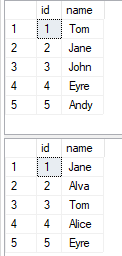
select * from a inner join b on a.name=b.name
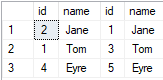
select * from a left  join b on a.name=b.name
select * from a right join b on a.name=b.name
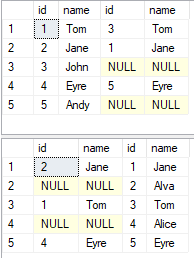
select * from a full outer join b on a.name=b.name
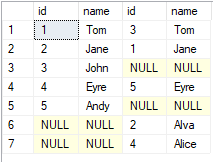
When using full join, all information of table a and table b will be returned. When there is no value that meets the on condition, a null value will be returned.
select * from a cross join b
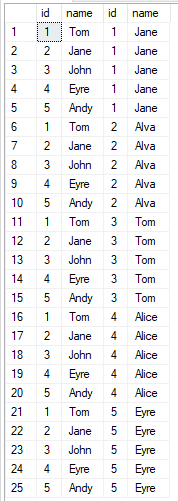
For more details, please refer to:Joins (SQL Server)
If this doesn't solve your problem,please publish the table with the data and the output you want, so that the experts will get a right direction and can do some tests, which will help you solve your problem quickly.
If you have any question, please feel free to let me know.
If the response is helpful, please click "Accept Answer" and upvote it.
Best Regards
Echo
If the answer is helpful, please click "Accept Answer" and upvote it.
Note: Please follow the steps in our documentation to enable e-mail notifications if you want to receive the related email notification for this thread.
' cx='32' cy='32' r='32' /%3E%3Ctext x='50%25' y='55%25' dominant-baseline='middle' text-anchor='middle' fill='%23FFF' %3EFF%3C/text%3E%3C/svg%3E)
Hi.. I usually use a left outer join, with the primary table on the right and the table with multiple rows in the join on the right...
You should be able to just change the full to left outer..

What do you want to achieve? Why do you want to use a full join in the first place?
Full outer joins are quite more advanced that regular left outer joins. And full joins over more than two tables is not a walk in the park at all. I know, because I once had reasons to write such a query, and it took me a quite a while to get it right.
This is why I ask why you want to use a full join. If there is no good reason for it, you should not get into the complexities of it.
Good day!
thank you for your reply
What do you want to achieve?
i want to join and sum multiple table
sorry for the insufficient info in my post,
i will post a new topic with sample data tables
thank you