Note
Access to this page requires authorization. You can try signing in or changing directories.
Access to this page requires authorization. You can try changing directories.
APPLIES TO: AI Gateway tier (preview)
Important
AI Gateway tier is currently in public preview. During public preview, AI Gateway tier is available in the following regions:
- United States - East US 2
- Europe - Sweden Central
AI Gateway tier (preview) from Azure API Management is a fully managed gateway for AI workloads. It gives teams one place to publish, secure, govern, and observe access to AI models and Model Context Protocol (MCP) tools.
AI Gateway tier is in public preview. Preview features, regions, service limits, and APIs can change before general availability. Pricing and the business model will be announced later in the preview.
What is AI Gateway tier?
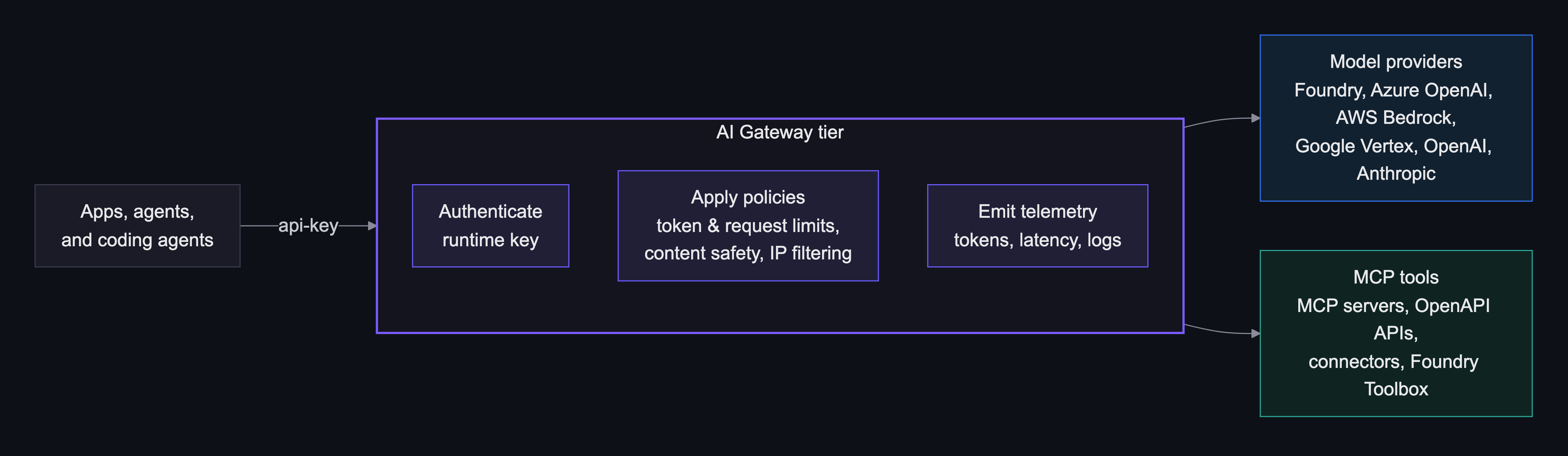
AI Gateway tier is a managed gateway for applications that call models and tools. Applications call a gateway endpoint instead of calling each provider or tool backend directly. For each request, the gateway:
- Authenticates the runtime access key in the
api-keyheader. - Evaluates the policies that apply to the target model or tool.
- Routes the request to the selected backend - by the
modelfield for models, or the tool name for tools - using the backend credentials you configured. - Returns the response and emits telemetry — OpenTelemetry logs and metrics such as token counts and latency.
Why use it
AI Gateway tier gives platform teams one governed runtime boundary for apps, models, and tools. Use it to:
- Put one gateway endpoint in front of supported AI providers.
- Keep provider credentials hidden from applications.
- Manage models, MCP servers, runtime access keys, policies, and monitoring.
- Apply governance controls such as token rate limits, request rate limits, content safety, and IP filters.
- Publish approved MCP tools for AI agents.
- Discover and use available models and tools through a self-service catalog.
- Sign in to manage the gateway with Microsoft Entra ID.
Choose your path

New to AI Gateway tier? Create a gateway, add a model, and make your first call in about 20–30 minutes.

Add Foundry and custom models, and publish MCP tool servers behind one governed endpoint.
Apply policies, identity, networking, and monitoring to run in production.
Key concepts
Gateway
A gateway is the runtime and management boundary for AI traffic. It's a dedicated Azure resource that you can provision in about a minute, with no scale units to plan. Applications call one gateway endpoint with a runtime access key instead of calling each provider or tool backend directly. You manage the models, tools, policies, keys, and identity for it in one place.
Models
A model is a provider's model that you publish through the gateway. Applications select it by name in the request's model field. All OpenAI-compatible providers (Microsoft Foundry, Azure OpenAI, AWS Bedrock, Google Vertex, and OpenAI) share one endpoint, .../models/openai/v1. The gateway routes by an exact match on model, so give each model a unique name. Anthropic uses a custom provider with Messages API passthrough at .../models/anthropic/v1/messages. The gateway holds backend credentials, so applications never handle provider keys.
MCP servers and tools
An MCP server is one governed endpoint (.../toolservers/<server-name>/mcp) that agents call to reach tools. It federates one or more backends from three sources: a remote MCP server (by URL), an OpenAPI spec, or a built-in connector (more than 1,000 SaaS apps, with no server to host). Each backend's operations become tools. You choose how the gateway authenticates to each backend: None, API Key, OAuth 2.0, or Managed identity.
Policies
A policy is a runtime guardrail that you configure as a card in the portal - no XML.
| Policy | What it controls |
|---|---|
| Content safety | Safety checks for prompts and responses. |
| IP filter | Runtime calls from approved client network ranges. |
| Token rate limit | Token throughput during a rolling minute. |
| Request rate limit | Request volume during a rolling minute. |
Identity and access keys
Administrators sign in to manage the gateway by using Microsoft Entra ID. Applications authenticate with runtime access keys - create these keys on the portal's Keys page (Create API key) and send them in the api-key header. A key is gateway-scoped: it reaches every model and tool. For backends, the gateway uses managed identity where available (so no secrets are stored) or a provider key that you supply. Issue one key per application and environment, and grant every identity least privilege.
Self-service catalog
Developers discover models and tools in a self-service catalog - each with connection details and samples - pin favorites, and jump anywhere with the Ctrl+K (⌘K on macOS) command palette.
Regional availability
During public preview, the AI Gateway tier is available in the following Azure regions.
| Geography | Region |
|---|---|
| United States | East US 2 |
| Europe | Sweden Central |
Region availability can vary by subscription, cloud, capacity, feature flag, and preview enrollment. If your target region isn't available in the portal or deployment tools, select another supported preview region or contact your Microsoft representative.
Choose the region that best matches your users, applications, AI backends, and network dependencies. If the gateway routes to Azure OpenAI, Microsoft Foundry, model endpoints, APIs, or MCP servers, consider those locations too. Data residency depends on the full request path, not only the gateway region. Review where each component is deployed, including the gateway, AI backends, tools, logging destinations, managed identities, and client applications.
Frequently asked questions
When should I use AI Gateway tier instead of calling providers directly?
Use AI Gateway tier when you want one governed endpoint in front of many models and tools: central runtime keys instead of provider credentials in every application, shared policies (token and request limits, content safety, IP filters), unified telemetry, and a self-service catalog. If you call a single model from a single application and don't need governance or central credentials, calling the provider directly can be simpler.
Should I import from Foundry or add a custom model?
Import from Foundry when your model runs in a Microsoft Foundry or Azure OpenAI (Azure AI Services) resource; the wizard discovers the resource's deployments for you. Add a custom model for AWS Bedrock, Google Vertex, OpenAI, Anthropic, or any other OpenAI-compatible endpoint, where you enter the endpoint and model names yourself. See Manage models and tools.
Is AI Gateway tier ready for production?
AI Gateway tier is in public preview: availability is best effort with no service-level agreement (SLA), and APIs, portal workflows, telemetry, limits, regions, and pricing can change. Preview quotas can cap the number of models, tools, and runtime access keys, and your request and token throughput; specific limits will be published before general availability. Start with noncritical workloads, controlled pilots, and clear rollback plans.
How is pricing handled during preview?
Pricing and the business model for AI Gateway tier will be announced later in the preview. You might also pay for related resources that you use with the gateway, such as model providers, Application Insights, networking, and observability platforms.
Which regions are available?
AI Gateway tier is available in East US 2 and Sweden Central. See Regional availability.
How is my data handled?
You choose where telemetry goes. With Application Insights, it stays in your Azure subscription. Other OpenTelemetry (OTLP) destinations follow your configuration and the provider's terms. Telemetry uses OpenTelemetry GenAI semantic conventions (the gen_ai.* prefix). Data residency depends on the full request path, so place the gateway, backends, and telemetry destinations in approved regions and involve your security and privacy teams.
Does AI Gateway tier support private networking?
Yes. Inbound Private Link and outbound virtual network integration are part of the public preview. See Configure private networking for setup, DNS, and limitations.
Which API version should I use for automation?
Use the preview management API version 2026-05-01-preview. Validate automation before a broad rollout because the API is in preview.