Note
Access to this page requires authorization. You can try signing in or changing directories.
Access to this page requires authorization. You can try changing directories.
When you use Event Grid basic, you can deliver events to Azure Event Hubs, Azure Service Bus, or Azure Storage over an encrypted channel that uses a known sender identity (Event Grid) on public IP space. To do so, use an Event Grid custom topic or domain that has a system-assigned or user-assigned managed identity. For details about delivering events by using a managed identity, see Event delivery using a managed identity.
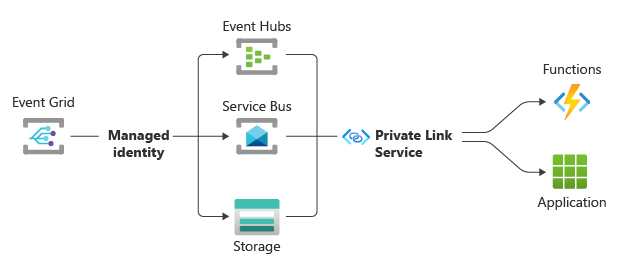
With this configuration, the secured traffic from Event Grid to Event Hubs, Service Bus, or Azure Storage stays on the Microsoft backbone and uses a managed identity of Event Grid. When you configure your Azure function or webhook from within your virtual network to reach Event Hubs, Service Bus, or Azure Storage over a private link, the traffic between those services and your function or webhook stays within your virtual network perimeter.
Deliver events to Event Hubs by using managed identity
Note
This section applies to both Event Grid basic and standard tiers.
To deliver events to event hubs in your Event Hubs namespace by using managed identity, follow these steps:
- Enable system-assigned or user-assigned managed identity: system topics, custom topics and domains.
- Add the identity to the Azure Event Hubs Data Sender role on the Event Hubs namespace.
- Enable the Allow trusted Microsoft services to bypass this firewall setting on your Event Hubs namespace.
- Configure the event subscription that uses an event hub as an endpoint to use the system-assigned or user-assigned managed identity.
Deliver events to Service Bus by using managed identity
Note
This section applies to the Event Grid basic tier only.
To deliver events to Service Bus queues or topics in your Service Bus namespace by using managed identity, follow these steps:
- Enable system-assigned or user-assigned managed identity: system topics, custom topics and domains.
- Add the identity to the Azure Service Bus Data Sender role on the Service Bus namespace.
- Enable the Allow trusted Microsoft services to bypass this firewall setting on your Service Bus namespace.
- Configure the event subscription that uses a Service Bus queue or topic as an endpoint to use the system-assigned or user-assigned managed identity.
Deliver events to Storage queues by using managed identity
Note
This section applies to the Event Grid basic tier only.
To deliver events to Storage queues by using managed identity, follow these steps:
- Enable system-assigned or user-assigned managed identity: system topics, custom topics and domains.
- Add the identity to the Storage Queue Data Message Sender role on the Azure Storage queue.
- Configure the event subscription that uses a Storage queue as an endpoint to use the system-assigned or user-assigned managed identity.
Deliver events to webhooks by using managed identity
Note
This section applies to both Event Grid basic and standard tiers.
To deliver events to a webhook by using managed identity, follow these steps:
- Enable system-assigned or user-assigned managed identity: system topics, custom topics and domains, and namespaces.
- Create a single-tenant or multitenant application to set the audience for the token.
- Configure the event subscription that uses a webhook as an endpoint to use the system-assigned or user-assigned managed identity. After you select the type of managed identity, enter the application ID and the tenant ID. In the cross-tenant scenario, the application ID must be from an application created in the destination tenant.
Firewall and virtual network rules
If you don't configure firewall or virtual network rules for the destination Storage account, Event Hubs namespace, or Service Bus namespace, you can use both user-assigned and system-assigned identities to deliver events.
If you configure a firewall or virtual network rule for the destination Storage account, Event Hubs namespace, or Service Bus namespace, you can use only the system-assigned managed identity if Allow Azure services on the trusted service list to access the storage account is also enabled on the destinations. You can't use user-assigned managed identity whether this option is enabled or not.
Related content
For more information about delivering events by using a managed identity, see Event delivery using a managed identity.