Note
Access to this page requires authorization. You can try signing in or changing directories.
Access to this page requires authorization. You can try changing directories.
Azure Private Link over IPv6 enables you to privately access Azure PaaS services, such as Azure Storage and Azure SQL Database, over IPv6-based connectivity. You use IPv6 private endpoints to connect from IPv6 clients in an Azure virtual network or from on-premises networks over ExpressRoute.
This article shows you how to configure the virtual network, private endpoint, DNS, ExpressRoute, and routing components that Private Link over IPv6 requires, and how to validate connectivity.
Important
Azure Private Link over IPv6 is currently in preview and is available in limited regions. This preview is provided without a service-level agreement, and we don't recommend it for production workloads. Certain features might not be supported or might have constrained capabilities. For more information, see Supplemental Terms of Use for Microsoft Azure Previews.
Supported scenarios
Private Link over IPv6 supports the following connectivity scenarios:
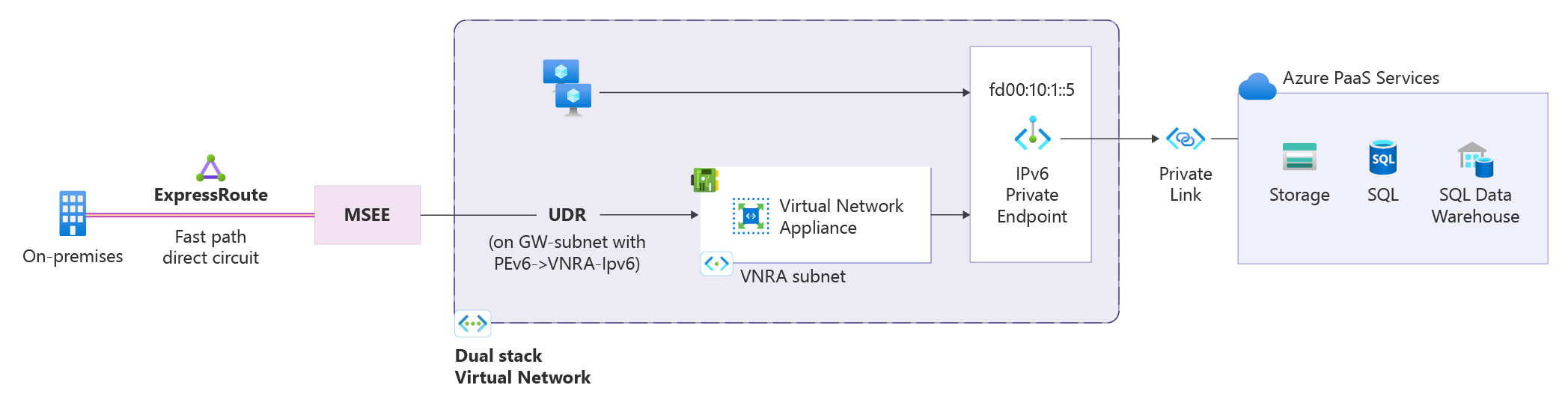
Azure-native connectivity: An IPv6 client virtual machine (VM) in a virtual network connects to an Azure PaaS service through an IPv6 private endpoint.
On-premises connectivity: On-premises IPv6 clients access IPv6 private endpoints over ExpressRoute through a Virtual Network Routing Appliance. ExpressRoute forwards traffic from on-premises IPv6 clients to the Virtual Network Routing Appliance, which then routes the traffic to the target IPv6 private endpoint that's hosted by the Azure PaaS service.
Prerequisites
An Azure account with an active subscription. Create an account for free.
Your subscription must be registered for the Private Link over IPv6 preview. Registration is mandatory before you configure any resources. You can self-register the subscription by running the following commands:
az feature register --namespace Microsoft.Network --name SupportIPv6PrivateEndpoint --subscription <subscription-id>
az provider register --namespace Microsoft.Network
The preview is available only in the following regions:
- West Central US
- East Asia
- UK South
- Central US
- North Europe
The preview supports IPv6 private endpoints for Azure Storage, Azure SQL Database, Azure Key Vault, and Azure Data Explorer.
A dual-stack (IPv4 and IPv6) virtual network. To create one, see Create a virtual network with a dual-stack (IPv4 and IPv6) configuration. Set the following virtual network policy:
"privateEndpointVNetPolicies": "Basic"A dual-stack subnet for your private endpoints. To add one, see Add a subnet. Set the following policy on the subnet:
"privateEndpointNetworkPolicies": "RouteTableEnabled"A virtual machine (VM) with an IPv6 address in the dual-stack virtual network. To create one, see Create a dual-stack VM.
If you don't already have a target resource for the private endpoint, use the following quickstarts to create one:
| Service | Create a resource |
|---|---|
| Azure Storage | Create a storage account |
| Azure SQL Database | Create a single database |
| Azure Key Vault | Create a key vault |
| Azure Data Explorer (Kusto) | Create a cluster and database |
Configure the private endpoint
Create the private endpoint with the ip-version-type parameter set to IPv6. This parameter determines whether the private endpoint uses an IPv4 or IPv6 address. For general private endpoint creation steps, see Create a private endpoint.
The following example shows the Azure CLI syntax to create an IPv6 private endpoint:
az network private-endpoint create \
  --name <private-endpoint-name> \
  --resource-group <resource-group-name> \
  --vnet-name <vnet-name> \
  --subnet <subnet-name> \
  --private-connection-resource-id <resource-id-of-target-service> \
  --group-id <group-id> \
  --connection-name <connection-name> \
  --location <region> \
  --ip-version-type IPv6
Configure DNS
Configure Azure Private DNS so that the PaaS service fully qualified domain name (FQDN) resolves to the IPv6 address of the private endpoint.
Create a Private DNS zone for each service type. For steps, see Create an Azure private DNS zone. For the zone names to use per service, see Azure Private Endpoint DNS configuration.
Link the Private DNS zone to the private endpoints.
Validate that the PaaS FQDN resolves to the private endpoint IPv6 address.
Validate native Azure connectivity
Validate that an Azure VM in the dual-stack virtual network reaches the PaaS service over IPv6. The following example uses an Azure Storage account.
Ensure the storage account FQDN resolves to the IPv6 private endpoint address.
Access the storage account by using the standard service FQDN.
From the dual-stack VM, resolve the storage account FQDN:
nslookup <storage-account>.blob.core.windows.net
The command returns output similar to the following example:
<storage-account>.privatelink.blob.core.windows.net
AAAA: <private endpoint IPv6 address>
Validate connectivity to the storage account:
curl https://<storage-account>.blob.core.windows.net
Test-NetConnection <storage-account>.blob.core.windows.net -Port 443
Configure on-premises connectivity through ExpressRoute and a Virtual Network Routing Appliance
On-premises IPv6 clients access IPv6 private endpoints over ExpressRoute through a Virtual Network Routing Appliance. ExpressRoute forwards traffic from on-premises IPv6 clients to the Virtual Network Routing Appliance, which then routes the traffic to the target IPv6 private endpoint that's hosted by the Azure PaaS service.
This connectivity requires the following components:
An ExpressRoute circuit with the appropriate gateway SKU for your connectivity type (FastPath or standard). For more information, see Create and modify an ExpressRoute circuit.
A dual-stack Virtual Network Routing Appliance created in the ExpressRoute gateway virtual network to forward IPv6 traffic to the private endpoint. For steps, see Create a Virtual Network Routing Appliance.
Create a user-defined route
Create a route table and set Propagate gateway routes to Yes. For steps, see Create a route table.
Add a route with the following values:
Setting Value Destination type IP Addresses Destination Private endpoint IPv6 prefix Next hop type Virtual appliance Next hop address Virtual Network Routing Appliance IPv6 address Associate the route table with the
GatewaySubnetin the virtual network where you created the Virtual Network Routing Appliance.
Validate connectivity
Validate connectivity from your on-premises IPv6 client to the private endpoint.
From the client VM, run a DNS lookup for the PaaS FQDN and confirm that it resolves to the private endpoint IPv6 address.
Connect to the service by using the PaaS FQDN.
Confirm the following results:
- The client connects to the private endpoint over IPv6.
- Data-plane traffic works as expected.
- Connectivity works in dual-stack scenarios.
Limitations
Private Link over IPv6 has the following limitations during preview:
- Limited regional availability – see the preview regions mentioned earlier in this document.
- The destination PaaS resource must be in the same region as the Private Endpoint. Cross region connectivity isn't supported in this release.
- Limited PaaS services supported in this release (Storage, SQL, AKV, Azure Data Explorer).
- Current on-premises connectivity support is limited to ExpressRoute-based scenarios and doesn't currently include VPN, Virtual WAN (vWAN), or Network Virtual Appliances (NVAs).
- NSGs and ASGs with Private Link over IPv6 aren't supported in this preview.
- In PL IPv6 scenarios, the original client IPv6 address isn't preserved in downstream service logs. Due to implicit NAT translation, logs display the VNet-side translated source IP address instead.
Support
During the preview, the product group provides support services. To request support, fill out the following form:
Private Link IPv6 Public Preview Support Request