Note
Access to this page requires authorization. You can try signing in or changing directories.
Access to this page requires authorization. You can try changing directories.
This article discusses high availability (HA) for multitier application deployment in Azure Kubernetes Service (AKS) clusters. It describes Kubernetes HA mechanisms and constructs, and it provides a checklist and guidelines to identify and eliminate single points of HA failure.
There are two fundamental tasks for implementing HA for AKS applications:
- Identify all single points of failure in the application.
- Eliminate the single points of failure.
To eliminate single points of failure, you need an HA solution.
The four HA pillars
Four HA pillars appear in every highly available system:
- Redundancy
- Monitoring
- Recovery
- Checkpointing
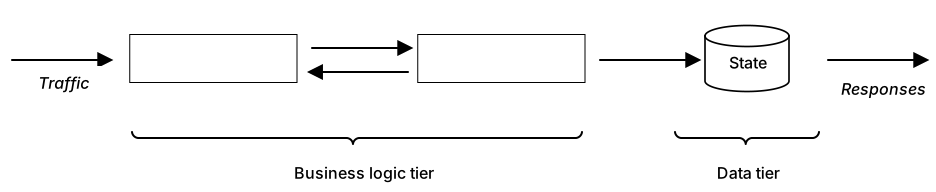
Consider the following multitiered AKS application, where traffic arrives at the business logic tier, the data tier preserves state, and the application returns responses to users.
Identify single points of failure
To identify single points of failure, start by determining the critical path between client requests and the components that serve those requests. Any component on this path that isn't managed according to the four HA pillars, or three pillars if it's a stateless component without checkpointing, is a single point of failure. Even a replicated component is considered a single point of failure if it isn't monitored, because its failure goes silently undetected.
Eliminate single points of failure
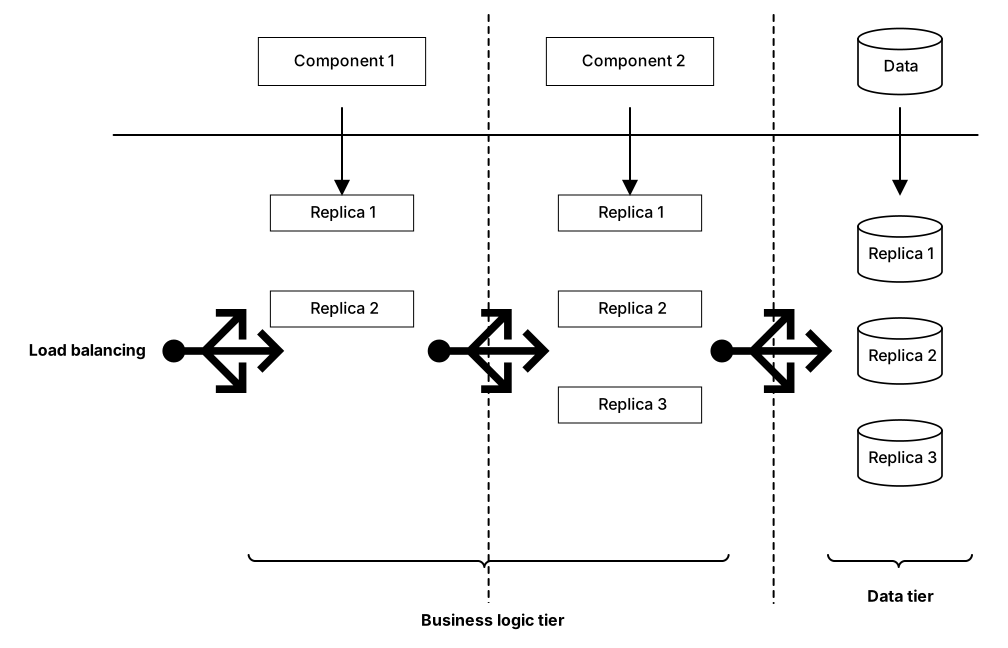
To eliminate single points of failure, deploy your application to replicate critical path components, and employ load balancers, monitoring, and recovery mechanisms. Kubernetes can handle all these activities.
Download a Visio file of this diagram.
In a replicated application:
- You replicate the business tier components with various numbers of replicas per component, depending on their performance and workload.
- You also replicate the data tier behind a load balancer.
Kubernetes provides several constructs and mechanisms, such as load balancing and liveness probes, that can help you implement the HA pillars. The following checklist and discussion divide these constructs and mechanisms into categories that map to the four HA pillars.
Kubernetes HA checklist
Other than state management, Kubernetes does an exceptional job of maintaining application HA. The HA checklist lists common configurations that you can use to optimize Kubernetes HA management. To use the checklist, evaluate your Kubernetes deployment against the following mechanisms and constructs, and implement any that are missing.
| HA pillar | Solution |
|---|---|
| Redundancy | ☐ Kubernetes controller type ☐ Number of replicas ☐ Scheduling anti-affinity |
| Monitoring | ☐ Liveness probes ☐ Readiness probes ☐ Startup probes |
| Recovery | ☐ Service type ☐ Leader election ☐ Restart policy ☐ Pre-stop hooks |
| Checkpointing | ☐ Persistent volume claims ☐ Persistent volumes |
Redundancy
Redundancy mitigates having a single point of failure. You need redundancy across all tiers of an application. To achieve redundancy, you replicate a component of a given tier with one or more identical replicas.
Controller type. Configuration:
kind: Deployment. Kubernetes provides several controllers that can manage the lifecycle of your application's pod. The most popular controller isDeployment.Statefulset, another controller, is useful when you need to maintain pod identity after a recovery. Other controllers, such asReplicasets, don't provide the same useful functionality, such as rollbacks, thatDeploymentprovides.Number of replicas. Configuration:
spec.replicas. Setting the number of replicas to only one configures a cold standby model. If you use a cold standby model, when a failure occurs, a new instance starts from scratch, which affects availability. This model might work for components that have low-volume workloads, but consider replicating stateless, high-volume components.By specifying the resource request limits,
spec.containers[].resources, you can add horizontal pod autoscaling (HPA), which causes Kubernetes to automatically scale up or down the number of replicas based on resource utilization thresholds that you define. HPA helps you avoid scenarios in which a surge in load prevents your application from serving requests because of overload.Scheduling anti-affinity. Configuration:
spec.affinity.podAntiAffinity. A typical production-level Kubernetes cluster has nodes spread across multiple availability zones, which you configure by using atopologyKey. Pods of the same deployment should have preferred or soft anti-affinity with each other. This configuration ensures that the pods schedule on nodes in different availability zones.An AKS cluster can have multiple node pools, each with different virtual machines scale set sizes and specs. For example, you can host your database pods on nodes with fast solid-state drives (SSDs), and host your machine learning pods on nodes with graphics processing units (GPUs).
Monitoring
If you don't monitor your application, redundancy can become ineffective. You need a constant monitoring mechanism to ensure that the workload reaches a healthy replica.
Liveness probes, configuration
spec.containers.livenessProbe, monitor the health of your pods. If a container fails or exits, Kubernetes can detect it. When liveness fails, Kubernetes restarts the container.Readiness probes, configuration
spec.containers.readinessProbe, determine whether to send traffic to the pod. If any pods of a deployment aren't ready, they won't be part of the endpoints of the Kubernetes service abstracting the deployment, and therefore won't be useful. It's important to carefully set the readiness probes, because they don't trigger a restart, but are used to isolate the pods from receiving traffic until they're ready.Startup probes, configuration
spec.containers.startupProbe, mainly prevent false positives for readiness and liveness in slow-starting applications. After the startup probe succeeds, the liveness probe starts.
Azure provides deeper insights that allow you to set alerts based on your cluster health.
Recovery
The main purpose of monitoring is to trigger recovery when it detects a failure. A recovery process involves three phases:
- Isolate and redirect: Make sure the faulty replica isn't receiving traffic, and direct its workload to healthy replicas.
- Repair: Restart the faulty replica. Doing so can repair transient errors.
- Rejoin: After repair, if monitoring deems the replica healthy, rejoin the replica to other replicas to handle the workload.
Kubernetes provides the following mechanisms to implement these phases:
Service type. Configuration:
spec.type. Exposing your pods through a service can be classified as redundancy or recovery. However, in some cases, you might use a single-replica deployment. There are still benefits to exposing the pods through a service, even though there's no load balancing.The main advantage of using the service is that Domain Name System (DNS) entries automatically update with the Kubernetes service endpoints. A pod that has containers with failing readiness probes won't receive traffic through AKS. Although the load balancing ability of Kubernetes cluster IP services is rudimentary, you can couple a headless service with ingress or other service mesh solutions to better balance load distribution.
The mechanism by which external traffic reaches your AKS cluster is outside the scope of Kubernetes. You can handle external traffic by using services such as Azure Application Gateway.
Leader election. Some components are best deployed as singletons. The scheduler is such a component, because two active schedulers can conflict with each other. Using a singleton exposes the application to cold standby problems. To enable warm standby of a pod, you can use leader election, where only one pod, the leader, handles requests.
Restart policy. Configuration:
spec.restartPolicy. The restart policy applies to all containers in the pod. There should be valid justification for setting this attribute toNever. Some containers contact a license server each time they start, and you might want to avoid the added costs of excessive restarts.Pre-stop hooks. Configuration:
spec.containers.lifecycle.preStop. Pre-stop hooks run before aSIGTERMsignal is sent to the container. A pre-stop script can be as simple as a 30-second sleep command.For example, when an application that's managed by an HPA is scaling down, in-progress requests might be abruptly terminated unless the application has a
SIGTERMhandler that completes serving requests before it exits. A pre-stop hook removes the pod endpoint, and therefore the DNS entry, from the service endpoint. While the pre-stop hook is running, no new requests can be sent to the pod. The pre-stop hook allows the pod to finish processing its in-progress requests without receiving new ones. Pre-stop hooks are a simple way to minimize dropped requests without modifying application code.
Checkpointing
Modern applications contain many stateless components, but entirely stateless applications are still rare. Most applications checkpoint their state in the data layer. Kubernetes intentionally doesn't provide any mechanism to handle application state. State management is a complex task that isn't part of container management.
You can persist application state in three levels:
The data records level stores the data in a database. Each database record can replicate across multiple database instances. Database records are the dominant form of state persistence, especially in managed cloud databases like Azure Cosmos DB.
The file system level typically replicates data files, such as write-ahead logging (WAL) files. Most cloud providers offer plugins for their solutions. For example, Azure Files provides a plugin.
The disk level persists data at the block level, which provides flexibility to define the file system to use, as in Azure Disk Storage.
Kubernetes volumes, persistent volumes, and persistent volume claims can persist the state of the application at the file system or disk level. The most common pattern to store state is still the data records level.
HA and DR
For both HA and disaster recovery (DR), the choices of network topology and load balancing solutions are important.
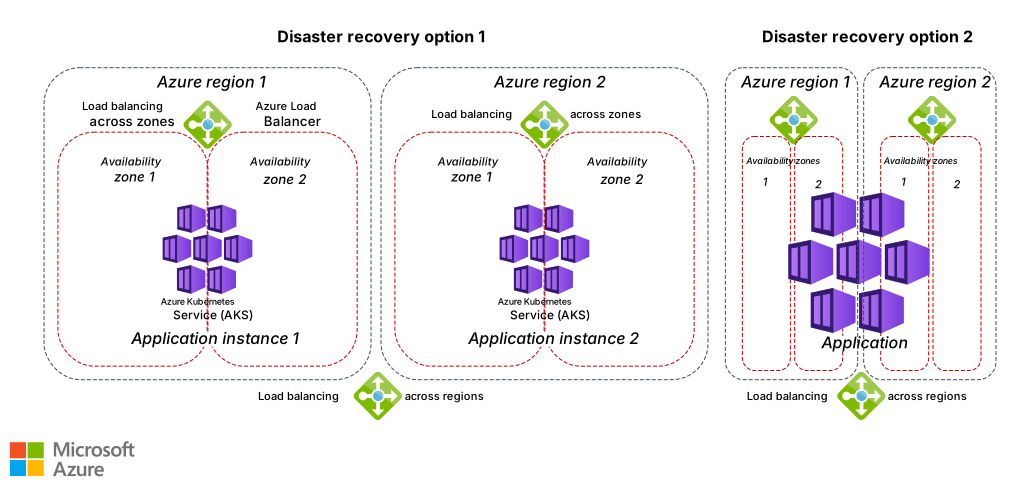
However, DR requires multiregion service deployment at the entire service level, with load balancing solutions between Azure regions. The application is either deployed across multiple regions, or an entire application instance is deployed in each region. The choice depends on application type, application architecture, and latency tolerance between components.
HA benefits from multizone deployments within Azure regions instead of the use of multiple regions. The following diagram illustrates the difference between availability zones and regions for HA and DR.
Download a Visio file of this architecture.
This article focuses on HA at the application level within one AKS cluster. For more information about DR in AKS multi-cluster deployments, see AKS baseline for multiregion clusters.
Other considerations
To maintain application HA, make sure your Kubernetes control plane, including the API server and controller manager, is highly available. Use the Standard or Premium pricing tier to ensure HA.
A resource consolidation strategy directly contravenes the HA redundancy pillar. Therefore, you should carefully analyze the cost of redundancy. The Azure pricing calculator can help.
Contributors
Microsoft maintains this article. The following contributors wrote this article.
Principal author:
- Ali Kanso | Principal Software Engineer
Other contributors:
- Ayobami Ayodeji | Senior Program Manager
- Kinshuman Patra | Partner Group Engineering Manager
- Oscar L Pla Alvarez | Domain Solution Architect
- Karthik Sankara Subramanian | Software Engineer II
To see nonpublic LinkedIn profiles, sign in to LinkedIn.
Next steps
- High availability Kubernetes cluster pattern
- Regions and availability zones
- Quotas, virtual machine size restrictions, and region availability in AKS
- Architecture best practices for AKS