Note
Access to this page requires authorization. You can try signing in or changing directories.
Access to this page requires authorization. You can try changing directories.
Attribute-based access control (ABAC) is an access-control model that uses governed tags and policies to grant permissions based on object attributes rather than per-object grants. This page defines the building blocks: governed tags, the three ABAC policy types (row filter, column mask, and GRANT policies), the permissions required to configure them, and the separation of duties ABAC enables across teams.
See Attribute-based access control in Unity Catalog for an overview of all ABAC topics, including tutorials, policy management, best practices, and limitations.
What is ABAC?
Attribute-based access control (ABAC) is a dynamic access control model where access decisions are based on policies evaluated against attributes associated with securable objects. In Unity Catalog, these attributes are represented through governed tags. These governed tags are used in policy conditions to match data objects within a given scope, such as a catalog or a schema. This allows a single policy to apply automatically across multiple data objects that meet its conditions.
For example, an ABAC policy might mask all columns tagged PII for tables within schemas tagged HR. As new data objects are created and tagged, the policy applies automatically without requiring separate policy definitions for each object.
ABAC supports row and column-level security through row filter policies and column mask policies on tables, materialized views, and streaming tables. Row filter policies restrict which rows a user can see. Column mask policies control how column values are presented to users. For a comparison with table-level row filters and column masks, see When to use ABAC vs table-level row filters and column masks.
ABAC also supports dynamic privilege grants through GRANT policies (Beta), currently scoped to EXECUTE on models. See ABAC GRANT policies for models (Beta).
Governed tags
In Unity Catalog, attributes are implemented as governed tags. Governed tags are key-value pairs defined at the account level and applied to Unity Catalog securable objects such as catalogs, schemas, tables, columns, models, and volumes, in addition to workspace objects. They represent characteristics such as sensitivity, classification, or business domain.
By default, securables inherit tags from their parent catalog or schema. You can override inherited tags at every level except the column level: column tags do not inherit from the parent table and must be applied directly.

Governed tags can be referenced in policy conditions using built-in functions like has_tag() and has_tag_value(), which check whether a given tag is present on the target data object, either directly or through tag inheritance.
Governed tags are defined at the account level. This means that you can use the same tag taxonomy across your entire data estate in an account, including across multiple metastores.
For more information, see Governed tags and Apply tags to Unity Catalog securable objects.
Policies
Policies are attached to securable objects in Unity Catalog to define access control rules based on tag conditions. Below is an example:
CREATE FUNCTION mask_pii(val STRING) RETURNS STRING
    RETURN '***';

CREATE POLICY mask_pii_for_hr
ON CATALOG catalog_a
COLUMN MASK mask_pii
TO `account users` EXCEPT `HR admins`
FOR TABLES
WHEN has_tag('HR')
MATCH COLUMNS has_tag('PII') AS pii_col
ON COLUMN pii_col;
Each policy specifies:
- Scope: The securable object where the policy is attached, specified by the
ONclause. Attaching a policy to a securable object means the policy conditions are evaluated for all objects of the type specified in theFORclause, across that object and all of its descendants.- For row filter and column mask policies, supported policy scopes are
CATALOG,SCHEMA, orTABLE. For GRANT policies (Beta), supported policy scopes areCATALOGandSCHEMA. - Tables, including streaming tables and materialized views, are the only supported securable object type for row filter and column mask policies, specified using the
FOR TABLESclause. GRANT policies (Beta) support models only, specified usingGRANT EXECUTE FOR MODELS. See ABAC GRANT policies for models (Beta). - A policy attached at a catalog evaluates against all tables in that catalog. A policy attached at a schema evaluates against all tables in that schema. A policy attached at a table evaluates only against that table.
- For row filter and column mask policies, supported policy scopes are
Note
Databricks recommends attaching policies at the highest applicable level, usually the catalog, to maximize governance efficiency. See Best practices for ABAC policies.
- Principals: Who the policy applies to and who is exempt. The
TOclause specifies the users, groups, or service principals subject to the policy. The optionalEXCEPTclause excludes specific principals from this policy. - Actions: Whether the policy applies a row filter, a column mask, or a privilege grant. Row filter and column mask policies use a user-defined function (UDF) to implement the filtering or masking logic. GRANT policies (Beta) do not use UDFs. See Policy types.
- Conditions: Tag-based expressions that determine which tables or columns the policy targets. See Conditions and built-in functions.
Policies are created and managed through the UI or programmatically with SQL statements, such as CREATE POLICY, DROP POLICY, SHOW POLICIES, or DESCRIBE POLICY, REST APIs, Databricks SDKs, or Terraform. See Create and manage ABAC policies for the full syntax and examples.
Policy types
ABAC supports three policy types: row filter policies, column mask policies, and GRANT policies (Beta). Row filter and column mask policies require UDFs to implement the filtering or masking logic. GRANT policies don't use UDFs, and instead grant privileges when their tag-based condition matches the target object's attributes.
Row filter policies
Row filter policies restrict which rows a user can see in a table based on values in columns identified by tags that match the Conditions and built-in functions. The policy references a UDF that evaluates each row. Rows where the function returns FALSE are excluded from query results. Arguments are passed to the UDF through the USING COLUMNS clause.
Example use case: For a sales catalog, ensure the EMEA team sees only EMEA sale records across all tables that have a column tagged region.
CREATE FUNCTION filter_by_region(region STRING, allowed STRING) RETURNS BOOLEAN
    RETURN region = allowed;

CREATE POLICY regional_access_emea
ON CATALOG sales
ROW FILTER filter_by_region
TO `emea team`
FOR TABLES
MATCH COLUMNS has_tag('region') AS rgn
USING COLUMNS (rgn, 'EMEA');
Column mask policies
Column mask policies control what values a user sees for specific columns identified by tags that match the Conditions and built-in functions. The policy references a UDF that takes the column value as input and returns the original value or a masked version. The masked column value is bound automatically as the first argument from the ON COLUMN clause, and additional arguments can be passed through USING COLUMNS. The return type must match or be castable to the column's data type.
Example use case: Mask SSN columns tagged with pii : ssn so that users see ***-**-XXXX (last four digits only) unless they are in a compliance group exempt from the policy.
CREATE FUNCTION mask_ssn(ssn STRING, show_last INT) RETURNS STRING
    RETURN CONCAT('***-**-', RIGHT(ssn, show_last));

CREATE POLICY mask_ssn_columns
ON CATALOG hr_catalog
COLUMN MASK mask_ssn
TO `account users` EXCEPT `compliance team`
FOR TABLES
MATCH COLUMNS has_tag_value('pii', 'ssn') AS ssn_col
ON COLUMN ssn_col
USING COLUMNS (4);
The USING COLUMNS clause passes arguments to the UDF. It accepts aliases for columns that match a tag-based expression, or constant values (quoted strings, numeric literals, boolean values (TRUE/FALSE), or NULL), supplied in the order the function expects them. For column mask policies, these are additional arguments beyond the masked column (which is bound automatically from ON COLUMN). This allows a single UDF to be reused across policies with different parameters.
SQL UDFs are recommended for better performance. Python UDFs registered in Unity Catalog are also supported, though the query optimizer cannot inline or optimize them the way it can SQL UDFs. See Performance considerations for guidance on UDF language selection.
GRANT policies (Beta)
Important
GRANT policies are in Beta, currently scoped to EXECUTE on models. See ABAC GRANT policies for models (Beta) for syntax, examples, and Beta limitations.
GRANT policies dynamically grant a Unity Catalog privilege when their tag-based condition matches a securable object's tags. Each time a user attempts to access a securable object, Unity Catalog identifies all GRANT policies whose scope covers the object, checks whether the user is in the TO list and not in the EXCEPT list, and evaluates the policy's WHEN condition against the tags on the securable, including inherited tags. If the policy applies, Unity Catalog grants the privilege. GRANT policies use the same evaluation model as row filter and column mask policies, except they do not use UDFs. The condition is expressed inline in the policy definition.
The effective privileges on an object are the union of direct grants and any applicable GRANT policies. A principal has the privilege if a GRANT policy in scope applies to that principal or a direct GRANT of the same privilege applies. GRANT policies only add access. They cannot revoke access that was granted directly.
Conditions and built-in functions
Conditions are tag-based expressions that determine which tables and columns a policy targets within its scope.
- Table conditions (
WHENclause): Boolean expressions that match tables based on their tags. If omitted, defaults toTRUE, meaning the policy applies to all tables in scope. - Column conditions (
MATCH COLUMNSclause): One or more comma-separated boolean expressions that identify which columns the policy targets. Each expression can be a single built-in function likehas_tag('pii'), or a combination using logical operators likehas_tag_value('pii', 'ssn') AND has_tag('sensitive'). Each expression can be assigned an alias (specified afterAS) that can be referenced in theON COLUMNandUSING COLUMNSclauses. A policy can include up to 3 column expressions, and all must match for the policy to apply.
Both clause types use the following built-in functions, evaluated by Unity Catalog against securable metadata:
| Function | Context | Description |
|---|---|---|
has_tag('tag_key') |
Tables and columns | Returns true if the resource has the specified tag. In table conditions (WHEN), checks tags set directly on the table or inherited from a parent catalog or schema. In column conditions (MATCH COLUMNS), checks tags set directly on the column only — does not match table tags. |
has_tag_value('tag_key', 'tag_value') |
Tables and columns | Returns true if the resource has the specified tag with the specified value. Same context behavior as has_tag(). |
Tags don't propagate from tables to columns. Using has_tag() in a MATCH COLUMNS clause only matches column-level tags, not tags on the parent table or its ancestors.
Note
The has_tag and has_tag_value functions use snake_case naming. The older camelCase forms (hasTag, hasTagValue) continue to work but aren't recommended. Azure Databricks plans to deprecate camelCase forms when creating new policies. Existing policies aren't affected.
Example: using two column conditions. A customers schema has tables with an email column tagged pii : email and a consent column tagged consent_to_contact. The policy masks email addresses unless the customer has consented to be contacted. It uses two column conditions:
has_tag_value('pii', 'email')identifies the column that contains email addresses (the column to mask).has_tag('consent_to_contact')identifies the column that contains consent information (used by the UDF to decide whether to mask).
CREATE FUNCTION mask_email_by_consent(email STRING, consent BOOLEAN)
RETURNS STRING
RETURN CASE
  WHEN consent = true THEN email
  ELSE '****@****.***'
END;

CREATE POLICY mask_email_with_consent
ON SCHEMA customers
COLUMN MASK mask_email_by_consent
TO `account users`
FOR TABLES
MATCH COLUMNS has_tag_value('pii', 'email') AS m,
  has_tag('consent_to_contact') AS c
ON COLUMN m
USING COLUMNS (c);
This policy only applies to tables that have both a column tagged pii : email and a column tagged consent_to_contact. If a table does not have columns matching both conditions, the policy does not apply and the data is returned unmasked.
User-defined functions (UDFs)
Row filter and column mask policies use user-defined functions (UDFs) to implement their filtering or masking logic. See User-defined functions (UDFs) in Unity Catalog for how to create and manage UDFs, and Common patterns for row filtering and column masking for examples.
Separation of duties and permissions
Setting up ABAC involves several steps, each with its own permission requirements. Organizations can distribute these tasks across specialized groups depending on how they choose to separate duties. For example, an organization can define a tag taxonomy centrally, then have data stewards classify data, governance admins write policies, data creators create objects within governed scopes, and data consumers access the governed objects.
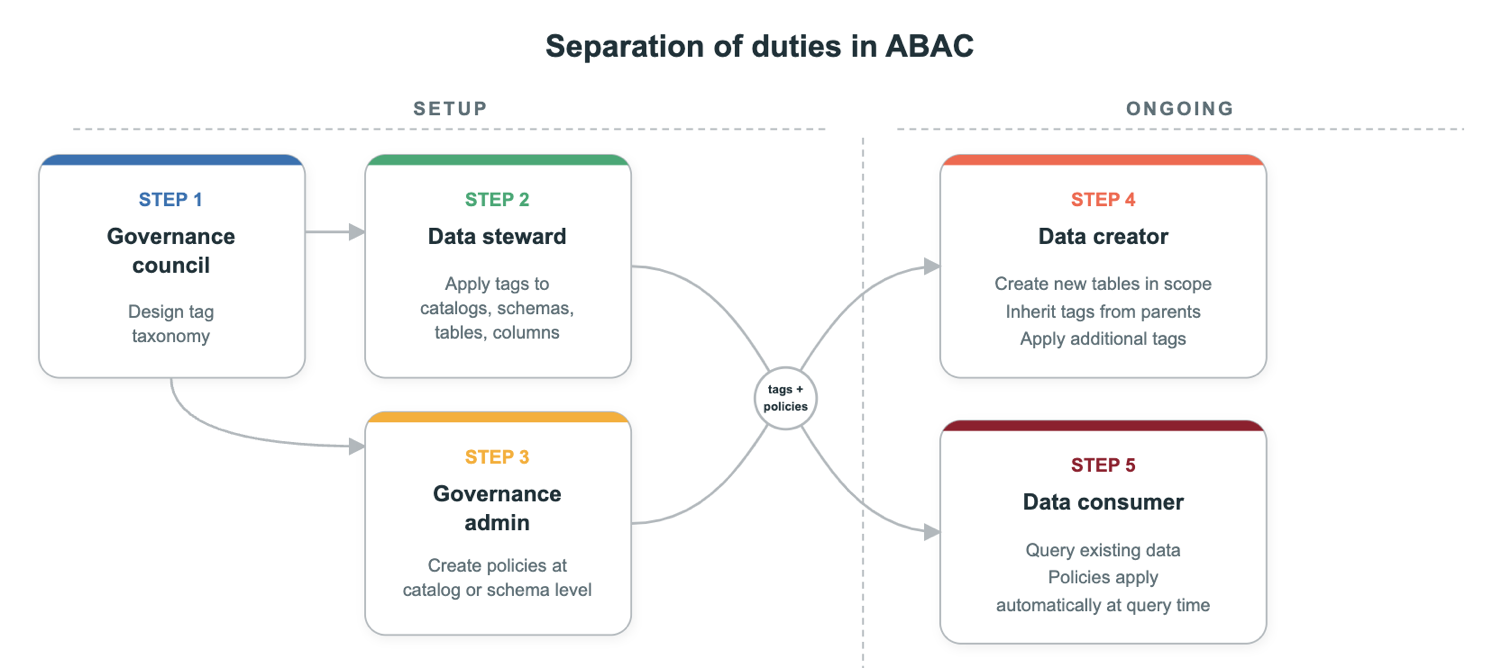
Create the tag taxonomy. Define the governed tag keys and their allowed values before anyone applies them or writes policies. For example, create a
sensitivitytag with controlled values (public,internal,confidential,restricted) or apiitag with values likessn,email, andphone_number. See Standardize attributes and naming for recommendations on naming conventions and taxonomy design.- Required permissions: Account admin, or a user with
CREATEpermission for tags at the account level.
- Required permissions: Account admin, or a user with
Tag data assets. A data steward, data creator, or AI classification system applies governed tags to Unity Catalog securable objects such as catalogs, schemas, tables, columns, models, and volumes. For example, tag columns that contain personally identifiable information with
pii : ssn, or tag a model withlifecycle : production. Correct tagging is the essential first step for ABAC policies to apply.- Required permissions:
ASSIGNon the tag, andAPPLY TAGon the object.
- Required permissions:
Warning
Tagging is a security boundary. If a user can change tags on a data asset, they can change which policies apply to it. Organizations should control who can apply tags and audit tag changes.
Create a policy. A governance admin creates a policy at a scope, such as a catalog or schema. The policy specifies who it applies to, what conditions it evaluates, and the action to apply, such as a row filter, a column mask, or a privilege grant.
- Required permissions:
MANAGEpermission or object ownership on the securable object where the policy is attached. For row filter and column mask policies, alsoEXECUTEprivilege on the UDF.
- Required permissions:
Create data objects. Data creators create securable objects such as tables, models, or volumes within the scopes to which they were granted access. New objects inherit tags from parent catalogs and schemas. Data creators also have
APPLY TAGautomatically on objects they create, so they can apply additional tags. Alternatively, they can rely on automatic data classification to handle tagging. If an organization relies on data creators to tag their own objects, it should establish clear tagging practices. Data creators do not need to configure any access controls if policies are set at higher levels, which Azure Databricks recommends.- Required permissions:
CREATE TABLEor other relevant creation privileges on the parent object.
- Required permissions:
Access governed objects. When a user attempts to access a securable object within a policy's scope, Unity Catalog evaluates applicable policies automatically. For row filter and column mask policies, the user sees filtered or masked data if the table or columns match the policy's conditions and the user is not exempt. For GRANT policies (Beta), the user gains the granted privilege if the conditions match and the user is in
TOand not inEXCEPT.- Required permissions: For row filter and column mask policies, users must be granted permissions on the table, such as
SELECT, through a direct object grant. These policies filter records or mask columns for tables the user can already access. They do not grant permissions on their own. GRANT policies (Beta) grant the privilege themselves and union with any direct grants on the same securable.
- Required permissions: For row filter and column mask policies, users must be granted permissions on the table, such as
Benefits of ABAC
Reusable policies based on attributes: A single policy can apply to multiple data objects that match the same attribute-based conditions, rather than being tied to one specific object.
Automatic application to new objects: When new data objects are created within scope and tagged with the relevant attributes, existing ABAC policies apply without additional configuration. Policies act like future grants, which means that access controls apply automatically as new data is created and tagged appropriately.
Consistent enforcement within a scope: Policies attached at the catalog or schema level are evaluated dynamically against matching data objects in that scope, which removes differences in how similar data is filtered or masked.
Lower ongoing maintenance: Changes can be made by updating policy logic or governed tags, rather than revisiting each individual object as is required with table-level row filters and column masks.
Centralized governance: Because policies can be defined once and applied across many matching data objects, governance teams can manage controls across larger parts of the data estate with fewer policy definitions.