Note
Access to this page requires authorization. You can try signing in or changing directories.
Access to this page requires authorization. You can try changing directories.
Note
Community interest groups have now moved from Yammer to Microsoft Viva Engage. To join a Viva Engage community and take part in the latest discussions, fill out the Request access to Finance and Operations Viva Engage Community form and choose the community you want to join.
This article explains how to reset the Financial reporting data mart for Microsoft Dynamics 365 Finance. You can reset the data mart in multiple ways, depending on your role and access to the client or infrastructure.
Resetting the data mart is a significant action and should almost never be done. However, a few special cases might require a reset. If you encounter a situation where a reset seems necessary, contact support first. The support team can help you properly investigate any underlying product issues that might be prompting the need for a reset. This investigation helps ensure that the root cause is addressed rather than applying a temporary fix.
Reset the data mart only when a small amount of processing is occurring on the database. Financial reporting is unavailable during the reset process.
Note
To confirm that it's necessary to reset your data mart, see When to reset a data mart.
A reset of the data mart doesn't affect any report definitions that define the structure of reports. Nevertheless, it's always a good idea to have a backup of your reports, which you accomplish by exporting them. The steps for exporting report definitions are included at the end of this article in the section titled, Export and import report definitions.
Reset the Financial reporting data mart from Report designer
To find the version of Report designer, watch this video: How to find the version of Report designer.
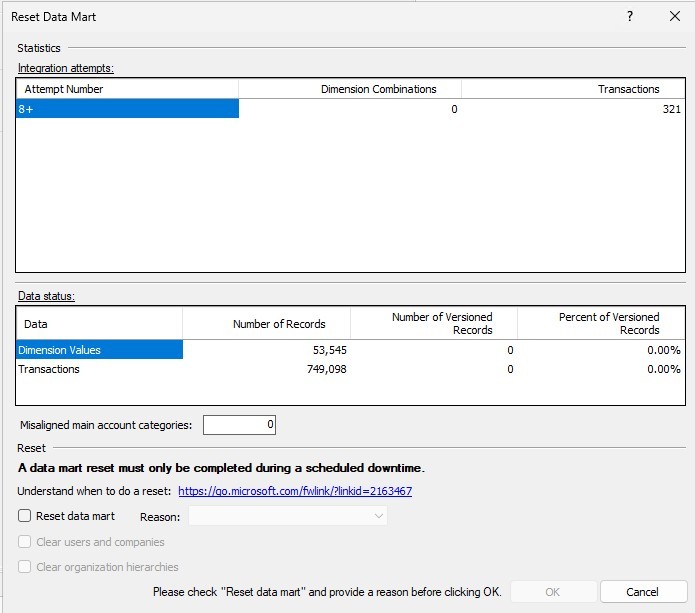
To reset the data mart, in Report designer, on the Tools menu, select Reset Data Mart as shown in the following illustration. The dialog box that appears has two sections: Statistics and Reset.
Integration attempts
The Integration attempts grid shows how many times the system tried to integrate transactions. The system continues to try to integrate data over a period of days if the first few attempts aren't successful. In this situation, the data isn't reported on.
Data status
The Data status grid provides a snapshot of the transactions, exchange rates, and dimension values in the data mart. A large number of versioned records indicate that numerous updates to the records occurred. This situation might increase the time that is required to generate reports.
Misaligned main account categories
If you're using a release that is earlier than Financial reporting release 7.2.1, you might have to reset the data mart if you rename accounts and move accounts between account categories. These actions can cause main account categories to become misaligned. The Misaligned main account categories field shows whether you're experiencing that issue.
Reset the data mart and select a reason
If you determine that a data mart reset is required, select the Reset data mart check box, and then select a reason in the Reason field. The following options are available:
- Missing or incorrect data – Based on the statistics, you determined that data might be missing. Before you continue, work with Support to determine the root cause.
- Restore database – The database was restored, but the database for the Financial reporting data mart wasn't restored.
- Other – You're resetting the data mart for another reason. If you're concerned that there's an issue, contact Support to identify it.
Note
Verify that all data mart reset tasks complete an initial load before you begin a reset. You can confirm this by looking for a value in the Last Runtime column by selecting Tools > Integration status.
Clear users and companies
Select the Clear users and companies check box if you restored your database, but then changed users or companies. You should rarely have to select this check box.
When you're ready to start the reset process, select OK. You're prompted to confirm that you're ready to start the process. Financial reporting isn't available during the reset and the initial data integration that occurs afterward.
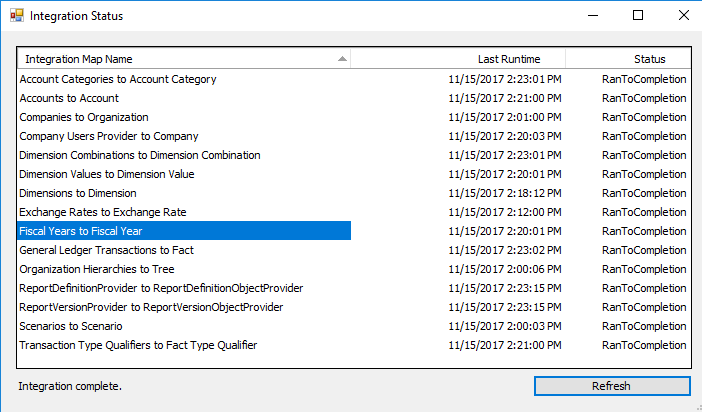
If you want to review the status of the integration, select Tools > Integration status to see the last time that the integration was run and the status.
Note
The reset finishes when all mappings show a status of RanToCompletion, and an "Integration complete" message appears in the lower-left corner of the Integration Status dialog box.
Reset the Financial reporting data mart for Dynamics 365 Finance + Operations (CHE, LBD, and VHD) through SQL Server Management Studio
Note
The following steps are designed for Cloud Hosted Environments (CHE Tier 1 Dev), downloadable VHD images, and LBD on-premises.
Before getting started, make sure all users close Report designer and exit the Financial reporting area.
On the database used for Financial reporting (CHE & VHD - ManagementReporter or MRDB; LBD - FinancialReporting), run the following script. The script was last updated April 9, 2020: Reset Datamart Begin.txt
--setup for servicing mode
BEGIN TRANSACTION IF NOT EXISTS(SELECT SCHEMA_NAME FROM INFORMATION_SCHEMA.SCHEMATA WHERE SCHEMA_NAME = 'Servicing') BEGIN EXEC ('CREATE SCHEMA Servicing') END
    IF (DATABASE_PRINCIPAL_ID('GeneralUser') IS NULL)
    BEGIN
        CREATE ROLE [GeneralUser] AUTHORIZATION [dbo];
    END
    ALTER AUTHORIZATION ON SCHEMA::Servicing TO [GeneralUser]

    IF NOT EXISTS(SELECT NAME FROM SYS.TABLES WHERE Name = 'ServicingLock')
    BEGIN
        CREATE TABLE [Servicing].[ServicingLock] ([Name] nvarchar(255) not null, [Value] int not null, [LastServiceTimestamp] datetime null)
    END

    IF NOT EXISTS(SELECT 1 FROM [Servicing].[ServicingLock])
    BEGIN
        INSERT INTO [Servicing].[ServicingLock] (Name, Value) VALUES ('ServicingLockMode', 0)
    END
 COMMIT TRANSACTION


 PRINT 'Entering servicing mode'
 DECLARE @result int;
 EXEC @result = sp_getapplock @DbPrincipal='public', @Resource='ServicingLock', @LockMode='Exclusive', @LockOwner='Session', @LockTimeout=300000;
 IF @result < 0 RAISERROR ('Unable to acquire SQL applock. Result: %d', 16, 1, @result);

 BEGIN TRY
 IF EXISTS(SELECT TOP 1 1 FROM INFORMATION_SCHEMA.COLUMNS WHERE TABLE_SCHEMA = 'Scheduling' COLLATE DATABASE_DEFAULT AND TABLE_NAME = 'SchedulerRegister' COLLATE DATABASE_DEFAULT AND COLUMN_NAME = 'ServicingMode' COLLATE DATABASE_DEFAULT)
 BEGIN
     UPDATE Scheduling.SchedulerRegister SET ServicingMode = 1 WHERE ServicingMode = 0
     UPDATE [Servicing].[ServicingLock] SET Name = 'SchedulerServicingMode', Value = 1, LastServiceTimestamp = GETUTCDATE() WHERE Value = 0
 END
 PRINT 'Acquired servicing locks'

 --Disable maps
 DECLARE @triggerIds table(id uniqueidentifier, taskTypeId uniqueidentifier)
 INSERT INTO @triggerIds SELECT tr.[Id], tt.[Id]
 FROM [Scheduling].[Task] t with(nolock)
 JOIN [Scheduling].[Trigger] tr ON t.[TriggerId] = tr.[Id]
 JOIN [Scheduling].[TaskState] ts ON ts.[TaskId] = t.[Id]
 LEFT JOIN [Scheduling].[TaskCategory] tc ON tc.[Id] = t.[CategoryId]
 JOIN [Scheduling].[TaskType] tt ON t.[TypeId] = tt.[Id]
 WHERE tt.[Id] IN ('D81C1197-D486-4FB7-AF8C-078C110893A0', '55D3F71A-2618-4EAE-9AA6-D48767B974D8') -- 'Maintenance Task', 'Map Task'
 PRINT 'Disable integration tasks'
 UPDATE [Scheduling].[Trigger] SET IsEnabled = 0 WHERE [Id] in (SELECT id FROM @triggerIds)

 ------------------------------------------------------------------------------------------
 ------------------------------------------------------------------------------------------
 ------------------------------------------------------------------------------------------


 ------------------------------
 PRINT 'Save and Drop Indexes Of FactAttributeValue and DimensionValueAttributeValue'
 ------------------------------

 IF EXISTS(SELECT 1 FROM sys.procedures WHERE object_id = OBJECT_ID('[Datamart].[SaveAndDropAttributeValueIndexes]'))
 BEGIN
  IF (NOT EXISTS (SELECT * FROM INFORMATION_SCHEMA.TABLES WHERE TABLE_SCHEMA = 'Datamart' AND  TABLE_NAME = 'AttributeValueIndexesBackUp'))
  BEGIN
   --create table to store indexses
   -- Indexes of different table can have same index_id,but we need unique index id
   Create table [Datamart].[AttributeValueIndexesBackUp]
   (
    IndexID INT not null IDENTITY(1,1) PRIMARY KEY,
    IndexName NVARCHAR(255),
    IsUnique BIT,
    IndexType NVARCHAR(60),
    FilterDefinition NVARCHAR(max),
    KeyColumns NVARCHAR(max),
    IncludedColumns NVARCHAR(max),
    IndexRetry INT,
    IndexStatus NVARCHAR(60),
    AttributeType INT,
   )
  END

  IF (EXISTS (SELECT * FROM INFORMATION_SCHEMA.TABLES WHERE TABLE_SCHEMA = 'Datamart' AND  TABLE_NAME = 'FactAttributeValue'))
  BEGIN
   --truncate table to increase index drop performance
   PRINT('TRUNCATE TABLE [Datamart].[FactAttributeValue]')
   EXEC('TRUNCATE TABLE [Datamart].[FactAttributeValue]')
   EXEC [Datamart].[SaveAndDropAttributeValueIndexes] 'FACTID','[Datamart].[FactAttributeValue]'
  END

  IF (EXISTS (SELECT * FROM INFORMATION_SCHEMA.TABLES WHERE TABLE_SCHEMA = 'Datamart' AND  TABLE_NAME = 'DimensionValueAttributeValue'))
  BEGIN
   --truncate table to increase index drop performance
   PRINT('TRUNCATE TABLE [Datamart].[DimensionValueAttributeValue]')
   EXEC('TRUNCATE TABLE [Datamart].[DimensionValueAttributeValue]')
   EXEC [Datamart].[SaveAndDropAttributeValueIndexes] 'DIMENSIONVALUEID','[Datamart].[DimensionValueAttributeValue]'
  END
 End

 ------------------------------
 PRINT 'Drop archive tables'
 ------------------------------
 DECLARE @stagingTableName nvarchar(max)
 DECLARE dropCursor CURSOR LOCAL FAST_FORWARD FOR
 SELECT t.TABLE_NAME as TableName
 FROM INFORMATION_SCHEMA.TABLES t WITH (NOLOCK)
 WHERE t.TABLE_SCHEMA = 'Datamart' and (t.TABLE_NAME like 'FactStaging[0-9]%' or t.TABLE_NAME like 'DimensionCombinationStaging[0-9]%')
 OPEN dropCursor
 FETCH NEXT FROM dropCursor INTO @stagingTableName
 WHILE @@FETCH_STATUS = 0
 BEGIN
  EXEC('DROP TABLE IF EXISTS [Datamart].' + @stagingTableName)
  FETCH NEXT FROM dropCursor INTO @stagingTableName
 END
 CLOSE dropCursor
 DEALLOCATE dropCursor

 ------------------------------
 PRINT 'Dropping tables with dynamic columns'
 ------------------------------
 DROP TABLE IF EXISTS [Datamart].DimensionCombinationProcessing
 DROP TABLE IF EXISTS [Datamart].DimensionCombination
 DROP TABLE IF EXISTS [Datamart].DimensionCombinationResolving
 DROP TABLE IF EXISTS [Datamart].DimensionCombinationStaging
 DROP TABLE IF EXISTS [Datamart].DimensionCombinationUnreferenced
 DROP TABLE IF EXISTS [Datamart].DimensionValueAttributeValue
 DROP TABLE IF EXISTS [Datamart].FactAttributeValue
 DROP TABLE IF EXISTS [Datamart].TranslatedPeriodBalance
 DROP TABLE IF EXISTS [Datamart].TranslatedPeriodBalanceChanges

 ------------------------------
 PRINT 'Begin Truncating tables'
 ------------------------------
 DECLARE @tablename nvarchar(200)
 DECLARE @schemaname nvarchar(200)
 DECLARE clear_tables CURSOR
 FOR SELECT TABLE_NAME, TABLE_SCHEMA FROM INFORMATION_SCHEMA.TABLES WHERE TABLE_SCHEMA = 'Datamart' AND TABLE_TYPE='BASE TABLE'
 PRINT 'remove check constraints'
 OPEN clear_tables
 FETCH NEXT FROM clear_tables INTO @tablename, @schemaname
 WHILE @@FETCH_STATUS = 0
 BEGIN
  IF @tablename <> 'VersionHistory'
  BEGIN
   EXEC('ALTER TABLE [' + @schemaname + '].[' + @tablename + '] NOCHECK CONSTRAINT ALL')
  END
  FETCH NEXT FROM clear_tables INTO @tablename, @schemaname
 END
 CLOSE clear_tables

 ------------------------------
 PRINT 'delete data from tables and rebuild indexes'
 ------------------------------
 OPEN clear_tables
 FETCH NEXT FROM clear_tables INTO @tablename, @schemaname
 WHILE @@FETCH_STATUS = 0
 BEGIN
  IF @tablename <> 'VersionHistory' and @tablename <> 'AttributeValueIndexesBackUp'
  BEGIN
   IF(EXISTS (select TOP 1 1 from sys.foreign_keys where referenced_object_id = OBJECT_ID(@schemaname + '.' + @tablename)) OR
    EXISTS(SELECT TOP 1 1 FROM sys.sql_expression_dependencies sed
    INNER JOIN sys.objects o ON sed.referencing_id = o.[object_id]
    WHERE o.[type] = 'V'
    AND referenced_schema_name = @schemaname
    AND referenced_entity_name = @tablename))
   BEGIN
    PRINT 'deleting from ' + @tablename
    EXEC('DELETE FROM [' + @schemaname + '].[' + @tablename + ']')
   END
   ELSE
   BEGIN
    PRINT 'truncating from ' + @tablename
    EXEC('TRUNCATE TABLE [' + @schemaname + '].[' + @tablename + ']')
   END
  END
  EXEC('ALTER INDEX ALL ON [' + @schemaname + '].[' + @tablename + '] REBUILD')
  FETCH NEXT FROM clear_tables INTO @tablename, @schemaname
 END
 CLOSE clear_tables

 ------------------------------
 PRINT 'reenable check constraints'
 ------------------------------
 OPEN clear_tables
 FETCH NEXT FROM clear_tables INTO @tablename, @schemaname
 WHILE @@FETCH_STATUS = 0
 BEGIN
  IF @tablename <> 'VersionHistory'
  BEGIN
   EXEC('ALTER TABLE [' + @schemaname + '].[' + @tablename +'] WITH CHECK CHECK CONSTRAINT ALL')
  END
  FETCH NEXT FROM clear_tables INTO @tablename, @schemaname
 END
 CLOSE clear_tables
 DEALLOCATE clear_tables
 ------------------------------
 PRINT 'Complete Truncating tables'
 ------------------------------

 -- Rebuild the tables with dynamic columns
 IF EXISTS(SELECT 1 FROM sys.procedures WHERE object_id = OBJECT_ID('[Datamart].[AddDynamicTables]'))
  BEGIN
   EXEC [Datamart].AddDynamicTables
  END
 ELSE
  BEGIN
   ---- Basically a copy of sproc AddDynamicTables
   IF NOT EXISTS (SELECT 1 FROM INFORMATION_SCHEMA.TABLES WHERE TABLE_TYPE ='BASE TABLE' AND TABLE_NAME = 'DimensionCombinationStaging' AND TABLE_SCHEMA = 'Datamart')
   BEGIN
    CREATE TABLE [Datamart].[DimensionCombinationStaging](
     [Id] [bigint] NOT NULL,
     [OrganizationId] [int] NULL,
     [Description] [nvarchar](51) NULL,
     [SourceKey] [nvarchar](100) NOT NULL,
     [OrganizationKey] [nvarchar](100) NULL,
     [FreshnessDate][datetime2] NULL default sysutcdatetime())
```   CREATE STATISTICS [stat_dcs_org] ON [Datamart].DimensionCombinationStaging (OrganizationKey)
   END

   IF NOT EXISTS (SELECT 1 FROM INFORMATION_SCHEMA.TABLES WHERE TABLE_TYPE ='BASE TABLE' AND TABLE_NAME = 'DimensionCombinationResolving' AND TABLE_SCHEMA = 'Datamart')
   BEGIN
    CREATE TABLE [Datamart].[DimensionCombinationResolving](
     [Id] [BIGINT] NOT NULL,
     [Description] [nvarchar](51) NULL,
     [SourceKey] [nvarchar](100) NULL,
     [OrganizationId] [INT] NULL
    )
   END

   IF NOT EXISTS(SELECT * FROM INFORMATION_SCHEMA.TABLES WHERE TABLE_TYPE ='BASE TABLE' AND TABLE_NAME='DimensionCombination' AND TABLE_SCHEMA='Datamart')
   BEGIN
    CREATE TABLE [Datamart].[DimensionCombination](
     [Id] [bigint] NOT NULL,
     [Description] [nvarchar](51) NULL,
     [SourceKey] [nvarchar](100) NULL,
     [OrganizationId] [int] NULL
    )
   END

   IF NOT EXISTS(SELECT * FROM INFORMATION_SCHEMA.TABLES WHERE TABLE_TYPE ='BASE TABLE' AND TABLE_NAME='FactAttributeValue' AND TABLE_SCHEMA='Datamart')
   BEGIN
    CREATE TABLE [Datamart].[FactAttributeValue](
     [FactId] [bigint] NOT NULL
    )
   END

   IF NOT EXISTS(SELECT * FROM INFORMATION_SCHEMA.TABLES WHERE TABLE_TYPE ='BASE TABLE' AND TABLE_NAME='DimensionValueAttributeValue' AND TABLE_SCHEMA='Datamart')
   BEGIN
    CREATE TABLE [Datamart].[DimensionValueAttributeValue](
     [DimensionValueId] [bigint] NOT NULL
    )
   END

   IF NOT EXISTS(SELECT 1 FROM INFORMATION_SCHEMA.TABLES WHERE TABLE_TYPE ='BASE TABLE' AND TABLE_NAME='PeriodExchangeRate' AND TABLE_SCHEMA='Datamart')
   BEGIN
    CREATE TABLE [Datamart].[PeriodExchangeRate]
    (
     [PeriodId] INT NOT NULL,
     [FromUnitOfMeasureId] INT NOT NULL,
     [CurrencyMethod] TINYINT NOT NULL,
     [ExchangeRateTypeId] INT NOT NULL,
     CONSTRAINT [PK_PeriodExchangeRates] PRIMARY KEY ([FromUnitOfMeasureId], [PeriodId], [CurrencyMethod], [ExchangeRateTypeId])
    )
   END

   IF NOT EXISTS(SELECT 1 FROM INFORMATION_SCHEMA.TABLES WHERE TABLE_TYPE ='BASE TABLE' AND TABLE_NAME='TranslatedPeriodBalance' AND TABLE_SCHEMA='Datamart')
   BEGIN
    CREATE TABLE [Datamart].[TranslatedPeriodBalance](
     [PeriodId] [INT] NOT NULL,
     [DimensionsId] [BIGINT] NOT NULL,
     [ScenarioId] [INT] NOT NULL,
     [FactType] [SMALLINT] NOT NULL,
     [PostingLayerId] [INT] NULL
    )
   END

   IF NOT EXISTS(SELECT 1 FROM INFORMATION_SCHEMA.TABLES WHERE TABLE_TYPE ='BASE TABLE' AND TABLE_NAME='TranslatedPeriodBalanceChanges' AND TABLE_SCHEMA='Datamart')
   BEGIN
    CREATE TABLE [Datamart].TranslatedPeriodBalanceChanges(PeriodId bigint, DimensionsId bigint, ScenarioId int, PostingLayerId int null, FactType smallint,
      constraint [IDX_BC1] unique Clustered (PeriodId, DimensionsId, ScenarioId, PostingLayerId, FactType DESC))
   END

   IF EXISTS (SELECT 1 FROM INFORMATION_SCHEMA.TABLES WHERE TABLE_NAME = 'DimensionCombinationArchive' AND TABLE_SCHEMA='Datamart')
   BEGIN
    IF EXISTS (SELECT TOP 1 * FROM [Datamart].[DimensionCombinationArchive])
    BEGIN
     -- move archived combinations from the obsolete DimensionCombinationArchive table to a new table in the archive
     -- and set its generation to 5, so it will run in 4 hours (which is how long the archived combinations were attempted originally before moving to the archive table).
     DECLARE @archiveId INT = 0
     INSERT INTO [Datamart].[Archive] (Generation, NextAttempt) VALUES (5, DATEADD(MINUTE, POWER(3, 5), SYSUTCDATETIME()))
     SET @archiveId = SCOPE_IDENTITY()
```  DECLARE @comboArchiveTableName nvarchar(100) = 'DimensionCombinationStaging' + CAST(@archiveId as nvarchar(10))
     EXEC sp_rename 'Datamart.DimensionCombinationArchive', @comboArchiveTableName

   DECLARE @factArchiveTableName nvarchar(100) = 'FactStaging' + CAST(@archiveId as nvarchar(10))
     EXEC ('select top 0 * into Datamart.' + @factArchiveTableName + ' from Datamart.FactStaging')
    END
    ELSE
    BEGIN
     DROP TABLE [Datamart].[DimensionCombinationArchive]
    END
   END

   IF NOT EXISTS (SELECT * FROM INFORMATION_SCHEMA.TABLES WHERE TABLE_TYPE='BASE TABLE' AND TABLE_NAME = 'DimensionCombinationUnreferenced' and TABLE_SCHEMA ='Datamart')
    BEGIN
     CREATE TABLE [Datamart].[DimensionCombinationUnreferenced](
      [Id] [bigint] NOT NULL,
     [Description] [nvarchar](51) NULL,
     [SourceKey] [nvarchar](100) NULL,
     [OrganizationId] [int] NULL
    )
DECLARE @columnIndex int DECLARE @idColumn nvarchar(128) DECLARE columnCursor CURSOR LOCAL FAST_FORWARD FOR SELECT DISTINCT ColumnIndex FROM [Datamart].DimensionDefinition ORDER BY ColumnIndex OPEN columnCursor FETCH NEXT FROM columnCursor INTO @columnIndex WHILE (@@FETCH_STATUS <> -1) BEGIN SET @idColumn = 'Dimension' + CAST(@columnIndex as nvarchar(3)) + 'Id' EXEC [Datamart].AddColumn @schemaName = 'Datamart', @tableName = 'DimensionCombinationUnreferenced', @columnName = @idColumn, @columnType = 'bigint NULL' FETCH NEXT FROM columnCursor INTO @columnIndex END CLOSE columnCursor DEALLOCATE columnCursor
    DECLARE @rowsCopied bigint
    DECLARE @columnName nvarchar(100)
    DECLARE columnNameCursor cursor local fast_forward for select distinct Name from sys.columns c where c.object_id = OBJECT_ID('DimensionCombination')
    OPEN columnNameCursor
    FETCH NEXT FROM columnNameCursor INTO @columnName
    WHILE (@@FETCH_STATUS <> -1)
    BEGIN
     IF @dcColumnList <> ''
      SET @dcColumnList = @dcColumnList + ', '

     SET @dcColumnList = @dcColumnList + @columnName
     FETCH NEXT FROM columnNameCursor INTO @columnName
    END
    CLOSE columnNameCursor
    DEALLOCATE columnNameCursor

    if @dcColumnList <> ''
    BEGIN
     exec ('
      insert into [Datamart].DimensionCombinationUnreferenced (' + @dcColumnList + ')
      select ' + @dcColumnList + ' from [Datamart].DimensionCombination dc
      where dc.Id not in (Select distinct DimensionsId from [Datamart].Fact)')

     SET @rowsCopied = @@ROWCOUNT
     IF @rowsCopied > 0
     BEGIN
      DECLARE @comboCount bigint
      EXEC [Datamart].GetRowCount 'DimensionCombination', @comboCount

      IF (@rowsCopied * 2) > @comboCount
      BEGIN
       -- most of the combinations in the combination table were unreferenced, so it would be faster to move the referenced out, truncate the table, then move back
       SELECT * INTO #referencedCombos from [Datamart].DimensionCombination dc
       WHERE dc.Id NOT IN (SELECT Id from [Datamart].DimensionCombinationUnreferenced)

       TRUNCATE TABLE [Datamart].[DimensionCombination]

       INSERT INTO [Datamart].[DimensionCombination]
       SELECT * FROM #referencedCombos

       DROP TABLE #referencedCombos
      END
      ELSE
      BEGIN
       -- we didn't find many unreferenced combinations, so delete them
       DELETE FROM [Datamart].[DimensionCombination] WHERE Id in (SELECT Id FROM [Datamart].[DimensionCombinationUnreferenced])
      END
     END
    END
   END
  END
-- Rebuild dropped indexes that are dynamic EXEC [Datamart].ConfigureIndexesAndConstraints
EXEC sys.sp_releaseapplock @Resource='ServicingLock', @LockOwner='Session' END TRY BEGIN CATCH EXEC sys.sp_releaseapplock @Resource='ServicingLock', @LockOwner='Session' ;THROW; END CATCH
- (Optional) On the database used for Financial reporting, execute the following script, which was last updated February 25, 2020: ResetUsersAndCompanies.txt
Note
Don't run this script unless you need to delete all users and companies. This script will remove user references from previously generated reports, and remove users from their assigned security groups. This step isn't required in most cases.
-- Attempt to delete integrated users
 DECLARE @userId nvarchar(max)
 DECLARE removeUserCursor CURSOR LOCAL FAST_FORWARD FOR
 select UserID from Reporting.SecurityUser where UserID <> '00000000-0000-0000-0000-000000000002'
 OPEN removeUserCursor
 FETCH NEXT FROM removeUserCursor INTO @userId
 WHILE @@FETCH_STATUS = 0
 BEGIN
  BEGIN TRY
     exec Reporting.SecurityUserDeleteRelatedEntities @userId
     delete from Reporting.SecurityGroupUser where UserID = @userId
     delete from Reporting.SecurityUser where UserID = @userId
  END TRY
  BEGIN CATCH
  -- Just skip if we can't delete a user, integration should take care of it
  END CATCH
  FETCH NEXT FROM removeUserCursor INTO @userId
 END
 CLOSE removeUserCursor
 DEALLOCATE removeUserCursor

-- Attempt to delete integrated companies
 DECLARE @companyId nvarchar(max)
 DECLARE removeCompanyCursor CURSOR LOCAL FAST_FORWARD FOR
 select cc.ID from Reporting.ControlCompany cc join Reporting.ControlCompanyIntegration cci on cc.ID = cci.ID
 OPEN removeCompanyCursor
 FETCH NEXT FROM removeCompanyCursor INTO @companyId
 WHILE @@FETCH_STATUS = 0
 BEGIN
  BEGIN TRY
     delete from Reporting.ControlCompany where ID = @companyId
  END TRY
  BEGIN CATCH
  -- Just skip if we can't delete a company
  END CATCH
  FETCH NEXT FROM removeCompanyCursor INTO @companyId
 END
 CLOSE removeCompanyCursor
 DEALLOCATE removeCompanyCursor
- On the database for Dynamics 365 Finance, which is referred to as AXDB, use the following script to clear the financial reporting related tables. The script was last updated February 25, 2019: Reset Datamart AXDB.txt
IF EXISTS (SELECT 1 FROM [INFORMATION_SCHEMA].[TABLES] WHERE [TABLE_SCHEMA] = 'dbo' and [TABLE_NAME] = 'FINANCIALREPORTS')
BEGIN
    TRUNCATE TABLE [dbo].[FINANCIALREPORTS]
END
IF EXISTS (SELECT 1 FROM [INFORMATION_SCHEMA].[TABLES] WHERE [TABLE_SCHEMA] = 'dbo' and [TABLE_NAME] = 'FINANCIALREPORTVERSION')
BEGIN
    TRUNCATE TABLE [dbo].[FINANCIALREPORTVERSION]
END
- On the database used for Financial reporting, re-enable the integration and end servicing mode with the following script, that was last updated February 25, 2019: Reset Datamart END.txt
DECLARE @triggerIds table(id uniqueidentifier, taskTypeId uniqueidentifier)
INSERT INTO @triggerIds SELECT tr.[Id], tt.[Id]
FROM [Scheduling].[Task] t with(nolock)
JOIN [Scheduling].[Trigger] tr ON t.[TriggerId] = tr.[Id]
JOIN [Scheduling].[TaskState] ts ON ts.[TaskId] = t.[Id]
LEFT JOIN [Scheduling].[TaskCategory] tc ON tc.[Id] = t.[CategoryId]
JOIN [Scheduling].[TaskType] tt ON t.[TypeId] = tt.[Id]
WHERE tt.[Id] IN ('D81C1197-D486-4FB7-AF8C-078C110893A0', '55D3F71A-2618-4EAE-9AA6-D48767B974D8') -- 'Maintenance Task', 'Map Task'
------------------------------------------
------------------------------------------
PRINT 'Reset the map tokens'
UPDATE [Connector].[Map] SET InitalLoad = 0, ReaderToken=NULL, LastQuerySuccess='1900-01-01' WHERE MapId IN (SELECT t.[Id]
FROM [Scheduling].[Task] t with(nolock)
JOIN [Scheduling].[Trigger] tr ON t.[TriggerId] = tr.[Id]
JOIN [Scheduling].[TaskState] ts ON ts.[TaskId] = t.[Id]
LEFT JOIN [Scheduling].[TaskCategory] tc ON tc.[Id] = t.[CategoryId]
JOIN [Scheduling].[TaskType] tt ON t.[TypeId] = tt.[Id]
WHERE tt.[Id] = '55D3F71A-2618-4EAE-9AA6-D48767B974D8')
PRINT 'Reset the tasks'
UPDATE [Scheduling].[TaskState] SET StateType = 0, Progress = 0.0, LastRunTime = NULL, NextRunTime = NULL WHERE TaskId IN (SELECT ts.[TaskId]
FROM [Scheduling].[Task] t with(nolock)
JOIN [Scheduling].[Trigger] tr ON t.[TriggerId] = tr.[Id]
JOIN [Scheduling].[TaskState] ts ON ts.[TaskId] = t.[Id]
LEFT JOIN [Scheduling].[TaskCategory] tc ON tc.[Id] = t.[CategoryId]
JOIN [Scheduling].[TaskType] tt ON t.[TypeId] = tt.[Id]
WHERE tt.[Id] IN ('D81C1197-D486-4FB7-AF8C-078C110893A0', '55D3F71A-2618-4EAE-9AA6-D48767B974D8'))
PRINT 'Enable integration tasks, RunImmediately'
UPDATE [Scheduling].[Trigger] SET IsEnabled = 1, RunImmediately = 1, StartBoundary = '1900-01-01'
WHERE Id in (SELECT [id] from @triggerIds WHERE taskTypeId = '55D3F71A-2618-4EAE-9AA6-D48767B974D8')
PRINT 'Enable the Maintenance Task'
UPDATE [Scheduling].[Trigger] SET IsEnabled = 1, RunImmediately = 0, StartBoundary = GETDATE() WHERE Id in
(SELECT [id] from @triggerIds WHERE taskTypeId = 'D81C1197-D486-4FB7-AF8C-078C110893A0')
------------------------------------------
------------------------------------------

UPDATE [Servicing].[ServicingLock] SET [Value] = 0 WHERE [Value] = 1
IF EXISTS(SELECT TOP 1 1 FROM INFORMATION_SCHEMA.COLUMNS WHERE TABLE_SCHEMA = 'Scheduling' COLLATE DATABASE_DEFAULT AND TABLE_NAME = 'SchedulerRegister' COLLATE DATABASE_DEFAULT AND COLUMN_NAME = 'ServicingMode' COLLATE DATABASE_DEFAULT)
BEGIN
       UPDATE Scheduling.SchedulerRegister SET ServicingMode = 0
END
After the reset, you can manually verify the data reload by running the following query against the Financial reporting database.
select ReaderObjectName, WriterObjectName, LastRunTime, StateType from Connector.MapsWithDetail with (nolock)
Confirm that all rows have a LastRunTime value, and that StateType is set to 5. A StateType value of 5 indicates that the data was successfully reloaded. A value of 7 indicates a faulted state. Sometimes, the Organization Hierarchy map has this state the first time that it runs. However, the default state but should be automatically resolved.
Export and import report definitions
Although a reset of the data mart doesn't affect any report definitions, some data movement activities can cause report definitions to be lost. Be careful when you perform a data movement activity such as overwriting a user acceptance testing (UAT) test environment with a copy of the production environment if new reports were being created in the UAT environment. Exporting report definitions can provide a backup if it becomes necessary to restore your definitions.
Export report definitions
First, follow these steps to export the report designs from Report designer.
In Report designer, select Company > Building Block Groups.
Select the building block group to export, and then select Export.
Note
For finance and operations, only one building block group is supported: Default.
Select the report definitions to export:
- To export all your report definitions and the associated building blocks, select Select All.
- To export specific reports, rows, columns, trees, or dimension sets, select the appropriate tab, and then select the items to export. To select multiple items on a tab, press and hold the Ctrl key while you make your selections. When you select reports to export, the associated rows, columns, trees, and dimension sets are also selected.
Select Export.
Enter a file name, and select a secure location to save the exported report definitions in.
Select Save.
You can copy or upload the file to a secure location.
Warning
Be aware of the behavior of drive D on Microsoft Azure virtual machines (VMs). Don't permanently store your exported building block groups on drive D. For more information about temporary drives, see Understanding the temporary drive on Microsoft Azure Virtual Machines.
Import report definitions
Next, import your report designs from Report designer by using the file that was created during export.
In Report designer, select Company > Building Block Groups.
Select the Default building block, and then select Import.
Select the file that contains the exported report definitions, and then select Open.
In the Import dialog box, select the report definitions to import:
- To import all the report definitions and the associated building blocks, select Select All.
- To import specific reports, rows, columns, trees, or dimension sets, select them.
Select Import.