Plan and implement remote access to public endpoints, Azure Bastion and just-in-time (JIT) virtual machine (VM) access
Azure Bastion is a service you deploy that lets you connect to a virtual machine using your browser and the Azure portal. Or you connect via the native SSH or remote desktop protocol (RDP) client already installed on your local computer. The Azure Bastion service is a fully platform-managed PaaS service that you deploy inside your virtual network. It provides secure and seamless RDP/SSH connectivity to your virtual machines directly over TLS from the Azure portal or via native client. When you connect via Azure Bastion, your virtual machines don't need a public IP address, agent, or special client software.
Bastion provides secure RDP and SSH connectivity to all of the VMs in the virtual network in which it's provisioned. Using Azure Bastion protects your virtual machines from exposing RDP/SSH ports to the outside world, while still providing secure access using RDP/SSH.
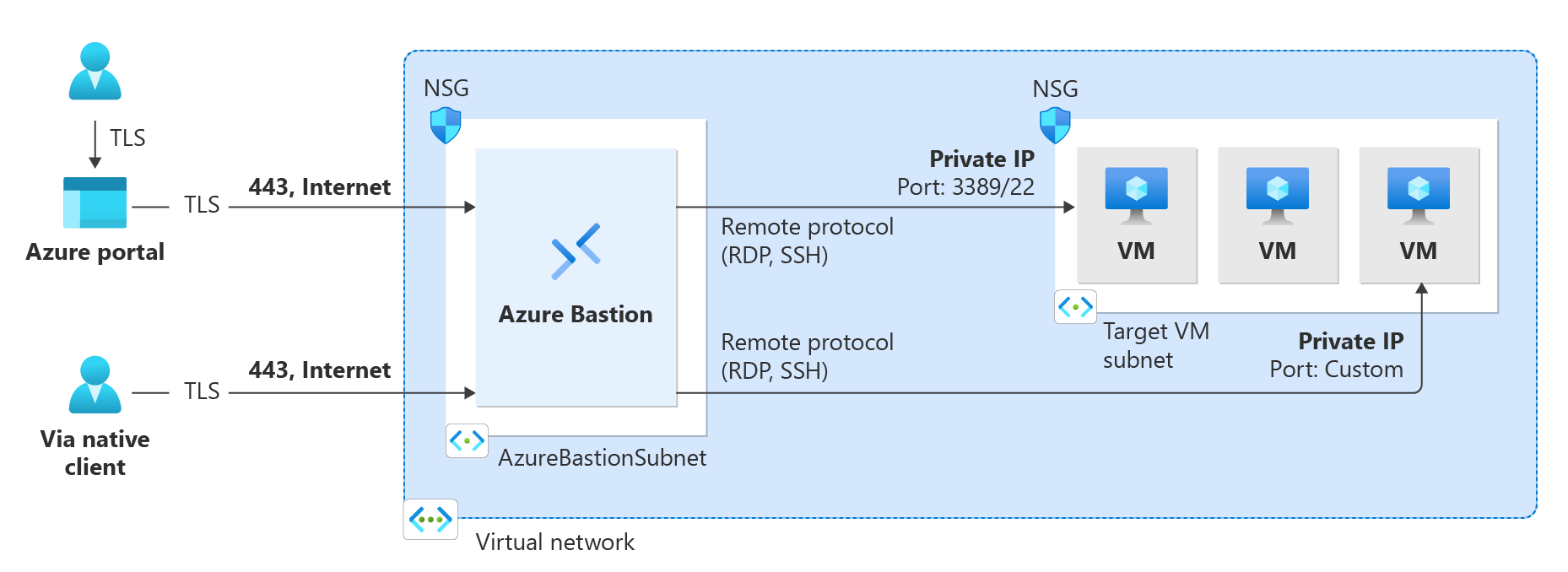
The following diagram shows connections to virtual machines via a Bastion deployment that uses dedicated SKUs (Basic, Standard, or Premium).
Key benefits
| Benefit | Description |
|---|---|
| RDP and SSH through the Azure portal | You can get to the RDP and SSH session directly in the Azure portal using a single click seamless experience. |
| Remote Session over TLS and firewall traversal for RDP/SSH | Azure Bastion uses an HTML5 based web client that is automatically streamed to your local device. Your RDP/SSH session is over TLS on port 443. Traffic can traverse firewalls more securely. Bastion supports TLS 1.2 and above. Older TLS versions aren't supported. |
| No Public IP address required on the Azure VM | Azure Bastion opens the RDP/SSH connection to your Azure VM by using the private IP address on your VM. You don't need a public IP address on your virtual machine. |
| No hassle of managing Network Security Groups (NSGs) | You don’t need to apply NSGs to the Azure Bastion subnet. Since Bastion connects to your virtual machines using private IPs, you can configure NSGs to allow RDP and SSH traffic only from Bastion. This eliminates the hassle of updating NSGs every time you need secure access to your VMs. |
| No need to manage a separate bastion host on a VM | Azure Bastion is a fully managed platform PaaS service from Azure that is hardened internally to provide you secure RDP/SSH connectivity. |
| Protection against port scanning | Your VMs are protected against port scanning by rogue and malicious users because you don't need to expose the VMs to the internet. |
| Hardening in one place only | Azure Bastion sits at the perimeter of your virtual network, so you don’t need to worry about hardening each of the VMs in your virtual network. |
| Protection against zero-day exploits | The Azure platform protects against zero-day exploits by keeping the Azure Bastion hardened and always up to date for you. |
SKUs (Stock-keeping units)
Azure Bastion offers four SKU tiers: Developer, Basic, Standard, and Premium. The following table shows features and corresponding SKUs.
| Feature | Developer SKU | Basic SKU | Standard SKU | Premium SKU |
|---|---|---|---|---|
| Connect to target VMs in same virtual network | Yes | Yes | Yes | Yes |
| Connect to target VMs in peered virtual networks | No | Yes | Yes | Yes |
| Support for concurrent connections | No | Yes | Yes | Yes |
| Access Linux VM Private Keys in Azure Key Vault (AKV) | Yes | Yes | Yes | Yes |
| Connect to Linux VM using SSH | Yes | Yes | Yes | Yes |
| Connect to Windows VM using RDP | Yes | Yes | Yes | Yes |
| Connect to Linux VM using RDP | No | No | Yes | Yes |
| Connect to Windows VM using SSH | No | No | Yes | Yes |
| Specify custom inbound port | No | No | Yes | Yes |
| Connect to VMs using Azure CLI | No | No | Yes | Yes |
| Host scaling | No | No | Yes | Yes |
| Upload or download files | No | No | Yes | Yes |
| Kerberos authentication | Yes | Yes | Yes | Yes |
| Shareable link | No | No | Yes | Yes |
| Connect to VMs via IP address | No | No | Yes | Yes |
| VM audio output | Yes | Yes | Yes | Yes |
| Disable copy/paste (web-based clients) | No | No | Yes | Yes |
| Session recording | No | No | No | Yes |
| Private-only deployment (no public IP) | No | No | No | Yes |
Architecture
Azure Bastion offers multiple deployment architectures depending on the selected SKU. For most SKUs (Basic, Standard, Premium), Bastion is deployed to a virtual network and supports virtual network peering. Specifically, Azure Bastion manages RDP/SSH connectivity to VMs created in the local or peered virtual networks.
RDP and SSH are some of the fundamental means through which you can connect to your workloads running in Azure. Exposing RDP/SSH ports over the Internet isn't desired and is seen as a significant threat surface. This is often due to protocol vulnerabilities. To contain this threat surface, you can deploy bastion hosts (also known as jump-servers) at the public side of your perimeter network. Bastion host servers are designed and configured to withstand attacks. Bastion servers also provide RDP and SSH connectivity to the workloads sitting behind the bastion, and further inside the network.
Dedicated SKUs (Basic, Standard, Premium)
For dedicated deployments:
- The Bastion host is deployed in the virtual network that contains the AzureBastionSubnet subnet that has a minimum /26 prefix.
- The user connects to the Azure portal using any HTML5 browser.
- The user selects the virtual machine to connect to.
- With a single select, the RDP/SSH session opens in the browser.
- No public IP is required on the Azure VM.
- Premium SKU supports private-only deployment, which doesn't require a public IP address on the Bastion host itself.
Developer SKU
Developer SKU is a free, lightweight offering ideal for dev/test environments. Key differences:
- Uses a shared resource model (not dedicated)
- Supports one VM connection at a time
- Doesn't require AzureBastionSubnet or a public IP address
- Connects directly through the virtual machine connect page
- Available in select regions only
- Not suitable for production workloads
- Doesn't support virtual network peering
Host scaling
Azure Bastion supports manual host scaling for Standard and Premium SKUs. You can configure the number of host instances (scale units) to manage the number of concurrent RDP/SSH connections that Azure Bastion can support. Increasing the number of host instances lets Azure Bastion manage more concurrent sessions. Decreasing the number of instances decreases the number of concurrent supported sessions. Azure Bastion supports up to 50 host instances.
Capacity by SKU
- Developer SKU: 1 VM connection at a time (shared resource)
- Basic SKU: 2 fixed instances (40 RDP sessions or 80 SSH sessions)
- Standard SKU: 2-50 configurable instances (up to 1,000 RDP sessions or 2,000 SSH sessions at maximum scale)
- Premium SKU: 2-50 configurable instances (up to 1,000 RDP sessions or 2,000 SSH sessions at maximum scale)
- Extra features over Standard SKU are graphical session recording, private-only deployment, and integration with Microsoft Entra PIM.
Each instance supports approximately 20 concurrent RDP connections and 40 concurrent SSH connections.
Premium SKU features
The Premium SKU includes all Standard features plus two exclusive capabilities for enhanced security and compliance:
Session recording
Session recording allows you to record graphical sessions for connections made to virtual machines (both RDP and SSH) via the bastion host. Key features include:
- Recorded sessions are stored in a blob container within your Azure Storage account (via SAS URL)
- Recordings become available after the session is closed or disconnected
- View and manage recorded sessions through the Azure portal
- Essential for compliance and audit requirements
- Provides forensic capabilities for security investigations
Private-only deployment
Private-only deployment creates a non-internet routable Bastion deployment that allows only private IP address access:
- No public IP address required on the Bastion host itself
- Ideal for environments with ExpressRoute or VPN connectivity
- Provides maximum security by eliminating public internet exposure
- Must be configured at deployment time
- Best for highly regulated environments with strict network segmentation requirements
The cost difference between Standard and Premium SKUs is marginal, making Premium the recommended choice for production deployments where audit trails or enhanced security are required.