Describe analytical data store options
Microsoft Fabric provides three primary analytical data stores: the lakehouse, the warehouse, and the eventhouse. Each store is built on OneLake and uses an open data format, but they serve different purposes and support different workload patterns. Understanding the strengths and trade-offs of each store helps you match data characteristics and team skills to the right solution.
In the retail scenario, you need to evaluate all three options before making a recommendation for each business group. This unit introduces the three stores, compares their core characteristics, and describes the decision factors you use throughout the rest of this module.
Three analytical data stores
All three analytical data stores in Fabric share a common foundation. They store data in OneLake, support open formats like Delta and Parquet, and integrate with other Fabric workloads. However, they differ in their primary query language, write capabilities, and the types of data they handle best.
| Data store | Primary use | Query language | Write pattern | Data types |
|---|---|---|---|---|
| Lakehouse | Flexible analytics and data engineering | Spark (Python, Scala, SQL, R) and T-SQL (read-only) | Batch via Spark notebooks, pipelines, dataflows | Structured, semi-structured, unstructured |
| Warehouse | Structured analytics and BI reporting | T-SQL (full DML/DDL) | Transactional via T-SQL, pipelines, dataflows | Structured |
| Eventhouse | Real-time analytics | KQL (Kusto Query Language) and T-SQL | Streaming ingestion and batch | Time-series, event, semistructured |
Each store is designed for a specific set of workload patterns, and no single store is ideal for every scenario. Many real-world solutions use multiple stores together, with each one handling the data pattern it's best suited for.
Note
Fabric also includes SQL database in Fabric for operational transactional workloads and Cosmos DB in Fabric for AI, NoSQL, and vector search scenarios. These stores serve operational purposes rather than analytical ones. This module focuses on the three analytical data stores: lakehouse, warehouse, and eventhouse.
How data stores connect through OneLake
Because all three stores write data to OneLake, data doesn't need to be copied or moved between systems for cross-workload access. Fabric provides several integration points:
- Shortcuts let you reference data in one store from another without duplicating it. For example, a warehouse can create a shortcut to Delta tables managed by a lakehouse.
- Cross-database queries in the warehouse let you join data from multiple warehouses and lakehouse SQL analytics endpoints using three-part naming.
- The SQL analytics endpoint on a lakehouse automatically exposes Delta tables for T-SQL queries and Power BI Direct Lake connections.
This shared OneLake foundation means your choice of data store doesn't lock you into a single access pattern. You choose the store that best handles data ingestion and transformation for a given workload, and other teams can access that data through the method that suits them.
Decision factors
The following diagram shows the ideal use cases for each data store in Fabric.
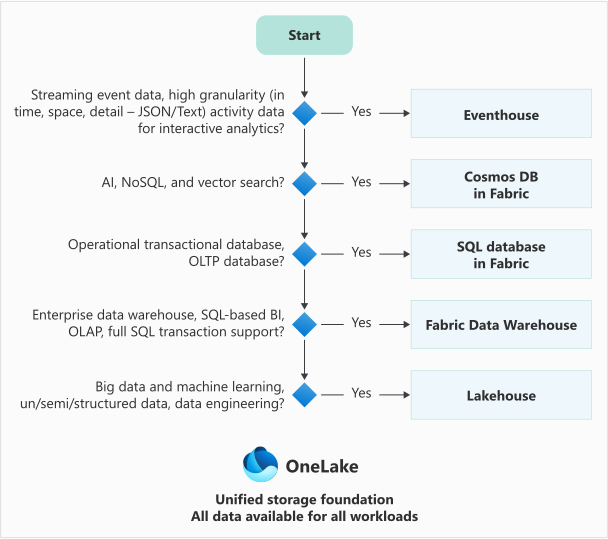
When you evaluate which data store to use for a specific scenario, consider these key factors:
- Data format. Is the data structured, semi-structured, or unstructured? Warehouses work best with structured data. Lakehouses handle all three. Eventhouses are optimized for time-series and semistructured event data.
- Query language preference. Does your team prefer T-SQL, Spark, or KQL? The warehouse provides the fullest T-SQL experience. The lakehouse supports both Spark and read-only T-SQL. The eventhouse uses KQL for its most powerful analytics.
- Write pattern. Do you need transactional updates (INSERT, UPDATE, DELETE, MERGE)? Only the warehouse provides full multi-table ACID transaction support through T-SQL. The lakehouse supports writes through Spark. The eventhouse is designed for streaming ingestion with append-optimized writes.
- Team skills. What tools and languages does your team know? SQL-first teams often prefer the warehouse. Teams with data engineering or data science skills lean toward the lakehouse and Spark notebooks. Teams handling operational monitoring and telemetry benefit from KQL expertise.
- Workload type. Is this batch analytics, real-time monitoring, or exploratory data science? Batch and BI workloads align with the warehouse. Exploratory and ML workloads align with the lakehouse. Streaming and time-series workloads align with the eventhouse.
Tip
You don't have to choose just one. Many Fabric solutions use a lakehouse for data engineering and staging, a warehouse for curated BI-ready data, and an eventhouse for real-time monitoring. The right question isn't "which store should we use?" but "which store should we use for this specific workload?"
Considerations when designing for AI usage
Your data store choice affects how easily AI capabilities can access and use your data. All three stores integrate with Copilot and AI features in Fabric, but they support different AI scenarios:
- Lakehouse is the natural home for ML training data and feature stores. Data scientists use Spark notebooks to build, train, and score models directly against lakehouse data. Semantic Link (SemPy) connects lakehouse data to Power BI semantic models, enabling data scientists to validate model outputs against business definitions. The lakehouse also supports vector embeddings and unstructured data formats that generative AI workflows require.
- Warehouse provides the structured, governed data that Copilot and data agents use when answering natural language questions. Curated dimensional models in a warehouse serve as a strong foundation for semantic models and AI agents. Clear naming conventions, well-defined relationships, and consistent data types help AI tools interpret your data correctly and generate accurate responses.
- Eventhouse supports real-time AI scoring, streaming predictions, and anomaly detection against live event data. KQL's built-in machine learning functions enable time-series forecasting and pattern detection without moving data to a separate compute environment.
Well-governed data in any of these stores is accessible to Copilot-enabled tools across Fabric. The work you do to organize, govern, and describe your data directly supports your organization's AI initiatives. Metadata quality—clear table names, descriptive column names, and documented relationships—is as important as data quality when preparing for AI.
Now that you understand the three options and the factors that drive the decision, let's explore each data store in detail, starting with the lakehouse.