Evaluate lakehouse capabilities
- 6 minutes
A lakehouse in Microsoft Fabric combines the scalability of a data lake with the querying capabilities of a data warehouse. You store structured, semi-structured, and unstructured data in a single location, manage it with Delta Lake, and analyze it with both Apache Spark and SQL. This flexibility makes the lakehouse the most versatile of the three analytical data stores.
In the retail scenario, the data science team needs to explore a mix of transaction data and web clickstream logs using Python. The lakehouse is a strong candidate for this workload. This unit examines the lakehouse's capabilities so you can evaluate when it fits your scenarios.
Lakehouse architecture and capabilities
A lakehouse organizes data into two top-level areas: Tables for managed Delta tables and Files for unstructured or non-Delta data. When you place data in the Tables area, Fabric automatically validates the file, extracts metadata, and registers the table in the metastore. This managed file-to-table experience means you don't need to write CREATE TABLE statements manually for data you place in the managed area.
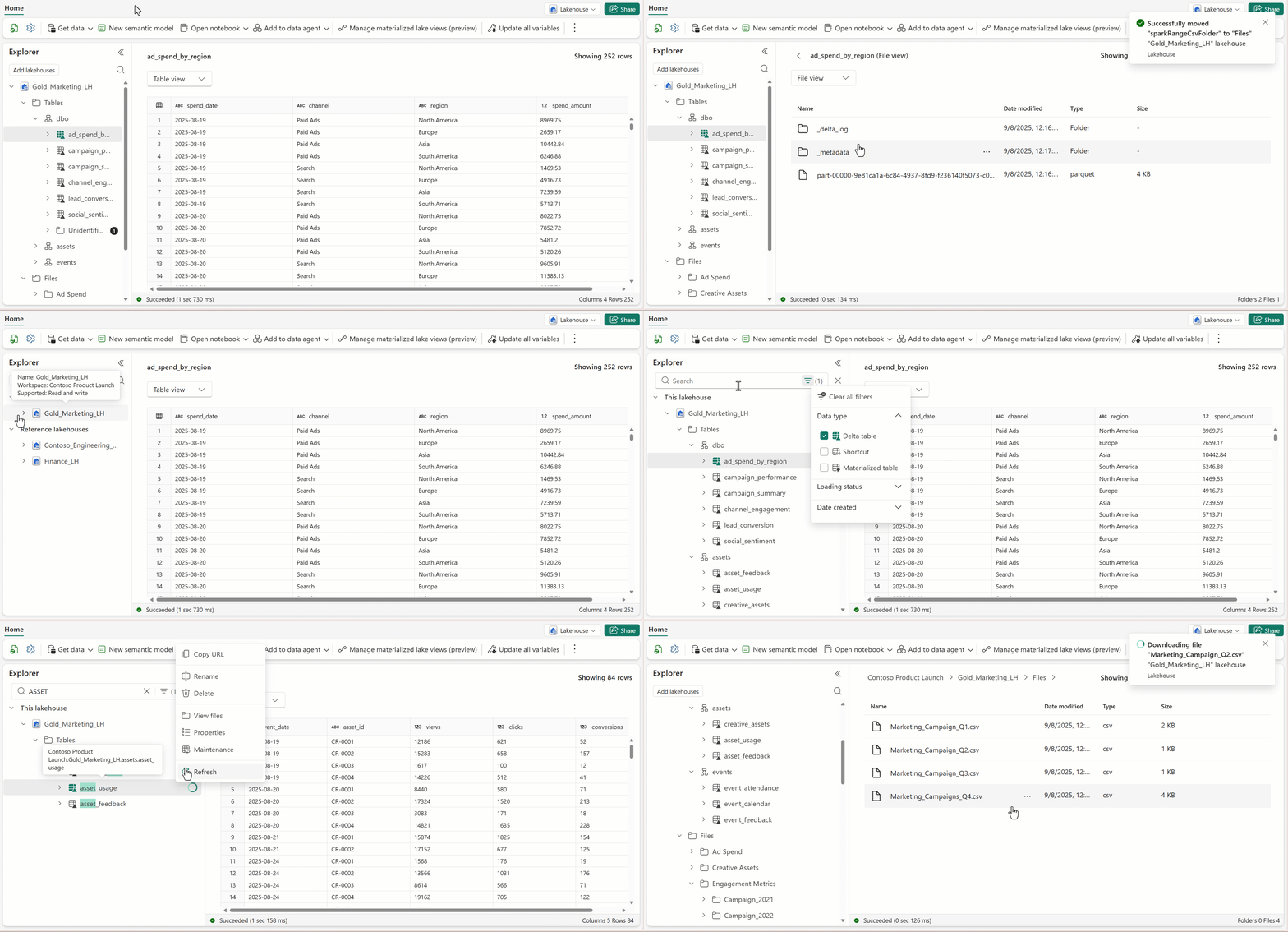
The lakehouse provides two access paths for the same data:
- Apache Spark for read/write operations. Data engineers and data scientists use notebooks with Python, Scala, SQL, or R to ingest, transform, and analyze data.
- SQL analytics endpoint for read-only T-SQL queries. Analysts and report builders query Delta tables with familiar SQL syntax and connect Power BI through DirectLake mode.
This dual-access model is one of the lakehouse's defining characteristics. A single copy of data serves both engineering and analytics workloads, with no data movement required.
| Capability | Details |
|---|---|
| Data types | Structured, semi-structured (JSON, Parquet), unstructured (images, documents) |
| Primary development tool | Apache Spark (Python, Scala, SQL, R) |
| Write support | Spark notebooks, pipelines, dataflows, Spark job definitions |
| Read support | Spark and T-SQL (via SQL analytics endpoint) |
| Storage format | Delta Lake (Parquet with transaction log) |
| Schema management | Schema-on-read with optional enforcement through Delta |
| Transaction support | Single-table ACID transactions through Delta Lake |
When to choose a lakehouse
The lakehouse is the right choice when your scenario matches several of these characteristics:
- Mixed data formats. You need to store structured tables alongside semi-structured files like JSON logs or Parquet exports. The lakehouse's dual Tables/Files areas handle both without forcing all data into a relational schema.
- Data science and ML workloads. Your team builds machine learning models, runs exploratory analysis, or creates feature stores. Spark notebooks provide the Python and R environment that data scientists need.
- Medallion architecture. You're implementing a bronze-silver-gold data pipeline where raw data is progressively refined. The lakehouse's Spark-based transformation capabilities and schema flexibility support this pattern well.
- Evolving requirements. Your schema isn't fully defined yet, or it changes frequently. The lakehouse lets you evolve your data model as you learn more about the data, without restructuring tables upfront.
- Large-scale batch processing. You process large volumes of data in batch windows using Spark. The lakehouse is optimized for distributed compute across large datasets.
Tip
The SQL analytics endpoint means that even teams who prefer T-SQL can query lakehouse data. You don't need a separate warehouse just to give SQL users access to data that lives in a lakehouse.
When a lakehouse isn't the best fit
The lakehouse has limitations that make other stores better choices for certain workloads:
- Heavy transactional updates. If your workload requires frequent UPDATE, DELETE, or MERGE operations across multiple tables with full ACID guarantees, a warehouse provides stronger transactional support. The lakehouse supports single-table transactions through Delta Lake, but it doesn't support multi-table transactions.
- T-SQL-first development. If need to define tables, views, stored procedures, and manage data with DDL and DML statements, the warehouse gives you the full T-SQL surface. The lakehouse's SQL analytics endpoint is read-only.
- Strict schema governance upfront. If regulatory or business requirements demand enforced data types and constraints from the start, the warehouse's schema-on-write approach provides tighter control.
- Real-time streaming. If you need to ingest and query streaming data with subsecond latency, the eventhouse is purpose-built for that scenario. The lakehouse processes data in batch or micro-batch patterns.
Lakehouse in the broader Fabric solution
In many Fabric solutions, the lakehouse serves as the hub for data engineering. Data engineers land raw data in the lakehouse, apply transformations in Spark notebooks, and produce curated datasets. A warehouse can then access those curated datasets through shortcuts or cross-database queries, or consumed directly by Power BI through the SQL analytics endpoint.
The lakehouse is also the natural home for AI and machine learning workloads. Data scientists work directly with lakehouse data in Spark notebooks, and the same governed data that powers reports is available for model training without separate data preparation pipelines. Specifically, the lakehouse supports AI scenarios at multiple levels:
- Feature engineering and model training. Spark MLlib, scikit-learn, and other ML frameworks run natively in lakehouse notebooks against Delta tables.
- Semantic Link (SemPy). This library bridges Power BI semantic models and lakehouse data, so data scientists can validate predictions against business-defined metrics.
- Unstructured data for generative AI. The Files area stores documents, images, and other content that retrieval-augmented generation (RAG) pipelines need. Vector embeddings generated from this content can be stored as Delta tables for similarity search.
Lakehouses are typically the first data store involved when an organization adds AI capabilities to its analytics solution because it handles all data formats and supports the Python ecosystem.
You now understand when the lakehouse is the right choice and when it isn't. Next, let's evaluate the warehouse and see how its capabilities compare.
Check your understanding
Feedback
Was this page helpful?
No
Need help with this topic?
Want to try using Ask Learn to clarify or guide you through this topic?