Describe the options for business logic in Dataverse
Business logic is the set of rules and processes that govern how data is created, validated, updated, and used within your applications. Dataverse provides multiple ways to define business logic so that your data policies are enforced consistently, regardless of which application or tool accesses your data.
Business rules
Business rules are the most accessible way to implement logic in Dataverse. Using a visual, no-code designer, makers can create conditions and actions that run when a record is created or updated. Business rules can:
- Set the value of a column based on conditions
- Make a column required or optional depending on other field values
- Show or hide columns based on the current state of a record
- Display error or warning messages when a user enters invalid data
- Validate data and prevent records from being saved when conditions are not met
Business rules defined at the table level apply across all Power Apps that use that table—both canvas apps and model-driven apps—ensuring consistent enforcement of your data policies without duplicating logic.
Note
Not all business rule actions are available in canvas apps. Actions such as show/hide columns, lock/unlock columns, and recommendations apply to model-driven apps only.
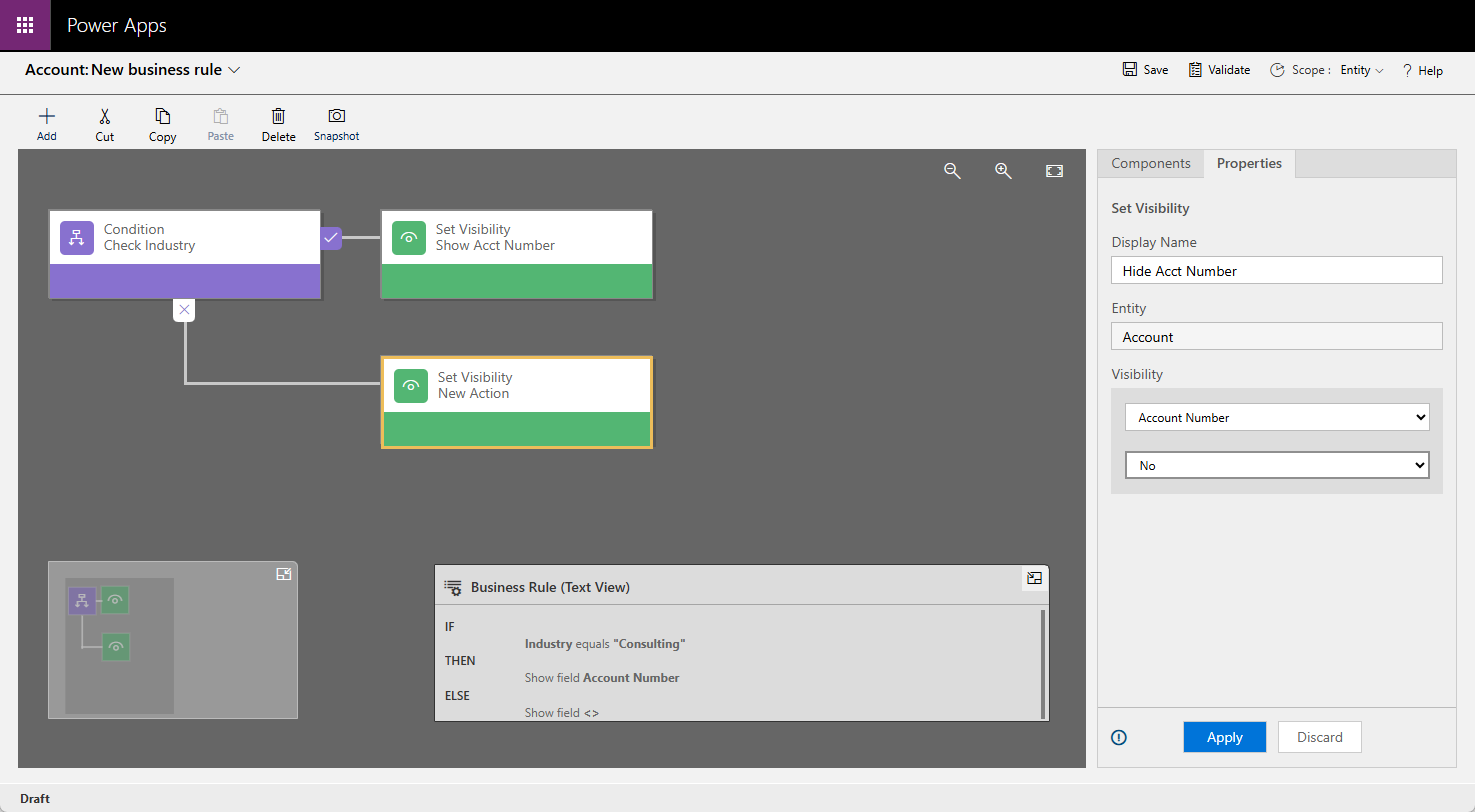
To create a business rule, navigate to your table in the Power Apps maker portal, select the Business rules tab under Customizations, and select Add business rule. The visual designer opens with a default condition node. You configure the condition, add actions to the canvas, set the rule's scope, validate it, and then activate it.
Power Fx
Power Fx is the low-code formula language used across Microsoft Power Platform. Originally introduced in Power Apps canvas apps, Power Fx is now deeply integrated into Dataverse, enabling makers to write reusable server-side logic that goes beyond what business rules can achieve.
Dataverse Functions (formerly known as instant low-code plug-ins) allow makers to define reusable logic using Power Fx expressions that execute on the server.
Note
Dataverse Functions are currently in preview and are not intended for production use.
This provides several advantages over client-side logic:
- Security: Server-side logic is not accessible from the client, protecting sensitive calculations and business processes from tampering.
- Performance: Logic that runs on the server reduces data transfer between the application and the database, resulting in faster processing.
- Consistency: Server-side logic applies the same rules to all clients and applications, eliminating discrepancies between different apps accessing the same table.
- Reusability: Makers can catalog their Power Fx functions so other makers in the organization can discover and use them in their own apps and flows.
Power Fx in Dataverse also supports live recalculations for formula columns, delegation for server-side data filtering and aggregation on large datasets, and offline functionality so that apps remain usable when connectivity is limited. Power Fx is covered in more detail in a later unit in this module.
Power Automate
When your business logic needs to cross application boundaries—sending an email, creating records in another system, or triggering a multi-step approval process—Power Automate is the right tool. Power Automate integrates natively with Dataverse and supports several flow types:
- Automated cloud flows: Triggered automatically when a Dataverse record is created, updated, or deleted
- Instant flows: Triggered manually by a user from within a Power Apps form or a Teams message
- Scheduled flows: Run on a time-based schedule, such as sending a daily summary report or syncing data overnight
By offering business rules, Power Fx, and Power Automate, Dataverse provides a comprehensive toolkit for implementing business logic. Each method is designed to address specific use cases, so you can choose the approach that best aligns with your goals.
Contoso Electronics in action
Contoso Electronics uses a business rule on its Service Request table to enforce a company policy: any request marked as High Priority must have an assigned technician before the record can be saved. This rule is defined once at the table level and applies automatically in every app that uses the table—no duplicated logic required.
When a service request has been open for more than 48 hours without an update, a Power Automate automated cloud flow sends an escalation email to the regional service manager, keeping response times within target thresholds.