Note
Access to this page requires authorization. You can try signing in or changing directories.
Access to this page requires authorization. You can try changing directories.
Data Factory in Microsoft Fabric now includes a Save As feature that lets you perform a single gesture to save an existing dataflow as a new Dataflow Gen2 (CI/CD) item.
Prerequisites
- A Fabric capacity (F2 or higher) or Fabric trial. Power BI Pro and Power BI Premium Per User (PPU) workspaces don't support Dataflow Gen2.
- The tenant setting Users can create Fabric items must be enabled for your tenant, capacity, or user group.
- Contributor or higher workspace role on the target workspace.
Save a Dataflow Gen2 or Gen2 (CI/CD) as a new Dataflow Gen2 (CI/CD)
You can now use the new Save As feature to save a Dataflow Gen2 or Dataflow Gen2 (CI/CD) to a new Dataflow Gen2 (CI/CD). To use the Save As feature:
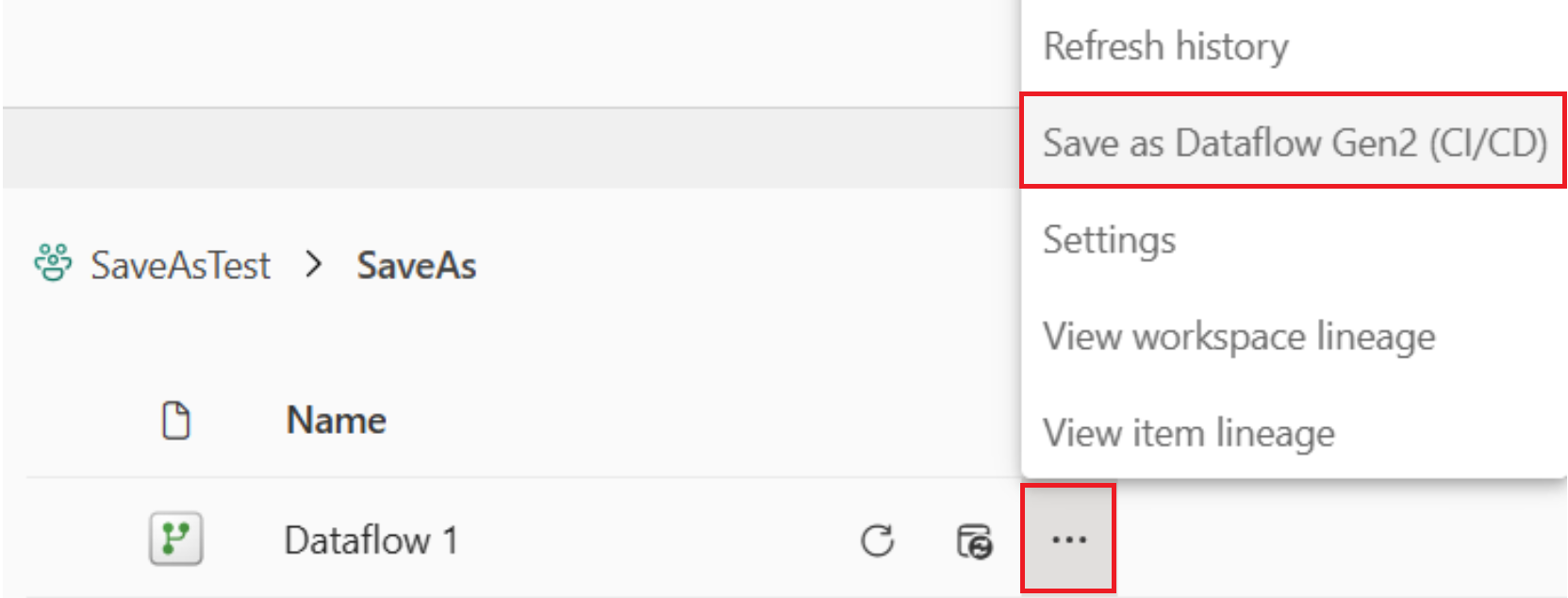
In your workspace, select the ellipsis (...) next to an existing dataflow, and select Save as Dataflow Gen2 in the context menu.
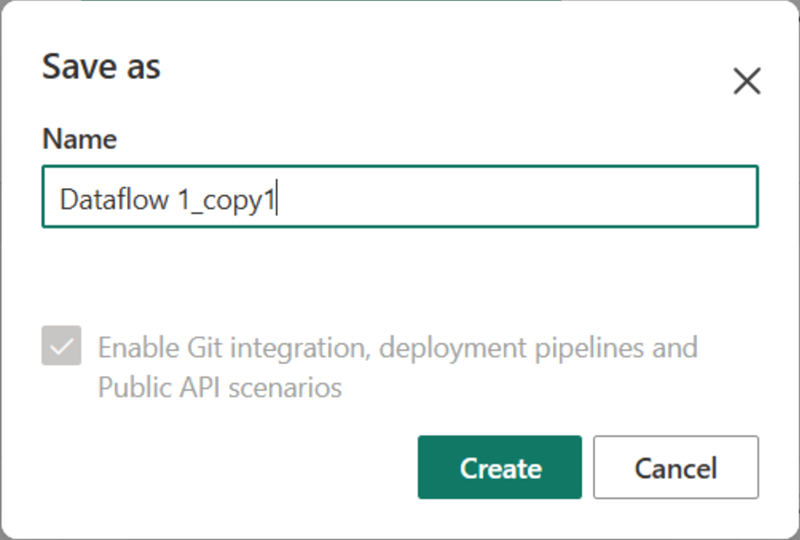
In the Save as dialog, optionally change the default Name, and then select Create.
The new Dataflow Gen2 (CI/CD) is opened, enabling you to review and make any changes.
Close the new Dataflow Gen2 (CI/CD), or select Save or Save and run.
Save a Dataflow Gen1 as a new Dataflow Gen2 (CI/CD)
You can also use the new Save As feature to save a Dataflow Gen1 to a new Dataflow Gen2 (CI/CD). To learn more, go to Migrate from Dataflow Gen1 to Dataflow Gen2.
To use the Save As feature:
In your workspace, select the ellipsis (...) next to an existing dataflow, and select Save as Dataflow Gen2 in the context menu.
In the Save as dialog, optionally change the default Name, and then select Create.
The new Dataflow Gen2 (CI/CD) is opened, enabling you to review and make any changes.
Close the new Dataflow Gen2 (CI/CD), or select Save or Save and run.
Tip
For bulk and auto-migrations, you can use the REST API.
Known limitations
These are the known limitations for the Save As feature:
- Scheduled refresh settings aren't copied by using Dataflow Gen2 Save As.
- Incremental refresh settings aren't copied by using Dataflow Gen1 Save As.
Dataflow Gen1 capabilities that aren't applicable in Dataflow Gen2 (CI/CD) and therefore aren't copied:
| Feature/Limitation | Dataflow Gen1 | Dataflow Gen2 |
|---|---|---|
| CDM folders | No | N/A |
| Bring your own lake (BYOL) | No1 | N/A |
| Compute Engine | No | N/A |
| DirectQuery | No2 | N/A |
| AI Insights | No | N/A |
| Endorsements | No | N/A |
1 Dataflow Gen2 uses OneLake. For more information, go to Govern Azure connections.
2 We recommend that you use data destinations and connect directly to the output tables. For more information, go to Dataflow Gen2 data destinations and managed settings.