Note
Access to this page requires authorization. You can try signing in or changing directories.
Access to this page requires authorization. You can try changing directories.
The local Model Context Protocol (MCP) server for Microsoft Fabric Real-Time Intelligence lets AI agents or AI applications interact with Real-Time Intelligence or Azure Data Explorer by providing tools through the MCP interface. MCP makes it easier for agents to query and analyze data.
MCP support for Real-Time Intelligence and Azure Data Explorer is a full open-source MCP server implementation for Real-Time Intelligence. Customers need to install, host, and manage the deployment.
Scenarios
The most common scenario for using the local MCP server for Real-Time Intelligence is to connect to it from an existing AI client, such as Cline, Claude, or GitHub Copilot. The client can then use all the available tools to access and interact with Real-Time Intelligence or Azure Data Explorer resources by using natural language.
For example, you can use GitHub Copilot agent mode with the Real-Time Intelligence MCP server to:
- List KQL databases or Azure Data Explorer clusters.
- Run natural language queries on Real-Time Intelligence eventhouses.
Architecture
The local MCP server for Real-Time Intelligence is at the core of the system. It acts as a bridge between AI agents and data sources. It runs locally and provides access to eventhouse, eventstream, Activator, and map resources.
Agents send requests to the Real-Time Intelligence MCP server. The MCP server translates the requests into Real-Time Intelligence operations.
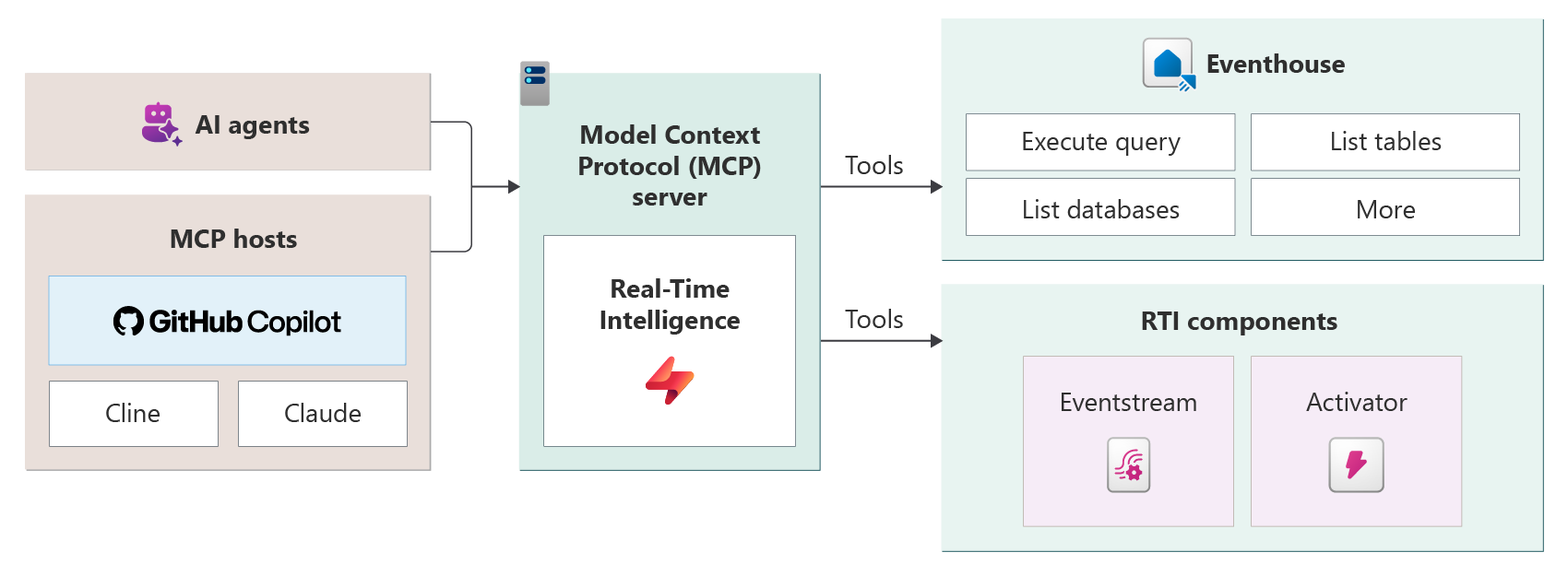
The architecture follows the MCP client/server model:
- MCP host: The application where AI interactions happen. For example, Visual Studio Code can interact with GitHub Copilot, Claude Desktop, or Cline. The host contains the AI model connection, a tool orchestrator, and one or more MCP clients.
- MCP server: A lightweight service that exposes specific capabilities as structured tools. The Real-Time Intelligence MCP server exposes tools like "execute query," "list databases," and "list tables" that translate into eventhouse operations.
Any application that supports MCP can connect to the local MCP server for Real-Time Intelligence by using the same protocol. This application can be an interactive product like GitHub Copilot or a programmatic AI agent framework.
Key features
Real-time data access: Retrieve data from KQL databases in seconds.
Natural language interfaces: Ask questions in plain English or other languages, and the system turns them into optimized queries. This translation of natural language to KQL is called the NL2KQL framework.
Schema discovery: Discover schema and metadata, so you can learn data structures dynamically.
Plug-and-play integration: Connect MCP clients like GitHub Copilot, Claude, and Cline to Real-Time Intelligence with minimal setup because of standardized APIs and discovery mechanisms.
Local language inference: Work with your data in your preferred language.
Supported Real-Time Intelligence components
Eventhouse: Run KQL queries against the KQL databases in your eventhouse back end. This unified interface lets AI agents query, reason, and act on real-time data.
Eventstreams: Query and manage eventstreams to analyze streaming data and get real-time insights. You can list the eventstreams in your workspace, get details and definitions, create new eventstreams, and more.
Activator: Interact with Fabric Activator to list Activator artifacts in your workspace, create trigger actions, and set up notifications.
Map: Query and manage map resources to visualize data and create geospatial insights. You can list maps in your workspace, visualize data on maps, get details and definitions, create new maps, and more.
You can also use the Fabric Real-Time Intelligence MCP server to run KQL queries against the clusters in your Azure Data Explorer back end.
Installation
To install the local MCP server for Real-Time Intelligence, follow the open-source instructions in the Real-Time Intelligence MCP server repository. The repository includes documentation on installation, configuration, and usage of the MCP server with Real-Time Intelligence.