Note
Access to this page requires authorization. You can try signing in or changing directories.
Access to this page requires authorization. You can try changing directories.
Volumes in Azure NetApp Files are the way you present high performance, cost-effective storage to your network attached storage (NAS) clients in the Azure cloud. Volumes act as independent file systems with their own capacity, file counts, ACLs, snapshots, and file system IDs. These qualities provide a way to separate datasets into individual secure tenants.
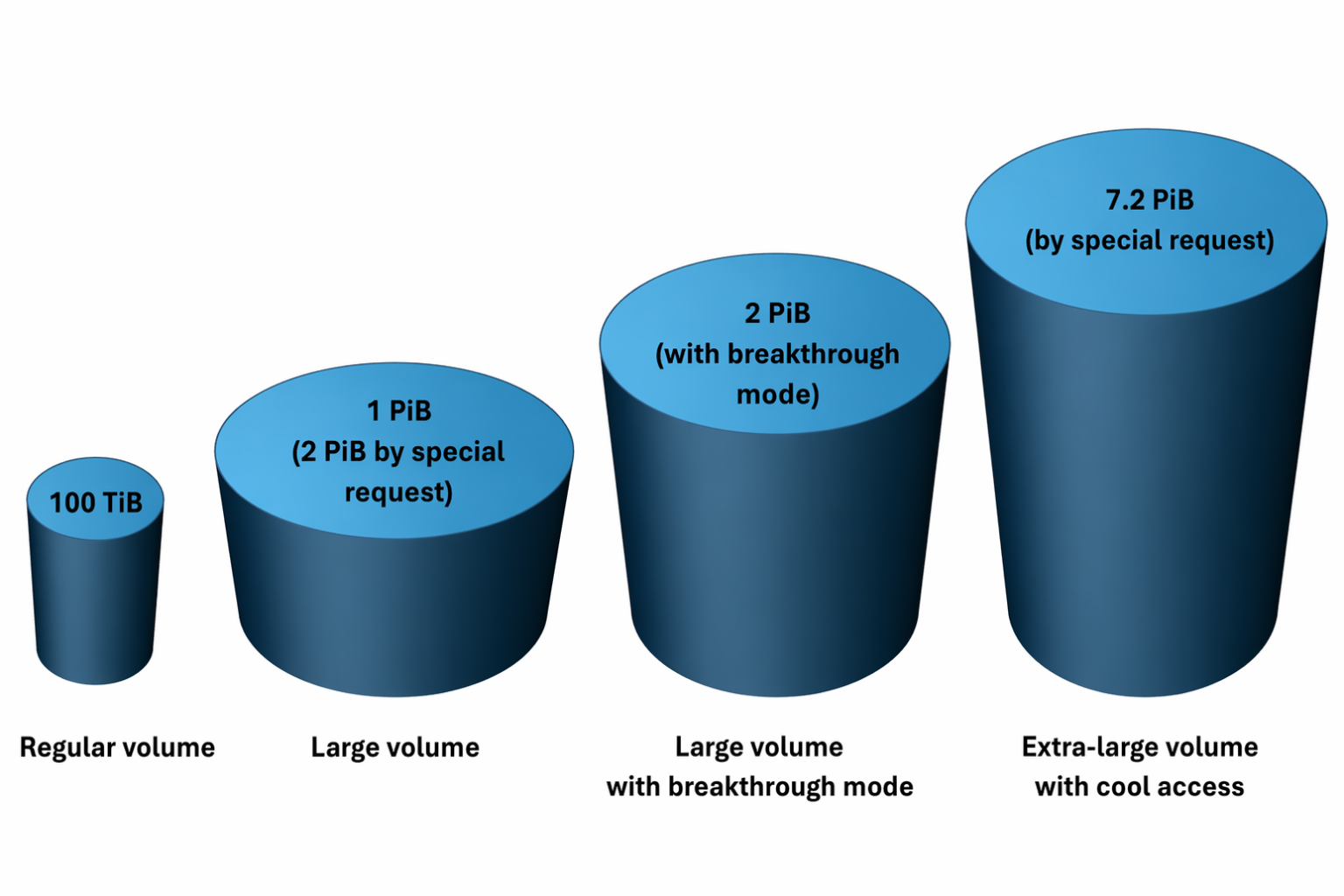
All resources in Azure NetApp files have limits. Regular volumes have the following limits:
| Limit type | Limits |
|---|---|
| Capacity |
|
| File count | 2,147,483,632 |
| Performance |
|
Large volumes have the following limits. With cool-access enabled, you can create volumes up to 7.2 PiB.
| Limit type | Values |
|---|---|
| Capacity | Large volumes
Large volumes with breakthrough mode
Extra-large volumes up to 7.2 PiB
|
| File count | 15,938,355,048 |
| Performance | The large volume performance limit is 12,800 MiB/s on all service levels. With breakthrough mode enabled, large volume performance is no longer constrained by a predefined limit. Depending on workload characteristics, throughput of up to 50 GiB/s on a single volume is achievable. |
Note
When creating Extra-large volumes (up to 7.2 PiB), you must enable cool access at the time of volume creation.
Important
Azure NetApp Files supports large volumes up to 1 PiB (or higher by special request), however large volume size increases are subject to regional and storage capacity availability. Actual capacity may vary by region. Customers planning volumes larger than 100 TiB are encouraged to work with their Microsoft account teams early to confirm availability and expected timeline. (This applies only to large volumes and is independent of service level. This does not apply to large volume breakthrough mode and extra-large volume with cool access)
Large volumes effect on performance
In many cases, a regular volume can handle the performance needs for a production workload, particularly when dealing with database workloads, general file shares, and Azure VMware Service or virtual desktop infrastructure (VDI) workloads. When workloads are metadata heavy or require scale beyond what a regular volume can handle, a large volume can increase performance needs with minimal cost impact.
Azure NetApp Files large volume breakthrough mode takes performance a step further by leveraging six storage endpoints on dedicated capacity to deliver high-performance, low-latency access with high concurrency data paths for large-scale workloads, like HPC/EDA, while simplifying network management and eliminating performance degradation. For example, the following graphs demonstrate that a large volume can deliver two to three times higher performance at scale than a regular volume, while breakthrough mode achieves up to eight times the performance of a regular volume.
For more information about performance tests, see Large volume performance benchmarks for Linux, Large volume breakthrough mode performance benchmarks for Linux, and Regular volume performance benchmarks for Linux.
For example, in benchmark tests using Flexible I/O Tester (FIO), a large volume achieved higher IOPS and throughput than a regular volume. A large volume with breakthrough mode had a much higher throughput.
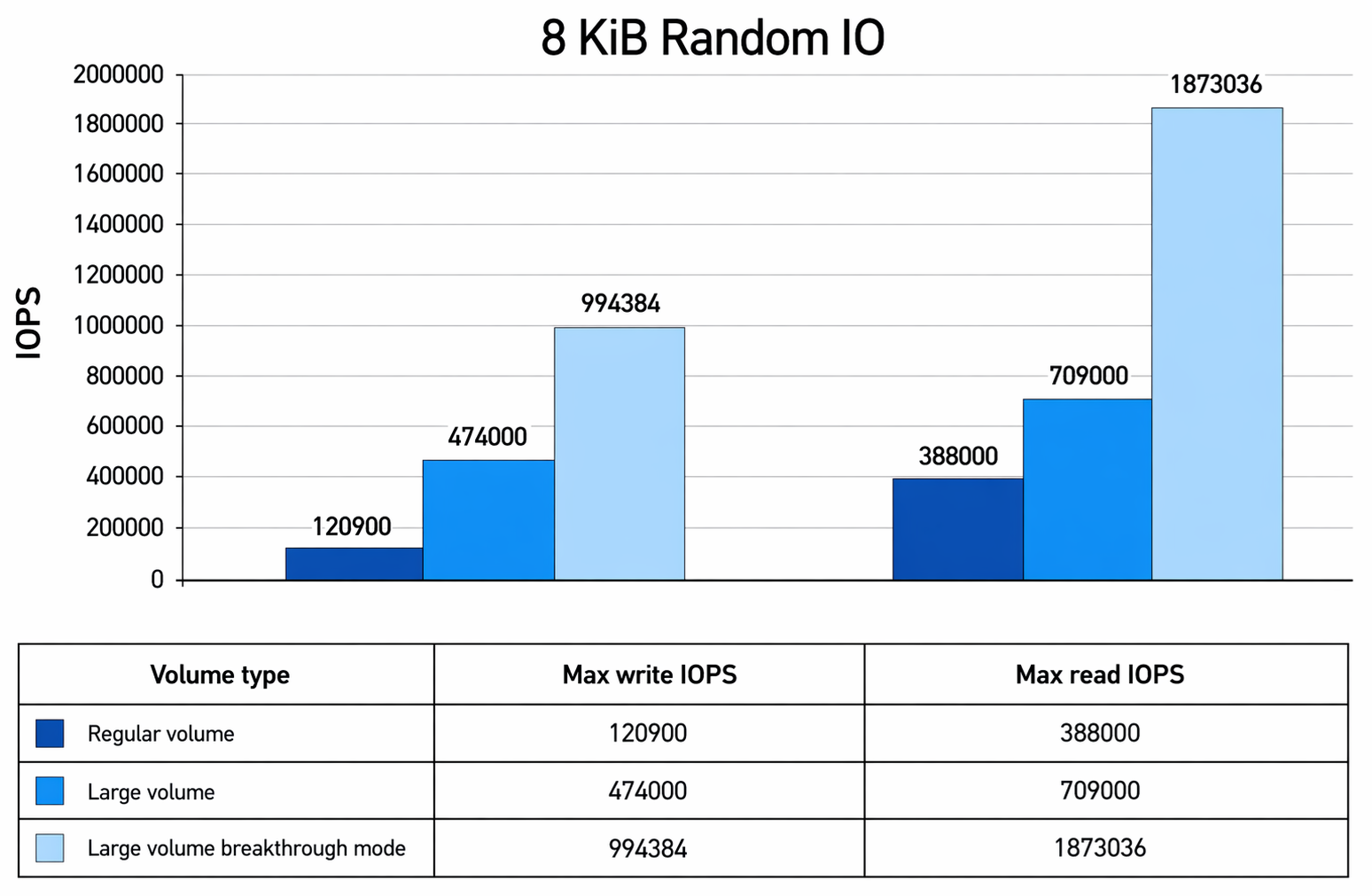
This table summarizes the relative IOPS performance improvements across volume types, highlighting the step-function gains achieved with large volumes and large volumes with breakthrough mode.
Baseline = Regular Volume
| Metrics | Large volume vs regular volume | Large volume breakthrough mode vs regular volume | Large volume breakthrough mode vs large volume |
|---|---|---|---|
| Write IOPS | 3.9x | 8.2x | 2.1x |
| Read IOPS | 1.8x | 4.8x | 2.6x |
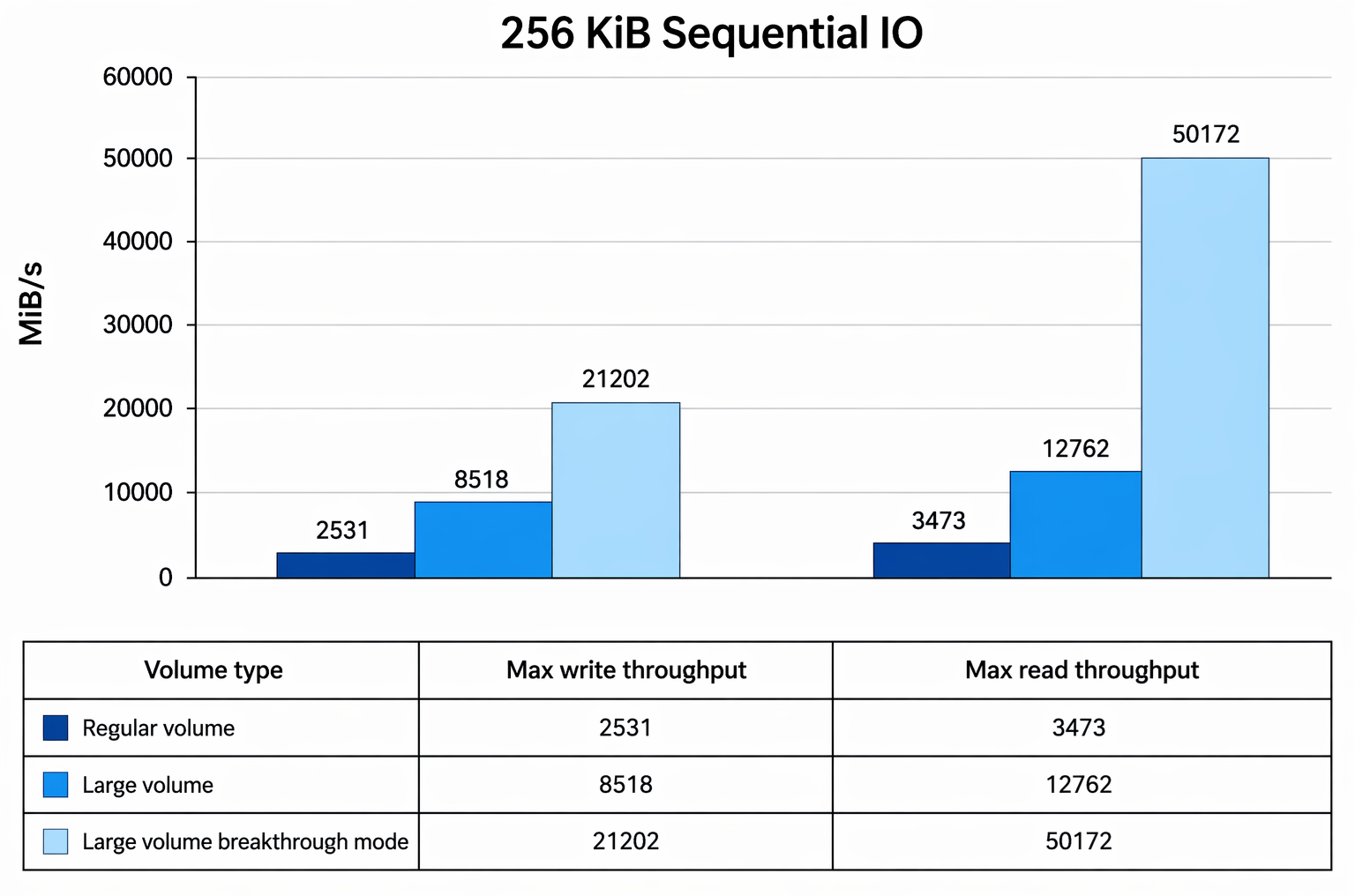
This table summarizes the relative throughput improvements across volume types, highlighting the step-function gains achieved with large volumes and large volumes with breakthrough mode.
Baseline = Regular Volume
| Metrics | Large volume vs regular volume | Large volume breakthrough mode vs regular volume | Large volume breakthrough mode vs large volume |
|---|---|---|---|
| Max Write Throughput | 3.4x | 8.4x | 2.5x |
| Max Read Throughput | 2.7x | 14.4x | 3.9x |
Work load types and use cases
Regular volumes can handle most workloads. Once capacity, file count, performance, or scale limits are reached, new volumes must be created. This condition adds unnecessary complexity to a solution.
Large volumes allow workloads to extend beyond the current limitations of regular volumes. The following table shows some examples of use cases for each volume type.
| Volume type | Primary use cases |
|---|---|
| Regular volumes |
|
| Large volumes |
|
| Large volumes breakthrough mode | All use cases involving large volumes, as well as those demanding throughput and concurrency beyond the capabilities of large volumes, such as HPC and EDA workloads. |