Note
Access to this page requires authorization. You can try signing in or changing directories.
Access to this page requires authorization. You can try changing directories.
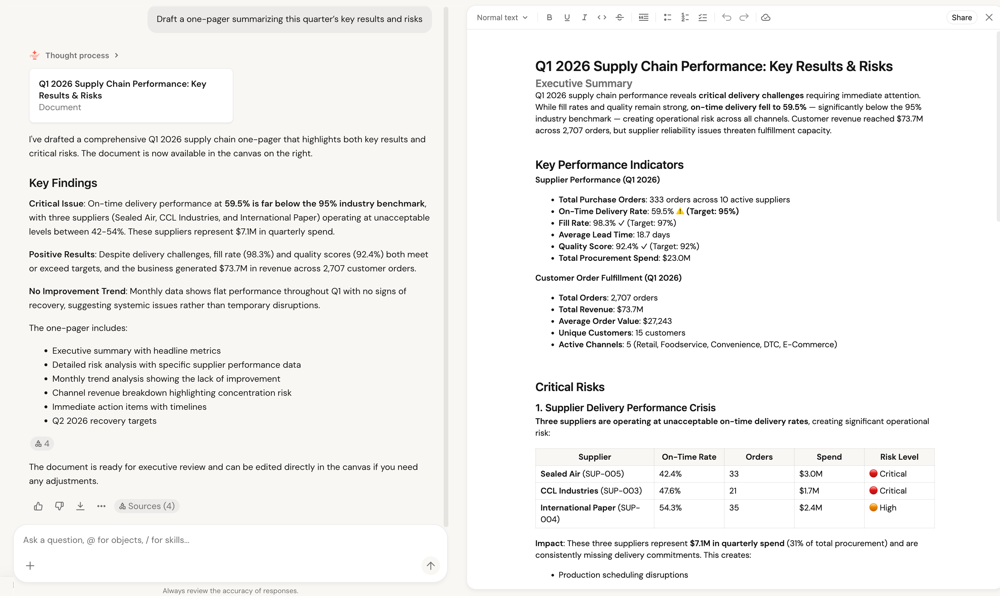
Documents in Genie One let you turn chat responses into shareable, editable documents without leaving the interface. You can ask Genie One to draft a document for you, or click Draft a document in chat. The document opens in a canvas pane alongside the conversation, where you can edit it and share it with others.
Create a document
To create a document from a chat conversation:
In a chat thread, ask Genie to draft a document. Alternatively, click Draft a document from the Genie One homepage. Genie might ask follow-up questions to help draft the document.
Tip
Tell Genie to do this for you:
Draft a one-pager summarizing this quarter's key results and risks.Genie One generates the document and opens it in a canvas pane. You can edit the content using the toolbar at the top of the pane.
View citations
Documents show citations that link content back to the data and sources Genie One used to generate it. Click a citation to see the underlying source, so you can verify where a figure or statement came from.
View version history
Documents keep a version history so you can track changes over time. In the document canvas pane, open the version history to review earlier versions of the document.
Open links in soft tabs
Documents support soft tabs. When you open a link in a document, it opens in a soft tab so you can view multiple links without leaving the document.
Share a document
To share a document with others:
- In the document canvas pane, click Share in the upper-right corner.
- In the sharing dialog, type to search for users, groups, or service principals to add.
- To share using a link, click
 Copy link.