Note
Access to this page requires authorization. You can try signing in or changing directories.
Access to this page requires authorization. You can try changing directories.
Azure Service Bus is a fully managed enterprise message broker. The Premium tier of Service Bus provides dedicated resource isolation at the CPU and memory level, so each messaging workload runs independently from other tenants. For more information about Service Bus, see What is Azure Service Bus?.
When your applications require predictable throughput, consistent latency, or support for large messages up to 100 MB, the Premium tier delivers the performance guarantees you need for production and mission-critical scenarios.
This article explains the technical differences between the Premium and Standard tiers, how messaging units and resource usage work, and how to get started with a Premium namespace. The following table highlights some key differences.
| Criteria | Premium | Standard |
|---|---|---|
| Throughput | High throughput | Variable throughput |
| Performance | Predictable performance | Variable latency |
| Pricing | Fixed pricing | Pay as you go variable pricing |
| Scale | Ability to scale workload up and down | N/A |
| Message size | Message size up to 100 MB. For more information, see Large message support. | Message size up to 256 KB |
Service Bus Premium Messaging provides resource isolation at the CPU and memory level so that each customer workload runs in isolation. This resource container is called a messaging unit. Each premium namespace is allocated at least one messaging unit. You can purchase 1, 2, 4, 8 or 16 messaging units for each Service Bus Premium namespace. A single workload or entity can span multiple messaging units and the number of messaging units can be changed at will. The result is predictable and repeatable performance for your Service Bus-based solution.
Premium messaging also delivers faster peak performance compared to the standard tier.
Premium messaging technical differences
The following sections discuss a few differences between premium and standard messaging tiers.
Express entities
Because Premium messaging runs in an isolated run-time environment, express entities aren't supported in premium namespaces. An express entity holds a message in memory temporarily before writing it to persistent storage. If you have code running under standard messaging and want to port it to the premium tier, ensure that the express entity feature is disabled.
Premium messaging resource usage
In general, any operation on an entity might cause CPU and memory usage. Here are some of these operations:
- Management operations such as Create, Retrieve, Update, and Delete (CRUD) operations on queues, topics, and subscriptions.
- Runtime operations (send and receive messages).
- Monitoring operations and alerts.
The additional CPU and memory usage isn't priced additionally though. For the premium messaging tier, there's a single price for the message unit.
The CPU and memory usage are tracked and displayed to you for the following reasons:
- Provide transparency into the system internals.
- Understand the capacity of resources purchased.
- Capacity planning that helps you decide to scale up/down.
How many messaging units are needed?
You specify the number of messaging units when provisioning an Azure Service Bus premium namespace. These messaging units are dedicated resources that are allocated to the namespace. When partitioning is enabled on the namespace, the messaging units are equally distributed across the partitions.
The number of messaging units allocated to the Service Bus premium namespace can be dynamically adjusted to factor in the change (increase or decrease) in workloads.
There are a few factors to take into consideration when deciding the number of messaging units for your architecture:
- Start with 1 or 2 messaging units allocated to your namespace, or 1 message unit per partition.
- Study the CPU usage metrics within the Resource usage metrics for your namespace.
- If CPU usage is below 20%, you might be able to scale down the number of messaging units allocated to your namespace.
- If CPU usage is above 70%, your application benefits from scaling up the number of messaging units allocated to your namespace.
To learn how to configure a Service Bus namespace to automatically scale (increase or decrease messaging units), see Automatically update messaging units.
Note
Scaling of the resources allocated to the namespace can be either preemptive or reactive.
Preemptive: If additional workload is expected (due to seasonality or trends), you can proceed to allocate more messaging units to the namespace before the workloads hit.
Reactive: If additional workloads are identified by studying the resource usage metrics, then additional resources can be allocated to the namespace to incorporate increasing demand.
The billing meters for Service Bus are hourly. When scaling up, you only pay for the additional resources for the hours that these were used.
Get started with premium messaging
Getting started with premium messaging is straightforward and the process is similar to that of standard messaging. Begin by creating a namespace in the Azure portal. Make sure you select Premium under Pricing tier. Select View full pricing details to see more information about each tier.
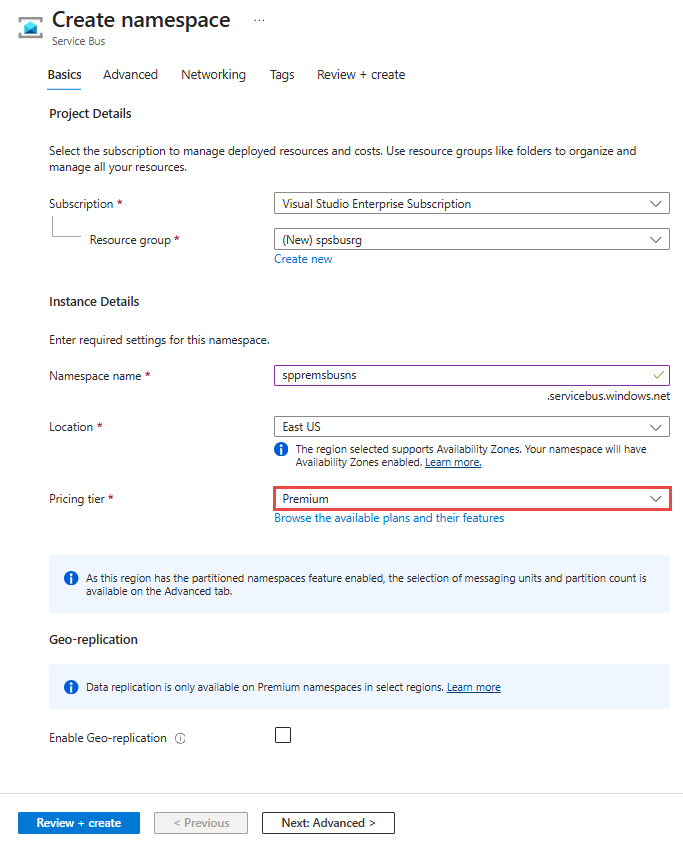
You can also create Premium namespaces using Azure Resource Manager templates.
Large messages support
Azure Service Bus premium tier namespaces support the ability to send large message payloads up to 100 MB. This feature is primarily targeted towards legacy workloads that used larger message payloads on other enterprise messaging brokers and are looking to seamlessly migrate to Azure Service Bus.
Here are some considerations when sending large messages on Azure Service Bus:
- Supported on Azure Service Bus premium tier namespaces only.
- Supported only when using the Advanced Message Queuing Protocol (AMQP) protocol. Not supported when using SBMP or HTTP protocols, in the premium tier, the maximum message size for SBMP and HTTP protocols is 1 MB.
- Supported when using Java Message Service (JMS) 2.0 client SDK and other language client SDKs.
- Sending large messages result in decreased throughput and increased latency.
- While 100-MB message payloads are supported, keep the message payloads as small as possible to ensure reliable performance from the Service Bus namespace.
- The max message size is enforced only for messages sent to the queue or topic. The size limit isn't enforced for the receive operation. It allows you to update the max message size for a given queue (or topic).
- Batching isn't supported.
Important
On 30 September 2026, we'll retire support of the SBMP protocol for Azure Service Bus, so you'll no longer be able to use this protocol after 30 September 2026. Migrate to the latest Azure Service Bus SDK libraries using the Advanced Message Queuing Protocol (AMQP), which offer critical security updates and improved capabilities, before that date.
For more information, see the support retirement announcement.
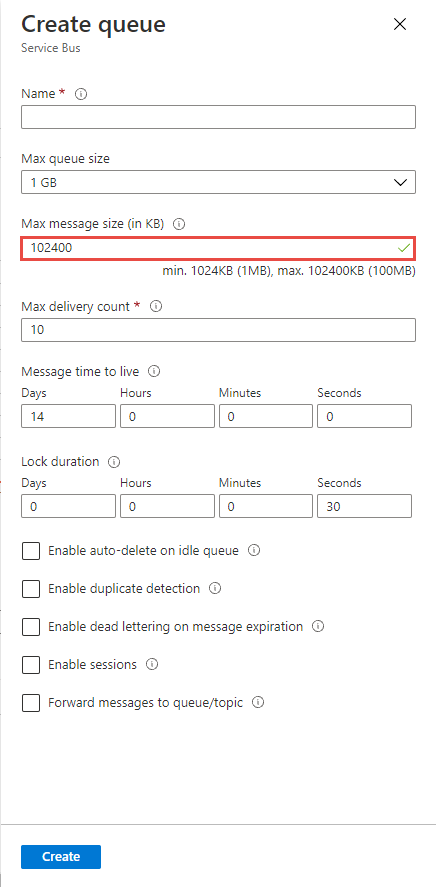
Enable large messages support for a new queue or topic
To enable support for large messages, set the max message size when creating a new queue or topic as shown in the following image:
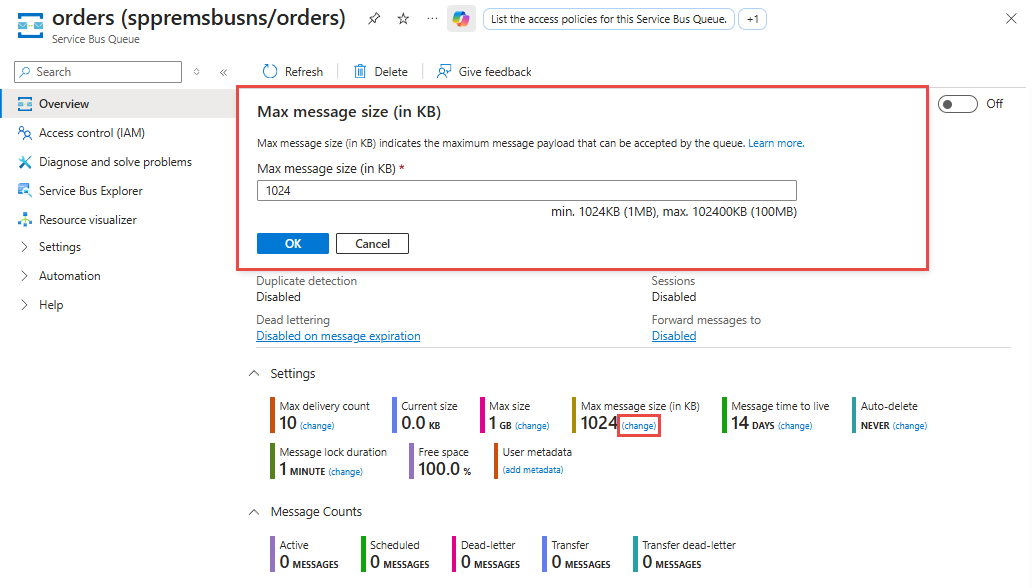
Enable large messages support for an existing queue or topic
You can also enable support for large messages for existing queues or topics by updating the Max message size on the Overview for that specific queue or topic as shown in the following image.
Network security in Service Bus Premium
The following network security features are available only in the premium tier. For details, see Network security.
Configuring IP firewall using the Azure portal is available only for the premium tier namespaces. However, you can configure IP firewall rules for other tiers using Azure Resource Manager templates, CLI, PowerShell, or REST API. For more information, see Configure IP firewall.
Encryption of data at rest in Service Bus
All Service Bus data is encrypted at rest using Microsoft-managed keys in both the Standard and Premium tiers. The Premium tier also supports customer-managed keys (CMK), which add a second layer of encryption on top of the Microsoft-managed key. With CMK, you can create, rotate, disable, and revoke access to the keys used for encrypting your data. Enabling customer-managed keys is a one-time setup process on your namespace. For more information, see Encrypting Azure Service Bus data at rest.
Partitioning in Service Bus
There are some differences between the standard and premium tiers when it comes to partitioning.
- Partitioning is available at entity creation for all queues and topics in basic or standard SKUs. A namespace can have both partitioned and nonpartitioned entities. Partitioning is available at namespace creation for the premium tier, and all queues and topics in that namespace are partitioned. Any previously migrated partitioned entities in premium namespaces continue to work as expected.
- When partitioning is enabled in the Basic or Standard SKUs, Service Bus creates 16 partitions. When partitioning is enabled in the premium tier, the number of partitions is specified during namespace creation.
For more information, see Partitioning in Service Bus.
High availability in Service Bus
Azure Service Bus spreads the risk of catastrophic failures of individual machines or even complete racks across clusters that span multiple failure domains within a datacenter and it implements transparent failure detection and failover mechanisms such that the service continues to operate within the assured service-levels and typically without noticeable interruptions when such failures occur. A premium namespace can have two or more messaging units and these messaging units are spread across multiple failure domains within a datacenter, supporting an all-active Service Bus cluster model.
For a Service Bus namespace, the outage risk is further spread across three physically separated facilities availability zones, and the service has enough capacity reserves to instantly cope with the complete, catastrophic loss of a datacenter. The all-active Azure Service Bus cluster model within a failure domain along with the availability zone support is superior to any on-premises message broker product in terms of resiliency against grave hardware failures and even catastrophic loss of entire datacenter facilities. Still, there might be grave situations with widespread physical destruction that even those measures can't sufficiently defend against.
Furthermore, the Geo-Replication feature is one of the options to insulate Azure Service Bus applications against outages and disasters, providing replication of both metadata (entities, configuration, properties) and data (message data and message property / state changes). The Geo-Replication feature ensures that the metadata and data of a namespace are continuously replicated from a primary region to one or more secondary regions.
- Queues, topics, subscriptions, filters.
- Data residing in the entities.
- All state changes and property changes executed against the messages within a namespace.
- Namespace configuration.
This feature allows promoting any secondary region to primary, at any time. Promoting a secondary repoints the name for the namespace to the selected secondary region, and switches the roles between the primary and secondary region. The promotion is nearly instantaneous once initiated.
For more information, see Azure Service Bus Geo-disaster recovery.
Java Message Service (JMS) support in Service Bus
The premium tier supports JMS 1.1 and JMS 2.0. For more information, see How to use JMS 2.0 with Azure Service Bus Premium.
The standard tier supports only JMS 1.1 subset focused on queues. For more information, see Use Java Message Service 1.1 with Azure Service Bus standard.