Note
Access to this page requires authorization. You can try signing in or changing directories.
Access to this page requires authorization. You can try changing directories.
This article describes advanced Virtual WAN designs that use spoke network virtual appliances to inspect north-south private traffic and internet-bound traffic.
Scenario overview
Note
All north-south inspection architectures in this document require using Option 2 from static routes guidance, where a static route is configured in a Virtual WAN route table with the next hop set to the hub virtual network connection, plus a matching next hop IP on the virtual network connection. Option 1 is not supported.
This document covers two specific design patterns:
- North-south branch-to-virtual-network via Shared Services, DMZ for internet egress: In this design, Virtual WAN routes private traffic that flows between branches and directly connected virtual networks to a spoke NVA that is dedicated to north-south traffic inspection. Internet-bound traffic from spoke virtual networks is routed directly to a separate spoke NVA that is dedicated to internet egress.
- Single spoke NVA for north-south and internet egress: This pattern is useful when you want to use a single NVA for centralized inspection of north-south traffic and internet egress, with Virtual WAN managing all routing. In this design pattern, no additional Virtual Network peerings or user-defined routes are needed.
Design Pattern 1: Direct peering between Workloads and DMZ for internet egress
In this option, workload virtual networks are directly peered to the DMZ virtual network for internet egress, and user-defined routes are applied on workload virtual networks to route internet traffic to the DMZ virtual network. Traffic between workload virtual networks and on-premises is inspected by the Shared Services NVA.
Network diagram
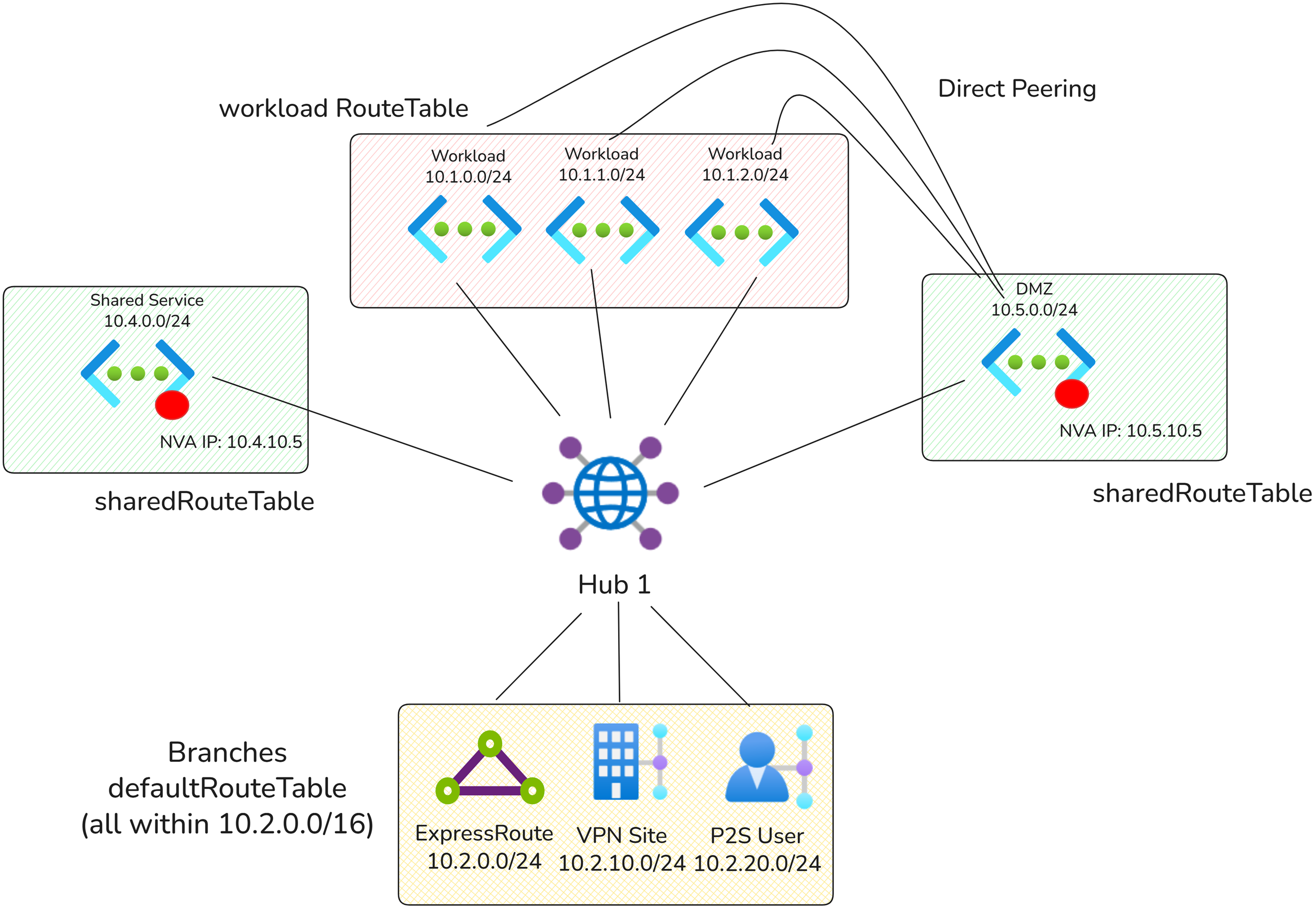
In the diagram above, there are a few special types of Virtual Networks:
- DMZ Virtual Network: Hosts the NVA used for internet egress.
- Shared Services Virtual Network: Hosts the NVA used for north-south traffic inspection.
- Workload Virtual Network: Any other virtual network connected to the Virtual WAN hub.
Traffic flows
The following sections explain how traffic is routed to indirect spokes and the Internet using Virtual WAN static routes.
| Source | Destination | Routing |
|---|---|---|
| Workload Virtual Network | Shared Services Virtual Network | Direct |
| Workload Virtual Network | Workload Virtual Network | Direct |
| Workload Virtual Network | Branches | Via Shared Services NVA |
| Workload Virtual Network | Internet | Via DMZ NVA (direct peering) |
| Branches | Shared Services Virtual Network | Direct |
| Branches | Workload Virtual Network | Via Shared Services NVA |
Virtual WAN Route Tables
The architecture needs three different Virtual WAN route tables because there are three connectivity patterns.
| Route Table Name | Associated Connections | Reasoning |
|---|---|---|
| defaultRouteTable | branches | Branches must use the defaultRouteTable to route workload virtual network traffic to the Shared Services NVA. |
| workloadRouteTable | Workload virtual networks | Used by workload virtual networks to route on-premises traffic to the Shared Services NVA. |
| sharedRouteTable | Shared Services and DMZ Virtual Networks | Used by the Shared Services and DMZ NVAs to route on-premises and workload virtual network traffic to the appropriate destination. |
Virtual WAN Routing configuration
| Connection | Associated route table | Propagated route table | Reasoning |
|---|---|---|---|
| Branches | defaultRouteTable | defaultRouteTable, dmzRouteTable | Branches must propagate to the DMZ route table so the DMZ NVA learns branch prefixes and can return north-south and internet-bound traffic correctly. Branches also propagate to the default route table for standard branch reachability. Branches do not propagate to virtual networks to ensure north-south traffic is inspected by the DMZ NVA. |
| Workload Virtual Networks | workloadRouteTable | workloadRouteTable, dmzRouteTable | Workload virtual networks must propagate to the DMZ route table so the DMZ NVA learns workload prefixes and can return virtual network traffic correctly. Workload virtual networks also propagate to the workload route table for workload-to-workload reachability. Workload VNets do not propagate to defaultRouteTable to ensure north-south traffic is inspected by the DMZ NVA. |
| DMZ Virtual Network | dmzRouteTable | dmzRouteTable, defaultRouteTable, workloadRouteTable | The DMZ virtual network must propagate to both the branch-facing and workload-facing route tables because the DMZ NVA is the centralized point for north-south traffic inspection and internet egress in this option. |
Static Routes
The following static routes are configured on the NVA virtual network connection directly.
Note
North-south inspection architecture requires overriding every on-premises prefix with a static route. The maximum number of static routes that can be configured is 550. This limit is not adjustable. This inspection architecture is not intended for large-scale deployments with a large on-premises route count.
Static routes configured on DMZ Virtual Network connection:
| Virtual Network connection | Address Prefix | Next hop IP address | Reasoning |
|---|---|---|---|
| DMZ | 10.1.0.0/16 | 10.4.0.5 | Used to send traffic destined for workload prefix ranges to the Shared Services NVA. Aggregate routes covering workload prefixes can be used, and Virtual WAN automatically routes traffic destined for virtual networks to the NVA. |
| DMZ | 10.2.0.0./24, 10.2.10.0/24, 10.2.20.0/24 | 10.4.0.5 | Used to send traffic destined for branch prefix ranges to the Shared Services NVA. In this case, specific static routes that provide a longest-prefix match (LPM) for each on-premises route are required to redirect traffic destined for on-premises networks to the Shared Services NVA. Using aggregate routes results in asymmetric routing. |
Static routes configured on Virtual WAN route tables:
| Route Table | Destination | Next Hop | Next Hop IP (configured on Virtual Network connection) | Reasoning |
|---|---|---|---|---|
| defaultRouteTable | 10.1.0.0/16 | Shared Services Virtual Network | 10.4.0.5 | Similar to routes on the Virtual Network connection, an aggregate range is sufficient to ensure branches route to workload VNets via the Shared Services NVA. |
| workloadRouteTable | 10.2.0.0./24, 10.2.10.0/24, 10.2.20.0/24 | Shared Services Virtual Network | 10.4.0.5 | Similar to routes on the Virtual Network connection, specific static routes that provide a longest-prefix match (LPM) for each on-premises route are required to redirect traffic destined for on-premises networks to the Shared Services NVA. Aggregate routes result in asymmetric routing. |
Additional workload virtual network configurations
In this design, Internet-bound traffic isn't routed via the Virtual WAN hub. Instead, it is routed directly from the workload virtual networks to the DMZ virtual network NVA for inspection. Add user-defined routes on the workload virtual networks to route internet traffic to the DMZ virtual network.
In the example above, workload virtual networks would need the following entry:
| Prefix | Next Hop IP address | Purpose |
|---|---|---|
| 0.0.0.0/0 | 10.5.10.5 | Route internet traffic for inspection |
Return traffic from the Internet is routed directly from the DMZ NVA to the workload virtual networks through Virtual Network peering.
Design Pattern 2: Utilize Virtual WAN routing to route traffic to DMZ
In this design pattern, workload virtual networks are not directly peered to the DMZ virtual network for internet egress. Instead, Virtual WAN routing is used to send internet traffic from workload virtual networks and on-premises to the DMZ virtual network NVA for inspection. Traffic between workload virtual networks and on-premises is also inspected by the DMZ NVA.
Traffic flows
The following sections explain how traffic is routed to indirect spokes and the Internet using Virtual WAN static routes.
| Source | Destination | Routing |
|---|---|---|
| Workload Virtual Network | Shared Services Virtual Network | Direct |
| Workload Virtual Network | Workload Virtual Network | Direct |
| Workload Virtual Network | Branches | Via DMZ NVA |
| Workload Virtual Network | Internet | Via DMZ NVA |
| Branches | Shared Services Virtual Network | Direct |
| Branches | Workload Virtual Network | Via DMZ NVA |
| Branches | Internet | Via DMZ NVA |
Network diagram
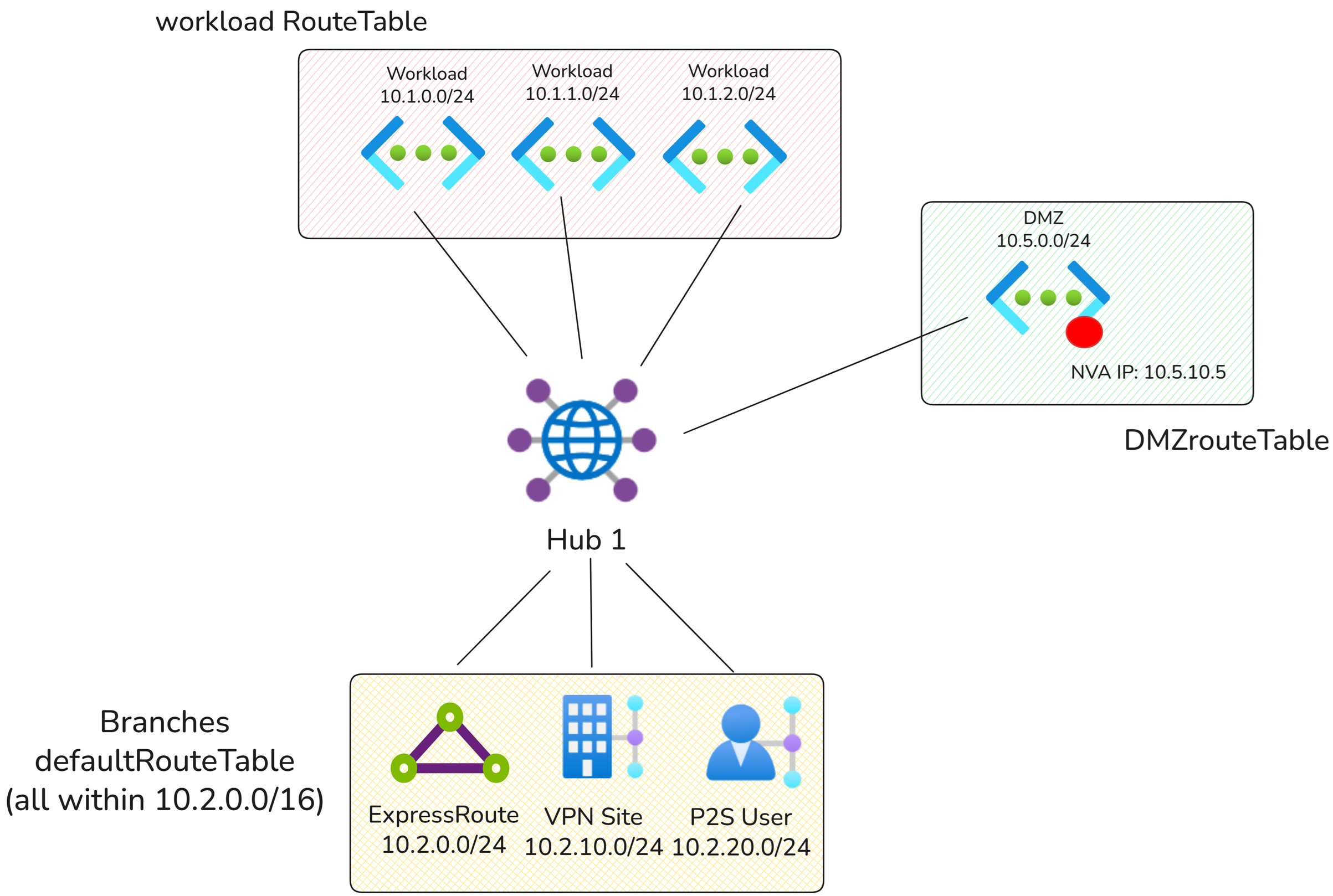
In the diagram above, there are two special types of Virtual Networks:
- DMZ Virtual Network: Hosts the NVA used for internet egress and north-south traffic inspection.
- Workload Virtual Network: Any other virtual network connected to the Virtual WAN hub.
Virtual WAN Route Tables
The architecture needs three different Virtual WAN route tables because there are three connectivity patterns.
| Route Table Name | Associated Connections | Reasoning |
|---|---|---|
| defaultRouteTable | Branches | Branches must use the defaultRouteTable to route workload virtual network and internet-bound traffic to the DMZ NVA. |
| workloadRouteTable | Workload virtual networks | Used by workload virtual networks to route on-premises traffic and internet-bound traffic to the DMZ NVA. |
| dmzRouteTable | DMZ Virtual Network | Used by the DMZ NVA to route on-premises and workload virtual network traffic to the appropriate destination. |
Virtual WAN Routing configuration
| Connection | Associated route table | Propagated route table | Reasoning |
|---|---|---|---|
| Branches | defaultRouteTable | defaultRouteTable, dmzRouteTable | Branches must propagate to the DMZ route table so the DMZ NVA learns branch prefixes and can return both private and internet-bound traffic correctly. Branches also propagate to the default route table for standard branch reachability. |
| Workload Virtual Networks | workloadRouteTable | workloadRouteTable, dmzRouteTable | Workload virtual networks must propagate to the DMZ route table so the DMZ NVA learns workload prefixes and can return both private and internet-bound traffic correctly. Workload virtual networks also propagate to the workload route table for workload-to-workload reachability. |
| DMZ Virtual Network | dmzRouteTable | dmzRouteTable, defaultRouteTable, workloadRouteTable | The DMZ virtual network must propagate to both the branch-facing and workload-facing route tables because the DMZ NVA is the centralized point for private traffic inspection and internet egress in this option. |
Static Routes
Note
North-south inspection architecture requires overriding every on-premises prefix with a static route. The maximum number of static routes that can be configured is 550. This limit is not adjustable. This inspection architecture is not intended for large-scale deployments with a large on-premises route count.
Static routes on Virtual Network connections:
| Virtual Network connection | Address Prefix | Next hop IP address | Reasoning |
|---|---|---|---|
| DMZ | 10.1.0.0/16 | 10.4.0.5 | Used to send traffic destined for workload prefix ranges to the DMZ NVA. In this case, aggregate routes covering workload ranges are used to ensure traffic destined for workload VNets is routed through the DMZ NVA. Virtual WAN ensures traffic destined for virtual networks is routed to the DMZ NVA. |
| DMZ | 10.2.0.0/24, 10.2.10.0/24, 10.2.20.0/24 | 10.4.0.5 | Used to send traffic destined for branch prefix ranges to the DMZ NVA. In this case, specific static routes that provide a longest-prefix match (LPM) for each on-premises route are required to redirect traffic destined for on-premises networks to the DMZ NVA. Aggregate routes result in asymmetric routing. |
| DMZ | 0.0.0.0/0 | 10.4.0.5 | Used to attract internet-bound traffic to the DMZ virtual network. |
Static routes configured on Virtual WAN route tables:
| Route Table | Destination | Next Hop | Next Hop IP (configured on Virtual Network connection) | Reasoning |
|---|---|---|---|---|
| defaultRouteTable | 10.1.0.0/16 | DMZ Virtual Network | 10.4.0.5 | Similar to routes on the Virtual Network connection, an aggregate range is sufficient to ensure branches route to workload VNets through the DMZ NVA. |
| defaultRouteTable | 0.0.0.0/0 | DMZ Virtual Network | 10.4.0.5 | Similar to routes on the Virtual Network connection, a default route is required to ensure branch-to-Internet traffic is routed via the DMZ NVA. |
| workloadRouteTable | 10.2.0.0/24, 10.2.10.0/24, 10.2.20.0/24 | DMZ Virtual Network | 10.4.0.5 | Similar to routes on the Virtual Network connection, specific static routes that are a longest-prefix (LPM) match for each on-premises route are required to redirect workload traffic destined to on-premises to the DMZ NVA. Aggregate routes result in asymmetric routing. |
| workloadRouteTable | 0.0.0.0/0 | DMZ Virtual Network | 10.4.0.5 | Similar to routes on the Virtual Network connection, a default route is required to ensure workload virtual network to internet traffic is routed through the DMZ NVA. |
Additional considerations
- If static routes overlap with the NVA virtual network address space, make sure the bypass next hop IP for workloads within this VNet setting is configured correctly on the virtual network connection. Toggling this setting to "true" is often required for scenarios where direct access to the management interface of the NVA is required. For more information, see Bypass next hop IP for workloads within this VNet.
- To ensure a connection learns the 0.0.0.0/0 route from Virtual WAN, ensure the Propagate default route or Enable Internet Security setting is set to On for the connection.