SQL Server | Other
Additional SQL Server features and topics not covered by specific categories
This browser is no longer supported.
Upgrade to Microsoft Edge to take advantage of the latest features, security updates, and technical support.
' cx='32' cy='32' r='32' /%3E%3Ctext x='50%25' y='55%25' dominant-baseline='middle' text-anchor='middle' fill='%23FFF' %3ECR%3C/text%3E%3C/svg%3E)
Trying to setup database with FILESTREAM. Using scripts that work great on previous versions of SQL Server (2016 to 2019). Getting strange error message when trying to add file to filegroup:
Msg 35221, Level 16, State 1, Line 2
Could not process the operation. Always On Availability Groups replica manager is disabled on this instance of SQL Server. Enable Always On Availability Groups, by using the SQL Server Configuration Manager. Then, restart the SQL Server service, and retry the currently operation. For information about how to enable and disable Always On Availability Groups, see SQL Server Books Online.
We do not use Always On, so of course it is disabled. Why would SQL require it to be enabled for SQL 2022?
Command being attempted is similar to this:
ALTER DATABASE MyDb ADD FILE ( Name = FILESTREAM_Files, FileName = 'C:\Databases\SQL2022\MyDb') To Filegroup My_FILESTREAM;
Also tried using SQL Mgmt Studio to do same and get same error.
Additional SQL Server features and topics not covered by specific categories
Answer accepted by question author

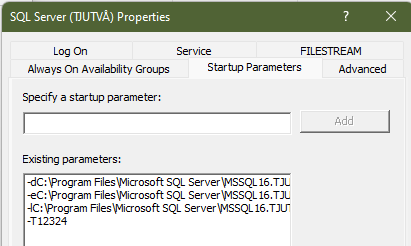
This is a known issue. Microsoft has said that this will be fixed in CU1 for SQL 2022. The fix is also available in the RTM version of SQL 2022, but it is hidden under a traceflag, TF12324.
Add it as a startup parameter in SSCM and restart SQL Server:
' cx='32' cy='32' r='32' /%3E%3Ctext x='50%25' y='55%25' dominant-baseline='middle' text-anchor='middle' fill='%23FFF' %3EY%3C/text%3E%3C/svg%3E)
Does anyone know if this is fixed in 2023? Came across the error when I was working with SQL Express 2022 installation... added the flag and it's fine. But was wondering if the cumulative updates solved the issue?

@Øyeblikk, the issue is fixed as of SQL Server 2022 CU1 (released in February 2023). I suggest you keep your instance patched with the latest SQL Server 2022 cumulative update (CU9 as of this writing).
Thanks! I have installed the latest update and can confirm all is ok!
' cx='32' cy='32' r='32' /%3E%3Ctext x='50%25' y='55%25' dominant-baseline='middle' text-anchor='middle' fill='%23FFF' %3EM%3C/text%3E%3C/svg%3E)
Still does not work with SQL Server 2022 Web Edition (16.0.1110.1 - January 2024)
setting the traceflag parameter -T12324 (not use TF ) worked
Still does not work with SQL Server 2022 Web Edition (16.0.1110.1 - January 2024)
Of course, you have SQL 2022 RTM + GDR. If you don't keep your system updated, you don't fixes. To get the fix without the trace flag, you need to install a Cumulative Update. You can get the most recent Cumulative Update here.
' cx='32' cy='32' r='32' /%3E%3Ctext x='50%25' y='55%25' dominant-baseline='middle' text-anchor='middle' fill='%23FFF' %3EJ%3C/text%3E%3C/svg%3E)
Hi,
Facing same issue with SQL 2022. Adding TF12324 as startup parameter is not working, the SQL Server process doesn't start after adding this flag.
When the CU1 for SQL 2022 will be available?
Thanks,
Jitendra
Facing same issue with SQL 2022. Adding TF12324 as startup parameter is not working, the SQL Server process doesn't start after adding this flag.
Can you share the SQL Server error log?
When the CU1 for SQL 2022 will be available?
I think Microsoft has said that for the first 12 months after release, we can expect a CU every month. RTM was announced Nov 16, so...
But there is Christmas and New Year, so we may have to wait a week or two into January.
Jitendra,
Note that the actual trace flag should be added as -T12324 (as shown in accepted answer screenshot) and NOT as TF12324. That may be your problem.
' cx='32' cy='32' r='32' /%3E%3Ctext x='50%25' y='55%25' dominant-baseline='middle' text-anchor='middle' fill='%23FFF' %3ES%3C/text%3E%3C/svg%3E)
Just want to mention that adding this flag no loner works. I was just setting up a test machine with SQL Server Express 2022 for Full Text Search and hit the error, tried to add the trace flag and BOOOM! SQL Server services will NOT EVEN START. The flag kills it and so now there is no fix at all, no way to use 2022 Express because MS regressions seem to have let this one slip. Express 2022 can not be used for FTS because of the HADR flag. Not good. Going to find an earlier SQL Server version installer ... tempted to go back to Oracle (come on team, what has happened to you over there?)
What does SELECT @@version report? Rather than piggybacking on an old thread, it would be more useful if you asked a new question, describing your problem from start to end.
By the way, you find the answer here: https://learn.microsoft.com/en-us/sql/sql-server/editions-and-components-of-sql-server-2022?view=sql-server-ver16#programmability.
Full-text search is not supported by Express Edition. (And it has no relation to FILESTREAM.)
' cx='32' cy='32' r='32' /%3E%3Ctext x='50%25' y='55%25' dominant-baseline='middle' text-anchor='middle' fill='%23FFF' %3EGA%3C/text%3E%3C/svg%3E)
"-T12324", not "TF12324" or "-TF12324"