Azure SQL Database
An Azure relational database service.
This browser is no longer supported.
Upgrade to Microsoft Edge to take advantage of the latest features, security updates, and technical support.
' cx='32' cy='32' r='32' /%3E%3Ctext x='50%25' y='55%25' dominant-baseline='middle' text-anchor='middle' fill='%23FFF' %3ER%3C/text%3E%3C/svg%3E)
Hi
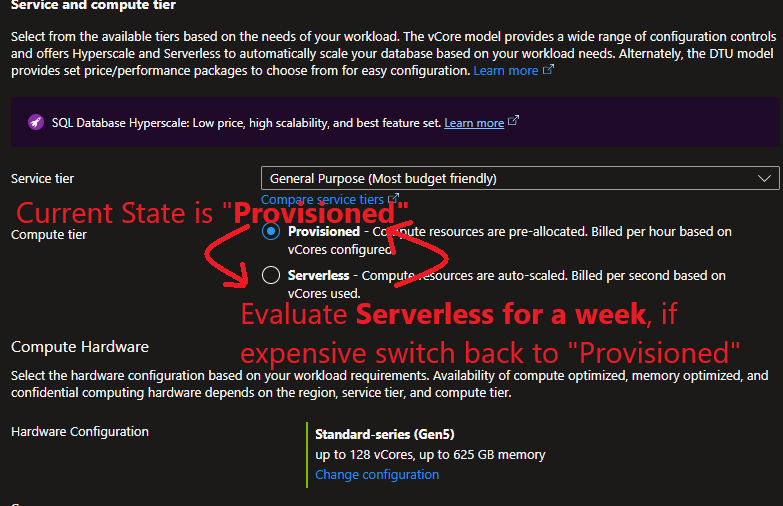
Can we switch Azure SQL from "Provisioned" to "Serverless" and back to "Provisioned" without any data loss / minimal downtime? Wanted to observe how serverless works for a week. Data should never be lost while switching the mode (NOT a transactional data). Its more of nightly refresh and nothing much happening during day time. Its a retail dataWH.
Currently im connecting to the below Azure SQL which is a provisioned instance. We are scaling up or down per our needs / work load and paying $X.
sql-xxxx-xxx-xxx-dev.database.windows.net
Nightly process runs at higher cores and then scales back to the lowest 2 core.
When someone queries tables, joins during day time, it takes 10-30 mins or so depending on the table size.
I'm wondering if i switch to serverless i would save money even if billed by seconds since nightly process runs 1hr and not much of querying every day during day time. i would like to test that.

Yes, you can switch an Azure SQL Database from "Provisioned" to "Serverless" and back to "Provisioned" without any data loss and with minimal downtime. This is particularly feasible for your scenario since you mentioned that your data warehouse primarily experiences activity during the nightly refresh, with minimal querying during the day.
To move a database between compute tiers, you can use either PowerShell, Azure CLI, or T-SQL commands. Here are the steps you would typically follow:
   ALTER DATABASE yourDatabaseName
   MODIFY ( SERVICE_OBJECTIVE = 'YourServiceObjective') ;
YourServiceObjective with the appropriate serverless service objective. ALTER DATABASE yourDatabaseName
MODIFY ( SERVICE_OBJECTIVE = 'YourProvisionedServiceObjective') ;
YourProvisionedServiceObjective with the desired service objective for the provisioned tier.During these transitions, Azure ensures that your data remains intact. However, it's advisable to perform these operations during off-peak hours to minimize any potential impact on performance. Additionally, you can monitor the database's performance and costs during your testing period to determine if the serverless model meets your needs better than the provisioned model.
References:

Yes, you can switch forth and back between provisioned and serverless.
I am not sure that serverless fits your bill, though. Serverless is useful for a test or dev environment which is only used occasionally. It sounds like in your case, the database is in use throughout the day, if only sporadically. But you need to pay for the time the database is loaded on the server, even if no queries are running.
It will be automatically paused and unloaded after some time. But here is an important thing: When you want to perform something on the database, you will have to wait until the database is loaded back on a server.
But certainly you can try. There is a way back if serverless does not fit you.
' cx='32' cy='32' r='32' /%3E%3Ctext x='50%25' y='55%25' dominant-baseline='middle' text-anchor='middle' fill='%23FFF' %3EVP%3C/text%3E%3C/svg%3E)
Hi @**RJ
**Thank you for reaching out on Microsoft Q&A. We’ve reviewed your question, and here are a few practical steps that may help you address the issue:
Action Plan to Mitigate the Issue (Switching Azure SQL Provisioned ↔ Serverless)
Pick the Right Window for the Change
Choose a quiet period—ideally when no nightly jobs or analytical queries are running. This keeps any momentary blip from affecting users.
Confirm There Are No Active Connections
Before switching tiers, make sure:
This avoids unnecessary delays or failed transitions.
Apply the Tier Change (Provisioned → Serverless or Back)
Run the ALTER DATABASE command or do it through the Azure Portal. This operation is safe—Azure keeps your data intact—so you just need to focus on timing.
Monitor the Database Right After the Transition
Give the database a quick health check:
If something feels off, switching back is simple.
Enable or Review Your Retry Logic
Even though downtime is tiny, apps can still see a brief disconnect. Make sure your application handles reconnect gracefully (even a lightweight retry loop is enough).
Track Performance and Cost for a Week
Since your goal is to observe cost vs. performance:
This will give you a clear picture of whether serverless is worth keeping long‑term.
Switch Back to Provisioned if Needed
If your test doesn’t meet your expectations, simply revert. The process is the same and just as safe.
References -
Serverless compute tier - Azure SQL Database | Microsoft Learn