Note
Access to this page requires authorization. You can try signing in or changing directories.
Access to this page requires authorization. You can try changing directories.
Many Azure regions provide availability zones, which are separated groups of datacenters within a region. Availability zones are close enough to have low-latency connections to other availability zones. They're connected by a high-performance network with a round-trip latency of less than 2 ms. However, availability zones are far enough apart to reduce the likelihood that local outages or weather affect more than one availability zone. Each availability zone has independent power, cooling, and networking infrastructure. They're designed so that if one zone experiences an outage, the remaining zones support regional services, capacity, and high availability. For more information, see Azure Availability Zones.
You can configure Azure Data Explorer clusters to use availability zones in supported regions. By using availability zones, a cluster can better withstand the failure of a single datacenter in a region to support business continuity scenarios.
You can configure availability zones when creating a cluster in the Azure portal or programmatically by using one of the following methods:
- REST API
- C# SDK
- Python SDK
- PowerShell
- ARM template
Important
- After you configure a cluster with availability zones, you can't change the cluster to not use availability zones.
- Not all regions support multiple zones. Therefore, you can't set up clusters in these regions to use availability zones.
- Using availability zones incurs extra costs for storage.
Note
- Before you proceed, make sure you're familiar with the Migration process and considerations.
- You can also use these steps to change the zones of an existing cluster that uses availability zones.
In this article, you learn about:
Prerequisites
Make sure your cluster is in a region where multiple availability zones are supported.
To migrate a cluster to support availability zones, you need a cluster that you deployed without availability zone support.
To change the zones of a cluster, you need a cluster that is configured with availability zones.
For REST API, familiarize yourself with Manage Azure resources by using the REST API.
For other programmatic methods, see Prerequisites.
Get the list of availability zones for your cluster's region
You can get a list of availability zones for your cluster in the following ways:
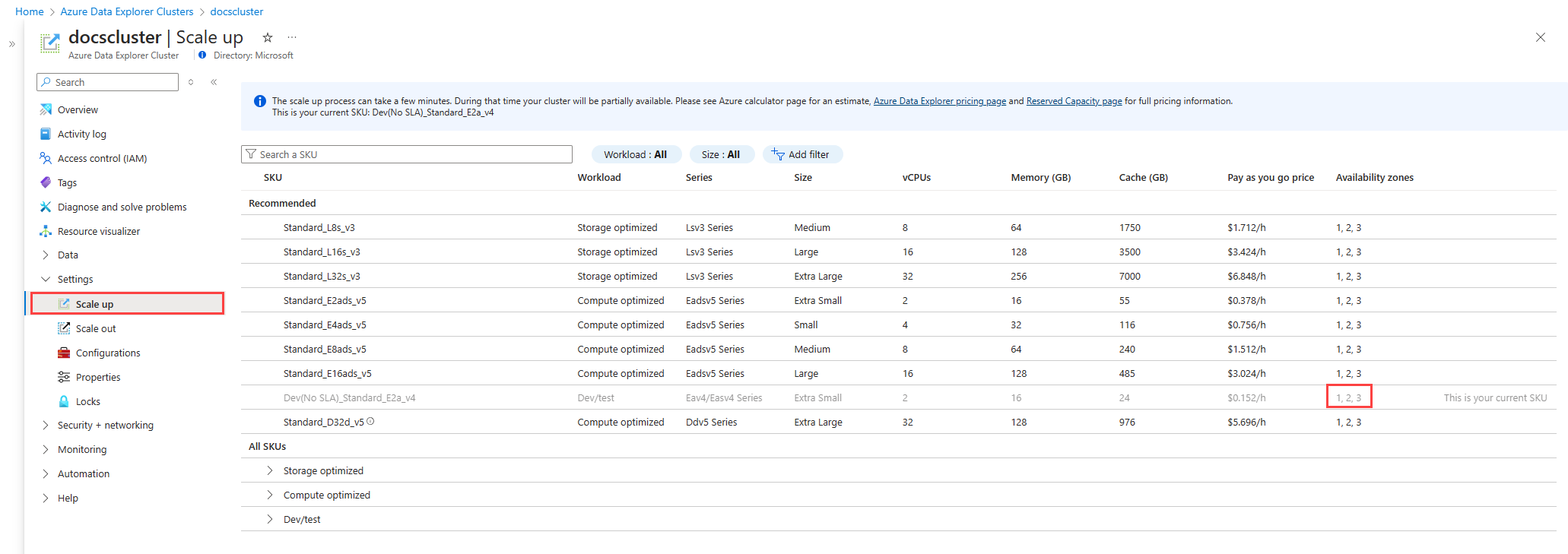
In the Azure portal, go to your cluster's Overview page.
Under Settings, select Scale up.
In the row for your cluster, the availability zones appear in the Availability zones column.
Configure your cluster to support availability zones
To add availability zones to an existing cluster, update the cluster zones attribute with a list of the target availability zones. Follow the instructions for your preferred method, using the information in the following table:
| Parameter | Value |
|---|---|
subscriptionId |
The subscription ID of the cluster |
resourceGroupName |
The resource group name of the cluster |
clusterName |
The name of the cluster |
apiVersion |
2023-05-02 or later |
Follow the instructions on how to deploy a template.
Make the REST API call to the following endpoint where you replace the parameters with your values:
PUT https://management.azure.com/subscriptions/{subscriptionId}/resourceGroups/{resourceGroupName}/providers/Microsoft.Kusto/clusters/{clusterName}?api-version={apiVersion}Specify your availability zones in the request body. For example, to configure the cluster to use availability zones 1, 2, and 3, set the body as follows:
{ "zones": [ "{zone1}", "{zone2}", "{zone3}" ] }
During the migration, the following message appears in the Azure portal, on the cluster's overview page. The message is removed after the migration completes.
Zonality change for the storage of this cluster is in progress. Update time may vary depending on the amount of data.
Architecture of clusters with availability zones
When you configure availability zones, the cluster deploys resources as follows:
Compute layer: Azure Data Explorer is a distributed computing platform that has two or more nodes. If you configure availability zones, the cluster distributes compute nodes across the defined availability zones for maximum intra-region resiliency. A zone failure might degrade cluster performance, until the failed compute resources are redeployed in the surviving zones. Configure the maximum available zones in a region.
Note
- In some cases, due to compute capacity limitations, only partial availability zones are available for the compute layer.
- A cluster's compute layer uses a best effort approach to evenly spread instances across selected zones.
Persistent storage layer: Clusters use Azure Storage as their durable persistence layer. If you configure availability zones, the cluster enables ZRS, placing three storage replicas across multiple availability zones for maximum intra-region resiliency.
Note
- ZRS incurs an extra cost.
- When you don't configure availability zones, storage resources use the default setting of Locally Redundant Storage (LRS), placing all three replicas in a single zone.
Migration process and considerations
When you configure an existing cluster that you deployed without any availability zones to support availability zones, the migration process performs the following steps:
Distributes compute resources across the defined availability zones
The process of redistributing compute resources involves a preparation stage in which the zonal compute resources cache is warmed. During the preparation stage, the existing cluster's compute resources continue to function, ensuring uninterrupted service. This preparation phase can take up to tens of minutes. The transition to the new compute resources only occurs once they're fully prepared and operational. This parallel processing approach ensures a relatively seamless experience, with only minimal service disruption during the switchover process, typically lasting between one to three minutes. However, query performance might be affected during the SKU migration. The degree of impact can vary depending on specific usage patterns.
Migrates historical persistent storage data to ZRS
The migration process depends on regional support for the transition from LRS to ZRS storage, and the available storage accounts capacity in the selected zones. The transfer of historical data can be a time-consuming process, potentially taking several hours or even extending over to weeks.
Writes all new data to ZRS
After you initiate the request for migration to availability zones, the system replicates and stores all new data in the ZRS configuration.
Note
- Following the migration request, there might be a delay of up to several minutes before all new data begins to be written in the ZRS configuration.
- If a cluster has streaming ingestion, then the recycling of new data to be written as ZRS data can take up to 30 days.
Updates zone status
Once the migration request to availability zones is completed, the system updates the zone status to reflect the supported zones. If the zone status is Zonal Inconsistency, it indicates that some compute or storage resources failed to migrate and aren't zonal. This condition generally occurs when there's insufficient zonal capacity available for some resources. In such cases, retry the migration later when capacity is available.
Migration considerations
Capacity constraints might prevent a successful migration request. For a successful migration, sufficient compute and storage capacity must support the migration. If capacity limitations exist, you receive an error message indicating the issue.