Note
Access to this page requires authorization. You can try signing in or changing directories.
Access to this page requires authorization. You can try changing directories.
Use Microsoft Defender for open-source relational databases to detect anomalous activity on Azure Database for PostgreSQL and Azure Database for MySQL. This article explains the prerequisites and the steps to enable the plan in Azure.
Microsoft Defender for Cloud detects anomalous activities indicating unusual and potentially harmful attempts to access or exploit databases for the following services:
To get alerts from this Microsoft Defender plan, enable Defender for open-source relational databases in Azure by following these steps.
Learn more about this Microsoft Defender plan in Overview of Microsoft Defender for open-source relational databases.
Prerequisites
Before you enable Defender for open-source relational databases, make sure you meet the following requirements:
You need a Microsoft Azure subscription. If you don't have one, sign up for a free Azure subscription.
You must enable Microsoft Defender for Cloud on your Azure subscription. For instructions, see Enable Defender for Cloud.
(Optional) Connect your non-Azure machines. For steps, see Onboard non-Azure machines.
Enable Defender for open-source relational databases on your Azure subscription
To enable Defender for open-source relational databases on your Azure subscription:
Sign in to the Azure portal.
Search for and select Azure Database for MySQL servers or Azure Database for PostgreSQL servers.
Select the relevant database server.
Expand the Security menu.
Select Microsoft Defender for Cloud.
If Defender for open-source relational databases isn't enabled, select Enable Microsoft Defender for [Database type] (for example, "Microsoft Defender for MySQL").
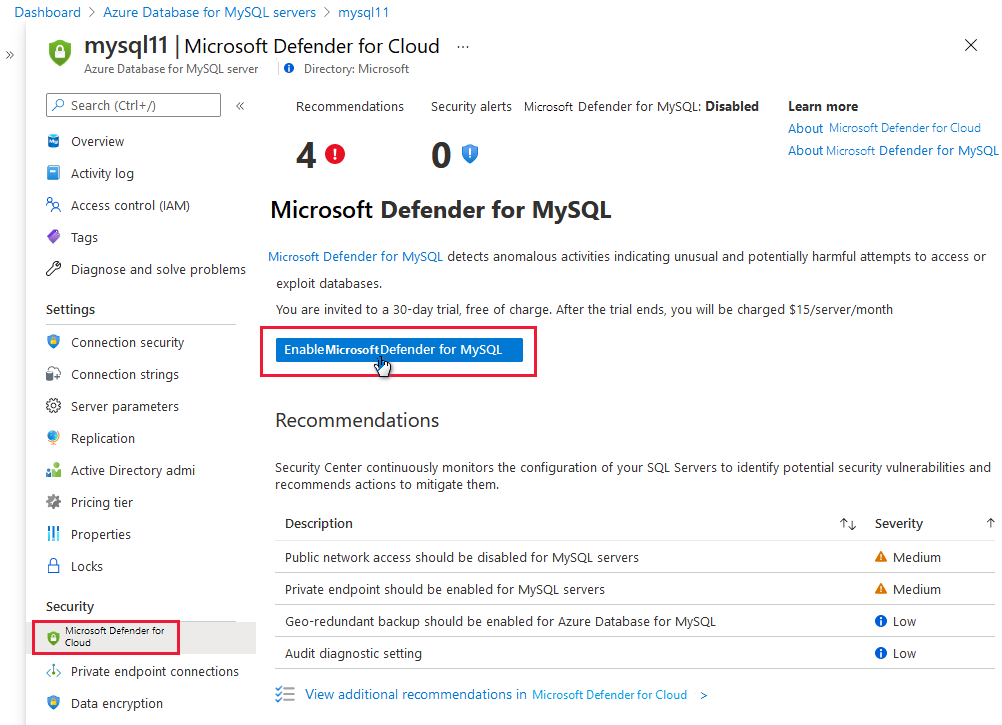
Tip
This page in the portal is the same for PostgreSQL and MySQL.
Select Save.
