Note
Access to this page requires authorization. You can try signing in or changing directories.
Access to this page requires authorization. You can try changing directories.
Note
The Vulnerability Management section in the Microsoft Defender portal is now located under Exposure management. With this change, you can now consume and manage security exposure data and vulnerability data in a unified location, to enhance your existing Vulnerability Management features. Learn more.
These changes are relevant for Preview customers (Microsoft Defender XDR + Microsoft Defender for Identity preview option).
This article explains how to sign up for the Microsoft Defender Vulnerability Management trial, the required roles, and how to extend or end your trial. The trial gives you access to real-time asset discovery, risk-based assessment, and built-in remediation tools for up to 90 days.
To start your trial, we recommend working with a Microsoft reseller. If you're not already working with a reseller, see Microsoft Security partners.
How to sign up for the Defender Vulnerability Management trial
Note
These steps apply only to customers with access to the Microsoft Defender portal.
If you don't have portal access, see the Microsoft Defender Vulnerability Management Standalone trial.
If you're a Microsoft Defender for Cloud customer, see Vulnerability Management capabilities for servers for details on the capabilities available to your organization.
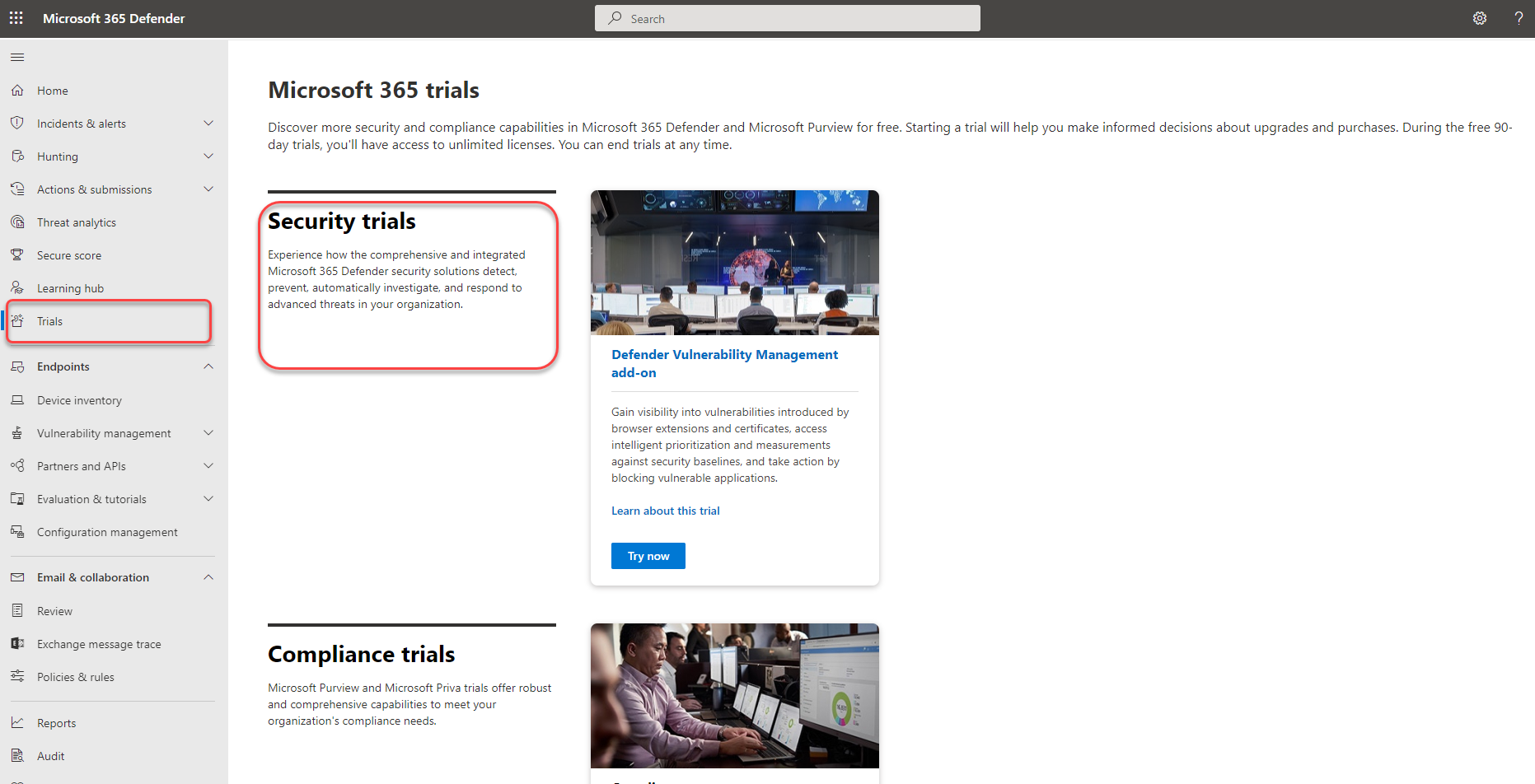
To sign up for the Defender Vulnerability Management trial, you can go directly to the Microsoft 365 trials hub page or by selecting Trials on the left navigation from the Microsoft Defender portal.
Once you've reached the Microsoft 365 trials hub:
- If you have Defender for Endpoint Plan 2, find the Defender Vulnerability Management add-on card and select Try now.
- If you're a new customer or an existing Defender for Endpoint P1 or Microsoft 365 E3 customer, choose the Defender Vulnerability Management card and select Try now.
- Review the information about what's included in the trial, then select Begin trial.
Your trial will be effective immediately:
- The Defender Vulnerability Management add-on trial lasts for 90 days.
- The Defender Vulnerability Management Standalone trial lasts for 90 days.
It can take up to six hours for all vulnerability management features to appear in your left navigation. Sign out and sign back in to see the updates.
To make the most of your trial, see Trial user guide: Microsoft Defender Vulnerability Management
Required roles for starting the trial
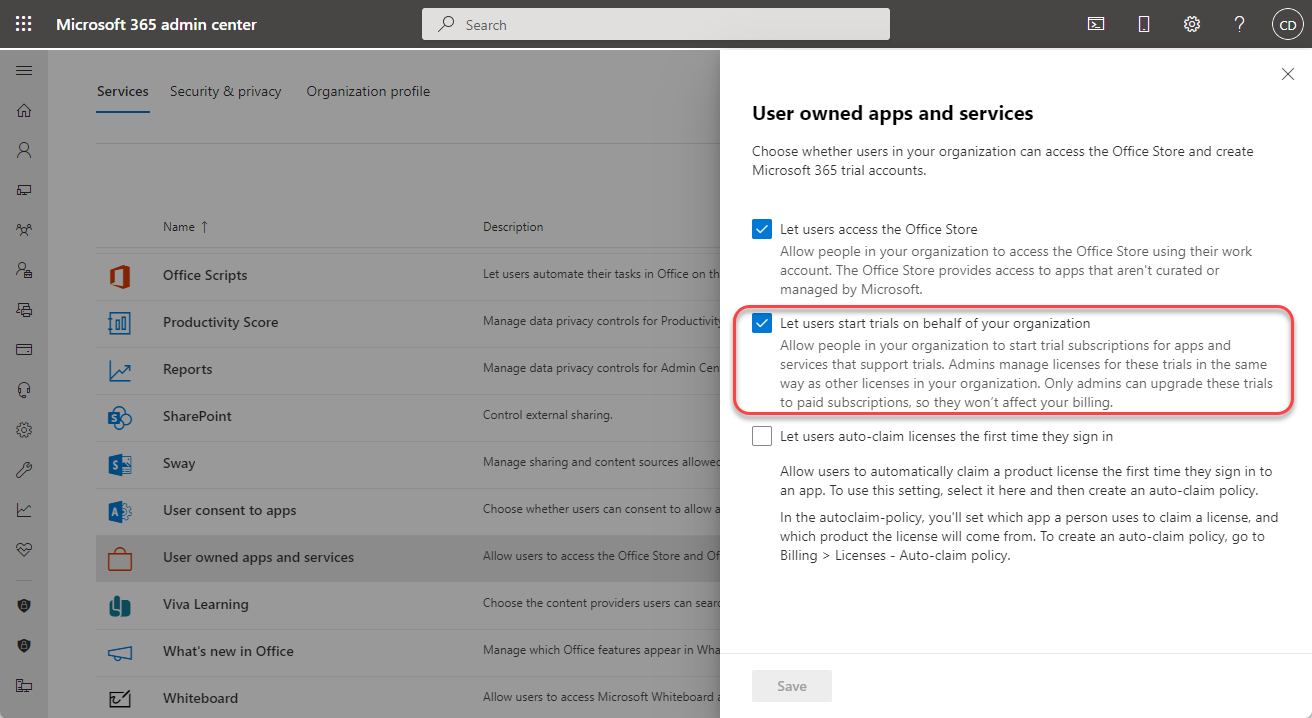
As a Global Administrator, you can start the trial or you can allow to users start the trial on behalf of your organization by enabling this option:
In the Microsoft 365 admin center, go to Settings > Org settings > Services > User owned apps and services.
Check Let users start trials on behalf of your organization
Select Save
Note
If you don't want users in your organization to be able to start trials, as a Global Administrator you must disable this option once you've activated the trial.
Only a Global Administrator can end the trial.
It can take a few hours for the changes to take effect. Once the changes take effect, return to the trial setup page and select Begin trial.
Getting started, extending, and ending the trial
The following sections explain how to get started with the trial, request an extension, and end the trial.
Getting started
You can start using Defender Vulnerability Management features as soon as you see them in the Microsoft Defender portal. Nothing is created automatically and users won't be affected. When you navigate to each solution, you may be guided to make extra setup configurations to start using features.
Extending the trial
You can request one extension of your current trial for 30 days within the last 15 days of the trial period. For any questions, please contact your field seller.
Ending the trial
Important
Unless stated otherwise for the solution, your trial data is retained for approximately 180 days after the trial ends and then permanently deleted. You may continue to access the data gathered during the trial until that time.
After you understand the data-retention policy above, admins can end the trial anytime by selecting Trials on the left navigation, going to the Defender Vulnerability Management trial card and selecting End trial.
Terms and conditions
See the terms and conditions for Microsoft 365 trials.
Learn more about Defender Vulnerability Management
Wondering what you can experience in your free trial? The Defender Vulnerability Management trial includes:
- Security baselines assessment: When the trial ends, baseline profiles might be stored briefly before deletion.
- Blocking vulnerable applications: When the trial ends, blocked apps are unblocked right away. Baseline profiles might be stored briefly before deletion.
- Browser extensions assessment
- Digital certificates assessment
- Network shares analysis
- Hardware and firmware assessment
- Authenticated scan for Windows