Note
Access to this page requires authorization. You can try signing in or changing directories.
Access to this page requires authorization. You can try changing directories.
The Resource Scheduling Health Diagnostics Tool helps admins identify and resolve issues in your Dynamics 365 Field Service, Project Operations, or Customer Service environments. You can use the Resource Scheduling Health Diagnostics Tool to:
- Identify configuration issues in your schedule board.
- Detect metadata issues that might affect the performance of your environment.
- Find unsupported customizations that might cause issues in your environment.
- Get recommendations for resolving issues.
Access the Resource Scheduling Health Diagnostics Tool
To access the Resource Scheduling Health Diagnostics Tool, follow these steps:
Go to the Resource Scheduling app and select Settings.
In the navigation menu, select Administration under Scheduling.
Select Scheduling Parameters.
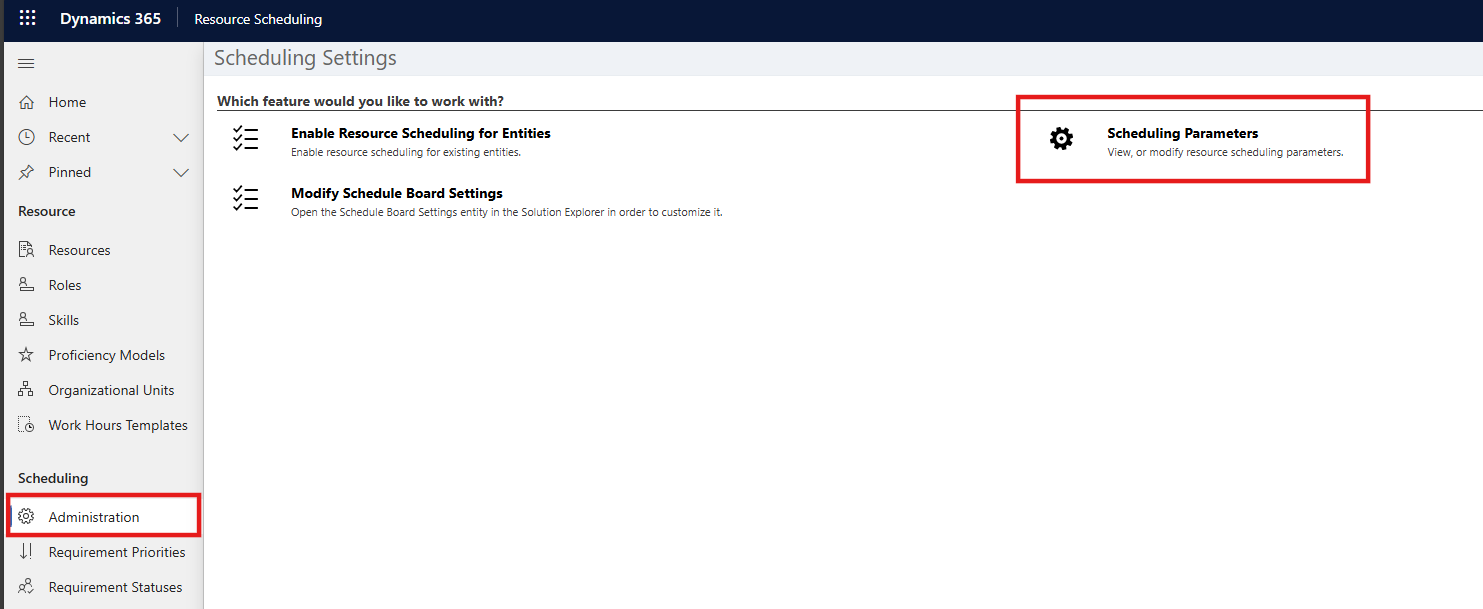
Select Health Diagnostics at the top bar.
The health diagnostics tool opens in a new tab.

Diagnostic details
The following table shows diagnostic information, including diagnostic name and type, for warnings or errors that the Health Diagnostics Tool might find in your environment. These diagnostics indicate potential issues that you might need to fix, such as performance degradation.
Note
If you don't see any diagnostic details from the following table when you run the Heath Diagnostics Tool, your environment doesn't have issues to resolve.
| Diagnostic displayed in UI | Description of diagnostic |
|---|---|
| An essential out-of-box record <Logical record name and id> in inactive state is detected. | This diagnostic appears if any of the following conditions are true:
|
| An out-of-box action/workflow in draft state is detected. | This diagnostic appears when a Universal Resource Scheduling workflow is in the draft state. The Health Diagnostics Tool logs a failure for each draft workflow and shows a resolution option. |
| An out-of-box SDK message processing step is disabled. | This diagnostic appears when a Universal Resource Scheduling SDK step is disabled. The Health Diagnostics Tool logs a failure for each disabled SDK step and shows a resolution option. |
| An out-of-box web resource is customized. This may cause unpredictable consequences during the next solution upgrade. | This diagnostic appears when a Universal Resource Scheduling web resource is customized. The Health Diagnostics Tool logs a failure for each customized web resource and shows the resolution option. |
| An unexpected result was encountered during the diagnostics of <diagnostics module>. | This diagnostic appears when an unexpected failure occurs during the diagnostic run. |
| Booking Relationship Logical Name should be empty for default BSM record. | This diagnostic appears if any of the following conditions are true:
|
| Default booking status record is not specified. | This diagnostic appears if msdyn_DefaultBookingCommittedStatus or msdyn_DefaultBookingCanceledStatus is null on any booking setup metadata record. The Health Diagnostics Tool logs a failure for each booking setup metadata record and shows a resolution option. |
| Default booking status setting on booking setup metadata is set to a record that does not exist or is inactive. | This diagnostic appears if any of the following conditions are true:
|
| Default requirement status setting on booking setup metadata is set to a record that does not exist or is inactive. | This diagnostic appears if any of the following conditions are true:
|
| Default Schedule Board Settings JSON configuration in Settings field is missing. | This diagnostic appears if msdyn_Settings on default schedule board setting is null. Also, shows a resolution option. |
| Default Schedule Board Settings SlotMetadataCollection is null or the contents of SlotMetadataCollection don't match the contents of all booking setup metadata records in the system. | This diagnostic appears if any of the following conditions are true:
|
| No booking status record of the core type <specify the core status type> exists. | This diagnostic appears if there's no booking status record with committed or canceled status. The Health Diagnostics Tool logs a failure for each missing record and shows a resolution option. |
| No requirement status record of the core type <specify the core status type> exists. | This diagnostic appears if there isn't at least one requirement status record for each status option. The Health Diagnostics Tool logs a failure for each option where a record doesn't exist and shows a resolution option. |
| Resource must not have empty required attribute <attribute name>. Affected entities: <entity name>. +<count of other affected entities> more. AND/OR Resource must have empty attribute <attribute name>. Affected entities: <entity name>. +<count of other affected entities> more. |
This diagnostic appears when there is a bookable resource record where any of the following conditions are true:
|
| The Resource Booking Synchronize Job could not be found. | This diagnostic appears when the ResourceBookingSync system job is disabled. Ignore it if you're using a Universal Resource Scheduling version higher than 3.12.152.16. |
| UFX configuration <configuration name> is not specified on a schedule board setting record. | This diagnostic appears if any of the following fields on the default schedule board setting record are null:
|
| UFX configuration <configuration name> is not specified on the booking setup metadata record. | This diagnostic appears if any of the following fields are null on the default booking setup metadata:
|
| UFX configuration <configuration name> on a schedule board setting is set to a record that does not exist or is inactive. | This diagnostic appears if any of the following fields on each schedule board setting record aren't referring to an active configuration record:
|
| UFX configuration <configuration name> on a booking setup metadata record refers to a non-existent or an inactive record. | This diagnostic appears if any of the following fields on each booking setup metadata aren't referring to an active configuration record:
|
| Unexpected share type on the default schedule board setting record. | This diagnostic appears if the share type of the default schedule board setting record is null or not system. |