Note
Access to this page requires authorization. You can try signing in or changing directories.
Access to this page requires authorization. You can try changing directories.
Important
- This is a production-ready preview feature.
- Production-ready previews are subject to supplemental terms of use.
Define the agent information, email signature, disclaimer, and other terms to set the context for the Sales Close Agent.
Follow these steps:
Under the General settings section, select Agent profile.
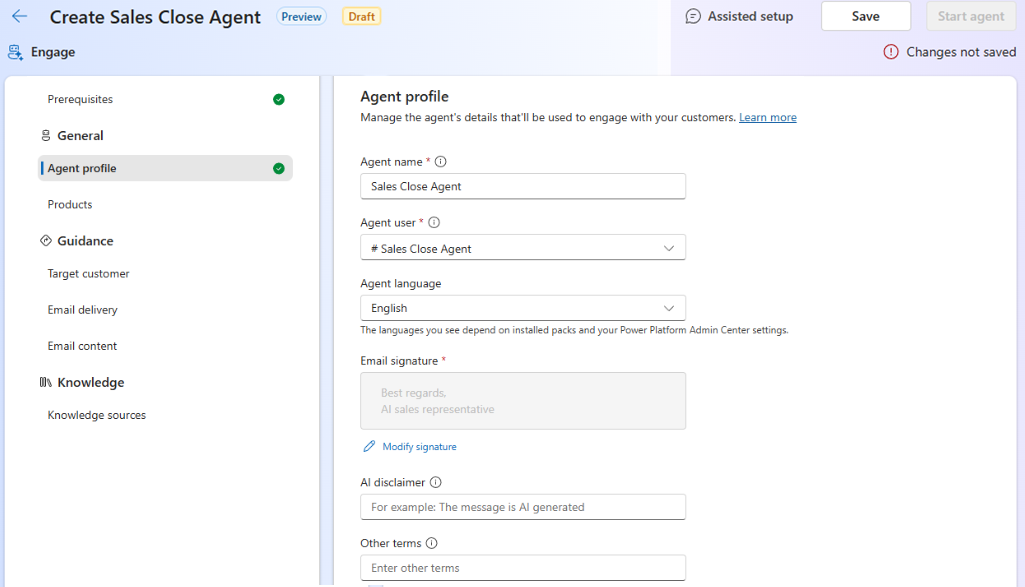
In the Agent profile page, enter the following information:
Field name Description Agent name Specify a meaningful name for the agent. Agent description Specify a brief description of the agent's purpose and the deals it will handle. Agent user Select the agent app user you created for the agent. This user account is used to perform all the agent tasks such as owning records, sending emails, and accessing data. Email signature Enter the email signature that the agent will use when sending emails to customers. This signature will be appended to the end of each email sent by the agent. Select Modify signature to open the Email signature editor, where you can format the signature text and add links or images. Ensure that the name used to configure the mailbox is the same as the agent name in the signature because the agent sends emails using this mailbox. AI disclaimer Enter a disclaimer that will be included in the emails sent by the agent. This disclaimer informs recipients that the email is sent by an AI agent and not a human. Work with your legal team to ensure the disclaimer meets your organization's requirements. Other terms Enter any other terms that the agent should include in its communications with opportunity’s contact. This could include terms of service, privacy policy links, or any other relevant information.