Note
Access to this page requires authorization. You can try signing in or changing directories.
Access to this page requires authorization. You can try changing directories.
Overview
Defender for Cloud is evolving its posture management model. During this transition, customers may see two recommendation models side by side:
- Grouped recommendations (also known as sub-assessment)
- Individual recommendations
This change improves the way grouped recommendations are presented, prioritized, and managed.
Operationally, customers should expect workflow adjustments while both models are available.
Important
Grouped recommendations are deprecated on July 31, 2026. We recommend transitioning to individual recommendations before that date.
This article explains what is changing, and outlines the recommended best practices to operate effectively during the transition period.
Tip
The transition is more manageable than it might seem. The key shift is moving from per-recommendation management to per-category management. Once you map your existing workflows to the right recommendation category, the path forward is clear.
If you need to update governance rules, exemptions, continuous export configurations, or existing queries, use the recommendation transition reference at the end of this article. It maps each grouped recommendation to its recommendation ID and recommendation category, giving you everything you need to update your configurations and scripts in one place.
Grouped vs. individual recommendations
The following table summarizes the behavioral and operational differences between grouped and individual recommendations.
| Aspect | Grouped recommendations | Individual recommendations |
|---|---|---|
| Availability | Available in the Azure portal | Available in Azure and Defender portals |
| Structure | Aggregates multiple findings under a single parent recommendation (for example, multiple vulnerabilities on virtual machine rolled up into one recommendation) | Flat list where each finding appears as a separate recommendation |
| Management scope | Managed, exempted, and tracked at the grouped recommendation level | Managed and tracked per finding (governance), exempted, and export |
| Prioritization behavior | Prioritization is applied at the grouped level | Prioritization is applied at the individual finding level |
| Lifecycle status | Set for deprecation during the transition period | Represents the posture model that Defender for Cloud is moving toward |
Modeling changes examples:
- VM vulnerabilities → Recommendation per software update.
- Secrets → Recommendation per key/secret type.
- SQL VA rules → Each rule becomes an independent recommendation.
Adopting individual recommendations
Best practice: Start using individual recommendations as your primary model for investigation and remediation. Grouped recommendations are deprecated on July 31, 2026.
The new individual recommendations are now the best‑practice posture model in Defender for Cloud. They provide clear benefits:
Granular & accurate prioritization – Each finding is scored individually, helping you focus on what reduces risk fastest.
Improved clarity & governance – Ownership, exemptions, and workflows can be applied at the right level (per finding).
Consistency across Defender – A single, unified model going forward.
Future‑proof – This is the model that will continue to evolve and be fully supported.
What is changing
- Each finding appears as a separate recommendation
- Recommendation volume may increase
- Prioritization becomes risk-based at the individual finding level
Where to start
- Begin reviewing and triaging individual recommendations for day-to-day security work
- Use individual recommendations to drive investigation, remediation, ownership, and exemptions
- Expect a more detailed and actionable queue compared to grouped recommendations
Transition example: vulnerability management
Vulnerability management is one of the most common areas where the transition has a direct operational impact. For many security and compliance teams, querying and tracking machine vulnerabilities is a core daily workflow. The following example shows what changes and how to adapt.
Before (grouped recommendations model):
The recommendation Machines should have vulnerability findings resolved aggregated all vulnerability findings across your machines into one entry per machine. You queried this using sub-assessments in Azure Resource Graph, filtering by recommendation ID and resource type.
After (individual recommendations model):
Each individual recommendation has a list of vulnerability findings. Instead of one aggregated entry per machine, you see individual findings per vulnerable software package, spanning Azure VMs, AKS nodes, EC2 instances, GCP instances, and containers, all within the SoftwareUpdate recommendation category.
Update your Azure Resource Graph queries
Old query (grouped recommendations):
securityresources
| where type =~ "microsoft.security/assessments/subassessments"
| where id contains "1195afff-c881-495e-9bc5-1486211ae03f"
| where properties.resourceDetails.id contains "microsoft.compute/virtualmachines"
| extend DisplayName = tostring(properties.displayName)
| extend Severity = tostring(properties.status.severity)
| extend SoftwareVersion = tostring(properties.additionalData.softwareVersion)
| extend RecommendedVersion = tostring(properties.additionalData.recommendedVersion)
| mv-expand CVE = properties.additionalData.cve
| extend CVE_Title = tostring(CVE["title"])
| project DisplayName, Severity, SoftwareVersion, RecommendedVersion, CVE_Title
New query (individual recommendations):
Note
This query will return the full results for all applicable resource types.
securityresources
| where type == "microsoft.security/assessments"
| where properties.resourceDetails.ResourceType =~ "microsoft.compute/virtualmachines"
| where properties.metadata.recommendationCategory == "SoftwareUpdate"
| extend DisplayName = tostring(properties.displayName)
| extend Severity = tostring(properties.metadata.severity)
| extend DetectedVersions = tostring(properties.additionalData.DetectedSoftwareVersions)
| extend FixedVersion = tostring(properties.additionalData.FixedVersion)
| extend CvesDetails = parse_json(tostring(properties.additionalData.CvesDetails))
| mv-expand CveDetail = CvesDetails
| extend CveId = tostring(CveDetail.CveId)
| project DisplayName, Severity, DetectedVersions, FixedVersion, CveId
Key field changes between the two schemas:
| Old field | New field | Note |
|---|---|---|
properties.status.severity |
properties.metadata.severity |
Severity moved to metadata |
properties.additionalData.cve |
properties.additionalData.CvesDetails |
Use parse_json() to expand |
properties.additionalData.softwareVersion |
properties.additionalData.DetectedSoftwareVersions |
May contain multiple values |
properties.additionalData.recommendedVersion |
properties.additionalData.FixedVersion |
May be empty if no fix is available |
Managing the side-by-side experience
During the transition, both recommendation models may appear simultaneously.
Best practice: Actively control which model your teams work with to reduce confusion and duplicate effort.
Keeping views manageable
- Use recommendation tags to filter your experience:
- New version for individual recommendations
- Set for deprecation for grouped recommendations
- Filter views based on the model your team is currently using
- Avoid leaving both models unfiltered unless explicitly required

Investigating and prioritizing at scale
Individual recommendations introduce increased granularity. To help you focus on the issues that matter most and handle the increased granularity of individual recommendations, Defender for Cloud provides several tools and views designed to assist you with effective investigation.
Category tabs
- Start investigations within the security category most relevant to your team's ownership or risk domain
- Use categories to reduce noise and focus effort
Available categories include:
- All – Full posture view
- Misconfigurations – Configuration-based risks
- Vulnerabilities – Software and platform vulnerabilities
- Secrets – Exposed keys and secrets
Prioritizing high-impact issues
Best practice: Make Critical and High risk levels your default operating view.
- Filter recommendations by risk level
- Address high-impact issues first to reduce risk quickly
Using aggregation views effectively
Aggregated views help align remediation to your workflow:
- View by title
- Show all assets for a single recommendation
- Suitable for bulk remediation across multiple resources
- View by resource
- Shows all recommendations for a single asset
- Suitable for asset-level investigation or isolating high-risk machines
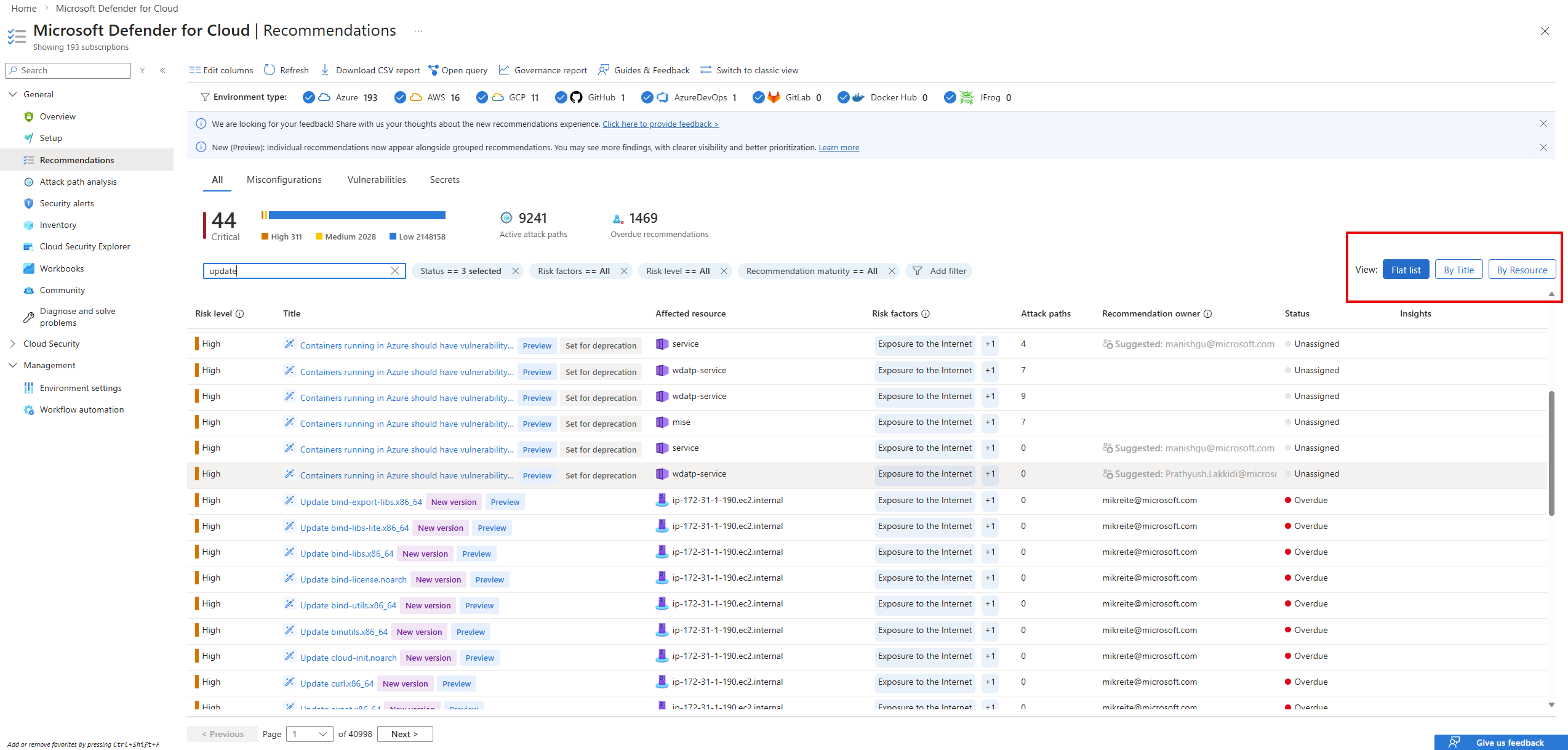
Choose the aggregation that matches the task:
- Widespread issue remediation: View by title
- Asset investigation: View by resource
How to manage the new individual recommendations
With the transition to individual recommendations, all Microsoft Defender for Cloud experiences continue to support Governance rules, Continuous export, and Exemptions. The main change is how these actions are scoped.
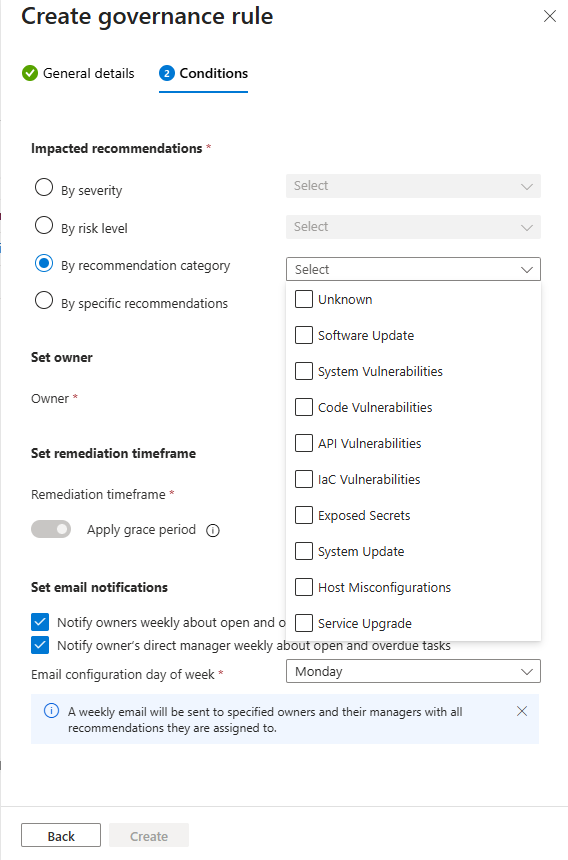
Individual recommendations are created per software update, secret, or issue type. Because they are generated according to your resources' current state, actions are no longer applied to a single static recommendation. Instead, management actions are now applied at the recommendation category level.
Governance rules, Continuous export, and Exemptions continue to work as they do today, but instead of targeting a grouped recommendation key, you now target a recommendation category. Each category automatically includes all current and future individual recommendations of that type.
The updated management experience is available in Environment settings, under Governance rules and Exemption rules, where you can apply ownership, automation, or exemptions consistently across an entire category of individual recommendations.
What you should do now
Important
Grouped recommendations are deprecated on July 31, 2026. Complete your transition before this date to avoid disruption to your workflows.
- Adopt individual recommendations for investigation and remediation
- Define a clear internal operating model for the transition period
- Use filters and tags to limit views to the model your team is actively using
- Prioritize Critical and High risk individual recommendations in daily operations
- Use aggregation views to scale remediation and investigation efficiently
- Review your existing scripts and queries that target sub-assessments and update them using the recommendation transition reference and query examples in this article
Recommendation transition reference
Use this reference to map each grouped recommendation to its recommendation ID and recommendation category. Recommendations are organized by product. This is your reference for:
- Updating governance rules, exemption rules, and continuous export — these now target a recommendation category instead of a specific recommendation key. Find the category for each recommendation you currently manage, then update your configurations to use that category.
- Migrating queries — replace grouped recommendation IDs with the
microsoft.security/assessmentsresource type and filter byproperties.metadata.recommendationCategory. The recommendation ID column helps you verify you're targeting the right recommendations.
Note
Because individual recommendations introduce more granularity, you'll see more items than before. A grouped recommendation that previously showed a count of vulnerabilities now surfaces each finding separately. This increase is expected and reflects more actionable detail, not more risk.
Your queries will also return more results because recommendation categories span multiple workloads. In the grouped model, a query was scoped to a specific recommendation ID and resource type, for example, Azure VMs only. In the new model, querying the SoftwareUpdate recommendation category returns findings across Azure VMs, EC2 instances, AKS nodes, GCP instances, and containers combined. Adjust your filters accordingly.
Each grouped recommendation transitions to one of two end-states:
- Replaced by individual recommendations — The grouped recommendation is replaced by individual recommendations generated dynamically per finding. Update governance rules, exemptions, and continuous export to target the Recommendation category instead of the recommendation ID.
- Replaced by a single new recommendation — The grouped recommendation is replaced by a specific new individual recommendation with a fixed recommendation ID. The recommendation category shows as Unknown. Update your configurations to use the New recommendation ID directly — don't use the category filter for these recommendations.
Microsoft Defender for Servers
The following grouped recommendations transition under Microsoft Defender for Servers.
How to review findings: Remediate machine vulnerabilities
Replaced by individual recommendations — update governance rules, exemptions, and continuous export to use the recommendation category:
| Recommendation | Recommendation ID | Recommendation category |
|---|---|---|
| Machines should have vulnerability findings resolved | 1195afff-c881-495e-9bc5-1486211ae03f |
SoftwareUpdate |
| EC2 instances should have vulnerability findings resolved | 77a4a140-e051-481a-84cc-d4bf2109bd65 |
SoftwareUpdate |
| GCP compute instances should have vulnerability findings resolved | 0a03fa35-e381-4e2f-ace6-2b9913db3381 |
SoftwareUpdate |
| System updates should be installed on your machines (powered by Azure Update Manager) | e1145ab1-eb4f-43d8-911b-36ddf771d13f |
SystemUpdate |
| Vulnerabilities in security configuration on your Windows machines should be remediated (powered by Guest Configuration) | 8c3d9ad0-3639-4686-9cd2-2b2ab2609bda |
HostMisconfigurations |
| Vulnerabilities in security configuration on your Linux machines should be remediated (powered by Guest Configuration) | 1f655fb7-63ca-4980-91a3-56dbc2b715c6 |
HostMisconfigurations |
| Machines should have secrets findings resolved | 17618b1a-ed14-49bb-b37f-9f8ba967be8b |
ExposedSecrets |
| EC2 instances should have secrets findings resolved | 490d3be5-0abd-485c-bcd7-b8d6c6f443c8 |
ExposedSecrets |
| VM instances should have secrets findings resolved | 17b615fd-ce09-494b-a3fa-5937a137a571 |
ExposedSecrets |
Deprecated recommendations — the following grouped recommendations are deprecated and don't have a direct replacement:
| Recommendation | Recommendation ID |
|---|---|
| EDR configuration issues should be resolved on virtual machines | dc5357d0-3858-4d17-a1a3-072840bff5be |
| EDR configuration issues should be resolved on EC2s | 695abd03-82bd-4d7f-a94c-140e8a17666c |
| EDR configuration issues should be resolved on GCP Virtual machines | f36a15fb-61a6-428c-b719-6319538ecfbc |
Microsoft Defender for Databases
The following grouped SQL recommendations transition under Microsoft Defender for Databases. After the transition, each SQL vulnerability assessment rule appears as an individual recommendation. To analyze findings for an Azure SQL database, open the resource in the Azure portal, go to Microsoft Defender for Cloud, and select the specific finding to see the rule description, severity, and remediation guidance. For SQL servers on machines, open the Recommendations page in Defender for Cloud, find the relevant individual recommendation, and follow the same remediation steps.
How to review findings: Review and remediate SQL vulnerability assessment findings
Deprecated recommendations — the following grouped recommendations are deprecated and don't have a single direct replacement. They are replaced by the new individual SQL vulnerability assessment recommendations now available in Defender for Cloud. For the full list, see SQL vulnerability assessment rules and recommendations mapping.
| Recommendation | Recommendation ID |
|---|---|
| SQL databases should have vulnerability findings resolved | 82e20e14-edc5-4373-bfc4-f13121257c37 |
| SQL servers on machines should have vulnerability findings resolved | f97aa83c-9b63-4f9a-99f6-b22c4398f936 |
Microsoft Defender for Containers
The following grouped recommendations transition under Microsoft Defender for Containers. After the transition, container vulnerability findings appear as individual recommendations, with each vulnerable image layer or package surfaced as a separate finding.
How to review findings: View and remediate vulnerabilities for containers running on Kubernetes clusters | View and remediate vulnerability assessment findings for registry images
Replaced by individual recommendations — update governance rules, exemptions, and continuous export to use the recommendation category:
| Recommendation | Recommendation ID | Recommendation category |
|---|---|---|
| AKS nodes should have vulnerability findings resolved | 24a15fbd-cfe4-4dff-b2be-1c367a6b2031 |
ServiceUpgrade |
| Azure registry container images should have vulnerabilities resolved | c0b7cfc6-3172-465a-b378-53c7ff2cc0d5 |
SoftwareUpdate |
| Container images in Azure registry should have vulnerability findings resolved | 33422d8f-ab1e-42be-bc9a-38685bb567b9 |
SoftwareUpdate |
| Azure running container images should have vulnerabilities resolved | c609cf0f-71ab-41e9-a3c6-9a1f7fe1b8d5 |
SoftwareUpdate |
| AWS running container images should have vulnerability findings resolved | 682b2595-d045-4cff-b5aa-46624eb2dd8f |
SoftwareUpdate |
| GCP running container images should have vulnerability findings resolved | e538731a-80c8-4317-a119-13075e002516 |
SoftwareUpdate |
Microsoft Defender for DevOps
The following grouped recommendations transition under Microsoft Defender for DevOps. After the transition, individual findings for code scanning, dependency vulnerabilities, secrets, infrastructure as code issues, and API security appear in the relevant recommendation categories.
How to review findings: In Defender for Cloud, go to Recommendations and filter by the relevant category: ApiVulnerabilities, SoftwareUpdate, CodeVulnerabilities, IacVulnerabilities, or ExposedSecrets. Select any individual recommendation to view the affected repository, finding details, and remediation steps.
Replaced by individual recommendations — update governance rules, exemptions, and continuous export to use the recommendation category:
| Recommendation | Recommendation ID | Recommendation category |
|---|---|---|
| GitHub repositories should have API security testing findings resolved | 7ad00833-a0f0-47b9-b377-5665bd5d9074 |
ApiVulnerabilities |
| Azure DevOps repositories should have API security testing findings resolved | d42301a5-4d23-4457-97c8-f2f2e9eb979e |
ApiVulnerabilities |
| GitHub repositories should have dependency vulnerability scanning findings resolved | 945f7b1c-8def-4ab3-a44d-1416060104b3 |
SoftwareUpdate |
| Azure DevOps repositories should have dependency vulnerability scanning findings resolved | 2ea72208-8558-4011-8dcd-d93375a4003d |
SoftwareUpdate |
| GitLab projects should have dependency vulnerability scanning findings resolved | 1bc53aae-c92e-406b-9693-d46caf3934fa |
SoftwareUpdate |
| GitHub repositories should have Shai-Hulud 2.0 compromised packages findings resolved | 14c00325-f0ee-4c12-bbaf-4059647d919c |
SoftwareUpdate |
| Azure DevOps repositories should have Shai-Hulud 2.0 compromised packages findings resolved | 70f5bbd7-c8bd-4b6f-a877-fa46b2719606 |
SoftwareUpdate |
| GitHub repositories should have code scanning findings resolved | 18aa4e75-776a-4296-97f0-fe1cf10d679c |
CodeVulnerabilities |
| Azure DevOps repositories should have code scanning findings resolved | 99232bb2-9b21-4bbb-8e3c-763673b9923d |
CodeVulnerabilities |
| GitLab projects should have code scanning findings resolved | cd3e4ff3-b1bc-4a42-b10d-e2f9f99e2991 |
CodeVulnerabilities |
| Azure DevOps security posture management findings should be resolved | 7b123b34-1f78-4902-abb6-3b813abe9866 |
CodeVulnerabilities |
| GitHub repositories should have infrastructure as code scanning findings resolved | d9be0ff8-3eb0-4348-82f6-c1e735f85983 |
IacVulnerabilities |
| Azure DevOps repositories should have infrastructure as code scanning findings resolved | 6588c4d4-fbbb-4fb8-be45-7c2de7dc1b3b |
IacVulnerabilities |
| GitLab projects should have infrastructure as code scanning findings resolved | ec1bface-60ff-46b6-b1dc-67171a4882d5 |
IacVulnerabilities |
| GitLab projects should have secrets scanning findings resolved | 867001c3-2d01-4db7-b513-5cb97638f23d |
ExposedSecrets |
| GitHub repositories should have secrets scanning findings resolved | dd98425c-1407-40cc-8a2c-da5d0a2f80da |
ExposedSecrets |
| Azure DevOps repositories should have secrets scanning findings resolved | b5ef903f-8655-473b-9784-4f749eeb25c6 |
ExposedSecrets |
| GitHub security posture management findings should be resolved | fd104c01-29d0-428d-bb62-2c936addd2cf |
Multiple — see GitHub recommendations in Defender for DevOps |
Microsoft Defender for Identity
Replaced by a single new recommendation — the following grouped recommendations are each replaced by a specific new individual recommendation with a fixed assessment key. Update your governance rules, exemptions, and continuous export to use the new assessment key directly.
| Assessment | Old assessment key | New assessment key |
|---|---|---|
| Guest accounts with read permissions on Azure resources should be removed | fde1c0c9-0fd2-4ecc-87b5-98956cbc1095 |
422107c6-5b9a-46a6-bb1d-26ef1cc52d65 |
| Guest accounts with write permissions on Azure resources should be removed | 0354476c-a12a-4fcc-a79d-f0ab7ffffdbb |
009678ce-adce-4c94-9cc8-cfc2bd0c6a06 |
| Guest accounts with owner permissions on Azure resources should be removed | 20606e75-05c4-48c0-9d97-add6daa2109a |
f2864482-b329-4310-8c06-3cf74fe880c5 |
| Disabled accounts with read and write permissions on Azure resources should be removed | 1ff0b4c9-ed56-4de6-be9c-d7ab39645926 |
9b4f4dd4-24fc-42ba-9978-2a1cf575d36d |
| Disabled accounts with owner permissions on Azure resources should be removed | 050ac097-3dda-4d24-ab6d-82568e7a50cf |
a4899b81-b689-4e0d-aa29-45983ab8b7fc |