Note
Access to this page requires authorization. You can try signing in or changing directories.
Access to this page requires authorization. You can try changing directories.
Applies to:  External tenants (learn more)
This tutorial guides you through integrating third-party bot protection providers with Native API sign-up flows in Microsoft Entra External ID. By using a Web Application Firewall (WAF) to intercept sign-up requests, you can implement risk-based challenge mechanisms during user registration to protect against automated bot attacks and fake account creation.
Note
This integration applies to native authentication API flows only. The WAF intercepts the native authentication /start endpoint to evaluate the request before user registration proceeds. Browser-delegated (web-hosted) sign-up flows aren't covered by this tutorial and use a different integration model.
Note
This tutorial assumes you manually make raw HTTP requests to execute the sign-up flow. When possible, use a Microsoft-built and supported authentication SDK. See Tutorial: Prepare your Android mobile app for native authentication and Tutorial: Prepare your iOS/macOS mobile app for native authentication.
Prerequisites
- An external tenant. If you don't already have one, create an external tenant.
- A registered application in the Microsoft Entra admin center with the following configuration:
- Application (client) ID and Directory (tenant) ID recorded.
- Admin consent granted.
- Public client and native authentication flows enabled.
- A user flow created in the Microsoft Entra admin center and associated with your application.
- A custom domain associated with your external tenant.
- A third-party bot protection provider account (this tutorial uses HUMAN Security as an example) with the following configuration values:
- Enforcer API credentials
- SDK integration details
- A WAF platform account (this tutorial uses Cloudflare) with domain administrator privileges.
How bot protection works
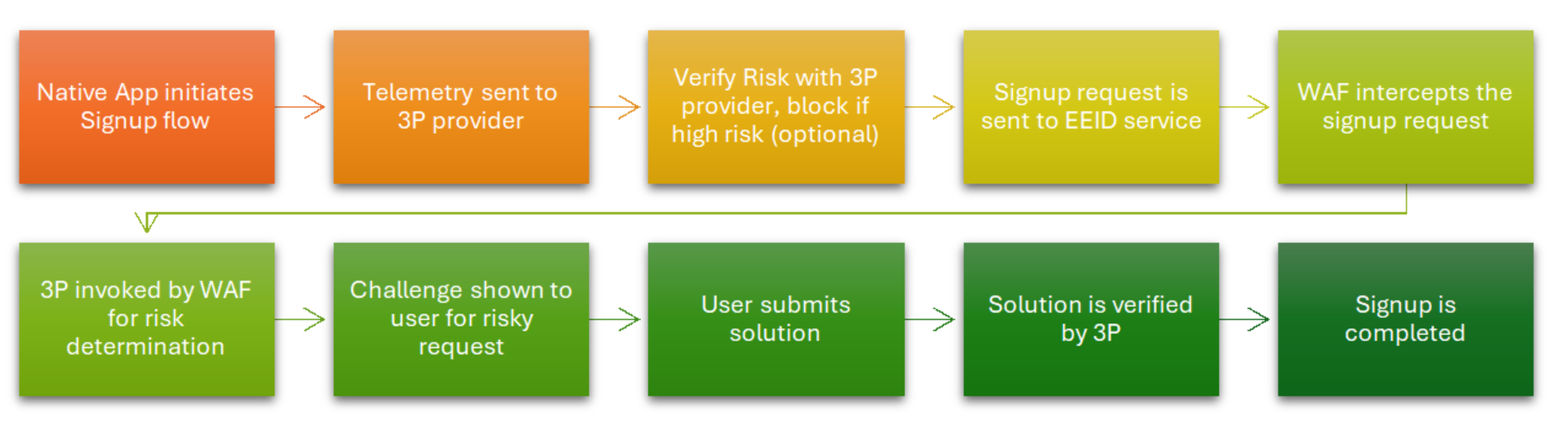
When a user attempts to sign up using Native Authentication, the sign-up request flows through a Web Application Firewall (WAF) that intercepts the /start endpoint. The WAF evaluates the request with your third-party bot protection provider using their detection APIs. If the request is flagged as suspicious based on device fingerprinting, behavioral analysis, or bot signatures, the WAF can block the request or present a challenge to verify the user is human.
This approach allows you to apply bot protection during the native sign-up flow without requiring browser-based redirects, maintaining the native app user experience while protecting against automated account creation and bot attacks.
Architecture components
This integration involves several key components working together to provide bot protection:
- External tenant: A dedicated Microsoft Entra ID instance for managing external identities and customer access.
- Native application: A mobile or desktop application that uses Microsoft Entra External ID (native authentication) to sign users up and sign them in.
- Native APIs: Service endpoints that enable mobile and desktop apps to perform sign-up, sign-in, and self-service password reset (SSPR) flows in-app, without a browser redirect.
- Web Application Firewall (WAF): A firewall that inspects incoming and outgoing HTTP traffic, intercepts sign-up requests, and coordinates with the third-party provider for bot detection.
- Third-party bot protection provider: A third-party provider that delivers bot detection, device fingerprinting, and risk-assessment services to identify automated attacks.
Configuration steps
- Create a sign-up flow for your external tenant.
- Create a WAF configuration.
- Update the WAF layer to intercept specific API requests during sign-up flow.
- Update the native app sign-up API call flow.
Create a sign-up flow for your external tenant
Before integrating bot protection, ensure you have a working sign-up flow configured. If you've already completed this setup as part of the prerequisites, you can skip to the next section.
- Sign in to the Microsoft Entra admin center.
- If you haven't already done so, register an application in the Microsoft Entra admin center. Make sure to:
- Record the Application (client) ID and Directory (tenant) ID for later use.
- Grant admin consent to the application.
- Enable public client and native authentication flows.
- If you haven't already done so, create a user flow in the Microsoft Entra admin center. When you create the user flow, take note of the user attributes you configure as required. These attributes are the ones that Microsoft Entra expects your app to submit.
- Associate your app registration with the user flow.
- Test the sign-up flow by registering a customer user. Alternatively, you can test after completing the integration.
Configure WAF to intercept sign-up requests
Configure a WAF to intercept sign-up requests for bot detection. This tutorial uses Cloudflare as an example, but you can use any WAF that supports request interception and custom logic execution.
Important
A custom domain must be associated with your external tenant before configuring WAF. Without a custom domain, the WAF can't intercept sign-up requests.
For detailed Cloudflare WAF setup instructions, see Configure Cloudflare WAF with Microsoft Entra External ID.
Configure WAF worker for bot detection
This section configures the WAF to intercept sign-up /start requests and perform bot detection with your third-party provider.
Update the WAF layer to intercept specific API requests during sign-up flow
Use the Cloudflare WAF that you created in the previous section.
Sign in to the Cloudflare account for the external domain (mentioned in the Create a WAF configuration step) associated with the external tenant with at least Domain Administrator privilege.
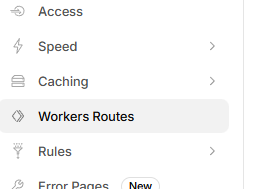
Go to Workers Routes, and select Create application.

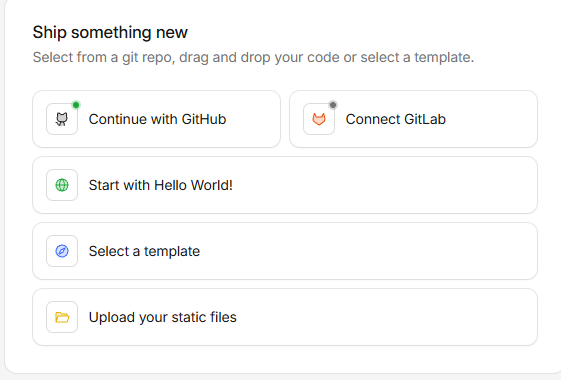
Select Start with Hello World.
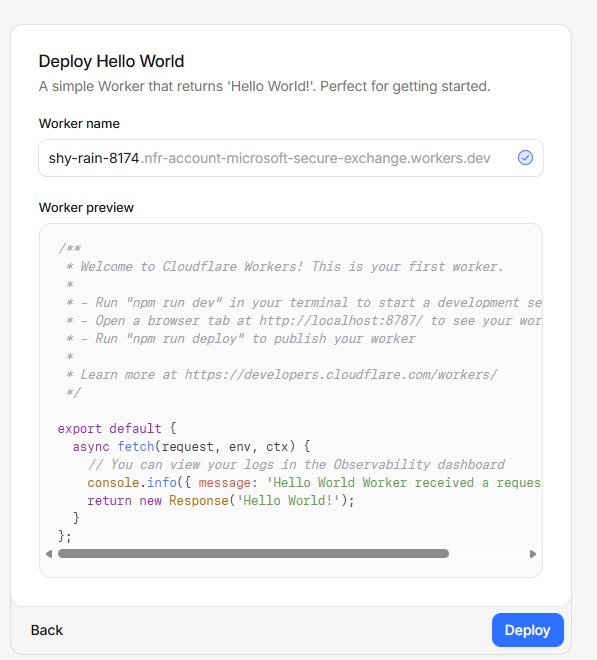
Name the worker and select Deploy.
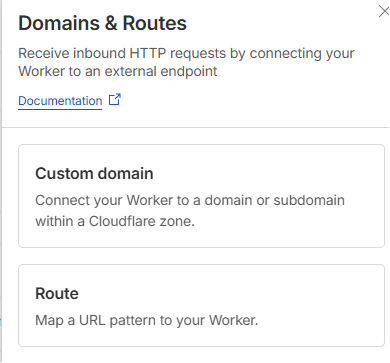
Once the worker is deployed, select the Settings tab. Select +Add in Domains & Routes.

Select Route.
Select the domain from Zone. Add the following in the Route field:
*<custom_domain>/<external_tenant_id(guid)>/*signup/v1.0/start*Select Fail Closed for failure mode.
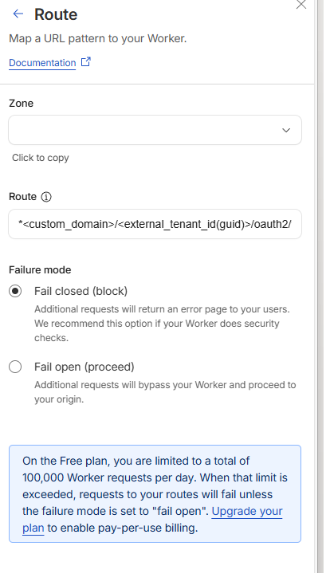
Select Add Route.
If the WAF setup was configured properly, all requests to the external tenant /start endpoint are intercepted by the worker.
Configure worker logic for bot detection
The worker logic must be configured to:
- Extract relevant information from the sign-up request (device fingerprint, IP address, user agent, behavioral data).
- Send this data to your third-party bot protection provider's detection API.
- Evaluate the bot detection score returned by the provider.
- If the request is identified as a bot based on your threshold, block the request or present a challenge.
- If the request appears legitimate, forward it to the Microsoft Entra /start endpoint.
Third-party provider integration
This tutorial uses HUMAN Security as the third-party bot protection provider. The Enforcer API provided by HUMAN Security is used for bot detection. Refer to the following HUMAN Security documentation:
- Enforce an HTTP request | HUMAN Documentation
- SDK documentation: Overview | HUMAN Documentation
Note
The worker code implementation is specific to your chosen bot protection provider's API and your detection thresholds. Contact Microsoft support for guidance on implementing the worker logic for your specific provider.
Update the native app sign-up API call flow
The standard sign-up flow using Native API endpoints is described in the Native authentication API reference documentation. With bot protection enabled, your native app's sign-up flow interacts with the WAF layer transparently.
Sign-up flow with bot protection
When the WAF intercepts a /start request and determines it's from a bot, it can either block the request entirely or present a challenge. The flow works as follows:
- App initiates sign-up: The native app calls the
/startendpoint to begin the sign-up flow. - WAF intercepts request: The WAF receives the request and extracts device and behavioral signals.
- Bot detection evaluation: The WAF sends the signals to the bot protection provider for analysis.
- Decision point:
- If legitimate: Request is forwarded to Microsoft Entra
/startendpoint. - If suspicious: Request is blocked or challenged based on your configuration.
- If legitimate: Request is forwarded to Microsoft Entra
- Sign-up continues: If allowed, the standard sign-up flow proceeds with
/challenge,/continue, and other endpoints.
Tip
To enhance bot detection accuracy, integrate your provider's SDK into your native app to collect device fingerprinting and behavioral signals. Pass these signals to the WAF through custom headers or request parameters.
Tip
For a complete Android SDK implementation example using WAF-based bot protection, see the HUMAN Security bot protection sample app.
Next steps
Now that you've integrated bot protection with Native Authentication sign-up, explore these related resources:
- Native authentication API reference
- Tutorial: Prepare your Android mobile app for native authentication
- Tutorial: Prepare your iOS/macOS mobile app for native authentication
- Enable custom URL domains for apps in external tenants
- Configure Cloudflare WAF with Microsoft Entra External ID
- HUMAN Security Enforcer API documentation
- HUMAN Security bot protection sample app