Note
Access to this page requires authorization. You can try signing in or changing directories.
Access to this page requires authorization. You can try changing directories.
This article shows you how to validate the Microsoft signature for a submission.
There are a couple cases where you might want to validate the Microsoft signature for a submission:
You aren't sure if a driver is Microsoft signed or not, and you want to check.
You have two drivers. You need to determine which one is attestation signed. The other driver is signed after submission of Windows Hardware Lab Kit (HLK) or Windows Hardware Certification Kit (HCK) results to the dashboard.
Download signed driver files
The first step is to download the signed files that you need to validate the Microsoft signature.
Note
The driver submission folder is located in the package files. Microsoft signs these files. The partner doesn't have to sign the returned payload. Microsoft always returns a .cat file with an approved submission. If a partner includes its own .cat file, Microsoft discards it and returns its own signed .cat file.
To download the driver signed files:
Find the hardware submission that contains the drivers for which you want to download signed files.
To open the driver details, select the Private Product ID.
On the driver details page, under Packages and signing properties, select More.
Select Download signed files.
Check the Enhanced Key Usage (EKU)
After you download the signed files, you validate the Microsoft signature by checking the Enhanced Key Usage (EKU) extension. The EKU belongs to the certificate that Microsoft uses to sign the submission.
To check the EKU:
Right-click the .cat file.
Select Properties, and then select the Digital Signatures tab.
Select the name of the certificate, and then select Details.
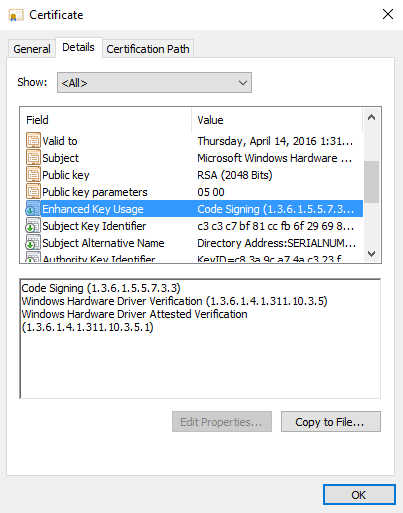
On the Details tab, select Enhanced Key Usage. There, see the EKUs and corresponding object identifier (OID) values for the certificate. In this case, the Windows Hardware Driver Verification OID ends with a 5, which means that driver isn't attestation signed.
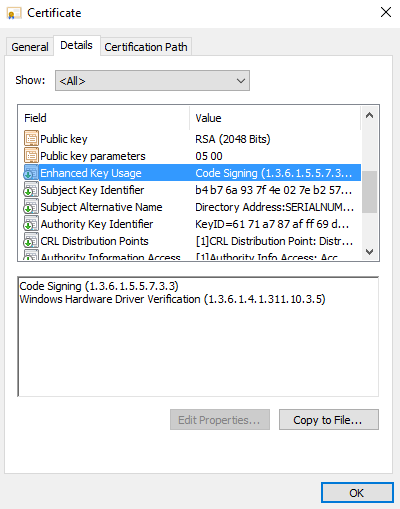
If the driver is attestation signed, the OID ends with a 1.