Outlook | Windows | Classic Outlook for Windows | For business
Using classic Outlook for Windows in business environments

This browser is no longer supported.
Upgrade to Microsoft Edge to take advantage of the latest features, security updates, and technical support.
' cx='32' cy='32' r='32' /%3E%3Ctext x='50%25' y='55%25' dominant-baseline='middle' text-anchor='middle' fill='%23FFF' %3EA%3C/text%3E%3C/svg%3E)
Hello,
Is there a way to add a specific word in an Office 2016 template dictionary and Office 365 apps including updating the autocorrect template to address the name such as Tuscón with an apostrophe? Also, after the update, could this be applied globally or department wide?
Thanks
Using classic Outlook for Windows in business environments
A family of Microsoft word processing software products for creating web, email, and print documents.

Answer accepted by question author

Hi @A_Lop ,
Go to this location:
C:\Users\<User Name>\AppData\Roaming\Microsoft\Office
Copy the ACL files you need to each PC:
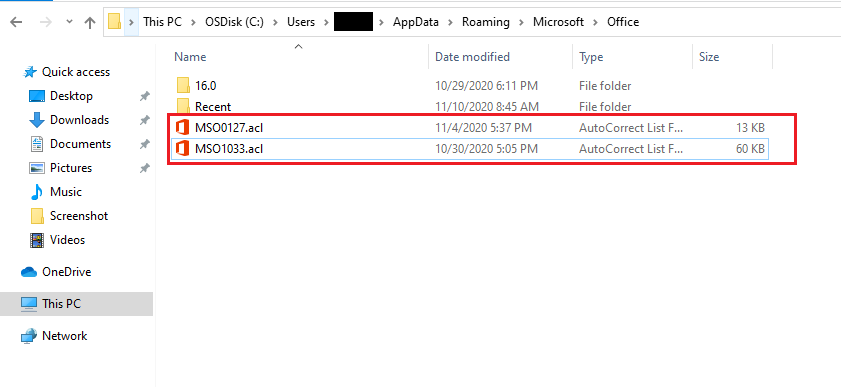
You can try this method and let me know if this will help you.
Any updates please let me know and I'm glad to help you.
If the response is helpful, please click "Accept Answer" and upvote it.
Note: Please follow the steps in our documentation to enable e-mail notifications if you want to receive the related email notification for this thread.
If that's the case how come nothing happened when I opened my Microsoft 365. I used Microsoft Word and typed the word Tuscon and didn't change automatically to Tuscón ? While in Office 2016, it did?
I checked the computer path for MSO1033 and this only has one file which is the one that I replaced. Anything I am missing here? Thanks.
Thank you John. Do you also have any input regarding the Office 365? I know now that this will now work in Office 2016 if we do a group policy pushing the replacement of the the users' existing MSO1033, but like what you have mentioned, the users' previous AutoCorrect entries will vanish once it's replaced with the new one.
Hello emizhang-msft ,
Copying the latest acl with the changes I made in Microsoft Word (e.g. adding the word "Tuscón, " and when the user typed Tuscon, will change to Tuscón - I hope I did this right? ) in the auto-spell worked. The other computer is now showing the changes I made.
My question is if the current computer have few .acls listed including the one that I made, should I copy all of that and then place it to the other computer after removing the existing acls of that computer (I definitely have to remove the one with the same name for me to be able to add the file from the current computer)?
What is the caveat of copying and replacing the acls of the other computer? Will the user's auto-correct list files be removed? What is the safest way to do this such as a clean replacement? After all, I just want that specific word "Tuscón" to be added on the users Office 2016.
Finally, we also have Office 365. How can I add this changes that will affect the Office 365 product? Is it possible to apply the added auto-spell in Office 365, how?
Thanks