I cobbled this script together from some bits and pieces of other work that I've done. It can be run as a post-build event in a visual studio installer project. Place the script into the same folder that contains the installer project (.vdproj). The post-build event should run
cscript.exe "$(ProjectDir)AddCOMRegistration.js" "$(BuiltOuputPath)"
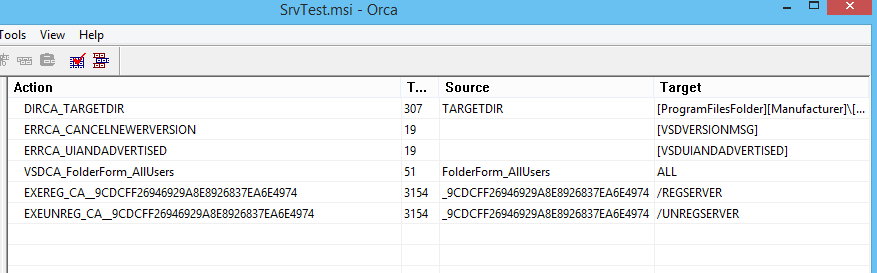
Before running the script you should edit it to insert the name of the COM server that will be installed by the .msi file. I haven't tested it extensively, but it worked properly in a limited test to add COM registration/unregistration to an installer project that set the vsdrpDoNotRegister property on the COM Server project's primary output.
This is the script -
// AddCOMRegistration.js <msi-file>
// Performs a post-build fixup of an msi to register/unregister out-of-process (.exe) COM Server


// Configurable values
var filename = "YourCOMServer.exe"; // The name of the executable COM server - change this to match the server you want to register


// Constant values from Windows Installer
var msiOpenDatabaseModeTransact = 1;

var msiViewModifyInsert         = 1
var msiViewModifyUpdate         = 2
var msiViewModifyAssign         = 3
var msiViewModifyReplace        = 4
var msiViewModifyDelete         = 6


if (WScript.Arguments.Length != 1)
{
    WScript.StdErr.WriteLine(WScript.ScriptName + " file");
    WScript.Quit(1);
}

var filespec = WScript.Arguments(0);
var installer = WScript.CreateObject("WindowsInstaller.Installer");
var database = installer.OpenDatabase(filespec, msiOpenDatabaseModeTransact);

var sql
var view
var record
var componentId

try
{
    fileId = FindFileIdentifier(database, filename);
    if (!fileId)
        throw "Unable to find '" + filename + "' in File table";


    WScript.Echo("Updating the CustomAction table...");
    var caReg = "EXEREG_CA_" + fileId
    sql = "INSERT INTO `CustomAction` (`Action`, `Type`, `Source`, `Target`) VALUES ('" + caReg + "', '3154', '" + fileId + "', '/REGSERVER')";
    view = database.OpenView(sql);
    view.Execute();
    view.Close();

    var caUnreg = "EXEUNREG_CA_" + fileId
    sql = "INSERT INTO `CustomAction` (`Action`, `Type`, `Source`, `Target`) VALUES ('" + caUnreg + "', '3154', '" + fileId + "', '/UNREGSERVER')";
    view = database.OpenView(sql);
    view.Execute();
    view.Close();

    WScript.Echo("Updating the InstallExecuteSequence table...")
    var condReg = "$" + componentId + ">2";
    sql = "INSERT INTO `InstallExecuteSequence` (`Action`, `Condition`, `Sequence`) VALUES ('" + caReg + "', '" + condReg + "', '5601')";
    view = database.OpenView(sql);
    view.Execute();
    view.Close();

    var condUnreg = "$" + componentId + "=2";
    sql = "INSERT INTO `InstallExecuteSequence` (`Action`, `Condition`, `Sequence`) VALUES ('" + caUnreg + "', '" + condUnreg + "', '2201')";
    view = database.OpenView(sql);
    view.Execute();
    view.Close();

    database.Commit();
}
catch(e)
{
    WScript.StdErr.WriteLine(e);
    WScript.Quit(1);
}


// Finds file id and component id of file
function FindFileIdentifier(database, fileName)
{
    var sql
    var view
    var record

    // First, try to find the exact file name
    sql = "SELECT `File`, `Component_` FROM `File` WHERE `FileName`='" + fileName + "'";
    view = database.OpenView(sql);
    view.Execute();
    record = view.Fetch();
    if (record)
    {
        var value = record.StringData(1);
        componentId = record.StringData(2)
        view.Close();
        return value;
    }
    view.Close();

    // The file may be in SFN|LFN format.  Look for a filename in this case next
    sql = "SELECT `File`, `Component_`, `FileName` FROM `File`";
    view = database.OpenView(sql);
    view.Execute();
    record = view.Fetch();
    while (record)
    {
        if (StringEndsWith(record.StringData(3), "|" + fileName))
        {
            componentId = record.StringData(2);
            var value = record.StringData(1);
            view.Close();
            return value;
        }

        record = view.Fetch();
    }
    view.Close();

}

function StringEndsWith(str, value)
{
    if (str.length < value.length)
        return false;

    return (str.indexOf(value, str.length - value.length) != -1);
}
' cx='32' cy='32' r='32' /%3E%3Ctext x='50%25' y='55%25' dominant-baseline='middle' text-anchor='middle' fill='%23FFF' %3EN%3C/text%3E%3C/svg%3E)
' cx='32' cy='32' r='32' /%3E%3Ctext x='50%25' y='55%25' dominant-baseline='middle' text-anchor='middle' fill='%23FFF' %3EDL%3C/text%3E%3C/svg%3E)

' cx='32' cy='32' r='32' /%3E%3Ctext x='50%25' y='55%25' dominant-baseline='middle' text-anchor='middle' fill='%23FFF' %3EDZ%3C/text%3E%3C/svg%3E)