How to update textinputframework.dll

Anonymous
2022-08-01T18:38:30+00:00

Hi,

We have a Windows 10 laptop were some non-Microsoft applications give a an error pointing to a missing entry in the mentioned DLL.

When we check this DLL present in Windows\System32 we see an older/smaller DLL compared with our other laptops that have no problem.

How to replace or update the laptop to the newest version?

You can't just rename/overwirite the older version, even with admin capabilities, because this does not enable "Trusted Installer"

Is there a redistributable that contains the latest version of this DLL ?

Any help appreciated,

Manu

Windows for home | Windows 10 | Windows update

Locked Question. This question was migrated from the Microsoft Support Community. You can vote on whether it's helpful, but you can't add comments or replies or follow the question.

0 comments No comments

5 answers

Sort by: Most helpful
  1. Anonymous
    2022-08-01T19:19:52+00:00

    Hello Manu, welcome to the Microsoft community, I'll be happy to help you today;

    I understand that you are having problems with the textinputframework.dll file;

    When starting which program does this error appear?

    Initially I suggest you try to reinstall Microsoft Visual C++ 2015 Redistributable Update 3:

    https://www.microsoft.com/en-us/download/detail...

    Go to Windows Update and do ALL pending updates;

    Check if the problem still persists;

    Hope this helps, see you soon!

    Was this answer helpful?

    1 person found this answer helpful.
    0 comments No comments
  2. Ramesh 181.2K Reputation points Volunteer Moderator
    2022-08-11T13:33:37+00:00

    Hi Manu,

    Here's the version of the DLL I have on my W10 v21H2 Build 19044.1889

    c:\windows\system32\TextInputFramework.dll:

    Verified:	Signed 
    
    Signing date:	11:51 AM 6/18/2022 
    
    Publisher:	Microsoft Windows 
    
    Company:	Microsoft Corporation 
    
    Description:	"TextInputFramework.DYNLINK" 
    
    Product:	Microsoft® Windows® Operating System 
    
    Prod version:	10.0.19041.1806 
    
    File version:	10.0.19041.1806 (WinBuild.160101.0800) 
    
    MachineType:	64-bit 
    
    Binary Version:	10.0.19041.1806 
    
    Original Name:	"TextInputFramework.DYNLINK" 
    
    Internal Name:	"TextInputFramework.DYNLINK" 
    
    Copyright:	© Microsoft Corporation. All rights reserved. 
    
    Comments:	n/a 
    
        Size: 991 KB (1,015,456 bytes)
    
    MD5:	6BC8C4D3E338A626873D566954CB5C53 
    
    SHA1:	5676B9C13547B49F80956F439060C6E3E2CCE71C
    

    Please post the version of the module available on your computer. Also, what build are you using?

    Was this answer helpful?

    0 comments No comments
  3. Anonymous
    2022-08-11T13:23:34+00:00

    I hear now that the first errors started several weeks ago.

    And I found out that there are no restore points available on this workstation.

    The fact that the error is triggered by several apps, including some of Windows itself, indicate that maybe more OS files are not up to date.

    Still searching for a fix...

    Was this answer helpful?

    0 comments No comments
  4. Anonymous
    2022-08-03T15:33:46+00:00

    Dear Manu,as this problem started a week ago I suggest you try to perform a system restore to a date when the PC did not have this problem;

    • Press the “Windows+R” keys now type RSTRUI and click “OK”.
    • Click on "Show more restore points" so that more options of dates to restore appear and then choose a point with a date before this problem;
    • Proceed through the screens until the restoration starts and completes.

    Note: System Restore will leave the computer the way it was on the date you choose, that is, if a program was installed after the date you chose, the program will not appear installed after the restore, and so on. Files and personal data are not lost, such as documents, music, videos, photos, etc.

    Check if the problem still persists after the restore;

    Hope it works, see you soon!

    Was this answer helpful?

    0 comments No comments
  5. Anonymous
    2022-08-03T15:15:03+00:00

    The error in general does not usually come up when you start a program, nut rather when already working in it, and you can't exactly do something that will always trigger the error.

    The error started to appear only a week ago, and around that time no additional software was installed by the user.

    He had just the usual Windows updates.

    • did install the Visual C++ redistributable you mentioned: that installed a slighter recent version of the DLL that was already present
    • did ALL updates

    But that did no help!

    We have had the error when trying to opening a log file (TXT) right after notepad started up
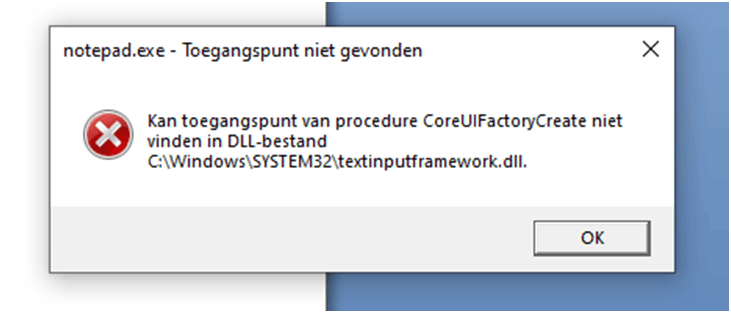
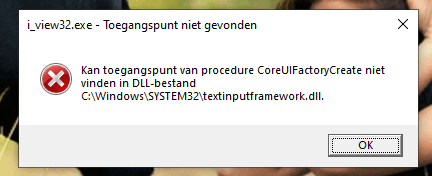
    But most of the time it happens when working in some application, e.g. when when browsing photo's in Irfanview and trying to rename, after hitting Enter that sets the actual changed file name.

    The user did this action countless times before, and never got an error, except when typing iillegal filename
    He also gets the error sometimes working in his faithful Excel 2007
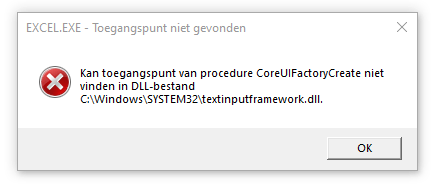
    You can't really predict when it's gonna happen.

    But when we repeat some specific action a lot, it will happen sooner or later.

    Was this answer helpful?

    0 comments No comments
