Event Viewer Logs : https://1drv.ms/u/s!AlDF29DIwtMzjQkdnQ_aXVyk6UhE?e=wKBQHz
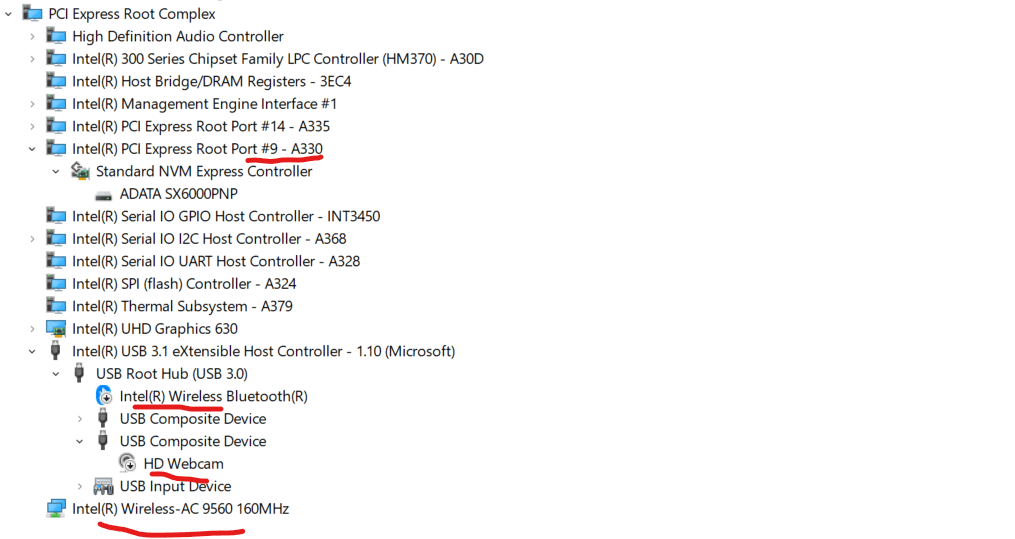
I've been having problems with my usb devices for over a year. This problem first started after an update to windows 10, the wifi constantly reset itself. Errors such as code 10 code 43, device unavailable, were constantly appearing and I could not use wifi. Neither myself nor windows update had done to my wifi adapter, the driver version was the same. So the problem completely appeared with the update of windows. I upgraded to windows 11, saying maybe my problem will be solved with windows 11. I used it for a bit, then with the updates to windows 11, this time it started to break down on my other usb devices. For example webcam , bluetooth stopped working. In a very strange way, for example, when I connect the device to the adapter, there is an interruption, sometimes not at all. When I remove the adapter from the device, there is an interruption and sometimes it does not happen at all. Sometimes windows resets the wifi adapter by itself without plugging in any adapter or while on the adapter. I sent the device to the place where I bought it, the last resort was the bios update, a clean install was done and windows 11 was installed again (the device was sent after stating that there was no hardware problem).And when I use the device, the underlined red ones you can see in the attached picture cause problems again. I have reviewed and tried every topic on the internet for the following errors. I tried: Sfc command (clean) DISM commands (applied, no change) Network reset commands, Adapter reset,Bios updated and tried to reset to default, clean installation as well. I tried to update wifi ,bluetooth driver from vendor's site, I made the updates via windows update as well but the problem is the same, unfortunately. I am getting the following errors in event viewer. "WLAN Extensibility Module has stopped.
Module Path: C:\WINDOWS\system32\IntelIHVRouter08.dll"
" ACPI: ACPI BIOS is attempting to write to an illegal PCI Operation Region (0x4), Please contact your system vendor for technical assistance.
" HAL = " The iommu fault reporting has been initialized."
WHEALOGGER error:" A corrected hardware error has occurred.
Component: PCI Express Root Port
Error Source: Advanced Error Reporting (PCI Express)
Primary Bus:Device:Function: 0x0:0x1D:0x0
Secondary Bus:Device:Function: 0x0:0x0:0x0
Primary Device Name:PCI\VEN_8086&DEV_A330&SUBSYS_10451D05&REV_F0
Secondary Device Name:"
' cx='32' cy='32' r='32' /%3E%3Ctext x='50%25' y='55%25' dominant-baseline='middle' text-anchor='middle' fill='%23FFF' %3EA%3C/text%3E%3C/svg%3E)
