Dear Ilya,
Good day! Thanks for posting in the community. We are happy to help you.
According to your description, you don't see the feature Insert 3D Models under the Insert tab. If so, please check if you can find or add it from Customize Ribbon. Click File> Options> Customize Ribbon. You can check if you can find the command "Insert 3D Models". If you don't see the command, you can add a new group to the Insert tab, select "All Commands" in the left list, find the command "Insert 3D Models" or "3D Models", add it to the new group, then check again.
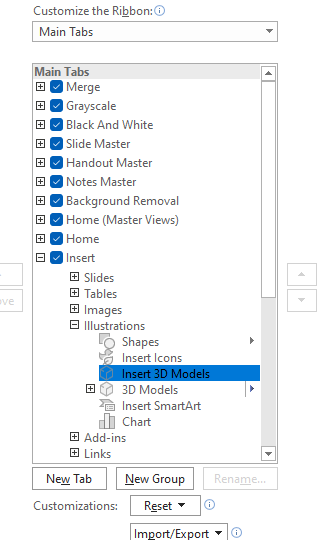
If you have tried the above steps, but the feature is still missing or not available, please try the following suggestions.
- Please make sure you have updated Office to the latest version. If not, please update it, then check again.
- Please try to set PowerPoint into Safe Mode, then create a new presentation and check again.
Close PowerPoint first, press win + R, in the Run box, type powerpnt /safe, and click OK
- Please try to Repair Office and choose Online Repair. After that, open the file and check again.
If the situation still happens after trying the above suggestions and steps, I would like to collect more information to troubleshoot.
- Please provide your Office version.
Click File> Account, please take a screenshot including Subscription Product and About PowerPoint.
- Does the situation only happen in PowerPoint or also happen in other Office applications, like Word?
- Does the situation happen to a specific presentation or also happen to a newly created presentation?
We look forward to your response. Thanks for your cooperation.
Sincerely,
George | Microsoft Community Moderator
' cx='32' cy='32' r='32' /%3E%3Ctext x='50%25' y='55%25' dominant-baseline='middle' text-anchor='middle' fill='%23FFF' %3EA%3C/text%3E%3C/svg%3E)
