Hello Teacher Tory!
Good day. I would be grateful to help you.
From your description, it seems that you have problem about Microsoft PowerPoint sync in your system. I understand that this issue has affected your daily teaching performance.
It might be supposed to your PowerPoint version. So, I think you can repair Office. Please check your PowerPoint version and make sure your copy of Office will always be up to date with the latest version.
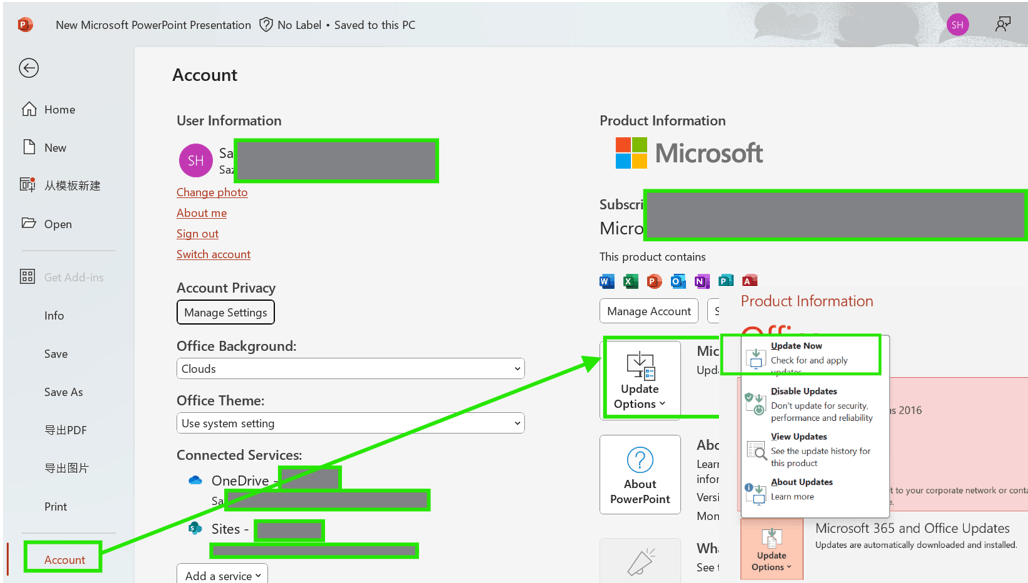
- To update Office: Open Microsoft PowerPoint > File > More > Account > Update Options > Update Now. After updating Microsoft PowerPoint restart your system.
- Try to fix the Office client, by performing a repair. Try a quick repair first; if that doesn't work, try the online repair.
If your problem persists, we can work together to get a solution. Please provide me with some details information such as:
- Does the problem happen with a specific file or all files?
- Does the problem happen with other Office application?
3. Do you use a personal Microsoft account or a work/school account? If you are using a work/school account, has this happened with your other colleagues?
Please don't hesitate to provide us with more details so we can better understand your concerns and support you more effectively.
Hope you have a nice day.
Best Regards,
Sophia
' cx='32' cy='32' r='32' /%3E%3Ctext x='50%25' y='55%25' dominant-baseline='middle' text-anchor='middle' fill='%23FFF' %3EA%3C/text%3E%3C/svg%3E)
