
@Anonymous Woops, youre right, sorry. I updated the file in the original link location.
Edit: The 192.168.100.1 DNS is actually not invalid, but its no DC. Removing it doesn't help either way though.
This browser is no longer supported.
Upgrade to Microsoft Edge to take advantage of the latest features, security updates, and technical support.
' cx='32' cy='32' r='32' /%3E%3Ctext x='50%25' y='55%25' dominant-baseline='middle' text-anchor='middle' fill='%23FFF' %3EC%3C/text%3E%3C/svg%3E)
Hi,
this is a rather strange problem and I'm stuck at this point.
Several users have issues with HTTPS connections not working or only working after multiple attempts. This may or may not only occur with certain applications and usually is not reproducible on other workstations.
Examples:
One user usually gets connection reset errors connecting to bing.com, everyone else can connect without problem
Another user cannot access stackoverflow or deepl unless refreshing multiple times. It will then at some point eventually load the page wihtout CSS, after a few more tries CSS will work too. Then it usually keeps working for the rest of the day or at least a longer period of time.
Our Jenkins server started having problems connecting to its (https) update servers, while the same URL can opened from a browser on the same machine without issues. Switching the update servers to HTTP will cause fetching update information to work, though the updates itself will work via https and thus fail. (Java error:SSLHandshakeException)
For me, Office 365 outlook decided to lose connection to exchange servers after a while, not being able to reconnect. Additionally, when I sign out of my Office 365 account from outlook (or any other office 365 app), It will fail to sign in again, simply closing the sign in dialog after entering the user name.
This behaviour started when the workstation was joined to the company domain and occurs with any user account, also local ones that didnt have a problem before.
The last issue does not appear when I switch to another network or change the DNS server from our domain controller to a publich one (1.1.1.1 used for reference). Changing DNS and then re-connecting (unplugging and re-plugging cable) to the network will allow me to sign in without issues, even if everything else is still configured via DHCP.
Changing DNS did not help in case of the Jenkins server, although re-connecting was not possible during my test and seemed to be required on my machine for the procedure to work.
I should also mention that many of the other users encountering issues are not yet domain members as it is currently in the process of being rolled out, so it doesnt appear to be (directly) connected to that. It should also rule out faulty GPOs as those workstations dont have any applied yet.
I initially suspected our sonicwall firewall, but it seems i can count it as ruled out (at least for the office365 problem) as cause of the issue.
DHCP config is very basic and just assigns IP, Netmask, Gateway, DNS and DNS Domain name.
DNS has three forward zones which havent changed for a while and were in use when everything still worked as expected.
DNS also has 1.1.1.1 and 8.8.8.8 set s forwarders for all requests that cannot be resolved locally. It is set up to use root hints if no forwarders are available, which shouldnt occur.
I really need to get this fixed soon as it is starting to affect production systems but I cant seem to pinpoint an actual cause.
Help is very appreciated.
Using classic Outlook for Windows in business environments

@Anonymous Woops, youre right, sorry. I updated the file in the original link location.
Edit: The 192.168.100.1 DNS is actually not invalid, but its no DC. Removing it doesn't help either way though.
' cx='32' cy='32' r='32' /%3E%3Ctext x='50%25' y='55%25' dominant-baseline='middle' text-anchor='middle' fill='%23FFF' %3EA%3C/text%3E%3C/svg%3E)
Looks like the dcdiag was not run with elevated credentials as most returned access denied
On WORKSTATION I'd remove the invalid DNS 192.168.100.1
--please don't forget to Accept as answer if the reply is helpful--
@Anonymous Find the requested files here:
https://1drv.ms/u/s!AgzwRu39BfcmanIjYNYtyyhf3W0?e=4c7DZ0
I anonymized them by replacing names with generic ones, so don´t wonder.
I performed them from the workstation with the outlook issue. I also included the nslookup results for @Gloria Gu . While theyre not from a workstation with the bing.com issue, they are identical to what I got there.
I doubt the actual name resolution is the issue, as that does work just fine as far as I can tell.
The interesting thing about this is that I need to re-connect my ethernet cable physically after changing the DNS server for the issue to disappear.
Disabling and Enabling the adapter works too, but flushing the dns cache to make sure the new dns will be used does not. The connection has to be re-established, I just dont know why.

Hi,
In regards to your issue, here're my suggestions:
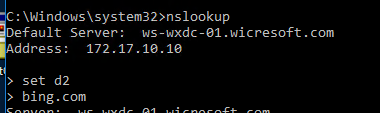
Can you please provide with the screenshots of 'nslookup bing.com' and 'nslookup set d2' command?
It will reflect the DNS query process which will be helpful to analyze the problem.
============================================
If the Answer is helpful, please click "Accept Answer" and upvote it.
Note: Please follow the steps in our documentation email-notifications.htmlto enable e-mail notifications if you want to receive the related email notification for this thread.
Please run;
Dcdiag /v /c /d /e /s:%computername% >c:\dcdiag.log
repadmin /showrepl >C:\repl.txt
ipconfig /all > C:\dc1.txt
ipconfig /all > C:\dc2.txt
(etc. as other DC's exist)
ipconfig /all > C:\problemworkstation.txt
then put unzipped text files up on OneDrive and share a link.