Note
Access to this page requires authorization. You can try signing in or changing directories.
Access to this page requires authorization. You can try changing directories.
To understand how Azure resource providers implement encryption at rest, you need to understand the different encryption models and their advantages and disadvantages. To ensure a common language and taxonomy, Azure resource providers share these definitions.
Azure automatically encrypts data at rest by default by using platform-managed keys. You can optionally choose other key management approaches based on your security and compliance requirements. Server-side encryption includes three scenarios:
Server-side encryption by using platform-managed keys (default).
- Azure resource providers perform the encryption and decryption operations.
- Microsoft manages the keys automatically.
- Enabled by default with no configuration required.
- Full cloud functionality.
Server-side encryption by using customer-managed keys in Azure Key Vault (optional).
- Azure resource providers perform the encryption and decryption operations.
- You control keys through Azure Key Vault.
- Requires customer configuration and management.
- Full cloud functionality.
Server-side encryption by using customer-managed keys on customer-controlled hardware (advanced option).
- Azure resource providers perform the encryption and decryption operations.
- You control keys on customer-controlled hardware.
- Complex configuration and limited Azure service support.
- Full cloud functionality.
Server-side encryption models refer to encryption that the Azure service performs. In that model, the resource provider performs the encrypt and decrypt operations. For example, Azure Storage might receive data in plain text operations and perform the encryption and decryption internally. The resource provider might use encryption keys that Microsoft or the customer manages, depending on your configuration.
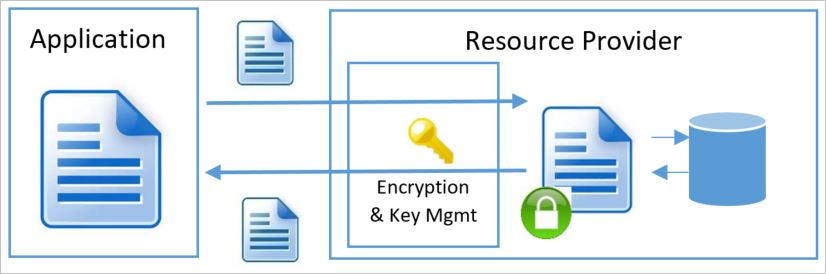
Each of the server-side encryption at rest models has distinctive characteristics of key management. These characteristics include where and how you create and store encryption keys, as well as the access models and the key rotation procedures.
For client-side encryption, consider:
- Azure services cannot see decrypted data.
- Customers manage and store keys on-premises (or in other secure stores). Azure services do not have access to keys.
- Reduced cloud functionality.
The supported encryption models in Azure split into two main groups: client encryption and server-side encryption. Regardless of the encryption at rest model you use, Azure services always recommend the use of a secure transport such as TLS or HTTPS. Therefore, address encryption in transport through the transport protocol. It shouldn't be a major factor in determining which encryption at rest model to use.
Client encryption model
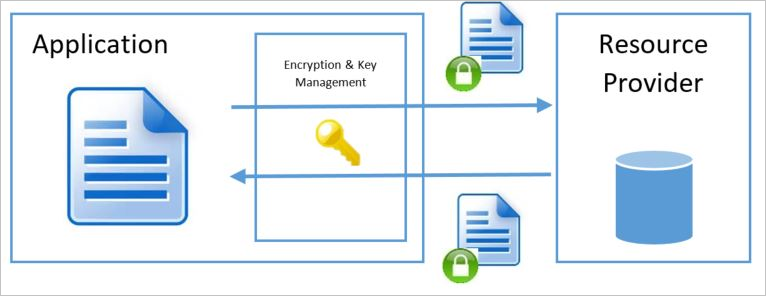
The client encryption model refers to encryption that the service or calling application performs outside of the resource provider or Azure. The service application in Azure or an application running in the customer data center can perform the encryption. In either case, when you use this encryption model, the Azure resource provider receives an encrypted blob of data without the ability to decrypt the data in any way or access the encryption keys. In this model, the calling service or application handles key management and keeps it opaque to the Azure service.
Server-side encryption by using platform-managed keys (default)
For most customers, the essential requirement is to ensure that data is encrypted whenever it is at rest. Server-side encryption by using platform-managed keys (formerly called service-managed keys) fulfills this requirement by providing automatic encryption by default. This approach enables encryption at rest without requiring customers to configure or manage encryption keys. Microsoft handles key management tasks such as key issuance, rotation, and backup.
Most Azure services implement this model as the default behavior, automatically encrypting data at rest by using platform-managed keys without any customer action required. The Azure resource provider creates the keys, places them in secure storage, and retrieves them when needed. The service has full access to the keys and maintains full control over the credential lifecycle management. This control provides robust encryption protection with zero management overhead for customers.
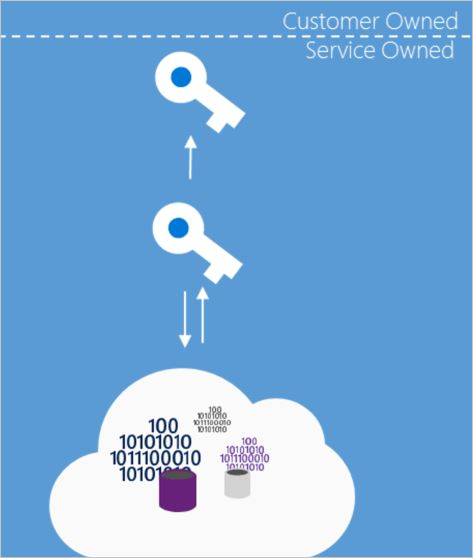
Server-side encryption by using platform-managed keys addresses the need for encryption at rest with zero overhead to the customer. This encryption is enabled by default across Azure services, providing automatic data protection without requiring any customer configuration or management. Customers benefit from robust encryption protection immediately upon storing data in Azure services, without additional steps, costs, or ongoing management required.
Server-side encryption by using platform-managed keys means the service has full access to store and manage the keys. While some customers might want to manage the keys because they feel they gain greater security, consider the cost and risk associated with a custom key storage solution when evaluating this model. In many cases, an organization might determine that resource constraints or risks of an on-premises solution are greater than the risk of cloud management of the encryption at rest keys. However, this model might not be sufficient for organizations that have requirements to control the creation or lifecycle of the encryption keys or to have different personnel manage a service's encryption keys than those managing the service (that is, segregation of key management from the overall management model for the service).
Key access
When you use server-side encryption with platform-managed keys, the service handles key creation, storage, and service access. Typically, the foundational Azure resource providers store data encryption keys in a store that's close to the data and quickly accessible, while key encryption keys reside in a secure internal store.
Advantages
- Simple setup.
- Microsoft manages key rotation, backup, and redundancy.
- You do not incur costs or risks associated with implementing a custom key management scheme.
Considerations
- No customer control over the encryption keys (key specification, lifecycle, revocation, etc.). This option is suitable for most use cases but might not meet specialized compliance requirements.
- No ability to segregate key management from the overall management model for the service. Organizations requiring separation of duties might need customer-managed keys.
Server-side encryption by using customer-managed keys in Azure Key Vault and Azure Key Vault Managed HSM (optional)
For scenarios where organizations have specific requirements to control their encryption keys beyond the default platform-managed encryption, customers can optionally choose server-side encryption by using customer-managed keys in Key Vault or Azure Key Vault Managed HSM. This approach builds on top of the default encryption at rest, allowing customers to use their own keys while Azure continues to handle the encryption and decryption operations.
Some services might store only the root key encryption key (KEK) in Azure Key Vault and store the encrypted data encryption key (DEK) in an internal location closer to the data. In this scenario, customers can use the bring your own key (BYOK) model to import keys to Key Vault or generate new keys in Key Vault, and then use them to encrypt the desired resources. While the resource provider performs the encryption and decryption operations, it uses the customer's configured KEK as the root key for all encryption operations.
Loss of key encryption keys means loss of data. For this reason, do not delete keys. Always back up keys when you create or rotate them. When a KEK is rotated, the service wraps the data encryption keys with the new key version - the underlying data is not re-encrypted. Both old and new key versions must remain enabled until all data encryption keys are wrapped with the new key version. To protect against accidental or malicious cryptographic erasure, Soft-delete and purge protection must be enabled on any vault storing key encryption keys. Instead of deleting a key, set enabled to false on the key encryption key. Use access controls to revoke access to individual users or services in Azure Key Vault or Managed HSM.
Warning
If you suspect a key is compromised, do not immediately disable or delete it. Disabling or deleting a key takes all dependent services offline, but it does not invalidate any copies of the key that were backed up and restored to another vault. Those copies remain fully functional. Instead, rotate to a new key and migrate all dependent services before disabling the compromised key. For the full incident response procedure, see Backup security considerations and Key compromise response.
For customer-managed key scenarios, use Azure Key Vault Premium tier (HSM-backed) as the minimum for compliance requirements that mandate HSM-protected keys. Use Azure Key Vault Managed HSM for workloads that require key sovereignty or dedicated HSM capacity. For organizations that have regulatory or contractual requirements that mandate key material to physically reside outside Microsoft infrastructure, Azure Key Vault Managed HSM also supports external key management (preview), which keeps the KEK in a customer-operated HSM entirely outside Azure.
Note
For a list of services that support customer-managed keys in Azure Key Vault and Azure Key Vault Managed HSM, see Services that support CMKs in Azure Key Vault and Azure Key Vault Managed HSM.
Key access
In the server-side encryption model that uses customer-managed keys in Azure Key Vault, the service accesses the keys to encrypt and decrypt as needed. You make encryption at rest keys accessible to a service through an access control policy. This policy grants the service identity access to receive the key. You can configure an Azure service running on behalf of an associated subscription with an identity in that subscription. The service can perform Microsoft Entra authentication and receive an authentication token identifying itself as that service acting on behalf of the subscription. The service then presents the token to Key Vault to obtain a key that it can access.
For operations that use encryption keys, you can grant a service identity access to any of the following operations: decrypt, encrypt, unwrapKey, wrapKey, verify, sign, get, list, update, create, import, delete, backup, and restore.
To obtain a key for use in encrypting or decrypting data at rest, the service identity that the Resource Manager service instance runs as must have UnwrapKey (to get the key for decryption) and WrapKey (to insert a key into Key Vault when creating a new key).
Note
For more information about Key Vault authorization, see Secure your key vault.
Advantages
- Full control over the keys used. Encryption keys are managed in your Key Vault under your control.
- You can encrypt multiple services by using one root key.
- You can segregate key management from the overall management model for the service.
- You can define service and key location across regions.
Disadvantages
- You have full responsibility for key access management.
- You have full responsibility for key lifecycle management.
- Additional setup and configuration overhead.
Server-side encryption by using customer-managed keys in customer-controlled hardware (specialized option)
Some Azure services enable the Host Your Own Key (HYOK) key management model for organizations with specialized security requirements. This management mode is useful in highly regulated scenarios that require encryption of data at rest and key management in a proprietary repository completely outside of Microsoft's control. It goes beyond the default platform-managed encryption and optional customer-managed keys in Azure Key Vault.
In this model, the service must use the key from an external site to decrypt the DEK. Performance and availability guarantees are affected, and configuration is significantly more complex. Additionally, because the service does not have access to the DEK during the encryption and decryption operations, the overall security guarantees of this model are similar to when the keys are customer-managed in Azure Key Vault. As a result, this model is not appropriate for most organizations unless they have very specific regulatory or security requirements that cannot be met with platform-managed keys or customer-managed keys in Azure Key Vault. Due to these limitations, most Azure services do not support server-side encryption by using customer-managed keys in customer-controlled hardware. One of the two keys in Double Key Encryption follows this model.
Key access
When you use server-side encryption with customer-managed keys in customer-controlled hardware, you keep the key encryption keys on a system that you configure. Azure services that support this model provide a way to establish a secure connection to a customer-supplied key store.
Advantages
- You have full control over the root key because a customer-provided store manages the encryption keys.
- You can encrypt multiple services by using one root key.
- You can segregate key management from the overall management model for the service.
- You can define service and key location across regions.
Disadvantages
- You have full responsibility for key storage, security, performance, and availability.
- You have full responsibility for key access management.
- You have full responsibility for key lifecycle management.
- You incur significant setup, configuration, and ongoing maintenance costs.
- The model increases dependency on network availability between the customer data center and Azure data centers.