Note
Access to this page requires authorization. You can try signing in or changing directories.
Access to this page requires authorization. You can try changing directories.
Generate prepopulated views over data in one or more data stores when the data isn't ideally formatted for required query operations. This approach can support efficient querying and data extraction and improve application performance.
Context and problem
When storing data, developers and data administrators often prioritize how the data is stored rather than how it's read. The chosen storage format usually reflects the format of the data, requirements for managing data size and data integrity, and the kind of store in use. For example, when you use a NoSQL document store, you often represent the data as a series of aggregates, each containing all of the information for that entity.
However, this approach can have a negative effect on queries. When a query only needs a subset of the data from some entities, such as a summary of orders for several customers without all of the order details, it must extract all of the data for the relevant entities in order to obtain the required information.
Adding indexes or reshaping queries at read time doesn't always resolve this inefficiency. Many stores can't be re-indexed for arbitrary read patterns without affecting write performance. Cross-entity aggregation remains expensive at query time. Some stores have limited query capabilities by design. Because of these constraints, optimizing the read path within the source store alone is often insufficient.
Solution
To support efficient querying, a common solution is to generate, in advance, a view that materializes the data in a format suited to the required result set. The Materialized View pattern describes generating prepopulated views of data in environments where the source data isn't in a suitable format for querying, where generating a suitable query is difficult, or where query performance is poor due to the nature of the data or the data store.
In this pattern, a materialized view is a read model or projection that persists data derived from one or more source stores. A dedicated application component or data pipeline can maintain the projection, including across store boundaries. Query consumers treat the projection as read-only. This architectural concept is broader than a database-native materialized-view object, which a database engine defines, stores, and refreshes according to its own feature constraints.
These materialized views, which contain only data required by a query, allow applications to quickly obtain the information they need. In addition to joining tables or combining data entities, materialized views can include the current values of calculated columns or data items, the results of combining values or executing transformations on the data items, and values specified as part of the query. A materialized view can even be optimized for a single query.
A key point is that a materialized view and the data it contains are completely disposable because they can be entirely rebuilt from the source data stores. Query consumers don't update the view directly. Instead, a dedicated component, data pipeline, or database engine maintains it, so it's a specialized cache.
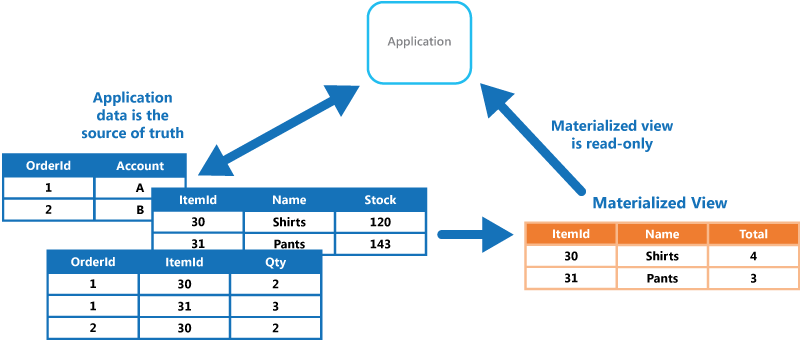
When the source data for the view changes, the view must update to include the new information. You can schedule this update to happen automatically or when the system detects a change to the original data. In some cases, you might need to regenerate the view manually. The following figure shows an example of how the Materialized View pattern might be used.
Problems and considerations
Consider the following points as you decide how to implement this pattern:
View refresh strategy. Ideally, the view regenerates in response to an event indicating a change to the source data, although this approach can lead to excessive overhead if the source data changes rapidly. Alternatively, consider using a scheduled task, an external trigger, or a manual action to regenerate the view.
Refresh behavior. Determine whether the implementation performs a full rebuild or applies changes incrementally. You also need to decide whether the refresh operations block reads.
These decisions determine whether queries return potentially stale materialized data, combine materialized data with unprocessed source changes to return current results, or continue to serve the last complete version until the refresh finishes.
Refresh signal reliability. If the activation signal that triggers view regeneration is lost or delayed - for example, a missed change-feed event or a failed scheduled task - the view silently serves stale results. Monitor refresh recency and alert when the view age exceeds the acceptable staleness window.
Refresh compute cost. Regenerating a view consumes compute resources proportional to the volume of source data and the complexity of the transformations. For event-driven refresh on rapidly changing source data, or for full rebuilds of large analytical views, the compute cost of refresh can be a significant cost driver. Right-size the refresh frequency and scope to balance data freshness against compute spending.
Event Sourcing dependency. In some systems, like when you use the Event Sourcing pattern to maintain a store of only the events that modified the data, materialized views are typically necessary. Prepopulating views by examining all events to determine the current state might be the only way to obtain information from the event store. If you're not using Event Sourcing, consider whether a materialized view is helpful. Materialized views tend to be specifically tailored to one or a small number of queries. If many queries are used, materialized views can result in unacceptable storage capacity requirements and storage cost.
Data consistency. Consider the impact on data consistency when generating the view, and when updating the view if this process occurs on a schedule. If the source data changes at the same time as the view is generated, the copy of the data in the view isn't fully consistent with the original data. The maximum staleness window is a direct consequence of the refresh interval or event-processing lag, so define the acceptable staleness before choosing between event-driven, scheduled, or manual refresh.
View storage location. The view doesn't have to be located in the same store or partition as the original data. You can combine subsets from a few different partitions.
Rebuild on loss. A view can be rebuilt if it's lost. Therefore, if the view is transient and is used only to improve query performance by reflecting the current state of the data, or to improve scalability, you can store it in a cache or in a less reliable location.
However, if the refresh process itself fails midway - for example, if a scheduled regeneration task crashes - determine whether the workload should serve the previous complete view, a partially updated view, or no view at all until regeneration succeeds.
The safest approach is typically atomic publication or versioned replacement, where your workload continues to serve and use the last complete view while you build and validate the new view. Swap to the new view after validation is complete.
Computed columns. When defining a materialized view, maximize its value by adding data items or columns based on computation or transformation of existing data items, on values passed in the query, or on combinations of these values when appropriate.
View indexing. Where the storage mechanism supports it, consider indexing the materialized view to further increase performance. Many relational databases support indexing for views. However, index maintenance on the view adds write-path overhead during each refresh cycle, so balance the read-performance gains against the additional refresh time and compute cost.
Access control on views. When a materialized view is used to restrict which data subsets are visible to certain consumers, such as for security or privacy reasons, the view store must enforce the same or stricter access controls as the source data. Your refresh pipeline must exclude unintended columns or rows, because a view that accidentally includes data beyond its intended scope can expose protected data.
Data lifecycle on views. Apply the source data's retention and deletion requirements to every materialized view. Propagate source deletions and redactions within the required period, and include each view in compliance monitoring. For more information, see Data governance and security baselines with Microsoft Purview.
View lifecycle management. Treat view definitions as deployable artifacts managed through source control and CI/CD pipelines, especially when views are defined declaratively. Without lifecycle management, view definitions can drift between environments, causing inconsistent query behavior across development, staging, and production.
When to use this pattern
Use this pattern when:
- You need to create views over data that's difficult to query directly, or where queries must be very complex to extract data that's stored in a normalized, semi-structured, or unstructured way.
- You want to create rebuildable or transient cached projections that improve query performance, or that shape data used to construct data transfer objects for a UI, report, or display.
- You need to support occasionally connected or disconnected scenarios where connection to the data store isn't always available. You can cache the view locally in this case.
- You want to simplify queries and expose data for experimentation in a way that doesn't require knowledge of the source data format. For example, by joining different tables in one or more databases, or one or more domains in NoSQL stores, and then formatting the data to fit its eventual use.
- You want to provide access to specific subsets of the source data that, for security or privacy reasons, shouldn't be generally accessible, open to modification, or fully exposed to users.
- You want to bridge different data stores to take advantage of their individual capabilities. For example, you might use a cloud store that's efficient for writing as the reference data store, and a relational database that offers good query and read performance to hold the materialized views.
- When you use microservices, keep them loosely coupled, including their data storage. Materialized views can help you consolidate data from your services. If materialized views aren't appropriate in your microservices architecture or specific scenario, consider having well-defined boundaries that align to domain-driven design (DDD) and aggregate their data on demand.
This pattern might not be suitable when:
- The source data is simple and easy to query.
- The source data changes very quickly, or can be accessed without using a view. In these cases, avoid the processing overhead of creating views.
- Consistency is a high priority. The views might not always be fully consistent with the original data.
Workload design
An architect should evaluate how the Materialized View pattern can be used in their workload's design to address the goals and principles covered in the Azure Well-Architected Framework pillars. For example:
| Pillar | How this pattern supports pillar goals |
|---|---|
| Performance Efficiency helps your workload efficiently meet demands through optimizations in scaling, data, and code. | The materialized views store the results of complex computations or queries without requiring the database engine or client to recompute for every request. This design reduces overall resource consumption. - PE:08 Data performance |
If this pattern introduces trade-offs within a pillar, consider them against the goals of the other pillars.
Example
Consider a sales application that stores Order, OrderItem, and Customer entities in Azure Table Storage. Orders are partitioned by customer ID, order items by order ID, and customers by region. These keys support the application's operational access patterns, but a sales report grouped by product must read data across partitions and combine it in application code.
The following figure shows a materialized view that stores the total sales value and the number of distinct purchasing customers for each product in the Electronics category. The source rows and summary values are illustrative, not a complete input dataset for the totals shown.
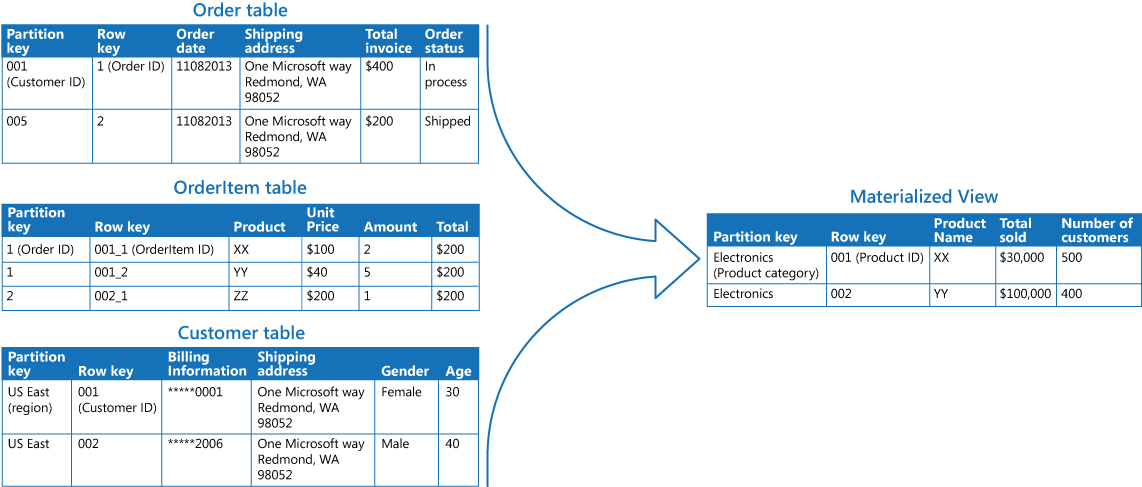
A background process reads the required source entities, associates order items with their orders and customers, and aggregates sales by product. It counts each customer once per product, even when that customer has multiple orders or order lines. The process writes the results to a separate summary table with product category as PartitionKey and product ID as RowKey. This summary table is an application-maintained projection, not a database-native materialized view.
A dashboard can then query the Electronics partition instead of repeating the cross-partition reads and aggregation for every request. A lookup for one product supplies both keys. For the query-performance implications of these keys, see Design for querying.
Refresh the summary on a schedule that meets the report's acceptable staleness window. Build and validate a new version before publishing it, so readers continue to use the previous complete version during a rebuild. The refresh still incurs cross-partition read and aggregation costs, but repeated report queries reuse the result. Source changes aren't visible until a subsequent refresh includes them.
Next steps
- Create indexed views describes how SQL databases can persist computed view results by creating an index on a view.
- Change feed design patterns in Azure Cosmos DB for NoSQL describes how change feed consumers can maintain materialized views.
- Materialized views overview describes materialized views in Azure Data Explorer.
- Azure Managed Redis can cache precomputed query results as a read-optimized layer in front of persistent data stores.
- Azure Table Storage can store precomputed view data generated by application logic or a background process.
Related resources
The following patterns might also be relevant when you implement this pattern:
- Command and Query Responsibility Segregation (CQRS) pattern. Use to update the information in a materialized view by responding to events that occur when the underlying data values change.
- Event Sourcing pattern. Use together with the CQRS pattern to maintain the information in a materialized view. When the data values a materialized view is based on change, the system can raise events that describe these changes and save them in an event store.
- Index Table pattern. The data in a materialized view is typically organized by a primary key, but queries might need to retrieve information from this view by examining data in other fields. Use this pattern to create secondary indexes over data sets for data stores that don't support native secondary indexes.