Note
Access to this page requires authorization. You can try signing in or changing directories.
Access to this page requires authorization. You can try changing directories.
User-defined functions (UDFs) in Unity Catalog extend SQL and Python capabilities within Azure Databricks. They let you define, use, and securely share and govern custom functions across computing environments.
Python UDFs registered as functions in Unity Catalog differ in scope and support from PySpark UDFs scoped to a notebook or SparkSession. See Python scalar user-defined functions (UDFs).
To register UDFs written in Scala or Java in Unity Catalog, see Scala and Java user-defined functions (UDFs) in Unity Catalog.
To see which workloads and tables reference a UDF in Unity Catalog before you modify it, see View UDF lineage.
See CREATE FUNCTION (SQL, Python, Scala, and Java) for complete SQL language reference.
Requirements
To use UDFs in Unity Catalog, you must meet the following requirements:
- To use Python code in UDFs registered in Unity Catalog, you must use a serverless or pro SQL warehouse or a cluster running Databricks Runtime 13.3 LTS or above.
- If a view includes a Unity Catalog Python UDF, it fails on classic SQL warehouses.
- ARM instance support for Scala UDFs on Unity Catalog-enabled clusters is available in Databricks Runtime 15.2 and above.
Scalar and Batch Unity Catalog Python UDFs are generally available on all supported compute types.
Python UDF feature requirements
Requirements vary by feature. Databricks Runtime 19 and environment version 6 are not general requirements for Unity Catalog Python UDFs.
For PySpark session UDFs on serverless notebooks or jobs, environment requirements refer to the session environment. For SQL-defined Python UDFs, they refer to environment_version in each function's ENVIRONMENT clause. Changing the session environment does not change an existing Unity Catalog function's environment. For example, a session using environment version 6 can call a Unity Catalog function defined with environment version 5.
| Feature | Requirements |
|---|---|
ENVIRONMENT clause and custom dependencies |
Serverless notebooks and jobs; pro or serverless SQL warehouses; Databricks Runtime 16.2 or above on classic compute. On classic compute running Databricks Runtime 16.2 through 18.1, environment_version must be 'None'. |
| Batch Unity Catalog Python UDFs | Serverless compute; pro and serverless SQL warehouses; Databricks Runtime 16.3 or above on classic compute |
| Named handler for a scalar Python UDF | Databricks Runtime 18.1 or above on classic compute. On serverless compute and on pro and serverless SQL warehouses, explicitly set the UDF's environment_version to 6 or above. |
| Service credentials in a scalar Python UDF | Databricks Runtime 18.1 or above on classic compute. On serverless compute and on pro and serverless SQL warehouses, explicitly set the UDF's environment_version to 6 or above. Classic compute does not require environment version 6. On serverless SQL warehouses, also enable the isolated-workload networking Public Preview. |
| Service credentials in a Batch Unity Catalog Python UDF | Serverless compute; pro and serverless SQL warehouses; Databricks Runtime 16.3 or above on classic compute. Environment version 6 is not required. On serverless SQL warehouses, also enable the isolated-workload networking Public Preview. |
| Secrets in a scalar or Batch Unity Catalog Python UDF | Explicitly set environment_version to 6 or above; serverless compute; pro and serverless SQL warehouses; Databricks Runtime 19 or above with standard access mode on classic compute. Direct invocation is not supported on dedicated access mode compute. |
PySpark-compatible TIMESTAMP input behavior |
Databricks Runtime 18.1 or above on classic compute. On serverless compute and on pro and serverless SQL warehouses, explicitly set the UDF's environment_version to 6 or above. |
| More than five UDF calls in a query | Databricks Runtime 18.1 or above on classic compute. On serverless compute and on pro and serverless SQL warehouses, explicitly set each UDF's environment_version to 6 or above. |
Existing UDFs and features that were available during Public Preview continue to work on applicable earlier runtime versions.
Environment version also determines whether callers need direct access to dependencies stored in a Unity Catalog volume. See Permissions for dependencies in Unity Catalog volumes.
Environment versions on classic compute
On classic compute, setting environment_version to a value other than 'None' requires Databricks Runtime 18.2 or above. On Databricks Runtime 16.2 through 18.1, set environment_version = 'None' whenever you use the ENVIRONMENT clause. The value 'None' uses the default Python environment.
On Databricks Runtime 18.2 or above, for predictable behavior, Azure Databricks recommends explicitly setting a fixed environment_version in each Unity Catalog Python UDF definition. Choose a version that meets the UDF's feature requirements and follows these compatibility recommendations:
| Databricks Runtime version | Maximum recommended environment version |
|---|---|
| 18.2 through 18.x | 5 |
| 19.x | 6 |
Creating SQL and Python UDFs in Unity Catalog
To create a SQL or Python UDF in Unity Catalog, users need USAGE and CREATE permission on the schema and USAGE permission on the catalog. See Unity Catalog for more details.
To run a UDF, users need EXECUTE permission on the UDF. Users also need USAGE permission on the schema and catalog.
To create and register a UDF in a Unity Catalog schema, the function name must follow the format catalog.schema.function_name. Alternatively, you can select the correct catalog and schema in the SQL Editor.
In this case, your function name must not have catalog.schema prepended to it:

The following example registers a new function to the my_schema schema in the my_catalog catalog:
CREATE OR REPLACE FUNCTION my_catalog.my_schema.calculate_bmi(weight DOUBLE, height DOUBLE)
RETURNS DOUBLE
LANGUAGE SQL
RETURN
SELECT weight / (height * height);
Python UDFs for Unity Catalog use statements offset by double dollar signs ($$). You must specify a data type mapping. The following example registers a UDF that calculates body mass index:
CREATE OR REPLACE FUNCTION my_catalog.my_schema.calculate_bmi(weight_kg DOUBLE, height_m DOUBLE)
RETURNS DOUBLE
LANGUAGE PYTHON
AS $$
return weight_kg / (height_m ** 2)
$$;
You can now use this Unity Catalog function in your SQL queries or PySpark code:
SELECT person_id, my_catalog.my_schema.calculate_bmi(weight_kg, height_m) AS bmi
FROM person_data;
See Row filter examples and Column mask examples for more UDF examples.
Use a named handler in a scalar Python UDF
On classic compute, named handlers require Databricks Runtime 18.1 or above. On serverless compute and on pro and serverless SQL warehouses, explicitly set the UDF's environment_version to 6 or above. The following example uses environment version 6. On classic compute running Databricks Runtime 18.1, omit the ENVIRONMENT clause. On later runtime versions, follow the compatibility recommendations if you include the clause.
Use the HANDLER clause to name a Python function in the UDF body as the entry point. The named handler accepts the UDF arguments and returns a value that matches the declared return type. Code outside the handler runs when each Python environment initializes the UDF, before the handler processes inputs. Use this code for one-time initialization that can be reused across handler calls.
The following example initializes greeting_prefix before defining greet_handler, the function that handles UDF inputs:
CREATE OR REPLACE FUNCTION my_catalog.my_schema.greet(name STRING)
RETURNS STRING
LANGUAGE PYTHON
HANDLER 'greet_handler'
ENVIRONMENT (
  environment_version = '6'
)
AS $$
# Runs once when each Python environment initializes the UDF.
greeting_prefix = "Hello"

def greet_handler(name):
    return f"{greeting_prefix}, {name}!"
$$;
Use secrets in a Python UDF
Scalar and Batch Unity Catalog Python UDFs can access secrets declared in the SECRETS clause. The UDF definition must explicitly set environment_version to 6 or above. A Unity Catalog secret uses a three-part name (catalog.schema.secret) and is distinct from a workspace-level Azure Databricks secret. For compute support, permissions, and the dedicated-compute column-mask exception, see UDF requirements and permissions.
To access a secret from a UDF:
- Add the secret's three-part name to the
SECRETSclause in the UDF definition. A UDF can retrieve only secrets declared in this clause. - In the UDF body, call
databricks.secrets.get()with the catalog, schema, and secret name.
The following scalar UDF example uses a Unity Catalog secret as a hash-based message authentication code (HMAC) signing key. Use the same SECRETS clause with PARAMETER STYLE PANDAS to access declared secrets from a Batch UDF handler.
CREATE OR REPLACE FUNCTION main.default.sign_value(value STRING)
RETURNS STRING
LANGUAGE PYTHON
SECRETS (main.default.hmac_key)
ENVIRONMENT (
  environment_version = '6'
)
AS $$
import hashlib
import hmac
from databricks.secrets import get

key = get(catalog="main", schema="default", key="hmac_key")
return hmac.new(key.encode(), value.encode(), hashlib.sha256).hexdigest()
$$;
Warning
Do not return secret values from a UDF. Secret redaction helps reduce accidental exposure in errors and logs, but it does not prevent UDF code from exposing secret material in query results.
Extend UDFs using custom dependencies
Note
To install custom dependencies from the internet on a serverless SQL warehouse, your workspace must have the Public Preview feature Enable networking for isolated workloads in Serverless SQL Warehouses enabled on the Previews page.
You can extend the capabilities of Unity Catalog Python UDFs beyond the Databricks Runtime environment by defining custom dependencies for external libraries.
Requirements
Custom dependencies for Unity Catalog UDFs are supported on the following compute types:
- Serverless notebooks and jobs
- Classic all-purpose compute using Databricks Runtime version 16.2 and above
- Pro or serverless SQL warehouse
Dependency sources
Install dependencies from the following sources:
- PyPI packages
- Files stored in Unity Catalog volumes See Permissions for dependencies in Unity Catalog volumes.
- Files available at public URLs Your workspace network security rules must allow access to public URLs. See Requirements.
Note
If your workspace restricts serverless network access, you must configure network security rules to allow the public URLs. See Set egress rules.
Permissions for dependencies in Unity Catalog volumes
The function creator must have READ VOLUME on a source volume to add a dependency from that volume to a UDF.
For a UDF whose definition explicitly sets environment_version to 6 or above, callers need EXECUTE on the UDF but do not need READ VOLUME on the source volume. If the UDF definition omits environment_version, sets it to None, or sets it to an earlier version, callers must also have READ VOLUME on the source volume.
Define dependencies
Use the ENVIRONMENT section of the UDF definition to specify dependencies:
CREATE OR REPLACE FUNCTION my_catalog.my_schema.mixed_process(data STRING)
RETURNS STRING
LANGUAGE PYTHON
ENVIRONMENT (
  dependencies = '["simplejson==3.19.3", "/Volumes/my_catalog/my_schema/my_volume/packages/custom_package-1.0.0.whl", "https://my-bucket.s3.amazonaws.com/packages/special_package-2.0.0.whl?Expires=2043167927&Signature=abcd"]',
  environment_version = '6'
)
AS $$
import simplejson as json
import custom_package
return json.dumps(custom_package.process(data))
$$;
The ENVIRONMENT section contains the following fields:
| Field | Description | Type | Example usage |
|---|---|---|---|
dependencies |
A list of comma-separated dependencies to install. Each entry is a string that conforms to the pip Requirements File Format. | STRING |
dependencies = '["simplejson==3.19.3", "/Volumes/catalog/schema/volume/packages/my_package-1.0.0.whl"]'dependencies = '["https://my-bucket.s3.amazonaws.com/packages/my_package-2.0.0.whl?Expires=2043167927&Signature=abcd"]' |
environment_version |
Specifies the environment version in which to run the UDF. This field is required whenever the ENVIRONMENT clause is present. A fixed environment version runs the UDF with a specific Python version and a set of preinstalled packages, independent of the Python version and packages in the underlying Databricks Runtime.Supported values are an environment version of 3 or above, such as '6', or the string 'None'. The value 'None' selects the default Python environment. On classic compute, setting environment_version to a value other than 'None' requires Databricks Runtime 18.2 or above. On Databricks Runtime 16.2 through 18.1, only 'None' is supported. When fixed environment versions are supported, explicitly select one for predictable behavior.On serverless compute and on pro and serverless SQL warehouses, some features require an explicit environment version. Set environment_version to the required version or above in each UDF definition. Omitting the entire ENVIRONMENT clause or setting environment_version = 'None' does not enable those features. See Python UDF feature requirements.For classic compute version compatibility, see Environment versions on classic compute. For the list of available versions, see Environment versions. |
STRING |
environment_version = '6' |
Use Unity Catalog UDFs in PySpark
from pyspark.sql.functions import expr

result = df.withColumn("bmi", expr("my_catalog.my_schema.calculate_bmi(weight_kg, height_m)"))
display(result)
Upgrade a session-scoped UDF
Note
Syntax and semantics for Python UDFs in Unity Catalog differ from Python UDFs registered to the SparkSession. See user-defined scalar functions - Python.
Given the following session-based UDF in a Azure Databricks notebook:
from pyspark.sql.functions import udf
from pyspark.sql.types import StringType

@udf(StringType())
def greet(name):
    return f"Hello, {name}!"

# Using the session-based UDF
result = df.withColumn("greeting", greet("name"))
result.show()
To register this as a Unity Catalog function, use a SQL CREATE FUNCTION statement, as in the following example:
CREATE OR REPLACE FUNCTION my_catalog.my_schema.greet(name STRING)
RETURNS STRING
LANGUAGE PYTHON
AS $$
return f"Hello, {name}!"
$$
Share UDFs in Unity Catalog
The access controls applied to the catalog, schema, or database where you register the UDF manage its permissions. See Manage privileges in Unity Catalog for more information.
Use the Azure Databricks SQL or the Azure Databricks workspace UI to give permissions to a user or group (recommended).
Permissions in the workspace UI
- Find the catalog and schema where your UDF is stored and select the UDF.
- Look for a Permissions option in the UDF settings. Add users or groups and specify the type of access they must have, such as EXECUTE or MANAGE.
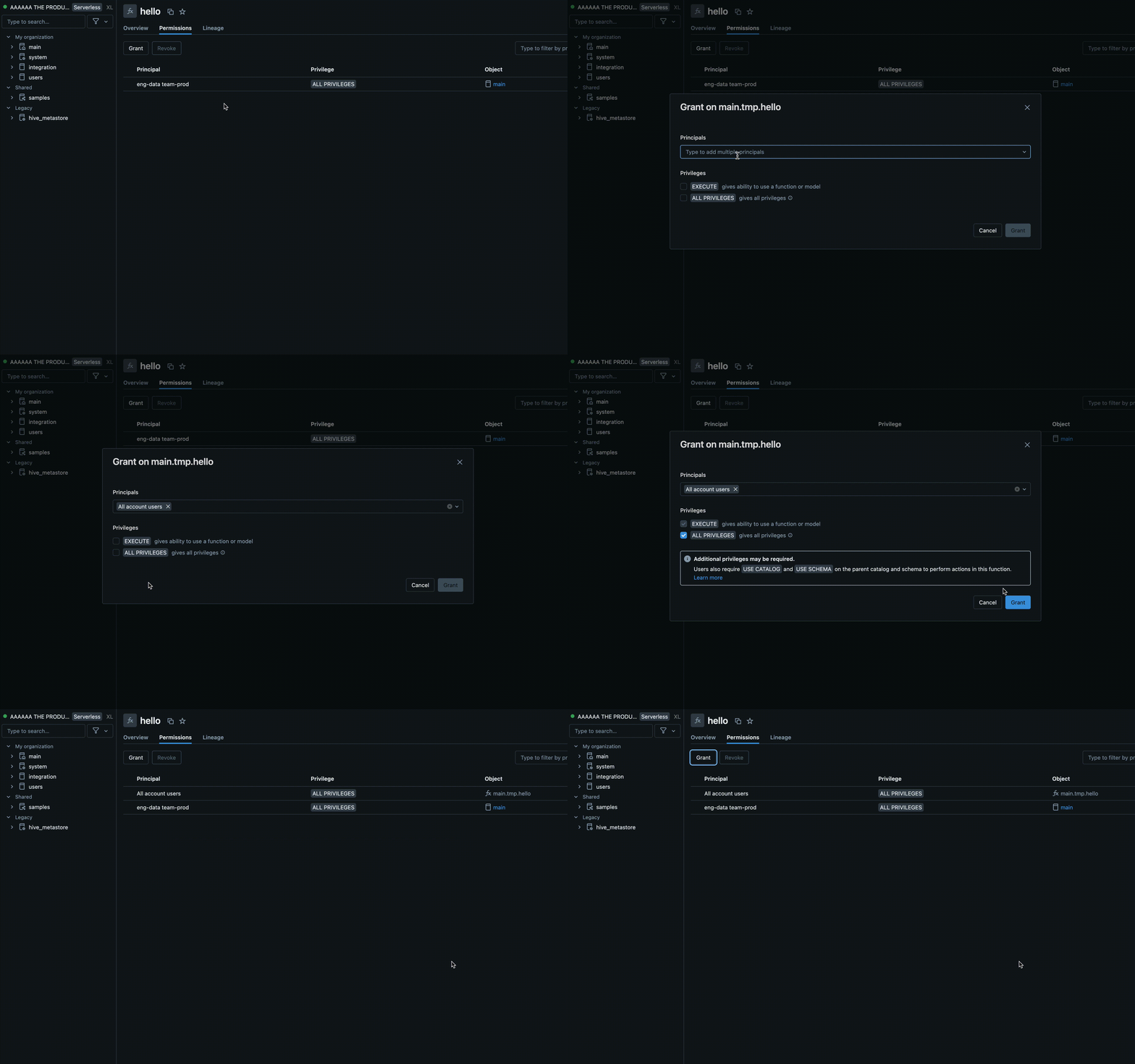
Permissions using Azure Databricks SQL
The following example grants a user the EXECUTE permission on a function:
GRANT EXECUTE ON FUNCTION my_catalog.my_schema.calculate_bmi TO `user@example.com`;
To remove permissions, use the REVOKE command as in the following example:
REVOKE EXECUTE ON FUNCTION my_catalog.my_schema.calculate_bmi FROM `user@example.com`;
Environment isolation
Note
Shared isolation environments require Databricks Runtime 18.1 and above. In earlier versions, all Unity Catalog Python UDFs run in strict isolation mode.
Unity Catalog Python UDFs with the same owner and session can share an isolation environment by default. This improves performance and reduces memory usage by reducing the number of separate environments that must be launched.
Strict isolation
To verify a UDF always runs in its own, fully isolated environment, add the STRICT ISOLATION characteristic clause.
Most UDFs don't need strict isolation. Standard data processing UDFs benefit from the default shared isolation environment and run faster with lower memory consumption.
Add the STRICT ISOLATION characteristic clause to UDFs that:
- Run input as code using
eval(),exec(), or similar functions. - Write files to the local file system.
- Modify global variables or system state.
- Access or modify environment variables.
The following code shows an example of a UDF that must be run using STRICT ISOLATION. This UDF runs arbitrary Python code, so it might alter the system state, access environment variables, or write to the local file system. Using the STRICT ISOLATION clause helps prevent interference or data leaks across UDFs.
CREATE OR REPLACE TEMPORARY FUNCTION run_python_snippet(python_code STRING)
RETURNS STRING
LANGUAGE PYTHON
STRICT ISOLATION
AS $$
import sys
from io import StringIO

# Capture standard output and error streams
captured_output = StringIO()
captured_errors = StringIO()
sys.stdout = captured_output
sys.stderr = captured_errors

try:
    # Execute the user-provided Python code in an empty namespace
    exec(python_code, {})
except SyntaxError:
    # Retry with escaped characters decoded (for cases like "\n")
    def decode_code(raw_code):
        return raw_code.encode('utf-8').decode('unicode_escape')
    python_code = decode_code(python_code)
    exec(python_code, {})

# Return everything printed to stdout and stderr
return captured_output.getvalue() + captured_errors.getvalue()
$$
Set DETERMINISTIC if your function produces consistent results
Add DETERMINISTIC to your function definition if it produces the same outputs for the same inputs. This allows query optimizations to improve performance.
By default, Azure Databricks treats Batch Unity Catalog Python UDFs as non-deterministic unless you explicitly declare otherwise. Examples of non-deterministic functions include generating random values, accessing current times or dates, or making external API calls.
See CREATE FUNCTION (SQL, Python, Scala, and Java)
UDFs for agent tools
AI agents can use Unity Catalog UDFs as tools to perform tasks and run custom logic.
See Create agent tools using Unity Catalog functions.
UDFs for accessing external APIs
You can use UDFs to access external APIs from SQL. The following example uses the Python requests library to make an HTTP request.
Note
Python UDFs allow TCP/UDP network traffic over ports 80, 443, and 53 when using serverless compute or compute configured with standard access mode.
CREATE FUNCTION my_catalog.my_schema.get_food_calories(food_name STRING)
RETURNS DOUBLE
LANGUAGE PYTHON
AS $$
import requests

api_url = f"https://example-food-api.com/nutrition?food={food_name}"
response = requests.get(api_url)

if response.status_code == 200:
   data = response.json()
   # Assume the API returns a JSON object with a 'calories' field
   calories = data.get('calories', 0)
   return calories
else:
   return None  # API request failed

$$;
UDFs for security and compliance
Use Python UDFs to implement custom tokenization, data masking, data redaction, or encryption mechanisms.
The following example masks the identity of an email address while maintaining length and domain:
CREATE OR REPLACE FUNCTION my_catalog.my_schema.mask_email(email STRING)
RETURNS STRING
LANGUAGE PYTHON
DETERMINISTIC
AS $$
parts = email.split('@', 1)
if len(parts) == 2:
  username, domain = parts
else:
  return None
masked_username = username[0] + '*' * (len(username) - 2) + username[-1]
return f"{masked_username}@{domain}"
$$
The following example applies this UDF in a dynamic view definition:
-- First, create the view
CREATE OR REPLACE VIEW my_catalog.my_schema.masked_customer_view AS
SELECT
  id,
  name,
  my_catalog.my_schema.mask_email(email) AS masked_email
FROM my_catalog.my_schema.customer_data;

-- Now you can query the view
SELECT * FROM my_catalog.my_schema.masked_customer_view;
+---+------------+------------------------+------------------------+
| id|        name|                   email|           masked_email |
+---+------------+------------------------+------------------------+
|  1|    John Doe|   john.doe@example.com |  j*******e@example.com |
|  2| Alice Smith|alice.smith@company.com |a**********h@company.com|
|  3|   Bob Jones|    bob.jones@email.org |   b********s@email.org |
+---+------------+------------------------+------------------------+
Best practices
For UDFs to be accessible to all users, Databricks recommends creating a dedicated catalog and schema with appropriate access controls.
For team-specific UDFs, use a dedicated schema within the team catalog for storage and management.
Databricks recommends you include the following information in the UDF docstring:
- The current version number
- A changelog to track modifications across versions
- The UDF purpose, parameters, and return value
- An example of how to use the UDF
The following example shows a UDF that follows best practices:
CREATE OR REPLACE FUNCTION my_catalog.my_schema.calculate_bmi(weight_kg DOUBLE, height_m DOUBLE)
RETURNS DOUBLE
COMMENT "Calculates Body Mass Index (BMI) from weight and height."
LANGUAGE PYTHON
DETERMINISTIC
AS $$
 """
Parameters:
calculate_bmi (version 1.2):
- weight_kg (float): Weight of the individual in kilograms.
- height_m (float): Height of the individual in meters.

Returns:
- float: The calculated BMI.

Example Usage:

SELECT calculate_bmi(weight, height) AS bmi FROM person_data;

Change Log:
- 1.0: Initial version.
- 1.1: Improved error handling for zero or negative height values.
- 1.2: Optimized calculation for performance.

 Note: BMI is calculated as weight in kilograms divided by the square of height in meters.
 """
if height_m <= 0:
 return None  # Avoid division by zero and ensure height is positive
return weight_kg / (height_m ** 2)
$$;
Timestamp timezone behavior for row-at-a-time inputs
A TIMESTAMP input reaches a row-at-a-time Python UDF as a timezone-naive datetime value in UTC. On classic compute, this behavior requires Databricks Runtime 18.1 or above. On serverless compute and on pro and serverless SQL warehouses, explicitly set the UDF's environment_version to 6 or above. The datetime object does not include timezone metadata in its tzinfo attribute.
Batch Unity Catalog Python UDFs receive timestamp inputs in pandas.Series objects and do not use this datetime mapping.
This change aligns Unity Catalog Python UDFs with Arrow-optimized Python UDFs in Apache Spark.
For example, the following query explicitly sets environment version 6 and the session timezone to UTC:
SET TIME ZONE 'UTC';

CREATE FUNCTION timezone_udf(date TIMESTAMP)
RETURNS STRING
LANGUAGE PYTHON
ENVIRONMENT (
  environment_version = '6'
)
AS $$
return f"{type(date)} {date} {date.tzinfo}"
$$;

SELECT timezone_udf(TIMESTAMP '2024-10-23 10:30:00');
The earlier execution path returns a timezone-aware value in the session timezone. This applies on classic compute before Databricks Runtime 18.1. It also applies on serverless compute and on pro and serverless SQL warehouses when you omit the ENVIRONMENT clause, set environment_version = 'None', or select a version earlier than 6. With the session timezone set to UTC, the earlier path produces:
<class 'datetime.datetime'> 2024-10-23 10:30:00+00:00 UTC
With the definition shown, serverless compute and pro and serverless SQL warehouses use the PySpark-compatible behavior. Classic compute running Databricks Runtime 18.1 or above uses the same behavior when you adjust or omit the ENVIRONMENT clause:
<class 'datetime.datetime'> 2024-10-23 10:30:00 None
This change can affect the clock fields as well as tzinfo. For the instant 2024-10-23T10:30:00Z, the earlier behavior in an America/Los_Angeles session produces 2024-10-23 03:30:00-07:00. The new behavior produces the timezone-naive UTC value 2024-10-23 10:30:00.
If your UDF relies on timezone information, restore UTC explicitly:
from datetime import timezone

date = date.replace(tzinfo=timezone.utc)
Adding UTC timezone information does not restore the previous session-local clock fields. If your logic needs those fields, also convert the aware value to the intended session timezone. For example:
from zoneinfo import ZoneInfo

date = date.astimezone(ZoneInfo("America/Los_Angeles"))
Limitations
- You can define any number of Python functions within a Python UDF, but all must return a scalar value.
- Python functions must handle NULL values independently, and all type mappings must follow Azure Databricks SQL language mappings.
- If you do not specify a catalog or schema, Azure Databricks registers Python UDFs to the current active schema.
- Python UDFs run in a secure, isolated environment and do not have access to file systems or internal services.
- You can call more than five UDFs in a query on classic compute running Databricks Runtime 18.1 or above. On serverless compute and on pro and serverless SQL warehouses, each UDF definition must explicitly set
environment_versionto6or above.