Note
Access to this page requires authorization. You can try signing in or changing directories.
Access to this page requires authorization. You can try changing directories.
Local AI agents run with user-level permissions and can access files, tools, and services on the devices where they operate. Without visibility into which agents are running and what they can reach, security teams can't assess exposure, enforce governance, or respond to agent-related incidents.
Microsoft Defender can discover local AI agents and their configured MCP servers after it observes agent activity on onboarded devices, then surfaces them in the Microsoft Defender portal. This gives security teams a centralized view of AI agents used in the organization.
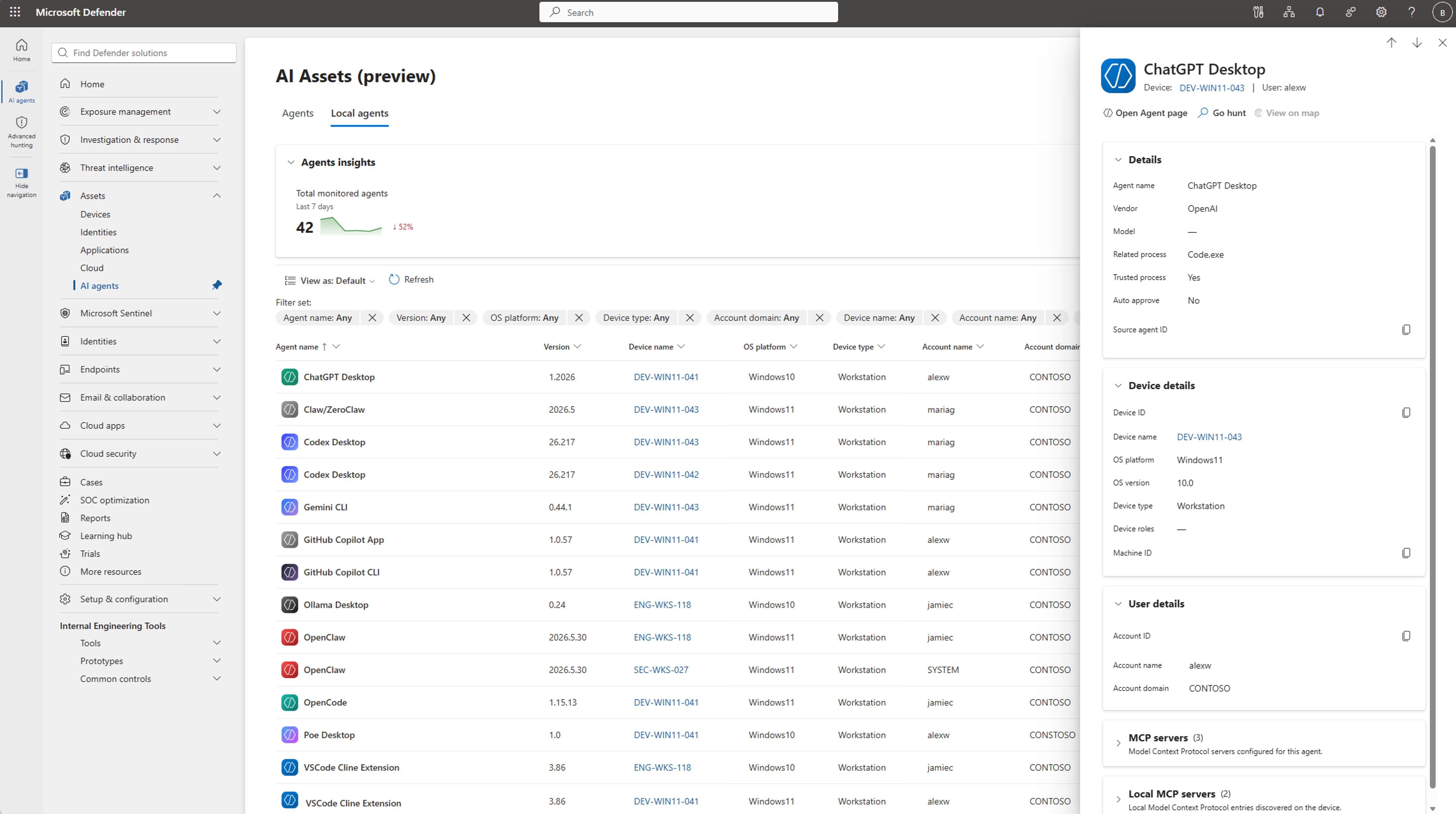
Learn how local AI agent discovery works, review coverage for agents and MCP server configurations, and view discovered agents in the Microsoft Defender portal.
Tip
Defender also provides AI agent runtime protection for local agents. When enabled, runtime protection monitors activity in the agentic loop and blocks malicious instructions before the agent can act on them. For more information, see AI agent runtime protection.
Local AI agent discovery on endpoints
Defender lists a local AI agent after it observes agent activity on an onboarded device. Installing an agent doesn't by itself guarantee that the agent appears in the local AI agent inventory. An installed agent might not appear until Defender observes agent activity.
Local AI agent discovery isn't a complete inventory of installed software. It provides security context for agents that Defender observes on endpoints, including the device and account associated with the activity. To review known software installed on devices, use Software inventory in Microsoft Defender Vulnerability Management.
When Defender identifies a local AI agent, the agent is displayed as a discoverable asset in the Microsoft Defender portal with visibility into:
- Local AI agent inventory: A centralized view of discovered local AI agents with device and user associations and discovery metadata.
- Exposure map: Visual relationships between local AI agents, devices, identities, and the resources those identities can access, to help assess potential impact.
- Advanced hunting: Hunting for discovery data using Kusto Query Language (KQL) to investigate local AI agents and the resources they can access based on the permissions of the user running them.
Note
Local AI agent discovery on macOS is in preview.
Supported local AI agents and MCP server configurations
Defender defines an agent as a combination of a user, a device, and an agent type. For example, if Claude Code runs in 15 different project folders on the same device for the same user, it appears as a single agent entry in the inventory.
Defender discovers local AI agents on Windows and macOS endpoints. This includes agents that run from the command line, desktop apps, agentic IDEs, VS Code extensions, and Claw-based local agent implementations. Microsoft Defender can also discover local and remote MCP server configurations associated with these agents.
For coverage by agent, operating system, and MCP server configuration, see Microsoft Defender for Endpoint AI agent support matrix.
Defender associates discovered MCP server configurations with the agent. The available configuration details can include the server name, type, endpoint, and the command used to start a local MCP server. An agent can have multiple configured MCP servers. To query these details, see Review the MCP servers and tools that local AI agents use.
To learn how to discover and view local AI agents, see Discover local AI agents.
Broader AI security capabilities
Microsoft Defender's discovery capabilities are part of a comprehensive AI security approach. Microsoft Defender provides other capabilities in your organization's AI ecosystem:
- Discover cloud and platform agents: Find agents built with Microsoft Copilot Studio, Microsoft Foundry, Amazon Web Services (AWS) Bedrock, and Google Cloud Platform (GCP) Vertex AI.
- Detect and investigate threats: Correlate alerts and investigate suspicious agent behavior in your security infrastructure.
For details on these capabilities and how to apply them, see Protect AI assets from emerging threats and vulnerabilities using Microsoft Defender.