Note
Access to this page requires authorization. You can try signing in or changing directories.
Access to this page requires authorization. You can try changing directories.
This article explains how to generate payment refunds via call centers when returns are created or when orders or order lines are canceled in Microsoft Dynamics 365 Commerce.
A user who creates a return order for a customer as a call center user in Microsoft Dynamics 365 Commerce headquarters uses the Return order page to create the initial return materials authorization (RMA). The RMA defines the products that the customer wants to return or exchange, and it creates a linked return sales order that has an order type of Returned order. This linked returned order is used to track the posting of the returned inventory and any credit notes or payment refunds that are posted.
If the Enable order completion option is set to Yes for the call center channel, the call center user who creates the RMA must run the order completion processing flow by selecting Complete on the Return order page. The Complete function provides a calculated return summary that outlines the refund amount that's due. Additionally, when the Complete function is configured correctly it systematically creates a refund payment line against the returned order.
Call center logic determines the payment method for the refund payment line, based on the payment method that was used for the original order. If the created return order isn't linked to an original order, a default payment method specified by a system parameter is applied.
How a call center determines which payment method to apply to a return order
The call center uses the payment method of the original order to determine the payment method that should be applied to a return order. Here's how this process works for the following original payment methods:
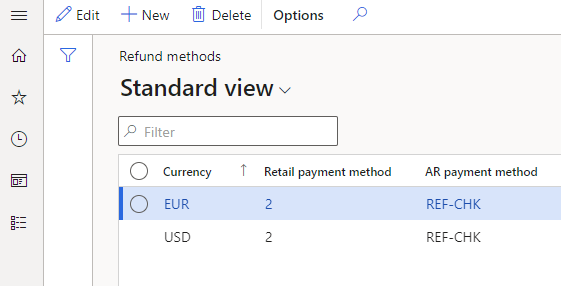
Normal (cash) or Check – When a created return order references an original order that was paid for by using the normal (cash) or check payment type, the call center application references configurations on the Call center refund methods page. This page enables organizations to define by order currency how to issue refunds to customers for orders originally paid for using the normal or check payment type. The Call center refund methods page also enables organizations to select if a system-generated refund check should be sent to the customer. In these scenarios, call center logic references the currency of the return order and then uses the Retail payment method value for that currency to create a refund payment line on the return sales order. Later, an accounts receivable (AR) customer payment journal that uses the mapped AR payment method is linked to the currency.
The following illustration shows the configuration for a scenario where a customer returns products from a sales order that's linked to the USD currency and was originally paid for using the normal or check payment type. In this scenario, a refund is issued to the customer through a system-generated refund check. The REF-CHK AR payment method is configured as a refund check payment type.
Note
Customer account isn't a supported refund method for cash or check payments.
Credit card – When a return order that's created references an original order that was paid for by using a credit card, call center logic for refund payments applies the same original credit card to the return order.
Loyalty card – When a return order that's created references an original order that was paid for by using a customer loyalty card, call center logic for refund payments applies the refund to the same loyalty card.
Gift card (internal) – When a return order that's created references an original order that was paid for by using a gift card that was issued from Dynamics 365 Commerce (internal gift card functionality), call center logic for refund payments applies the refund to the same original gift card number.
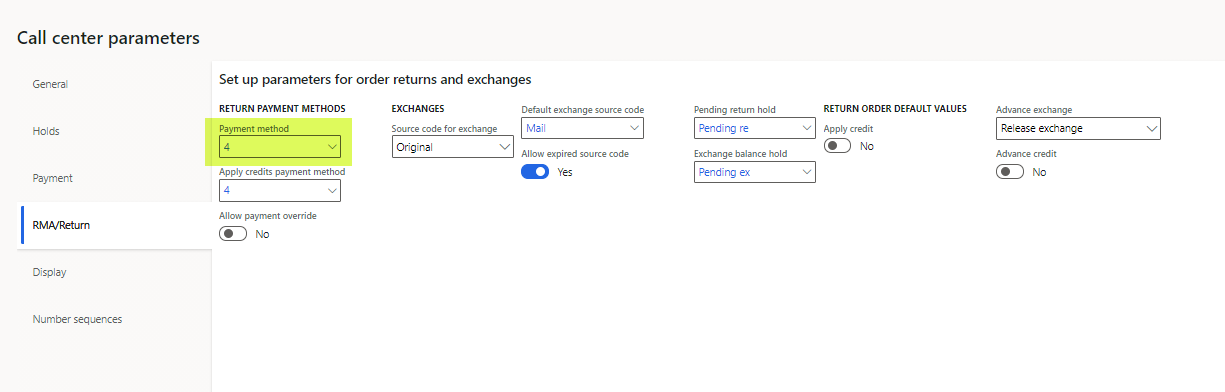
Gift card (External) – When a return order that's created references an original order that was paid for by using an external third-party gift card, call center logic for refund payments applies the default return payment method defined on the RMA/Return tab of the Call center parameters page.
If the original order payment type is unknown for any reason, or if multiple payment methods were used to pay for the original order, call center logic applies the default return payment method that's defined on the RMA/Return tab of the Call center parameters page.
The following illustration shows the Payment method field on the RMA/Return tab of the Call center parameters page.
Note
The refund processing rules that are described earlier also apply to orders or order lines that a call center user cancels in Commerce headquarters. If the cancellation of an order or specific order lines causes any overpayments, the same rules are used to generate refund payment lines.
Typically, a return order goes through a standard process where inventory is received or scrapped, a packing slip is posted against the return order, and an invoice posting process is run for the return sales order. The return sales order is linked and systematically generated as part of the process of creating the return order. In typical scenarios, payment refunds aren't issued to customers until the invoice for the return sales order is posted.
What happens when an invoice is posted on a return sales order
The following scenarios explain what happens when an invoice is posted on a return sales order:
- If the refund payment on the return order is for a credit card, additional logic is invoked when the invoice is posted. This logic calls the payment processor to refund payment to the customer's credit card. A refund customer payment voucher is also created and systematically posted against the customer's account. This payment journal is settled against the return order credit note voucher.
- If the refund payment to be issued is for the check payment type, the system creates a customer payment voucher that uses the AR payment method. This customer payment voucher must be manually posted or printed before the payment voucher can be posted against the customer account. To process the refund check, users can use either the Customer payment journal page in Accounts receivable or the specialized Refund check processing page in Retail and Commerce.
- If the refund payment to be issued is for the internal gift card or loyalty card payment type, when the return order is invoiced, the refund payment voucher is created and posted against the customer account. This invoicing step also adds the refund amount back to the customer's internally tracked gift card balance or loyalty points balance.
- If a payment method that uses the Customer function (for example, a customer account) is linked to the return sales order, credit limit validations are ignored when the payment is processed. No payment voucher is created or posted in this context. When a customer payment type is used on a return order, the credit note voucher that the invoice posting process creates serves as the customer credit voucher and indicates a refund to the customer's AR balance.
Advance credit
When a user processes return orders as a call center user in a call center where the Enable order completion option is set to Yes, an exception to the previously described process for refund payment posting can occur if the call center user who is creating the return order sets the Advance credit option to Yes on the RMA/Return tab of the Call center parameters page. In this case, the payment refund occurs immediately after the return order is successfully submitted by using the Submit function on the Return summary page. The system immediately creates a prepayment customer payment voucher for the return value, even though the return sales order itself isn't invoiced yet. This approach is useful in situations where an organization must issue refunds to customers in advance because of customer service issues and doesn't want to require that returned inventory be received before refunds are issued.
Replacement orders
When a return order is issued, you can use the Replacement order function to generate a new sales order for the customer. You can use this approach in exchange scenarios. The Replacement order function creates another sales order for the new items that must be sent, but a cross-reference link on the RMA/Return tab of the Call center parameters page links the replacement order, the RMA, and the returned sales order.
When payments on a replacement order are processed, organizations have two options:
- Refund the customer for the return order, based on the original payment method, and then collect a separate payment for the replacement order. No additional configuration is required to use this option.
- Set the Apply credit option to Yes on the RMA/Return tab of the Call center parameters page. In this case, a customer payment method is systematically applied to both the return order and the replacement order. This option can help prevent any external refund payment from being issued. It also helps prevent any payment processing on the transaction. It can be useful in situations where an even exchange is being processed, and the organization prefers to use the credit voucher generated when the return order is invoiced to pay for the invoice generated by the replacement order. When the Apply credit option is set to Yes, the organization must manually settle the credit note against the replacement order's invoice after both those financial documents are generated.
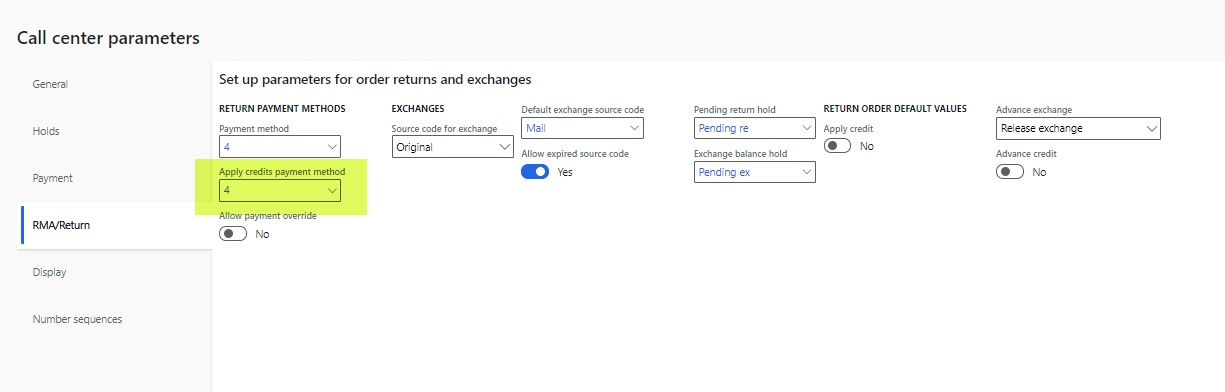
A setting of Yes for the Apply credit option is applicable only when the return order is linked to a replacement order. In this case, the customer payment method used to systematically pay for the return and the exchange order is defined by the Apply credits payment method field on the RMA/Return tab of the Call center parameters page. Only a payment of the Customer function payment type can be selected in this field.
Note
For a referenced return order that doesn't have an associated replacement order (for example, a return order linked to a sales order), a setting of Yes for the Apply credit option has no effect on the return order payment logic because this setting only applies to replacement orders. However, for an unreferenced return order that has no associated replacement order, a setting of Yes for the Apply credit option directs the system to use the payment method specified in the Apply credits payment method field on the Call center parameters page.
Important
If users who create replacement orders plan to use the Apply credit option, they shouldn't run the Complete function on the return order before they set the Apply credit option to Yes. After the Complete function is run, the refund payment is calculated and applied to the return sales order. Any attempt to set the Apply credit option to Yes after a refund payment is calculated and applied doesn't trigger a recalculation of the refund payment, and the payment method selected in the Apply credits payment method field isn't applied. If the Apply credit option must be used in this context, the user must delete the replacement order and the RMA, and then start over and create a new RMA. This time, the user must ensure that the Apply credit option is set to Yes before the Complete function is run.
Payment overrides for call center returns
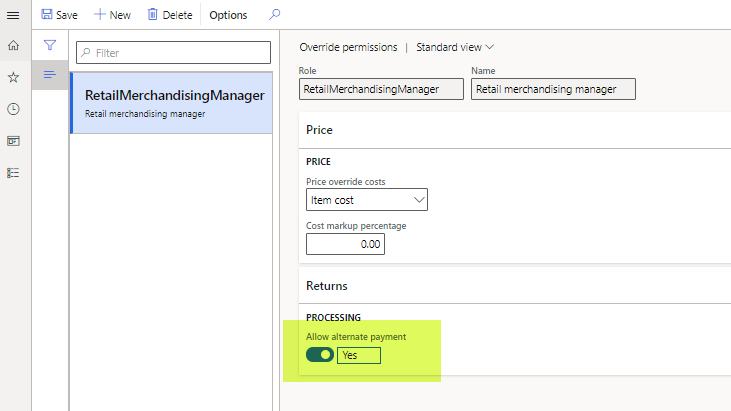
Although call center logic systematically determines the refund payment method in the manner described earlier in this article, users sometimes want to override those payments. For example, a user might edit or remove existing refund payment lines, and apply new payment lines. System-calculated refund payments can only be changed by users who have the correct override permissions. These permissions can be configured on the Override permissions page in Retail and Commerce. To do a refund payment override, the user must be linked to a security role where the Allow alternate payment option is set to Yes on the Override permissions page.
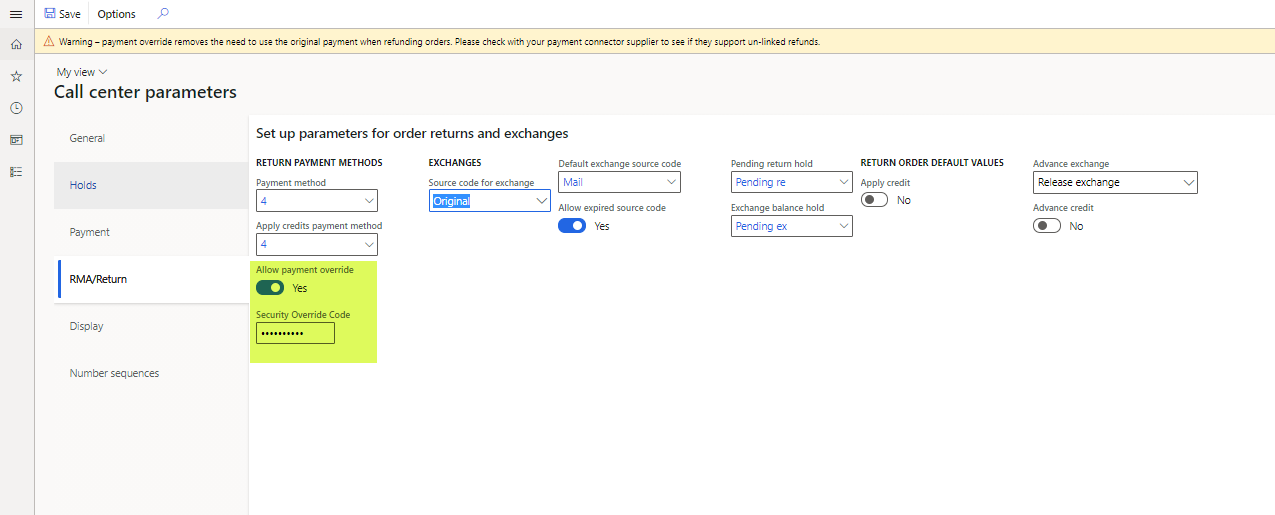
Alternatively, an organization can set the Allow payment override option to Yes on the RMA/Return tab of the Call center parameters page. In this case, a security override code must be selected in the Security Override Code field. The security override code is an alphanumeric code that must be externally managed, because users can't view it in Commerce headquarters after it's set. The security override code should only be known by a few key, trusted people in an organization. When the Allow payment override option is set to Yes, if any users who don't have the correct role permissions try to change the method of payment on a return order, they have the option to enter the security override code. If they don't know it, or if a manager or supervisor can't enter it on the page for them, they aren't able to override the return payment method.
Note
If the security override code is lost or forgotten, the organization must reset it by defining a new security override code in the Security Override Code field on the RMA/Return tab of the Call center parameters page.
Important
Before organizations try to override refund payments that use credit card payment types, they should verify that their credit card processor allows for unlinked returns. Many processors require that refunds be posted back to the original card. Any attempt to issue a refund to a card that has no previous captures might cause posting failures with the processor.