Most canceling, closing, and expiry is handled by an administrator. But there are some tasks that you can do as an end user. Being able to do these tasks yourself is possible if you signed up as an individual and your account or subscription isn't managed by your organization.
Cancel a Power BI license trial
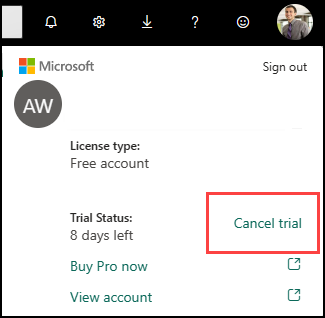
If you signed up for a trial of a paid Power BI license, you can cancel that trial. Open your Account manager and select Cancel trial.
Cancel your license account
If you signed up for Power BI as an individual, and you don't want to use Power BI any longer, close your Power BI account. After you close your account, you can't sign in to Power BI. Also, as it states in the data retention policy in the Power BI Service Agreement, Power BI deletes any customer data you uploaded or created.
In Power BI, select the gear icon in the upper right, then select Settings.
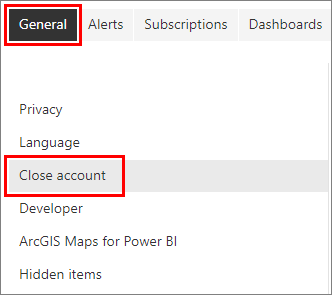
On the General tab, select Close Account.
Select a reason for closing the account. You can also provide further information. Then select Close account.
Confirm that you want to close your account.
You should see a confirmation that Power BI closed your account. You can reopen your account from here if necessary.
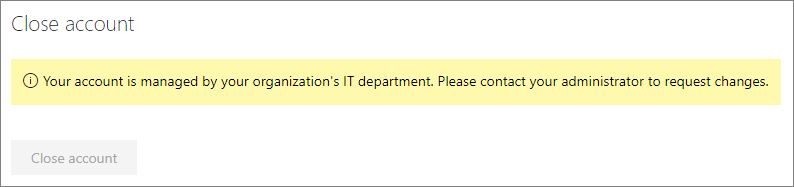
If your organization signed you up for Power BI, contact your admin. Ask them to unassign the license from your account.
Cancel a Fabric capacity trial that you started
If you signed up for a Fabric trial capacity, you can cancel that trial. Open your Account manager and select Cancel trial.
Fabric: close, cancel, end
With Microsoft Fabric, you can end a Fabric capacity trial, cancel a capacity subscription, and close a Fabric account.
Fabric trial capacity
Fabric trial capacities can be canceled, be deleted, be purchased, and expire.
Cancel a Fabric trial capacity
The Fabric trial capacity lasts 60 days. Cancel a Fabric capacity trial explains what happens when a trial is canceled or expires. Use this article to find helpful information on how to save your data whether you upgrade or not.
Delete a Fabric capacity and Fabric trial capacity
The Capacity administrator can delete Fabric capacities using the Fabric admin portal. Fabric items in workspaces assigned to the capacity become unusable unless the workspaces are assigned to a different Fabric capacity within seven days. To learn more, see Delete a capacity and
Fabric capacity deletion.
Buy a Fabric trial capacity
You can purchase a Fabric capacity at any time. You don't have to wait for your trial to end.
Migrate from a retired P SKU capacity
Power BI Premium per-capacity (P SKU) subscriptions are retiring. To keep your Power BI workloads running, migrate to Microsoft Fabric capacity (F SKUs).
Subscriptions
Fabric and Power BI subscriptions can be canceled in several different ways. The subscriptions remain active until the expiration date, so administrators should remind users to save their data.
Cancel a capacity subscription
Cancel a P SKU or EM SKU capacity subscription in the Microsoft 365 admin portal. If you're within your grace period, select Billing > Your products > Subscription status > Cancel subscription . If you're outside the grace period, turn off recurring billing. See Cancel your subscription in the Microsoft 365 admin center.
The subscription remains active until it expires. Only an administrator with billing permissions can cancel the subscription. Remember to ask users to save their data.
Cancel an A SKU subscription in Azure.
Disable Fabric
Fabric administrators can turn off Fabric for an entire organization, individuals, and security groups. See Can I disable Microsoft Fabric?. At the tenant level, the Fabric admin uses the Admin portal Settings. The Fabric administrator can also delegate a Capacity administrator to disable Fabric at the capacity level using the Admin portal Capacity settings.
Licenses
If an administrator with billing permissions assigned the Fabric (Free) license, that administrator can use the Admin portal to remover users' free licenses. The steps are the same as Close your Power BI account. If a Capacity administrator got the license themselves, that administrator can use the Admin portal to remove that license. If a paid license expires you have a grace period for repurchasing.
Manage an expired license
When a paid license passes its expiration date, you have a grace period for repurchasing the license. To learn more about expired licenses, see Power BI license expiration.
Cancel a Power BI trial
The method for canceling a Power BI trial depends on how the trial was started.
- If a user started a Power BI trial of a paid license, the only way to cancel that trial is if an administrator submits a Support ticket.
- To cancel a free organizational trial, an administrator with billing permissions can turn off recurring billing.
Close your Power BI account
If you don't want to use Power BI any longer, close your Power BI license account. After you close your account, you can't sign in to Power BI. Also, as it states in the data retention policy in the Power BI Service Agreement, Power BI deletes any customer data you uploaded or created.
If you signed up for Power BI as an individual, you can close your account from the Settings screen.
In Power BI, select the gear icon in the upper right, then select Settings.
On the General tab, select Close Account.
Select a reason for closing the account. You can also provide further information. Then select Close account.
Confirm that you want to close your account.
You should see a confirmation that Power BI closed your account. You can reopen your account from here if necessary.
If your organization signed you up for Power BI, contact your admin. Ask them to unassign the license from your account.