Note
Access to this page requires authorization. You can try signing in or changing directories.
Access to this page requires authorization. You can try changing directories.
Every world in Minecraft is different—rather than using pre-defined, static maps, Minecraft uses procedural generation to create maps. Starting with random "noise" that defines the base terrain, biomes, features, and structures are placed algorithmically during multiple generation passes.
As a player, you don't need to know much detail about world generation. As a creator, though, having a high-level understanding of how it all fits together will help you make add-ons that affect the way worlds are created through custom biomes, new or modified features, and structure templates.
World generation passes
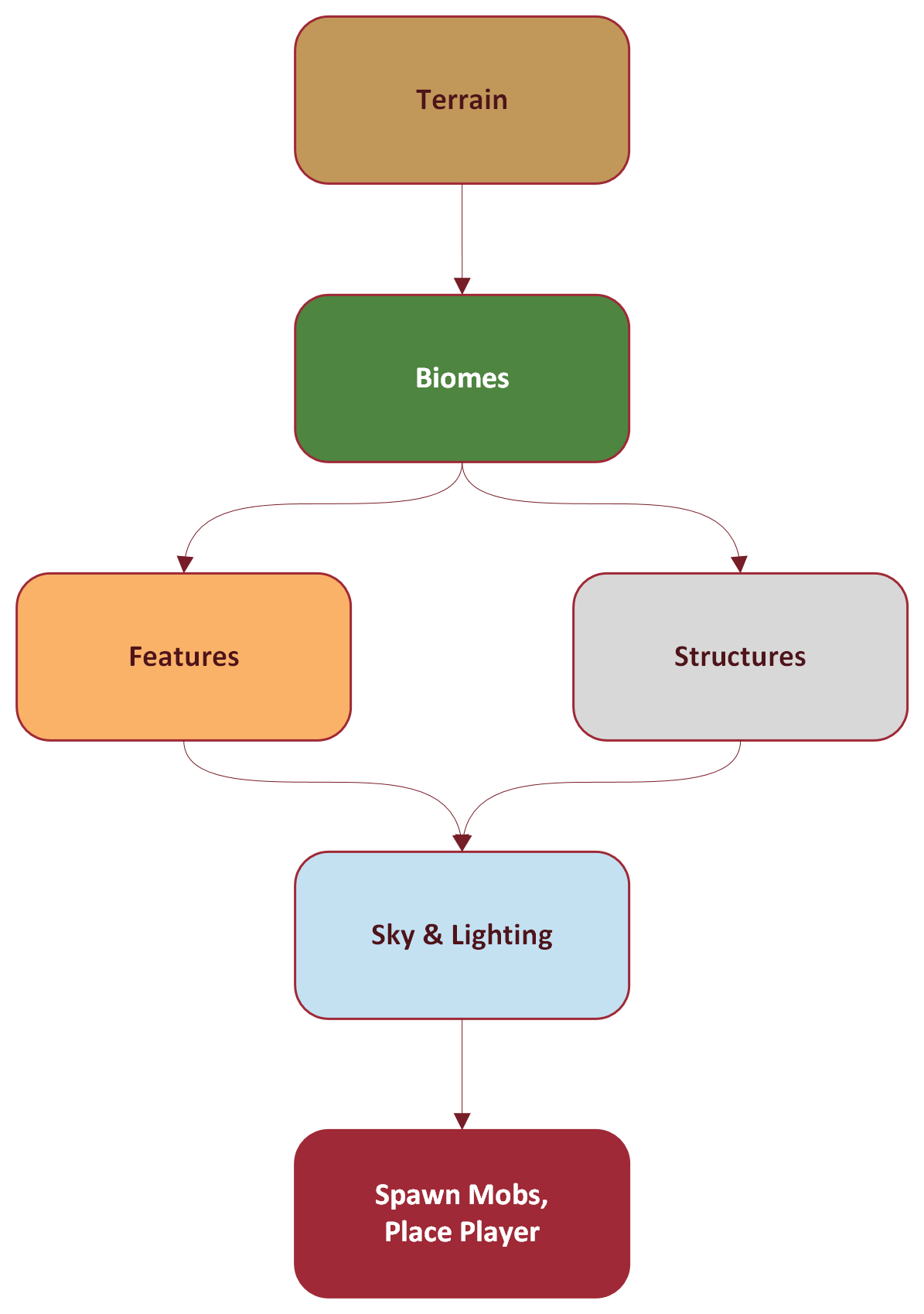
Minecraft world generation happens in multiple passes that build on one another.
First pass
The first pass determines the base terrain for the world: valleys, plains, and mountains. This stage doesn't worry about what goes on the terrain; it's just building up the land forms and oceans. While the terrain is randomly generated, Minecraft uses complex math behind the scenes to keep the landscape realistic. The generation starts with a "seed," a random number, that's fed into gradient noise generators to produce random variations in height that change smoothly from chunk to chunk.
Biome pass
This takes the model produced in the first pass and defines ecosystems across (and under) the world's surface. Biome generation takes into account height, but adds noise parameters for temperature, humidity, erosion (which reshapes the geology), and "weirdness," which adds biome variations (for instance, an old growth birch forest rather than the common forest biome). Biome-specific blocks are added to the surface here. This is also the pass in which custom biomes are placed: they replace or modify vanilla biomes.
Since biomes take elevation into account, the biome pass also incorporates underground elements like caves, which have their own biomes. (This is a change from the "Caves & Cliffs Part 2" update; previously, biomes were defined earlier in world generation.)
Structure pass
In this pass, Minecraft places structures defined in the world, including jigsaw structures.
Feature pass
A feature is any natural element on top of (or under) the terrain that isn't an entity. Trees, plants, flowers, springs, ore, coral: they're all features. This is the pass in which vanilla features are added to the world, following rules for which biomes they appear in and how they're distributed—that is, do they appear in tight groups like forests, or very occasionally, like springs. Custom features are usually placed in this pass, too, although feature rules can be used to modify that.
Sky pass
In this penultimate pass, color and lighting effects are calculated and initialized.
Final pass
The world is ready for action now. Mobs are spawned, and any deferred updates from past steps are executed. And, of course, the player enters the world!
Customization
There are points throughout world generation that creators can influence what's being generated. Here's an overview of those points, along with links to more detailed documentation.
Terrain
The terrain generation pass doesn't offer much customization. You can customize heights by setting minimum and maximum heights, but this may not do what you expect: rather than limiting world generation to a specific depth and height, existing, already-generated terrain is "sliced" at that minimum/maximum range. Any terrain (or buildings, entities, etc.) outside that range simply won't be accessible. And, when you specify a custom height range in a behavior pack, no more world generation will take place! New areas will be generated as empty voids. If you remove the limit by removing the behavior pack, then any areas that had been generated outside that range before you added the behavior pack will return—but any areas that were generated as voids will remain empty.
Biomes
A biome in Minecraft is much like a biome in the real world—a region defined by its geography and ecology. In Minecraft, this means a climate defined by temperature, humidity, erosion, and other variables. The world generation system uses biomes to select region-appropriate features and mobs. For instance, fish will only spawn in water biomes; polar bears will only spawn in icy biomes like frozen ocean and snowy plains; goats will spawn in biomes with mountains. The biome also defines precipitation, atmospheric lighting (such as the color of the sky), and even the background music!
Minecraft: Bedrock Edition has 54 biome types for the Overworld, which is far and away the most complicated environment. Biome types include ocean (which can be warm, cold, deep, and other variants), forests, flatlands, mountains, deserts, and more. The Nether only has five biome types, all hot and dry; The End has a single biome type (called, appropriately, "The End").
A Custom biome overrides all or part of an existing biome type. They can do this through behavior packs, which replace an existing biome type with new definitions, or through partial biome replacements, which let you roughly define how much of an existing biome to replace with new definitions.
You can find examples of custom biomes in the Chill Oasis Blocks and Features sample. Here's an example of a replacement biome for a beach that replaces some of the surface with a new white_sand block (also defined in the sample project).
{
  "format_version": "1.21.110",
  "minecraft:biome": {
    "description": {
      "identifier": "minecraft:beach"
    },
    "components": {
      "minecraft:climate": {
        "downfall": 0.4,
        "snow_accumulation": [0.0, 0.125],
        "temperature": 0.8
      },
      "minecraft:overworld_height": {
        "noise_type": "beach"
      },
      "minecraft:surface_builder": {
        "builder": {
          "type": "minecraft:overworld",
          "sea_floor_depth": 7,
          "sea_floor_material": "minecraft:gravel",
          "foundation_material": "minecraft:stone",
          "mid_material": "mike:white_sand",
          "top_material": "mike:white_sand",
          "sea_material": "minecraft:water"
        }
      },
      "minecraft:tags": {
        "tags": ["beach", "monster", "chill_oasis", "meadow", "overworld", "warm"]
      }
    }
  }
}
Features
As described above, features are things like trees and plants: part of the world, but not part of the terrain. Features can place blocks, other features, and even structure templates into the world. Each feature is defined in a separate JSON file in your add-on's behavior pack; the feature starts with a specific feature type, like geode_feature or sequence_feature. Some of these types are relatively self-explanatory: geode_feature generates a rock formation that simulates a geode. Many types define what the feature does. That is, single_block_feature places a single block, while scatter_feature scatters features throughout a chunk. Here's another example taken from the Chill Oasis Blocks and Features sample.
{
  "format_version": "1.21.40",
  "minecraft:single_block_feature": {
    "description": {
      "identifier": "mike:oasis_tall_dry_grass_feature"
    },
    "places_block": [
      {
        "block": "minecraft:tall_dry_grass",
        "weight": 3
      }
    ],
    "may_attach_to": {
      "auto_rotate": false,
      "min_sides_must_attach": 1,
      "south": [
        "minecraft:grass",
        "mike:white_sand",
        "minecraft:dirt"
      ]
    },
    "enforce_survivability_rules": true,
    "enforce_placement_rules": true,
    "may_replace": [
      "minecraft:air"
    ]
  }
}
You can add more complicated conditions to feature placement and distribution through the use of feature rules. Like feature JSON files, each rule controls only one feature. These rules can specify tests to determine whether and when to attach a feature to a biome. This is a rule file which goes along with the oasis dry grass feature described above:
{
  "format_version": "1.21.60",
  "minecraft:feature_rules": {
    "description": {
      "identifier": "mike:oasis_after_surface_dry_grass_feature_rules",
      "places_feature": "mike:oasis_scatter_dry_grass_feature"
    },
    "conditions": {
      "placement_pass": "after_surface_pass",
      "minecraft:biome_filter": [
        {
          "test": "has_biome_tag",
          "operator": "==",
          "value": "chill_oasis"
        }
      ]
    },
    "distribution": {
      "iterations": 6,
      "scatter_chance": {
        "numerator": 1,
        "denominator": 3
      },
      "x": {
        "distribution": "uniform",
        "extent": [ 0, 16 ]
      },
      "y": "query.heightmap(variable.worldx, variable.worldz)",
      "z": {
        "distribution": "uniform",
        "extent": [ 0, 16 ]
      }
    }
  }
}
Not all features need rule files. In the Chill Oasis biome, for instance, there are various sizes of palm trees all defined as features, but they're all called by reference from palm_tree_distro.json. That file uses the weighted_random_feature to randomly return a tree, with a slightly higher chance of the small or medium-small tree being returned than the medium or large one. And that file is called by reference, too, from palm_tree_scatter.json, which uses the scatter_feature to scatter palm trees. The palm_tree_scatter feature is the only one that has an associated rule file, which uses its condition block, like the dry grass file above, to limit the palm trees to the chill_oasis biome.
Structures
Structures in Minecraft can be buildings, furniture, monuments, and other "artificial" creations, but they can also be natural objects. Structures—which can include blocks and entities—are saved, loaded, exported, and imported using structure blocks.
Structure templates
The palm trees in the Chill Oasis biome are structures, stored in the Behavior Pack as .mcstructure files. These files are sometimes referred to as Structure Templates, particularly when building complex structures with jigsaw structures.
Note
Structure templates can also be NBT files, although it's easier (and safer) to create them in Creative Mode using structure blocks (.mcstructure files).
Jigsaw structures
A Jigsaw Structure is a complex structure built by connecting two or more special structure templates together. What makes the structure templates special is that they contain Jigsaw Blocks, which act as connection points: the structure templates become pieces which "snap together" at the jigsaw blocks in arrangements you define.
Unlike a jigsaw puzzle, you can use the same structure template multiple times in the same jigsaw structure, and even in more than one jigsaw structure in the world. This lets you build fantastically complex architecture (relatively) simply. Here's an example from the Jigsaw Structure Tutorial:
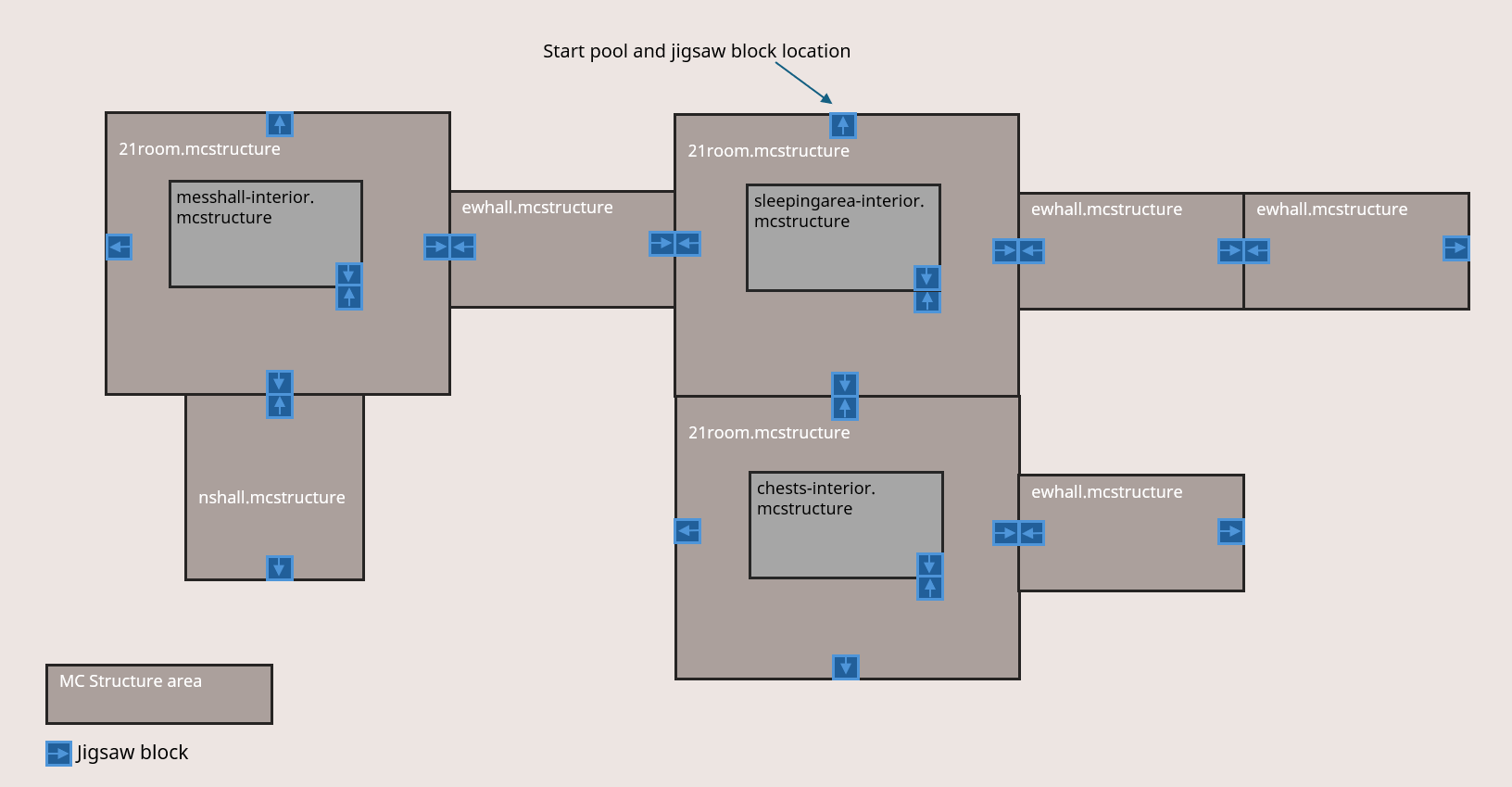
The assembly of jigsaw structures is governed by several JSON files:
- Jigsaw Processors can modify structure templates as they're placed in the world, following specified rules and conditions, to add variation (and even add loot tables). See for details.
- Template Pools group related structure templates together—they specify which pieces go in this specific "puzzle," how often they appear, and what processors to use with them. The structure templates in a pool are the ones drawn from while building the structure.
- Jigsaw Structures define the structures as a whole.
- Structure Sets define jigsaw structures as a whole, and provide rules for how to distribute them in the world: how often they appear, how far apart instances of the same jigsaw structure should be, and so on.
Putting it all together
This overview just touches on the range of possibilities for customized worlds that Minecraft offers. From custom biomes to complex jigsaw structures, you can have a dramatic effect on your world's look and feel.
For more in-depth discussion, read these articles on the Learning Portal: